Customizing Your Widget URL
Your booking widget lives at app.equipdash.com/widget/{your-slug}. You control the slug. That means your widget URL can read like your business name — app.equipdash.com/widget/coastal-adventures — instead of a numeric ID.
Why It Matters
- Memorable. Customers and partners can share a URL that looks like your brand.
- SEO-friendly. Search engines rank slug-based URLs higher than
id=482style URLs. - Safe to change. When you rename your slug, the old URL automatically redirects to the new one (permanently — a
308if you're technical). No broken links in old emails, old social posts, or QR codes.
Setting Your Slug
- Go to Settings → Booking widget → Widget settings tab.
- In the Your brand section, find the Widget URL field.
- Type your new slug in the input box — you'll see the full URL preview next to it (e.g.
app.equipdash.com/widget/). - That's it — your change saves automatically. There's no Save button.
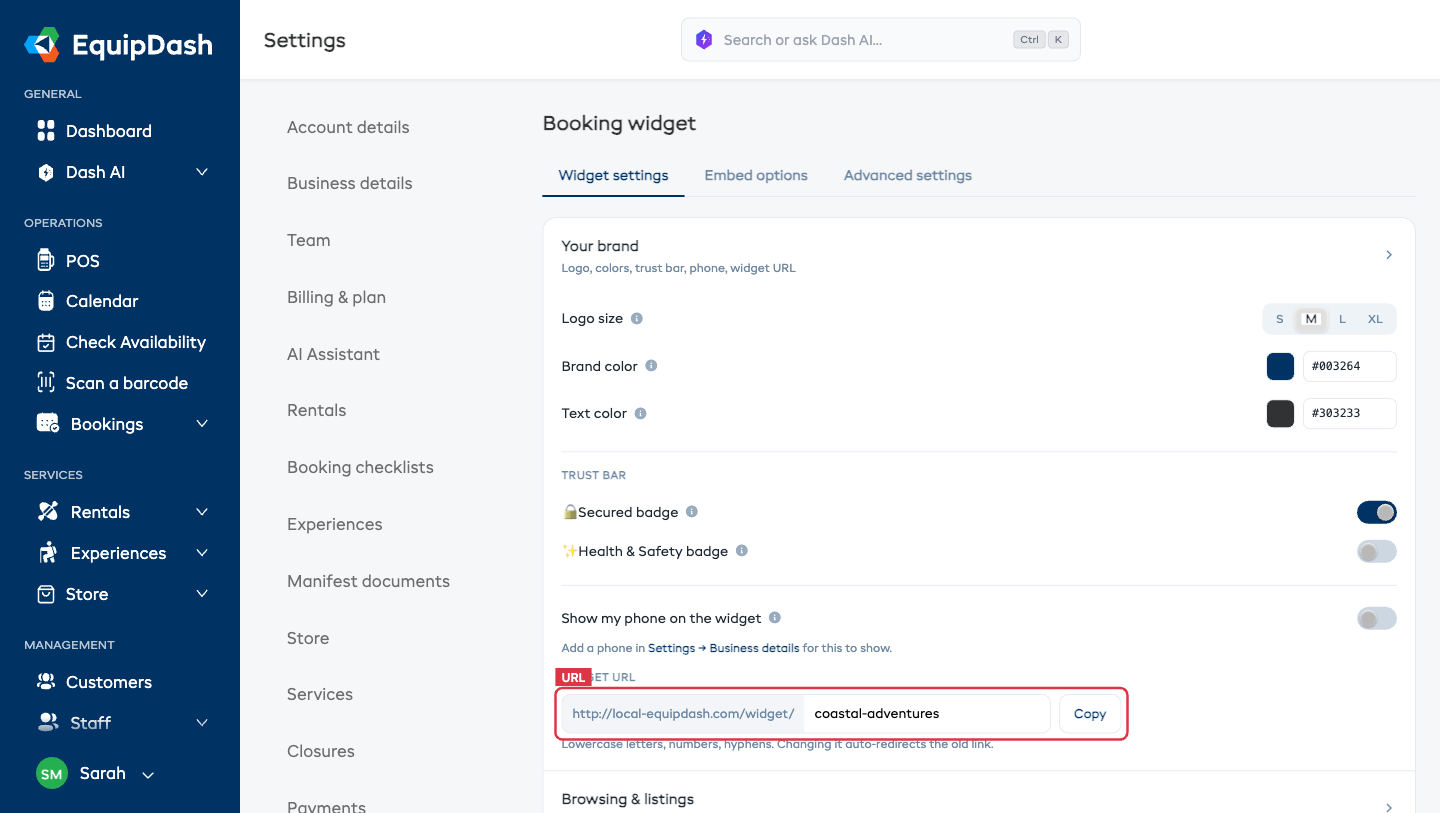
Slug Rules
- Lowercase letters, numbers, and hyphens only — no spaces, no underscores, no capitals.
- Minimum 3 characters.
- Must be unique across the entire EquipDash platform — you'll see an error if the slug is taken.
- Try to keep it short. Nobody remembers
app.equipdash.com/widget/super-amazing-awesome-tours-company.
Good vs. Bad Slugs
| ✅ Good | ❌ Bad | Why |
|---|---|---|
coastal-adventures | Coastal Adventures | no spaces, no caps |
paragliding-sa | paragliding_sa | hyphens, not underscores |
surf-school-hb | sc | too short |
tmp-tours | tablemountainparaglidingtours | too long |
Changing Your Slug
You can change your slug as often as you like. Every previous slug stays in the redirect history — so no matter how many times you change it, every URL you've ever published still works.
Example:
- Started with
coastal-adventures. - Rebranded to
coastal-sports, changed the slug. - A customer clicks a link from a 2023 email to
app.equipdash.com/widget/coastal-adventures. - They land on
app.equipdash.com/widget/coastal-sportsautomatically.
Where Your Slug Appears
Once your slug is set, it's used in:
- Direct widget links in Settings → Booking widget → Embed options tab.
- "Book now" button embed snippet.
- Booking confirmation emails — the widget links customers click come back to your slug.
- Your widget's
<title>tag — displayed as the browser tab name. - Social share previews when customers share your widget link on WhatsApp, Facebook, etc.
Troubleshooting
"This slug is already taken."
Someone else is using it. Try appending your location (coastal-adventures-sa), a descriptor (coastal-adventures-tours), or a shorter variant.
"Slug must be at least 3 characters."
Minimum is three. Pick a longer slug.
"My change didn't save."
The Widget URL field saves automatically as soon as you type a valid slug — there's no Save button. If it didn't stick, the slug probably broke one of the rules above (too short, contains spaces/capitals, or is already taken). Fix the slug and it saves on its own.