Fit tickets
Fit tickets capture each customer's sizing data (height, weight, ability, foot size, boot sole length, DIN) at booking time and surface a printable per-participant ticket on the booking detail page. Built for ski / snowboard shops where bench staff need DIN values, fitted boot sizes, and a paper trail.
Turned on by assigning a snow Product type — Skis, Snowboards, or Ski Boots — on the product or experience detail page. EquipDash never forces fit-ticket UX on rentals that don't need it: a product left on Standard product (a helmet, or any everyday rental) keeps a plain checkout with no fit fields.
What gets captured
The default ski-fit field pack collects:
- Height (cm) — sizing reference
- Weight (kg) — required for DIN calculation
- Age — drives junior / adult / senior DIN bracket
- Ability level (Type I beginner → Type III+ expert) — DIN skier-type input
- Foot size (Mondopoint)
- Boot sole length (BSL, mm) — bench captures off the boot
- DIN setting — calculator suggests, tech confirms
- Stance (snowboarders only)
- Helmet size (if shop rents helmets)
Each field has a prompt_on setting controlling whether it's asked at widget checkout or at the fit ticket on the bench. The shop can override per item (rename, hide, change required-flag, override options) in Settings.
Turning it on
- Open the product or experience → find the Product type card
- Pick a snow type — Skis, Snowboards, or Ski Boots. That switches the fit ticket and the ski-fit field pack on automatically; Skis also turns on the DIN calculator. The Applies line under the dropdown confirms exactly what the type includes
- Pick Where fit data is captured — Online checkout (customer fills the fit fields on the widget) or By staff only (your bench captures everything at fit-ticket time)
There are no per-product capability toggles to hunt for — assigning the type is the whole setup.
On the bench
The booking detail page gains a Fit ticket tab when the booking has any fit-ticket product on it. One section per participant.
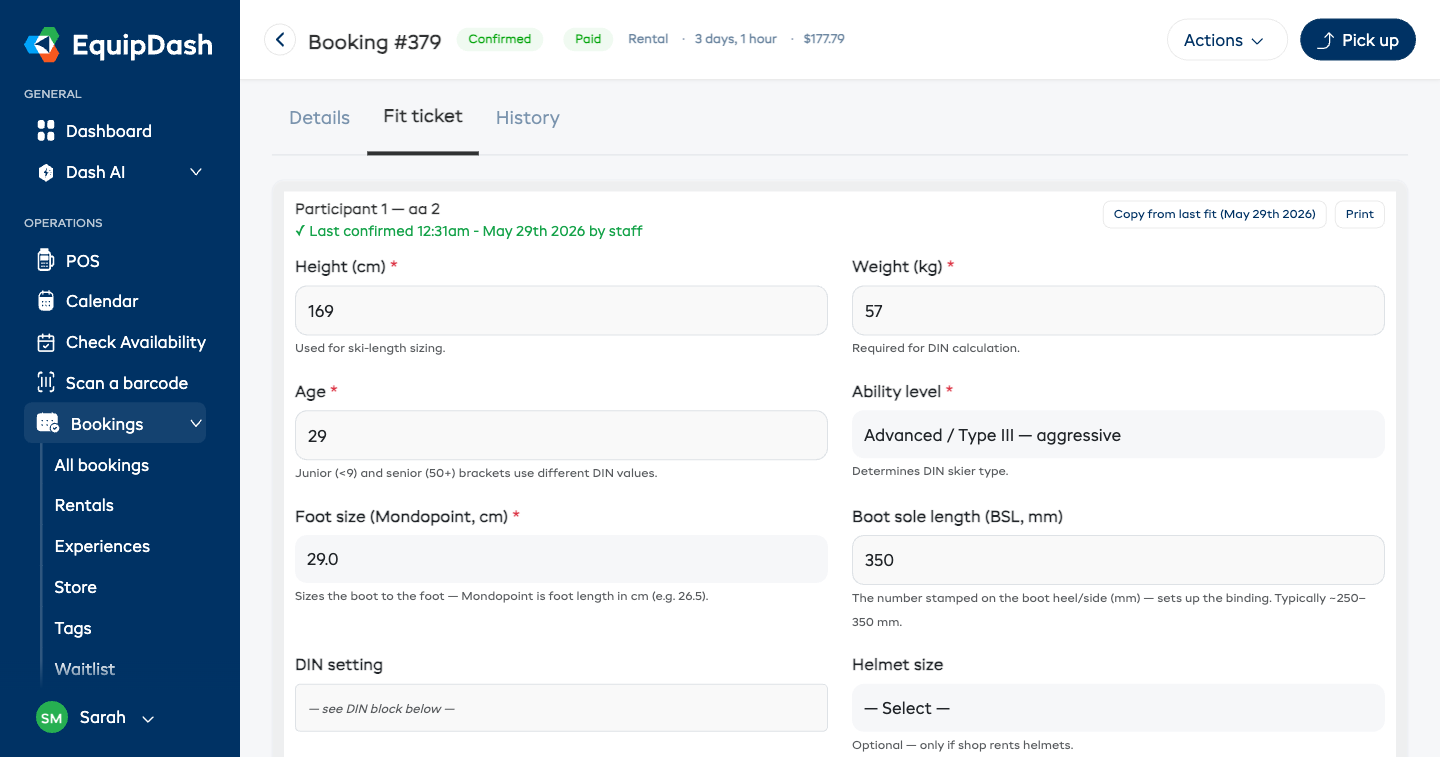
Bench staff:
- Reviews the customer-filled fields (height, weight, ability, etc.)
- For ski-binding rentals: reviews the suggested DIN in the yellow safety banner, verifies the binding setting using the manufacturer's procedure, then enters the confirmed DIN in the separate field. Pickup is blocked until confirmed.
- Taps Confirm fit → audit row written (who confirmed, when, suggested + final DIN, age bracket used)
For a family / group booking with multiple participants, tap Print all (group) to get a single A4 page with every participant's fit ticket stacked. Half-page-per-ticket by default; switch to full-page if your bench prefers.
DIN suggestions — safety reminder
The DIN suggestion comes from the ISO 11088 / Salomon chart lookup. It is not the final DIN value — every binding must be verified against the manufacturer's chart and set by a certified technician before rental. The reminder banner on the fit ticket says exactly that. The confirmed DIN value is what's logged as the value of record.
What the customer sees
If your product is set to Online checkout, the widget shows an "About your fit" section in the per-participant block. The customer fills it, submits, and the value is saved with the booking.
If your product is set to By staff only, the widget skips the fit section entirely. The bench captures everything at fit ticket time.
Pre-fill from prior visits
When a returning customer books again (same shop, sync_to_profile enabled on the relevant pack items), the new fit ticket shows a "Copy from last fit ([date])" button. Tap → values populate the form. Never auto-fills DIN — bench tech still has to set + confirm the final value against the binding chart.
Multi-vertical shops
A shop renting skis and snowboards alongside other gear assigns the relevant snow Product type to its ski and snowboard products only — everything else stays on Standard product with a plain checkout and no fit fields. Fit ticket is opt-in per product: there's no supplier-wide "ski mode" toggle.