The Service Workshop Flow
Every service moves through four stages. You drive them from the booking's detail page (and the Workshop board).
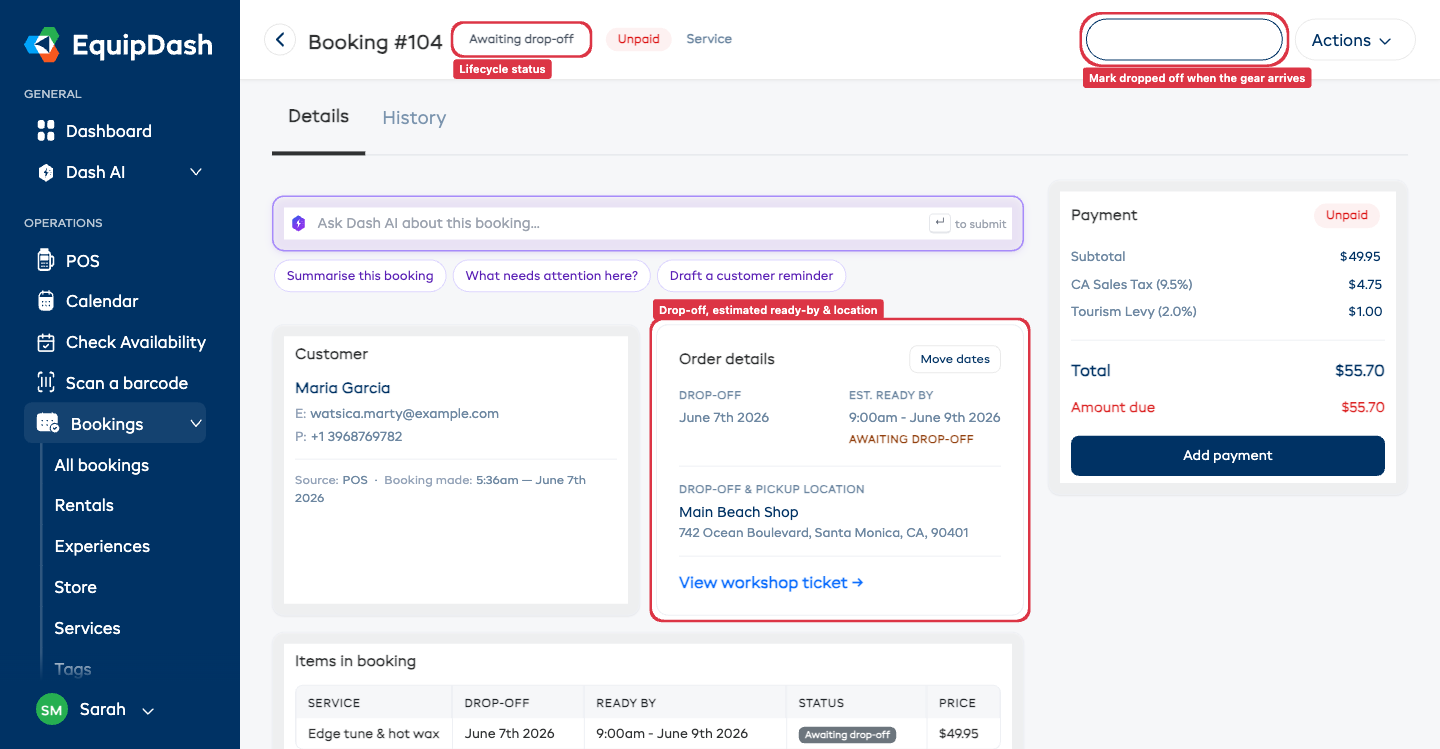
1. Awaiting drop-off
A new service booking starts here — the customer has booked, but hasn't brought their gear in yet. (A walk-in booked at the counter for today is marked dropped off straight away.)
On the booking you'll see an Awaiting drop-off status and an estimated ready-by time.
2. In workshop (dropped off)
When the customer brings their gear in, open the booking and click Mark dropped off.
- This starts the turnaround clock and works out the firm ready-by time (your turnaround time from drop-off, respecting your opening hours).
- The job now appears on your Workshop board so your team can work on it.
3. Ready for pickup
When the work is done, mark the job ready — from the workshop ticket use Mark ready & return to customer.
- The customer automatically gets a "your gear is ready" email.
- The booking shows Ready for pickup.
4. Picked up
When the customer collects, open the booking and click Mark picked up. The booking moves to Picked up and you're done.
The Workshop board
The Workshop board has a filter to separate:
- Customer services — paid jobs on customers' gear (these bookings).
- Our assets — your own fleet maintenance and repairs.
Customer jobs show the customer's name and a Customer tag, and a finished customer job reads return to customer (not "return to stock").
Moving the drop-off date
Need to reschedule? Use Move dates on the booking to change the drop-off date (subject to that day's capacity at the location). The estimated ready-by updates to match.