Welcome to EquipDash
EquipDash is an all-in-one booking and management platform built for rental shops, outdoor adventure companies, tour operators, and activity providers. Whether you rent out kayaks, run guided hikes, or manage a fleet of e-bikes, EquipDash gives you the tools to handle everything from a single dashboard.
What You'll Learn
- What EquipDash does and who it is built for
- A quick tour of the main features
- How to find your way around the interface
- Where to go when you need help
Who Is EquipDash For?
EquipDash is designed for small and medium-sized businesses that offer equipment rentals, guided experiences, product sales, or any combination. If any of these sound like you, you are in the right place:
- Bike, kayak, or ski rental shops that need to track inventory, availability, and bookings
- Tour and activity operators running scheduled group experiences with guides
- Outdoor adventure companies offering a mix of rentals and guided trips
- Watersport, snow sport, or camping gear providers looking to move beyond spreadsheets
A Quick Tour of the Main Features
EquipDash is organized into a handful of core areas. Here is a brief overview of each one — you can click through to the detailed guides whenever you are ready to dive deeper.
EquipDash is built around three core modules — Rentals, Experiences, and Store — that you can enable or disable independently. The portal automatically hides the bits you don't use. See Modules for the full picture.
Bookings
The heart of EquipDash. Create, manage, and track every reservation your business takes — whether it comes in through your booking widget, your staff at the counter via the Point of Sale, or the API.
Rentals
Set up your products, define pricing rules, manage inventory units, and track what is out, what is coming back, and what needs maintenance in the workshop. Use workshop checklists to standardize inspections and assign jobs to staff.
Experiences
Create scheduled activities and tours with time slots, participant limits, rate categories (adult, child, etc.), and guide assignments.
Calendar
See everything happening in your business at a glance. The calendar supports both rental and experience views, with day, week, and month layouts plus a handy list view.
Customers
Build a database of every customer who books with you. View their booking history, add notes, and use custom fields to capture the details that matter to your business.
Staff
Invite your team, assign roles and permissions, manage availability, and build staff schedules.
Waivers & Forms
Create digital waivers and custom forms, attach them to products or experiences, and collect signed responses before the booking starts.
Learn more about Waivers & Forms
Booking Widget
Add online booking to your website with a customizable widget. Customers can browse your products and experiences, check availability, and complete their booking — all without leaving your site.
Learn more about the Booking Widget
Reports
Track revenue, booking volume, popular products, customer trends, and inventory utilization. Export data whenever you need it.
AI Assistant
Ask questions about your business data in plain English and get instant answers. The AI Assistant can look up bookings, check availability, summarize trends, and more.
Learn more about the AI Assistant
Mobile App
Take EquipDash with you. The mobile app lets you view bookings, check availability, and manage your day from your phone — whether you are out on the water or away from the shop. Available on Android via Google Play and on iPhone & iPad via the App Store.
Learn more about the Mobile App
Quick Tour of the Interface
When you log in, you will land on your Dashboard. From here, the main areas of the app are always one click away.
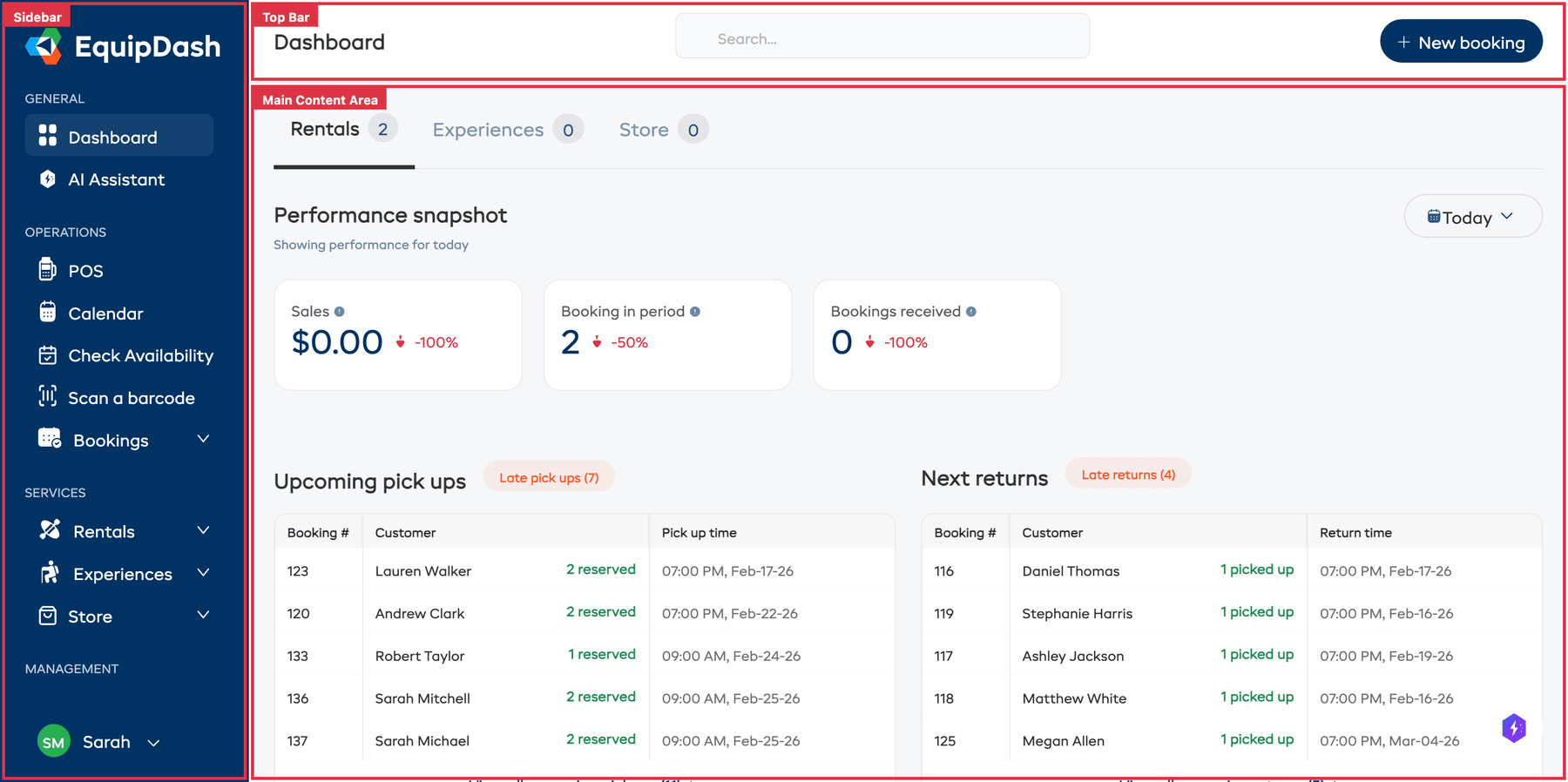
- Sidebar (left) — Your main navigation. Jump to Bookings, Calendar, Rentals, Experiences, Customers, Staff, and more. See Navigating EquipDash for a full breakdown.
- Top bar — Access Global Search, Quick Actions, and your Account Menu.
- Main content area — This is where the current page lives. It changes as you navigate around the app.
Where to Get Help
If you get stuck at any point, here are the best places to look:
- This help centre — Browse the sidebar or use the search bar at the top to find guides on any topic.
- AI Assistant — Open the AI Assistant from inside EquipDash to ask questions about your own data. Learn how.
- Contact Support — If you cannot find the answer, reach out to our support team. Contact Support.
Next Steps
Ready to get going? Here are some good starting points:
- Quick Start Guide — Get your first booking in about 10 minutes
- Setting Up Your Business — Configure your business details, payments, and preferences
- Key Concepts & Terminology — Understand the terms you will see throughout EquipDash
- Your Dashboard Explained — Learn what every section of the dashboard tells you