What is the Booking Widget?
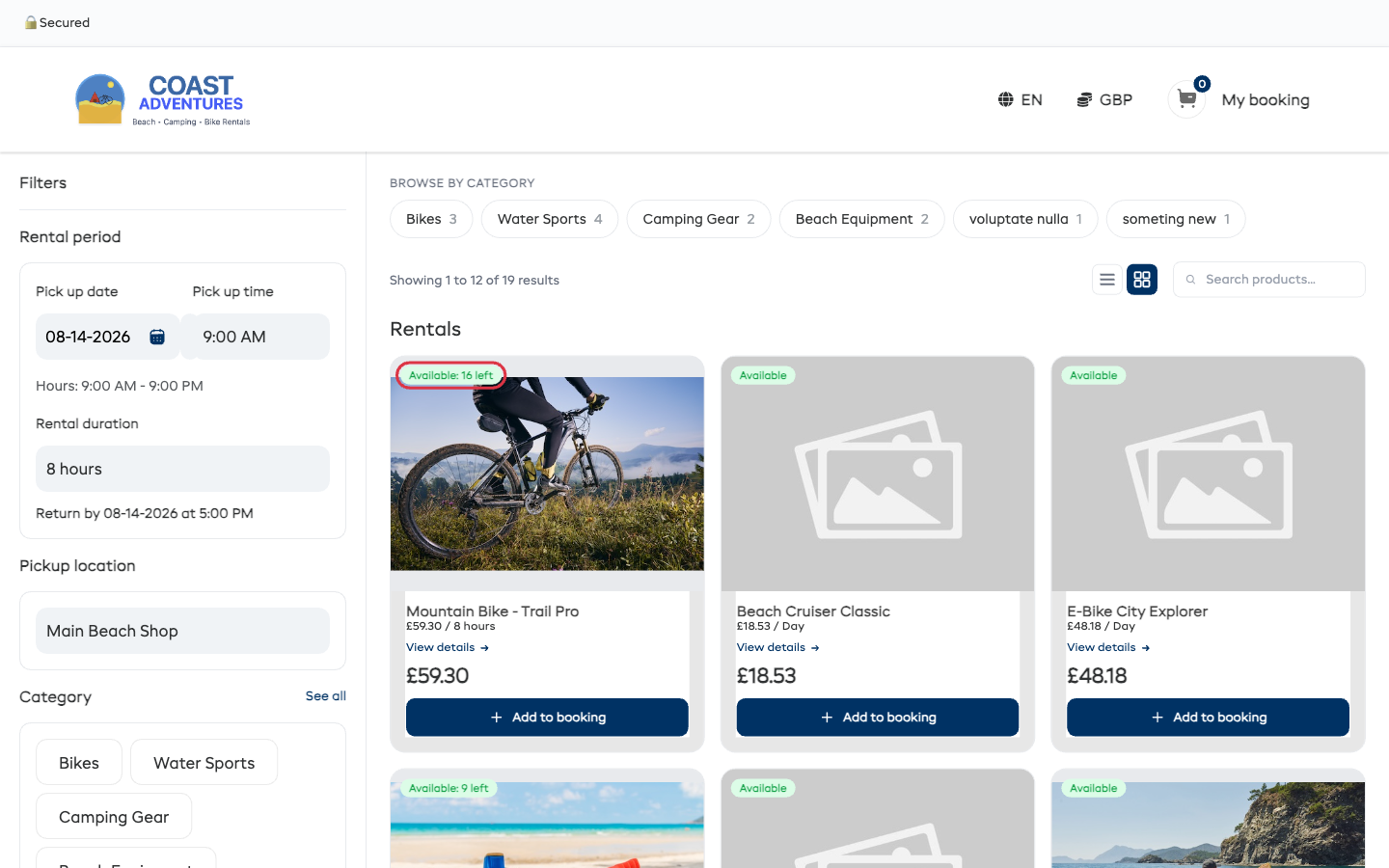
The Booking Widget is your online booking page powered by EquipDash. It lets your customers browse your rental products, experiences, store items, and gift vouchers, check availability, and complete bookings — all from your own website.
The widget only shows the modules you have enabled — Rentals, Experiences, and Store can each be turned on or off independently from their settings page. A rentals-only supplier sees a clean rentals-only widget. See Modules.
How It Works
The widget is a web page hosted by EquipDash that you embed into your existing website. When a customer visits your site and clicks to book, they see a clean, branded booking experience that matches your business.
Behind the scenes, everything is connected to your EquipDash account. Bookings made through the widget appear in your dashboard instantly, inventory is updated in real time, and confirmation emails are sent automatically.
What Can Customers Do on the Widget?
Browse and Search
Customers can browse your products and experiences in a grid or list view. They can filter by category using category chips in the sidebar and search by name using the search bar.
Check Availability
For rentals, customers select their pick up and return dates and times to see what is available. For experiences, they pick a date and see which time slots have open spots.
Add to Booking and Checkout
Customers add items to their booking, enter their details, apply promo codes or vouchers, and complete the booking. If you have Stripe payments connected, they can pay online during checkout.
Purchase Gift Vouchers
If you have voucher sales enabled, customers can also purchase gift vouchers through the widget, which they can then use towards future bookings.
Browse Your Store
If you have the Store module enabled, customers can browse and purchase store products (accessories, merchandise, etc.) alongside their rental or experience bookings.
Four Types of Widget Content
The widget supports four types of content, each with its own URL:
| Type | What It Shows |
|---|---|
| Rentals | Your rental products and bundles with availability, pricing, and booking flow |
| Experiences | Your scheduled activities and tours with time slots and participant booking |
| Store | Your store products for browsing and purchasing (accessories, merchandise, etc.) |
| Vouchers | A page where customers can purchase gift vouchers for your business |
You can embed any combination on your website — it is entirely up to you.
Widget vs. Point of Sale
The widget is designed for customer self-service. Customers use it on your website to book on their own. The Point of Sale (POS) is for your staff to create bookings in person at the counter.
Both feed into the same booking system, so you always have a single view of all reservations regardless of where they came from.
Customization
You can customize the widget to match your brand:
- Primary & text colors — Match your site's branding
- How your booking page lists items — Grid, List, Tile, Editorial, Showcase, Bento or Mosaic
- Wizard mode — Optional guided step-by-step booking flow
- Skill levels — Organize items by ability for the wizard
- Content blocks — Structured sections (What's Included, Itinerary, Highlights, Check-in, etc.) on every item page
- Overview block — At-a-glance tiles for Duration / Meeting Point / Ages / Group Size / Cancellation
- Trust badges — 🔒 Secured + ✨ Health & Safety reassurance
- Checkout field requirements — Required / Optional / Hidden per field
- Widget URL slug — Custom human-readable widget URL
- Timezone display style — Short
PDTvs long "Pacific Daylight Time" label - Default listing mode — Activity-first vs date-first vs customer choice
Learn more about customization
New Widget Features
- Category landing page — A "Browse by category" front door when you sell across more than one booking type
- Floating Book Now button — Persistent CTA on every page of your marketing site
- Browse-by-date listing mode — Date-first listing view for high-volume operators
- Inline waiver signing — Customers sign before payment, every booking arrives signed
- Per-participant Comments — Quick free-text notes on each participant
- Custom fields on widget — Participant-scope structured data at checkout
- Abandoned cart recovery — Persistent carts + recovery emails
- Returning customer auto-fill — Recognise repeat customers by email
Getting Started
Setting up your widget takes just a few minutes:
- Go to Settings in the sidebar
- Click Booking widget
- Configure your colors, default view, and embed options
- Copy the embed code or direct link and add it to your website