Happiness Scores (NPS) Explained Growth+This feature requires the Growth+ plan or higher
Your Happiness score is the average of the 0–10 ratings customers give you — the simplest possible answer to "are my customers happy?". Behind it sits NPS (Net Promoter Score), the industry-standard loyalty metric, so you can compare yourself to other businesses. EquipDash works out both automatically and tracks them over time.
Where the Score Comes From
It's based on a single question: "How likely are you to recommend us to a friend or colleague?" — the NPS Rating element, answered on a 0–10 scale.
Each answer falls into one of three groups:
| Score | Group | What it means |
|---|---|---|
| 9–10 | Happy | Loyal fans who come back and tell their friends |
| 7–8 | Okay | Satisfied but not wowed — a competitor could take them |
| 0–6 | Unhappy | Someone with a problem — the ones to call today |
The classic NPS names are promoter (Happy), passive (Okay), and detractor (Unhappy). EquipDash uses the plain-English words everywhere; benchmarking articles will use the classic ones. They're the same thing.
How NPS Is Calculated
Happiness is just the average rating. The NPS beside it uses a formula:
NPS = % Happy − % Unhappy
With 100 responses made up of 60 Happy, 25 Okay, and 15 Unhappy:
60% − 15% = +45
Okay customers count toward the total but don't move the score directly. They matter because converting them to Happy is usually the easiest lift available.
Score Ranges
NPS runs from −100 (everyone unhappy) to +100 (everyone happy).
| Range | Rating | What it means |
|---|---|---|
| 70 to 100 | World-class | You're delivering exceptional experiences. Keep it up. |
| 50 to 69 | Excellent | Customers love what you do. Look for small gains. |
| 0 to 49 | Good | Solid, with clear room to improve. Focus on reducing unhappy customers. |
| −100 to −1 | Needs work | More customers are unhappy than happy. Find and fix the root cause first. |
EquipDash color-codes the score through the analytics page: green at 50 and above, yellow from 0 to 49, red below 0.
Where to Find Your Score
- The surveys list — the Happiness column shows each survey's average with its NPS underneath.
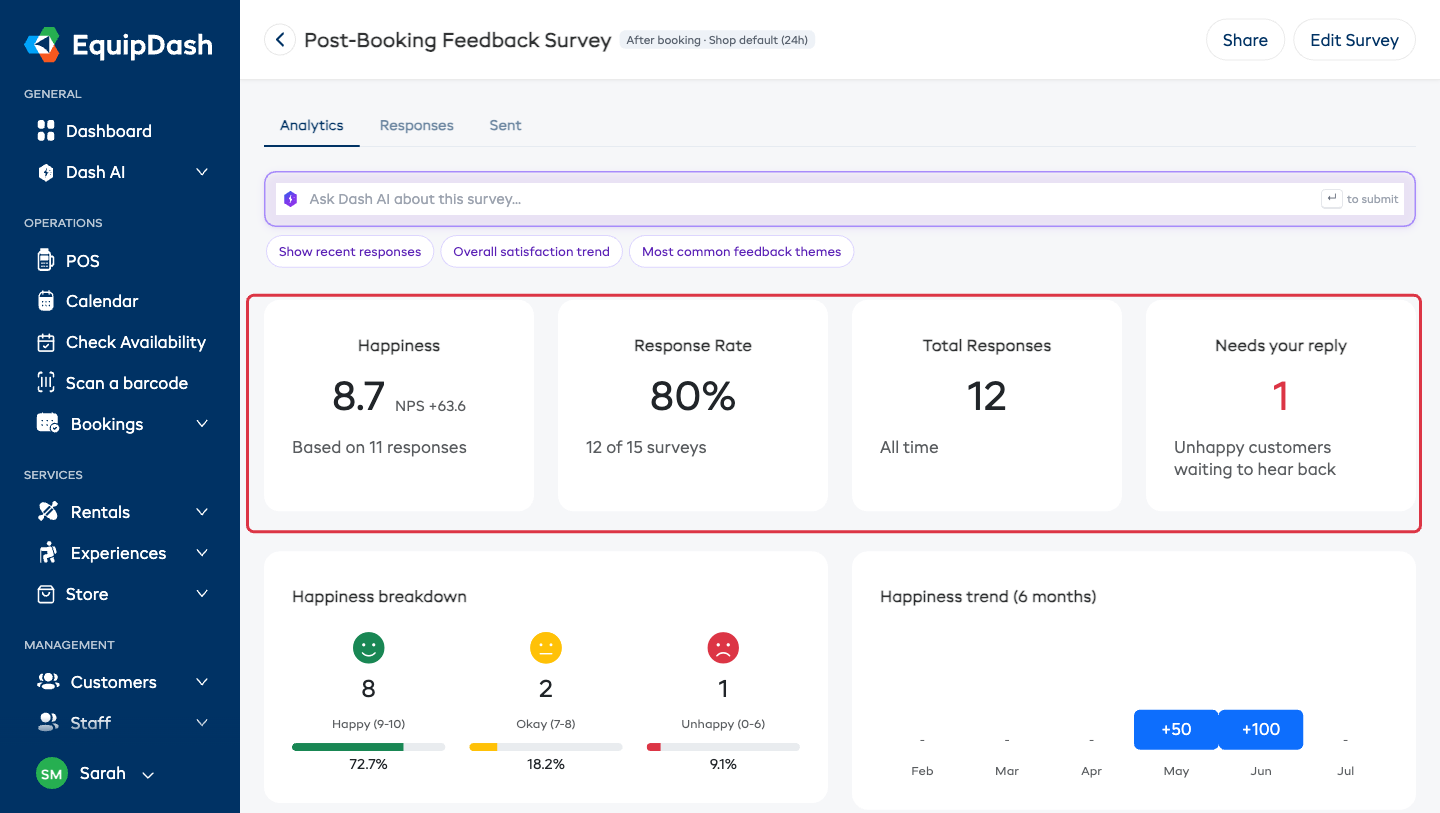
- The Analytics tab — the Happiness summary card shows the average large, with NPS beside it and the number of responses it's based on.
- Happiness breakdown — the Happy / Okay / Unhappy split with faces, counts and percentages.
- Happiness trend (6 months) — month-by-month, so you can see direction rather than a single snapshot.
- By guide — average happiness per rostered guide, if you run experiences with guides. Internal only.
- Your inbox — the Monday Your week in feedback email carries your Happiness for the week. See Your Weekly Feedback Digest.
Reading the Breakdown
The split tells you more than the score alone:
- High Happy % — your fans are vocal. Make sure your review links are set up so they can say it publicly.
- High Okay % — your biggest opportunity. These people are one small improvement away from a 9.
- High Unhappy % — something specific is going wrong. The open-text answers will usually name it.
How to Improve Your Score
1. Reply to unhappy customers
The single highest-impact thing you can do, and the fastest.
- Open the Responses tab on the survey.
- Filter Rating → Unhappy.
- Read what they said, then click the pencil icon to open Update Follow-up.
- Set the status to Replying, note what you're doing, and actually make the call.
With Email me when a customer is unhappy turned on (the survey's Advanced settings, or shop-wide in Settings → Surveys & reviews), you'll know within minutes rather than at the end of the week.
2. Read the open-ended answers
Numbers say there's a problem; text says what it is. Look for the same phrase turning up in several Short Text or Long Text answers.
3. Convert Okay to Happy
Okay customers (7–8) already like you. Faster check-in, cleaner equipment, a better briefing — small things push them to a 9 or 10.
4. Make it easy for happy customers to say so
Everyone who finishes your survey sees your Google and TripAdvisor links on the thank-you page, whatever score they left (that's required by Google and TripAdvisor policy — see Getting More Reviews — the Right Way). Add your links under Settings → Surveys & reviews → Your review pages, then watch the Review clicks card to confirm people are actually using them.
5. Track the trend
Check Happiness trend (6 months) monthly and look for:
- Upward — what you changed is working.
- Downward — something changed. Read the recent feedback.
- Seasonal dips — busy periods strain service. Plan staffing ahead of them.
6. Compare your questions to each other
If your survey has more than one rating question, compare them. A strong overall score with a weak "equipment condition" rating points you straight at the problem.
Benchmarks for Rental and Activity Businesses
There's no universal "good" NPS — it varies by industry. For outdoor recreation, rental and tourism:
| Benchmark | Typical score |
|---|---|
| Industry average | 30–40 |
| Good | 50+ |
| Excellent | 70+ |
Don't obsess over other businesses. Your own trend over time is the meaningful number.