Suggest Prices ProThis feature requires the Pro plan
Suggest Prices is an AI-powered pricing research tool that lives on Step 2 of the Add product, Add experience and Add store product forms. Dash searches the web for what similar businesses in your area are charging, then suggests a competitive rate — including which pricing structure (flat, tiered, seasonal) it thinks fits best based on what competitors actually do.
You stay in control. Dash surfaces the research, the range, and the sources it used. You decide whether to apply, tweak, or ignore it.
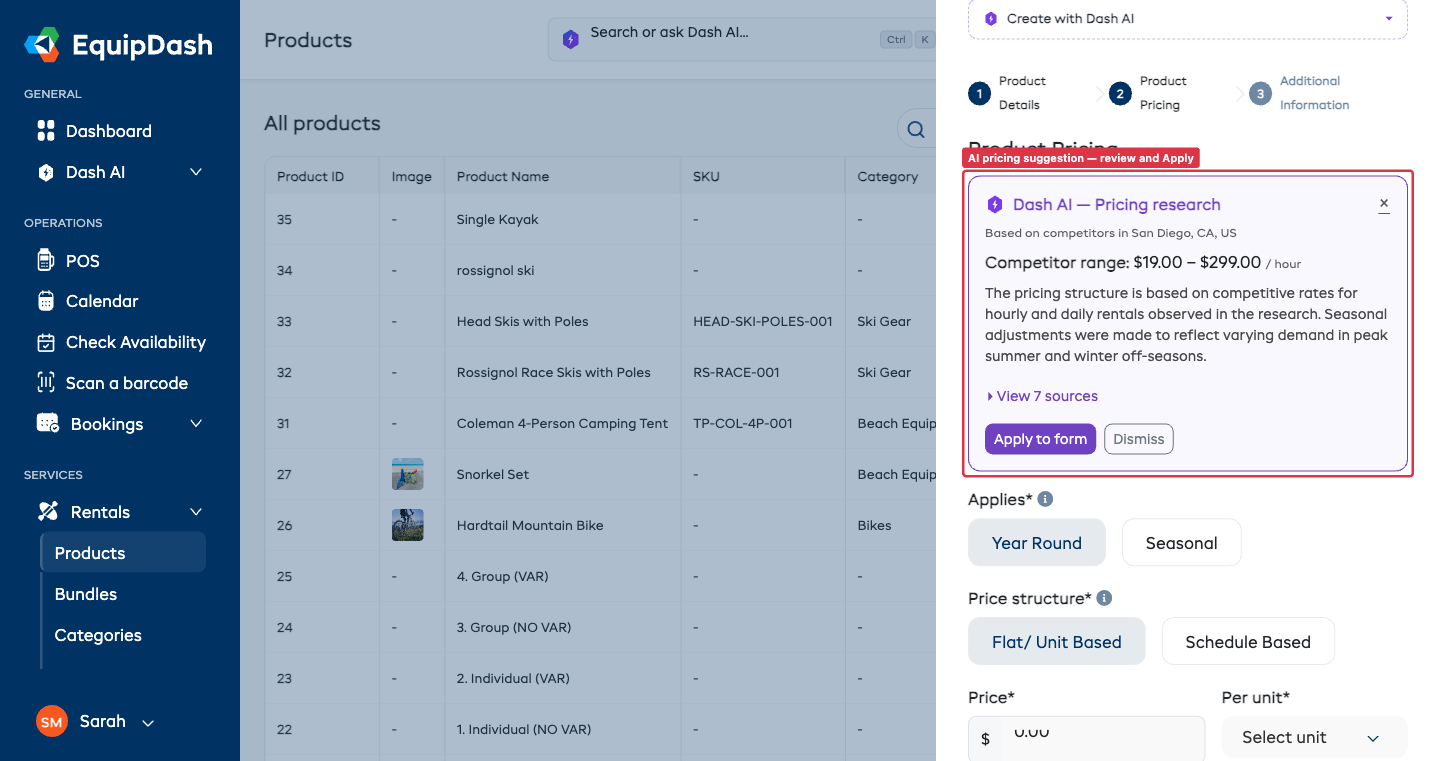
How It Works
- Open any Add modal (Rentals → Products, Experiences → Catalogue, or Store → Products).
- Give your item a name on Step 1 — Dash needs this to research the right thing.
- Move to Step 2 — Pricing.
- Click the Suggest prices button at the top of the pricing section.
- An editable prompt appears, pre-filled with what Dash already knows about your item. Tweak it to point Dash at the right market segment, or just leave the default.
- Click Research prices. Dash runs a live web search.
- A suggestion card appears with:
- The competitor price range (e.g.
$35 – $55 / day) - The pricing structure Dash picked (flat, tiered, seasonal, etc.) and the recommended values for it
- A short reasoning explanation
- A collapsible View sources list with links to each page Dash used
- A Season tip callout if Dash thinks you should add a season in Settings → Seasons to use seasonal pricing
- The competitor price range (e.g.
- Review the sources, then click Apply to form to drop the suggested prices into the form (or Dismiss to enter your own).
- Tweak anything that doesn't fit your business before saving.
Apply switches the form for you. If Dash recommends seasonal pricing but your form is on year-round, clicking Apply to form automatically switches the form to the right combo and fills it in. You don't need to change the toggles yourself first.
What Dash Fills In
Dash picks the pricing structure that best fits the research and fills it in for you. The shape of the suggestion depends on which kind of item you're creating.
Rental Products
| Structure Dash picks | What it fills in |
|---|---|
| Year-round, flat | A single price + rate unit (day / week / hour / etc.) |
| Year-round, schedule | A set of tiers (e.g. 1 day $45, 3 days $120, 7 days $200) with a consistent unit |
| Seasonal, flat | A price + unit for each of your configured seasons |
| Seasonal, schedule | A tiered schedule per season, all using the same unit |
Experiences
| Structure Dash picks | What it fills in |
|---|---|
| Year-round, group | One price + max participants |
| Year-round, participant | A price per rate category (Adult, Child, etc.) |
| Seasonal, group | Per-season prices + max participants |
| Seasonal, participant | Per-season × per-rate-category prices |
Proposed new rate categories — if Dash sees competitors using a rate category you don't have yet (e.g. Senior, Student, Family pass), it surfaces them as opt-in checkboxes on the suggestion card. Tick any you'd like to add, and Dash creates them for you when you click Apply.
Store Products
A single price plus an optional compare at price (the original/strikethrough price).
Seasons
Dash will only suggest seasonal pricing for seasons you've already configured in Settings → Seasons. It will never invent a season.
If Dash thinks seasonal pricing would suit your item but your seasons don't match (e.g. you only have "Summer" but competitors price differently for "Peak hours"), it shows a yellow Season tip callout with a link straight to Settings → Seasons so you can add one.
Location Matters
Dash uses your primary location (Settings → Locations) to target the search — "mountain bike rental Bondi" gets very different results from "mountain bike rental Whistler".
- Single-location suppliers — nothing to do, the default location is used automatically.
- Multi-location suppliers — the primary location drives the suggestion. If you operate across very different markets (e.g. metro vs regional), run Suggest Prices once, tweak for your other locations manually, and save.
- No location set — accuracy drops; consider adding a primary location first.
Verifying the Sources
Every suggestion comes with a View sources section. Click it to see the real pages Dash pulled from — each one includes a link and a price snippet so you can sanity-check the data before committing. Dash will never invent a citation.
If a source looks stale or wrong for your market, dismiss the suggestion, tighten your research prompt (e.g. specify a brand tier or rental duration), and try again.
Permissions & Credits
- Permissions — you can only run Suggest Prices on forms you can already use. If you don't have product/experience/store-create permission, the button doesn't appear.
- Credits — pricing research uses more AI credits than a typical Dash action because it includes a live web search. You can review your credit balance from any AI page or via Settings → AI.
- Caching — if you click Suggest Prices twice for the same product name + location + research prompt within 24 hours, Dash returns the first result without re-billing.
Troubleshooting
"Dash couldn't find pricing data." → Add more detail to your product/experience name, or sharpen the research prompt before clicking Research prices. For niche items, Dash may not have enough public comparables — try a broader search term.
"You are out of AI credits." → Top up under Settings → AI or wait for your monthly allowance to refill.
The suggested prices look way too low / too high. → Check the View sources list — are the competitors Dash found really comparable to you? Your brand, quality tier, or target customer may warrant a different position. Use the suggestion as a benchmark, not a mandate.
Dash recommended seasonal pricing but I want year-round (or vice versa). → Just Dismiss the suggestion and enter your own pricing manually. Or edit the research prompt to steer Dash toward the structure you want (e.g. "Suggest a single year-round rate") and re-run.