Morning Briefing Growth+This feature requires the Growth+ plan or higher
The Morning Briefing is a daily AI-generated summary that appears at the top of your dashboard. Each morning, Dash reads your business - today's pickups, returns, experience sessions, weather, late items, missing waivers - and surfaces only what matters so you can start the day informed without clicking through five reports.
How It Works
Each morning, before you open EquipDash, Dash automatically:
- Pulls today's bookings, pickups, returns, and experience sessions
- Checks the weather forecast for your location
- Compares this week's activity against last week
- Looks for late returns, unpaid pickups, missing waivers, low stock
- Writes a short summary and a list of items that need your attention
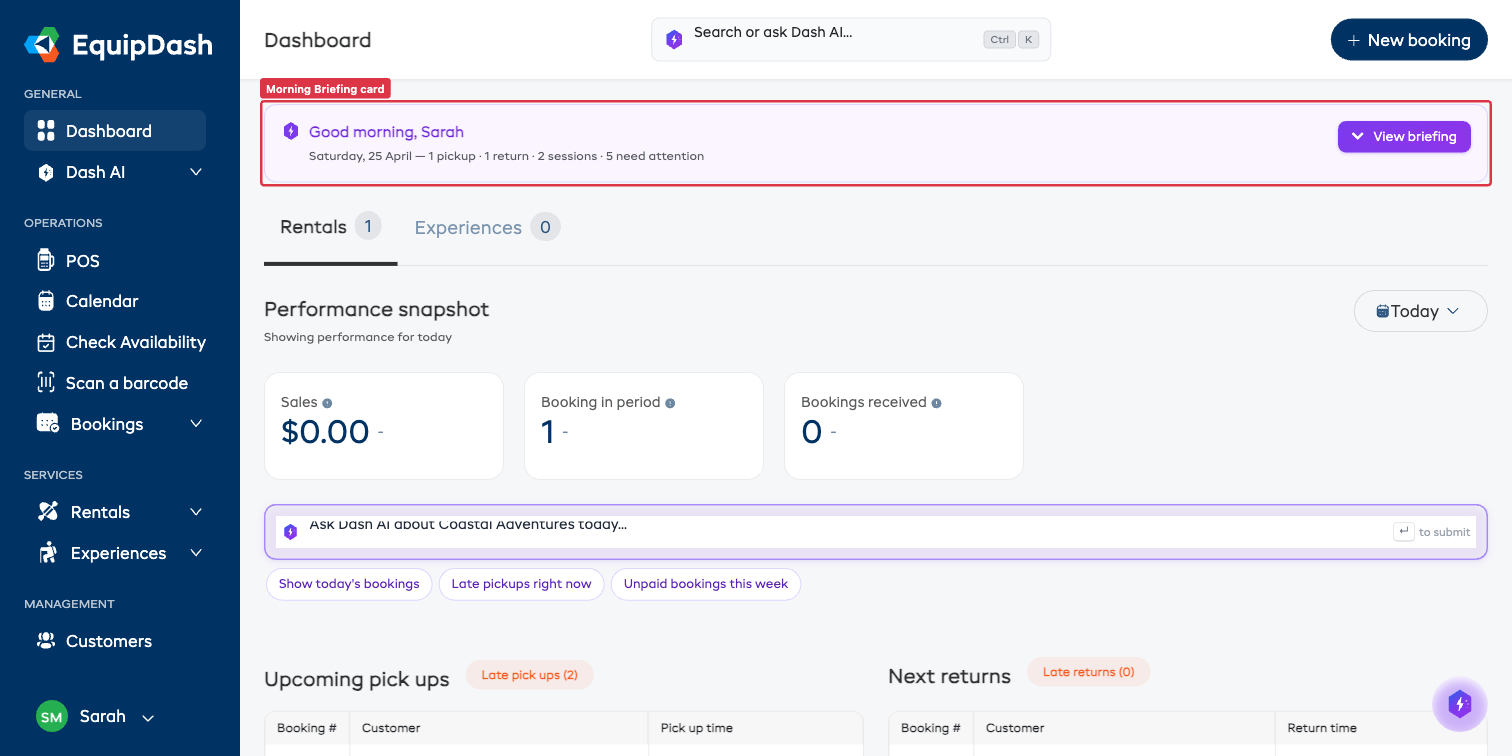
When you log in, the briefing card sits at the top of the dashboard with a one-line summary. Click View briefing to see the full breakdown.
What's in a Briefing
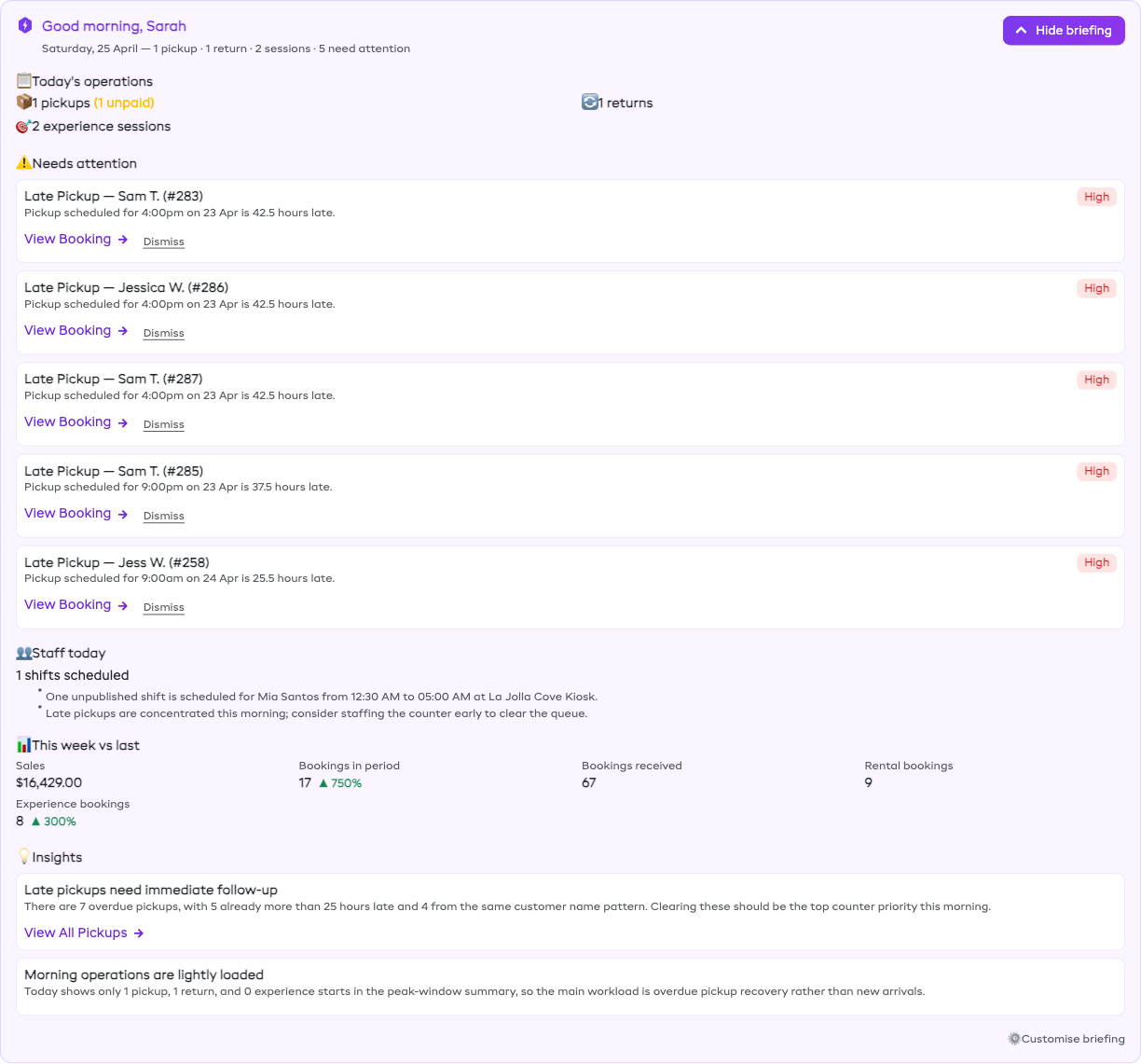
A typical briefing is divided into the following sections (you can turn any of them off in settings):
| Section | What it shows |
|---|---|
| Weather | Today + tomorrow's forecast for your location, with a note if rain or wind might affect operations |
| Busy windows | Peak pickup / return / experience start times so you can plan staffing |
| Today's operations | Total pickups, returns, experience sessions, and store orders for today |
| Needs attention | Up to 5 items that need action today - late returns, unpaid pickups, near-full sessions |
| Staff | Shifts scheduled, any gaps vs bookings |
| Waivers | Bookings missing mandatory waiver signatures so you can send them ahead of time |
| This week vs last | Bookings, revenue, and other metrics compared to the same window last week |
| Insights | Up to 3 patterns Dash noticed (e.g. "your 9am tour has been at capacity 4 weeks running - consider adding a second slot") |
Each item in Needs attention and Insights comes with action buttons. The most common are:
- View Booking - opens the booking detail page
- Send & Charge - sends the customer a reminder email and applies a configured fee
- Dismiss - hides this item from today's briefing (it won't return until tomorrow)
Daily Email
If you've turned on email delivery in settings, you'll also receive the briefing as an email each morning. It goes to everyone on your team with an admin login - the same people who get your other Dash notifications.
The email mirrors what's in the dashboard card. It's read-only - to take action on an item, click Open dashboard to jump back into EquipDash.
Customizing the Briefing
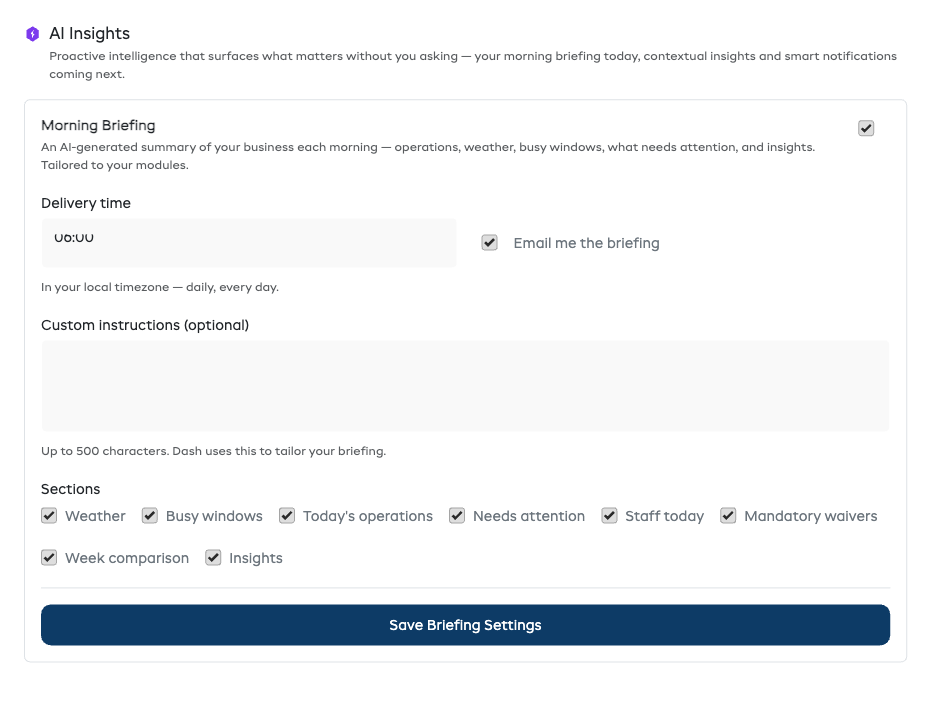
Open Settings → AI Assistant → AI Insights to customize:
Enable / Disable
Turn the briefing off entirely. The card disappears from your dashboard and no email goes out.
Delivery time
The local time at which Dash starts generating the briefing. Default is 6:00 AM in your own time zone. The bot usually finishes in a minute or two, so the briefing is waiting by the time you open up.
Email delivery
Send the briefing as an email each morning, in addition to the dashboard card. Useful if you want the morning summary in your inbox before you log in.
Sections
Pick which sections to include. If you don't run experiences, you can drop the experience-specific busy windows. If you've already got a good handle on weather from your local forecast, drop that section.
Custom instructions
A free-text box where you can give Dash extra guidance for your specific business. Examples:
- "If a tour has fewer than 4 bookings, flag it as a candidate for cancellation."
- "Always mention the dive shop wetsuits if they've gone out today."
- "Ignore weather notes - we operate rain or shine."
These instructions are added to the bot's prompt for every run. Keep them short and specific.
Plan Availability
The Morning Briefing is included on Growth and Pro plans. It's not available on Starter - you'll see no briefing card on your dashboard.
The briefing consumes AI credits like any Dash bot run. A typical briefing costs around 15,000 to 20,000 tokens a day, which is roughly $0.40 a month. You can see exact usage in Settings → AI Assistant → AI Credits.
Troubleshooting
"Generating today's briefing…" never finishes
This usually means the queue worker isn't running. The briefing card will tell you so directly - once it's been pending more than 5 minutes, it switches to a warning that asks you to check back later or contact support. If it's still stuck after that, contact support@equipdash.com.
The briefing is empty / says "Dash couldn't draft a reliable briefing"
Occasionally the AI returns output that can't be parsed cleanly. When that happens, the card shows a fallback message and no email goes out. Tomorrow's run will start from scratch, so this is almost always self-healing. If you see it more than a couple of days in a row, contact support.
I don't see a briefing on my dashboard
Check:
- You're logged in as an admin (the briefing only shows for admin users)
- Your plan is Growth or Pro (not Starter)
- The briefing is enabled in Settings → AI Assistant → AI Insights
If all three are true and there's still no card, the briefing for today may already have been dismissed. It will return tomorrow.
Related Articles
- Dash Bots Overview - how scheduled bots work in general
- AI Credit System - how credits are charged
- Use Your Own AI Account - bring your own OpenAI / Anthropic key to bypass credit costs