Choosing the Right AI Model ProThis feature requires the Pro plan
EquipDash gives admins eight AI models to choose from. They all do the same kinds of work - answering questions, looking up bookings, generating descriptions, helping with pricing - but they differ in speed, cost (how many credits each interaction uses), and how strong they are at complex reasoning.
This guide explains what each model is good at so you can pick one that fits your business.
DeepSeek V4.1 Flash is the recommended default and works well out of the box. You can change it any time from Settings > AI Assistant > Configuration.
Quick comparison
| Model | Provider | Speed | Credit cost | Needs your own key? | Best for |
|---|---|---|---|---|---|
| DeepSeek V4.1 Flash (recommended) | DeepSeek | Fastest | Low | No | Everyday work, and anything with a lot of steps |
| GLM 5.3 Flash | GLM | Slower to start | Lowest | No | The sharpest answers at the lowest cost |
| GPT-5.6 Luna | OpenAI | Fast | Low | No | Quick everyday answers |
| GPT-5.6 Terra | OpenAI | Slower | High | No | Harder reasoning |
| Claude Sonnet 5 | Claude | Slower | High | No | Long documents and careful instructions |
| Kimi K2.6 | Kimi | Fast | Low | No | High-volume tool work |
| Grok 4.3 | Grok | Fast | - | Yes | Live information from the web |
| Gemini 3.1 Flash-Lite | Gemini | Fast | - | Yes | Very long documents |
Recommendations by use case
Most businesses → DeepSeek V4.1 Flash (default)
The fastest replies in the picker, at a low credit cost, and strong at the tool work that makes up most of what you ask for - looking up bookings, drafting a message, checking what is running low. It also reads a lot of context at once, so a long conversation does not lose the thread.
You do not need to do anything to use it. It is already selected.
Lowest cost → GLM 5.3 Flash
The cheapest model in the picker, and the sharpest of the low-cost ones. It thinks before it answers, so replies start a little slower. A good fit if your team asks a lot of questions and you want the monthly allowance to stretch.
Quick everyday answers → GPT-5.6 Luna
Fast and cheap, and it handles simple lookups well - "how many bookings today?", "what is the phone number for that booking?".
Hardest reasoning → GPT-5.6 Terra
For the questions that need real analysis, like "given the last six months, what should I charge in the slow season?". It uses more credits, so save it for those.
Long documents and careful instructions → Claude Sonnet 5
Best when you have given Dash a lot of custom instructions, or when the answer has to follow a long set of rules exactly.
High-volume tool work → Kimi K2.6
Cheap and capable at the practical jobs - creating bookings, looking up customers, making recommendations.
Live information from the web → Grok 4.3 (your own key needed)
Grok can pull current information into an answer: today's weather, current prices, recent news. Useful if you ask it to compare your pricing against the market, or check conditions before a session.
You will need a free xAI account - see Use Your Own AI Account.
Very long documents → Gemini 3.1 Flash-Lite (your own key needed)
Strong when there is a lot to read at once, and quick to decide which tool to use. Available with a free Google AI Studio key.
How to switch models
- Go to Settings > AI Assistant.
- Click the Configuration tab.
- Under AI Model, click the model you want to use.
- Click Update to save.
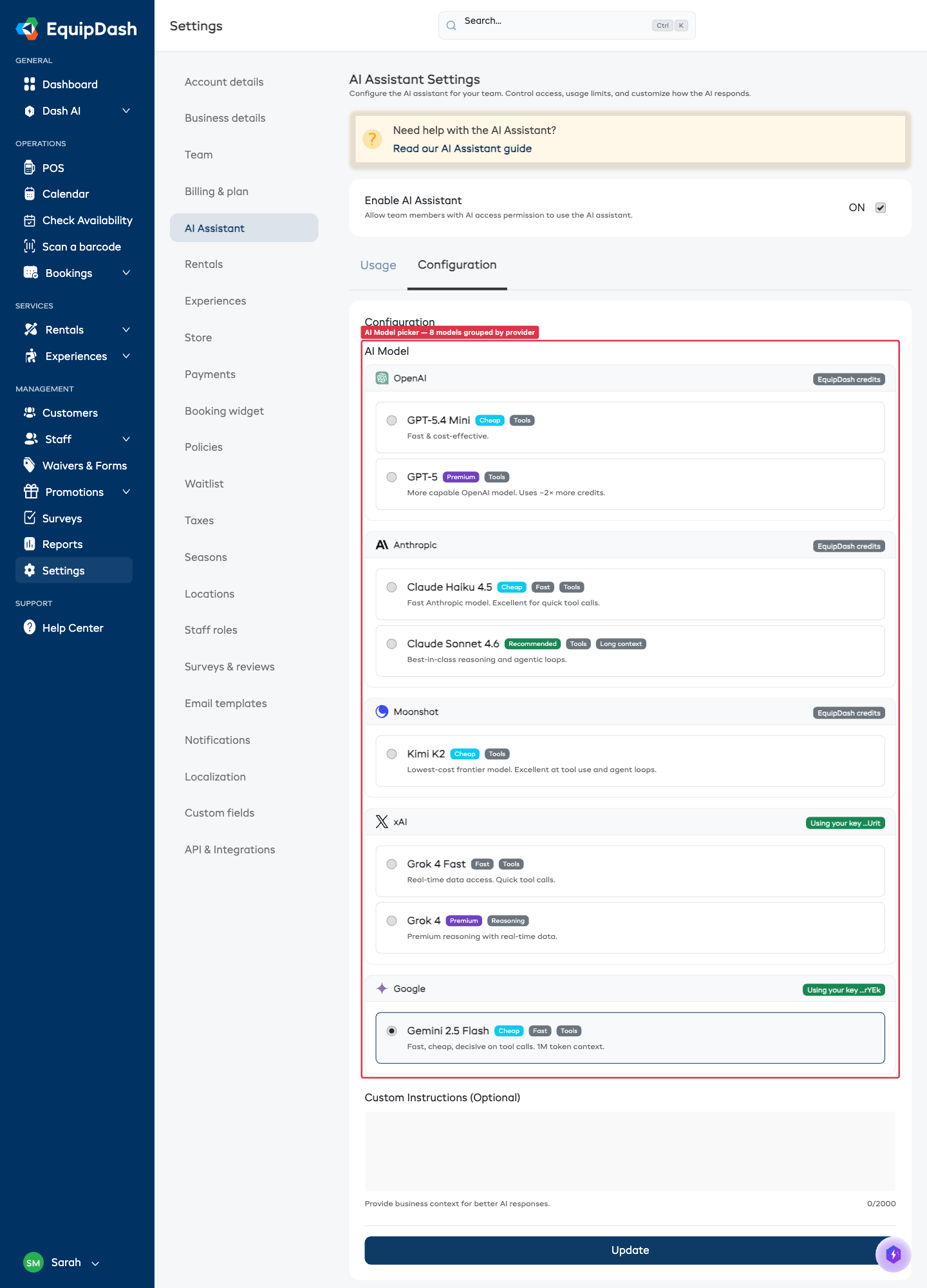
The change applies to all AI features instantly - chat, generated descriptions, smart suggestions, bots, everything.
The picker only shows models you can actually use. If you have not added your own xAI key, Grok 4.3 will not appear. Same for Gemini. Once you add a key for that provider, the model becomes selectable.
Tips for choosing
- Start with the default. DeepSeek V4.1 Flash covers nearly everything well.
- Switch when you have a reason. Cheaper credits, try GLM 5.3 Flash. Live web data, try Grok. Hardest analysis, try GPT-5.6 Terra.
- Everyone on your team uses the same model. It is one setting for the whole business, not one per person.
- You can change it any time. No commitment. Try one for a day and switch back if you don't like it.