AI Credit System ProThis feature requires the Pro plan
The AI Assistant uses a credit system to manage usage. Your subscription plan includes a monthly credit allowance, and you can purchase additional credit packs at any time. This page explains how credits work, how to track your usage, and how to top up when needed.
How Credits Work
Every time you send a message to the AI Assistant, it uses a small number of credits. Credits are measured in tokens - the building blocks that the AI model uses to read your question and compose a response.
- A short question like "How many bookings today?" uses fewer credits.
- A complex request like "Create a booking for three products over five days" uses more credits because the assistant needs to do more work.
Credits are deducted automatically after each interaction. You do not need to do anything - the system handles it behind the scenes.
Monthly Allowance
Your subscription plan includes a monthly credit allowance that resets at the start of each billing cycle.
- Growth plan: 3,000,000 tokens (≈ $5 of AI cost) per month
- Pro plan: 8,000,000 tokens (≈ $15 of AI cost) per month
When you use the AI Assistant:
- Credits are deducted from your monthly allowance first.
- Once the monthly allowance is used up, the system draws from any purchased credit packs you have on your account.
- If both are exhausted, the assistant will let you know that you need to purchase more credits.
You can also connect your own AI account (ChatGPT, Claude, etc.) so AI calls don't use EquipDash credits at all - your AI provider bills you directly.
Checking Your Credit Balance
You can check your current credit balance at any time from the AI Assistant interface.
From the AI Assistant
- Open the AI Assistant full-page view by clicking AI Assistant in the sidebar navigation.
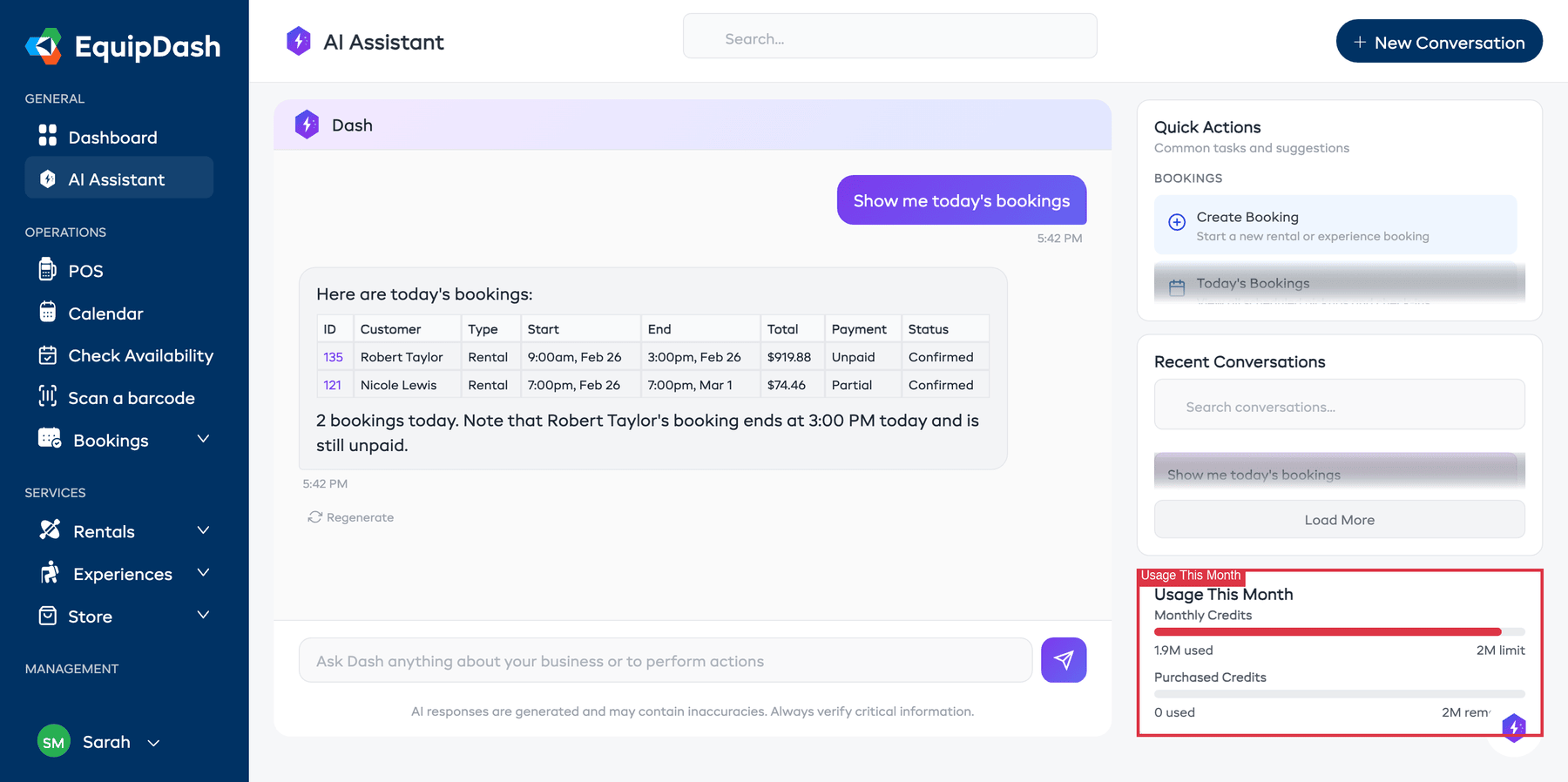
- Look at the Usage This Month section in the right-hand panel.
- You will see your Monthly Credits with a progress bar showing how much you have used, and your Purchased Credits remaining (if any).
From AI Settings
Admins can view a more detailed breakdown of credit usage.
- Go to Settings > AI Assistant.
- The Usage section shows:
- Monthly credits used and remaining with a progress bar
- Purchased credits remaining (if any credit packs have been bought)
- Usage by feature - a breakdown of how credits were used (e.g., AI Assistant, text generation)
- Usage by team member - how much each staff member has used
Purchasing Additional Credits
If you run through your monthly allowance, you can purchase credit packs to keep using the assistant without waiting for the next billing cycle.
- Go to Settings > Billing & Plan.
- Scroll to the AI Credit Packs section.
- Choose a pack size:
- 1M credits - $15.00
- 2M credits - $25.00
- 5M credits - $49.00
- 10M credits - $89.00
- Click Purchase next to the pack you want.
- The credits are charged to the payment method on file and added to your account immediately.
Purchased credit packs are valid for 12 months from the date of purchase. If you have multiple packs, the oldest one is used first.
How Credits Are Consumed
When you send a message, the system deducts credits in this order:
- Monthly allowance first - Credits included with your subscription plan are used before anything else.
- Purchased packs second - Once the monthly allowance is depleted, the system draws from purchased credit packs, starting with the oldest pack (first in, first out).
This means your purchased packs act as a safety net. They will only be touched once your monthly credits run out.
AI Model and Credit Usage
Your admin can choose between eight AI models in Settings > AI Assistant > Configuration. Different models use different amounts of credits per interaction:
| Model | Provider | Credit usage | Best for |
|---|---|---|---|
| DeepSeek V4.1 Flash (recommended) | DeepSeek | Low | Everyday work, and jobs with a lot of steps |
| GLM 5.3 Flash | GLM | Lowest | The sharpest answers at the lowest cost |
| GPT-5.6 Luna | OpenAI | Low | Fast everyday answers, simple lookups |
| GPT-5.6 Terra | OpenAI | Higher | Complex analysis, detailed reasoning |
| Claude Sonnet 5 | Claude | Higher | Long documents and careful instructions |
| Kimi K2.6 | Kimi | Low | High-volume tool work |
| Grok 4.3 | Grok | Bring your own key | Live information from the web |
| Gemini 3.1 Flash-Lite | Gemini | Bring your own key | Very long documents |
Grok 4.3 and Gemini 3.1 Flash-Lite are only available if you connect your own AI account - EquipDash does not offer plan credits for these providers.
For most day-to-day work, DeepSeek V4.1 Flash (the default) or GLM 5.3 Flash are good choices. See Choosing the Right AI Model for a deeper guide.
See our Choosing the Right AI Model guide for a side-by-side comparison and recommendations by use case.
What Happens When Credits Run Out
If your monthly credits and purchased credits are both exhausted:
- The AI Assistant will display a message letting you know that credits have been used up.
- You will not be able to send new messages until more credits are available.
- Your existing conversation history remains accessible - you can still browse past conversations.
- You can purchase a credit pack at any time to resume using the assistant immediately.
Tips for Managing Credits
- Use quick actions - They are optimized to get answers efficiently with fewer tokens.
- Be specific - A focused question uses fewer credits than a vague one that requires follow-ups.
- Check usage regularly - Keep an eye on the usage bar so you are not caught off guard.
- Choose the right model - Use DeepSeek V4.1 Flash or GLM 5.3 Flash for everyday lookups, and save Claude Sonnet 5 or GPT-5.6 Terra for complex analysis.