Viator Integration Growth+This feature requires the Growth+ plan or higher
EquipDash integrates directly with Viator on their new V2 supplier API. Once connected, availability, pricing, bookings, amendments, and cancellations flow automatically between systems — no Supplier Extranet blockouts to manage, no copy/paste, no double handling.
What Gets Synced
| Data | Direction | When |
|---|---|---|
| Tour List (catalogue) | Viator → EquipDash | Viator pulls your mapped products on demand |
| Calendar (long-range availability) | Viator → EquipDash | Once or twice per day for the next 365+ days |
| Real-time availability | Viator → EquipDash | Every time a traveller reaches checkout |
| Reservations (availability holds) | Viator → EquipDash | While a traveller completes checkout |
| Bookings | Viator → EquipDash | When a traveller confirms payment on Viator |
| Cancellations | Viator → EquipDash | Customer-initiated cancels on Viator |
| Amendments | Viator → EquipDash | Date / time / traveller changes |
| Special Offers | Viator → EquipDash | Viator pulls your active supplier offers when surfacing rates |
| Event Notifications | EquipDash → Viator | Pushed when availability or pricing changes in EquipDash |
| Special Offer Notifications | EquipDash → Viator | Pushed when supplier offers start, end, or change |
How It Works
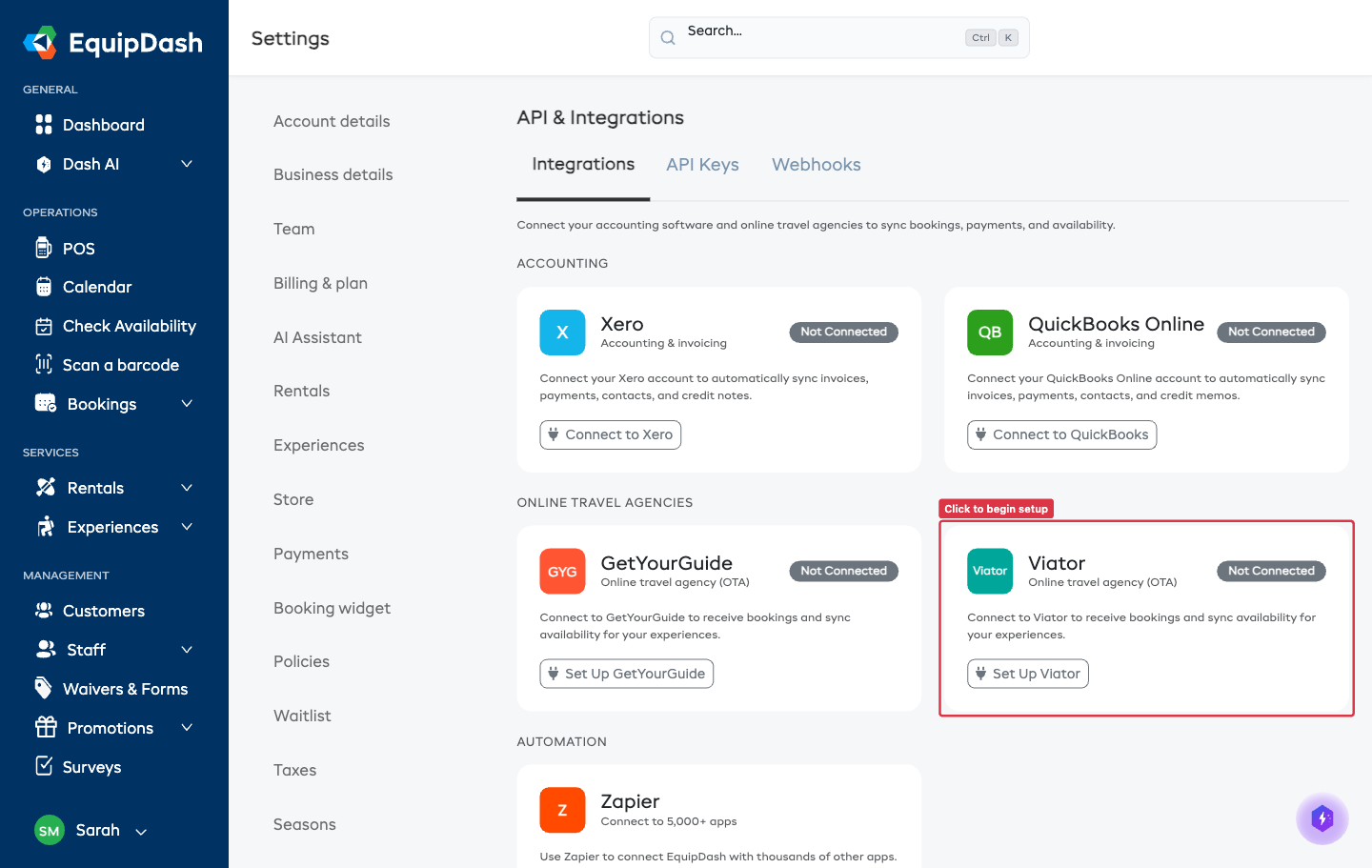
- Connect from Settings → API & Integrations → Viator. EquipDash generates an API key for you to give to Viator — no manual product codes or mappings. See Connecting Viator.
- Your experiences go on Viator automatically — every active experience is published using the prices you already set. Switch off any you don't want there (e.g. test items or multi-day packages).
- Viator handles the rest — it pulls availability, holds seats, creates bookings, and notifies you of any changes. EquipDash pushes changes back to Viator automatically.
All Viator bookings appear in your Bookings page, calendar, and reports tagged with source viator.
Key Aspects Supported
- TourDepartureTime — if your experience has fixed start times, Viator shows the menu of times to the customer.
- ContactEmail — the customer's email is captured from Viator and stored with the booking.
- AvailabilityHold — when a traveller adds to cart, we hold the seat for 20 minutes so they can complete checkout without risking a sell-out. (Viator's spec requires at least 15.)
- Booking Cutoff — your minimum-booking-notice is surfaced to Viator so it stops selling slots once they're too close to start.
- Remaining Capacity — every availability response includes the seats left, so Viator never oversells.
Quality SLAs
Viator holds partners to two quality targets:
- Booking failure rate must be under 10%.
- Availability endpoint must respond in under 5 seconds.
EquipDash instruments both automatically. The Health panel on the Viator settings page shows your last-24h p95 availability latency and booking failure rate, and raises an alert if either threshold is crossed.
Certified Capabilities
EquipDash is certified against Viator's V2 SAPI on all six contract-tested capabilities:
| Capability | What it covers |
|---|---|
| Availability | Real-time seat checks for a given date/time slot |
| Calendar | Long-range availability for a date range |
| Reserve | Holding a seat while a traveller checks out |
| Special Offers | Surfacing supplier-defined promotional rates |
| Event Notifications | Pushing availability/price changes to Viator |
| Special Offer Notifications | Pushing offer changes to Viator |
Every product profile Viator tests against — per-person pricing, per-unit (group) pricing, tiered pricing, free tickets, sold-out states, past-cutoff slots, multi-age-band products — is supported.
Plan Requirement
Viator is available on the Growth and Pro plans.
Next Steps
- Connecting Viator — step-by-step setup.
- Configuring Viator — choosing which experiences sell, sync settings, and monitoring.