Text Message Campaigns Growth+This feature requires the Growth+ plan or higher
Any campaign can go out as a text instead of an email. Texts are ideal for anything time-sensitive — a quiet weekday, a last-minute cancellation — because people actually read them. EquipDash shows you what the send will cost before you commit, and never texts anyone who has opted out.
Texts come out of your SMS wallet, so SMS needs to be set up first — see Getting Started with SMS.
Sending One
- Create the campaign as usual — name it, say what it's for, choose who gets it. See Creating a Campaign.
- On the campaign's Message tab, choose Text message instead of Email.
- Write your message in the Text message box.
- Check the Cost estimate on the right, then use Send now or Schedule at the top of the page.
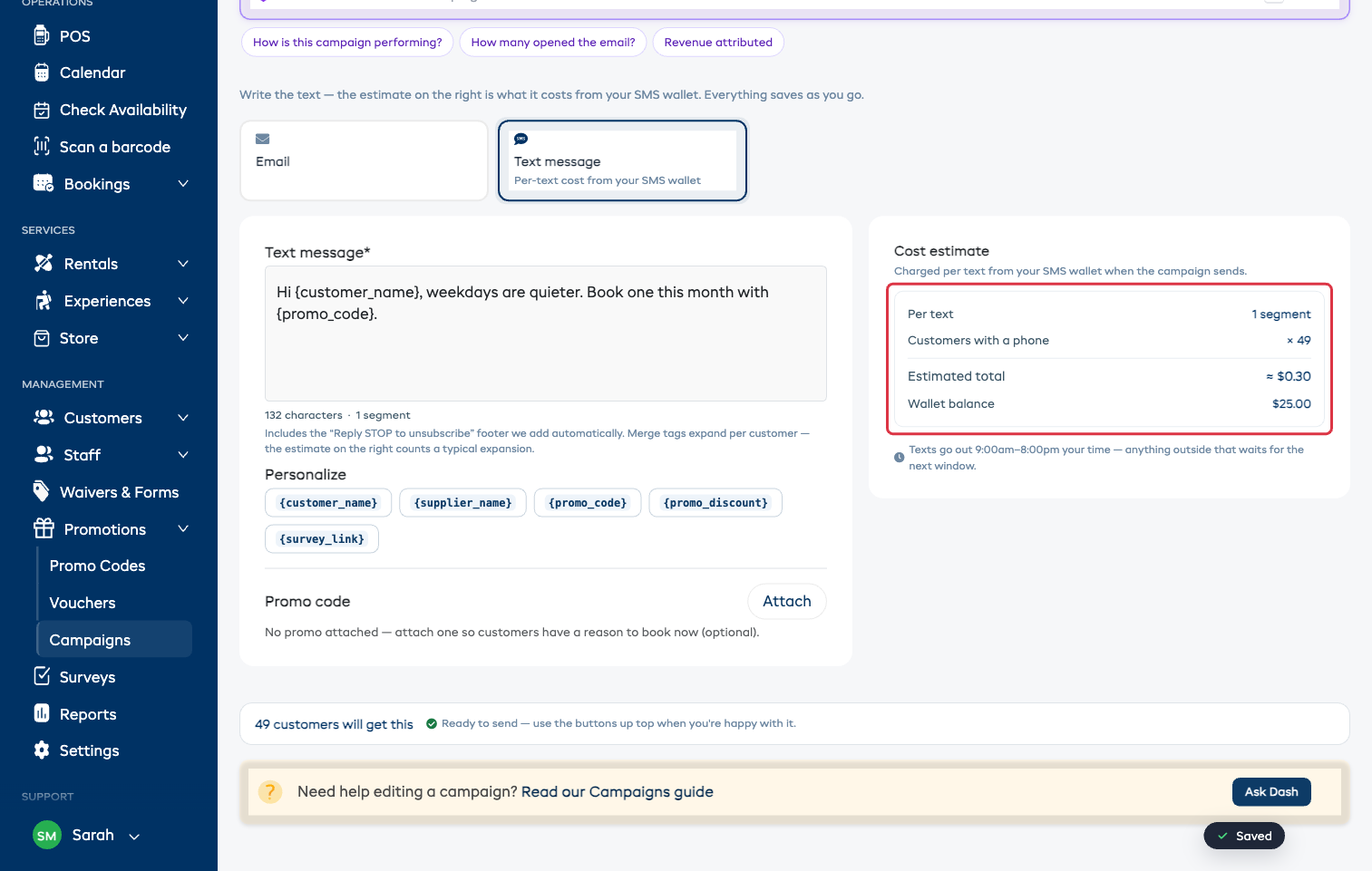
Only customers with a phone number receive a text, and the count next to the estimate reflects that.
Personalizing a Text
The same tags work in a text as in an email — tap a chip under Personalize to drop one in:
{customer_name} · {supplier_name} · {promo_code} · {promo_discount} · {survey_link}
Attach a promo code under Promo code → Attach so {promo_code} has something to fill in.
Characters, Segments, and Cost
Phone networks charge per segment, not per message:
- A plain text is one segment up to 160 characters.
- Emoji and special characters (including curly quotes and long dashes) switch the whole message to a format where a segment is only 70 characters — the counter tells you when that has happened.
- A "Reply STOP to unsubscribe" footer is added for you and counts toward the length.
The counter under the box updates as you type. The Cost estimate on the right is the one that matters — it's worked out on the server, counting a typical merge-tag expansion:
| Row | What it means |
|---|---|
| Per text | How many segments one message takes |
| Customers with a phone | How many people will actually receive it |
| Estimated total | What the send will take from your SMS wallet |
| Wallet balance | What you have available right now |
If your balance won't cover the send, a note appears with a link to top up — see Top Up Your SMS Wallet. If you use your own Twilio account, Twilio bills you directly and nothing comes out of a wallet.
There's a limit of 4 segments per message, and you'll be told to shorten anything longer before it can send. One clear offer and one link is plenty for a text.
Quiet Hours
Texts only go out between 9:00am and 8:00pm your time, and outside any quiet hours you've set yourself. Anything that would land outside that window waits for the next one — so you can schedule a campaign for 6am and customers get it at 9am, not at dawn.
Opt-Outs Are Handled For You
- Anyone who withdrew marketing consent or replied STOP is skipped automatically, and shows as Skipped (opted out) in the results.
- Every text includes the "Reply STOP to unsubscribe" footer, so customers always have a way out.