Campaigns Overview Growth+This feature requires the Growth+ plan or higher
Campaigns let you reach your customers with offers, news, and reminders — and show you exactly what each one brings back in bookings and revenue. Pick what the campaign is for, pick who gets it, write the message, and send. EquipDash handles the branding, the delivery, and the tracking.
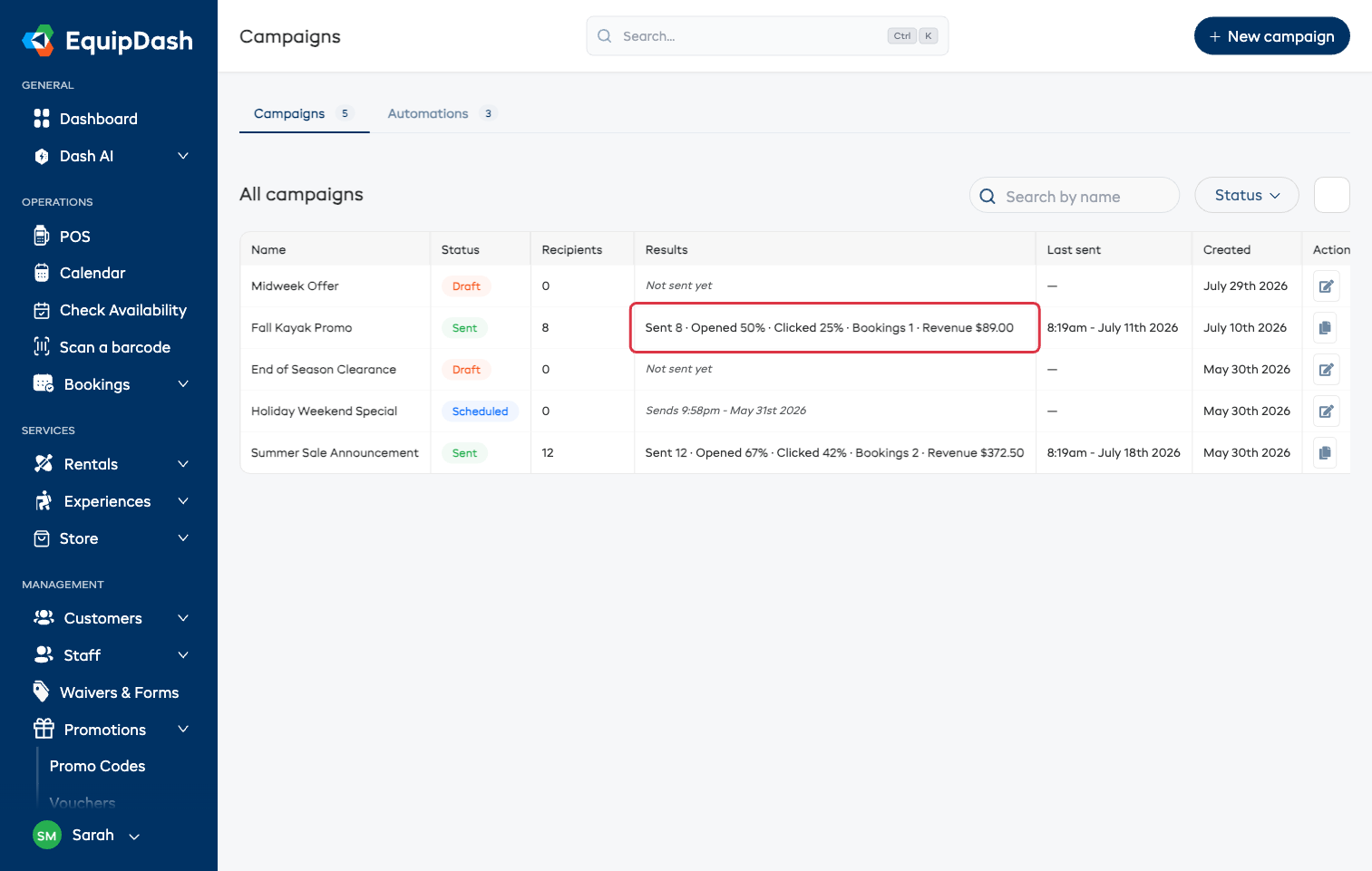
Where to Find Campaigns
- In the left sidebar, click Promotions then Campaigns.
- The page has two tabs:
- Campaigns — the one-off messages you send yourself, by email or text.
- Automations — always-on messages that send themselves (post-trip follow-up, abandoned-cart recovery, win-back).
What You Can Do
Send a one-off campaign
Click New campaign. A two-step panel asks what the campaign is for and who should get it, then creates the campaign and drops you on its page, where you write the message and send it.
| What it's for | What it sets up for you |
|---|---|
| Announce something | Announcement design, everyone who has booked with you |
| Fill slow days | Promo blast design, local customers, and a nudge to attach a promo code |
| Win back customers | Win-back design, people who haven't booked in a while |
| Create from scratch | A plain email, no design — just your words |
Everything it fills in is a starting point — you can change all of it before you send. See Creating a Campaign.
Turn on automations
The Automations tab holds three always-on messages with simple on/off switches:
- Post-trip follow-up — asks customers for a Google review after their booking.
- Abandoned-cart recovery — emails customers who started a booking but didn't finish.
- Win-back — emails customers who haven't booked in months.
Each card shows what it has sent and what it brought back. See Automations.
Send by text message instead
Any campaign can go out as a text instead of an email — with a live character count, the cost from your SMS wallet before you send, and quiet hours so nobody gets a text at night. See Text Message Campaigns.
See what each campaign brought back
Every sent campaign shows Sent · Opened · Clicked · Bookings · Revenue on the list, and per-customer results on its own page. Bookings count when a customer books within 7 days of opening or clicking. See Campaign Results & Analytics.
Good to Know
- People who opted out are always excluded. Every audience, every send, email and text. Customers who reply STOP to a text are never texted again.
- Everything saves as you go. A campaign stays a draft until you send or schedule it, so you can stop halfway and come back.
- Duplicate any campaign from the copy icon on its row — handy for repeating something that worked.
- Let Dash draft it for you. The Create with Dash AI panel at the top of the new-campaign panel turns a sentence about what you want to say into a campaign that is ready to review. See Create with Dash.
Who Can Use Campaigns
Campaigns are on the Growth plan and up.
| Permission | What it allows |
|---|---|
| View campaigns | See the Campaigns list, campaign pages, results, and automations |
| Manage campaigns | Create, edit, duplicate, delete, send, schedule, and switch automations on or off |
Someone with View campaigns only sees everything read-only — no New campaign button, no send or schedule buttons, and automation switches they can't move. See Managing Permissions.