Topping Up Your SMS Wallet
Managed-mode SMS uses a prepaid USD wallet — top up a pack, send until the balance runs out, top up again. No monthly minimums.
The wallet lives in Settings → Billing & plan → SMS credits (alongside your subscription and AI credits, so all your usage-based billing is in one place).
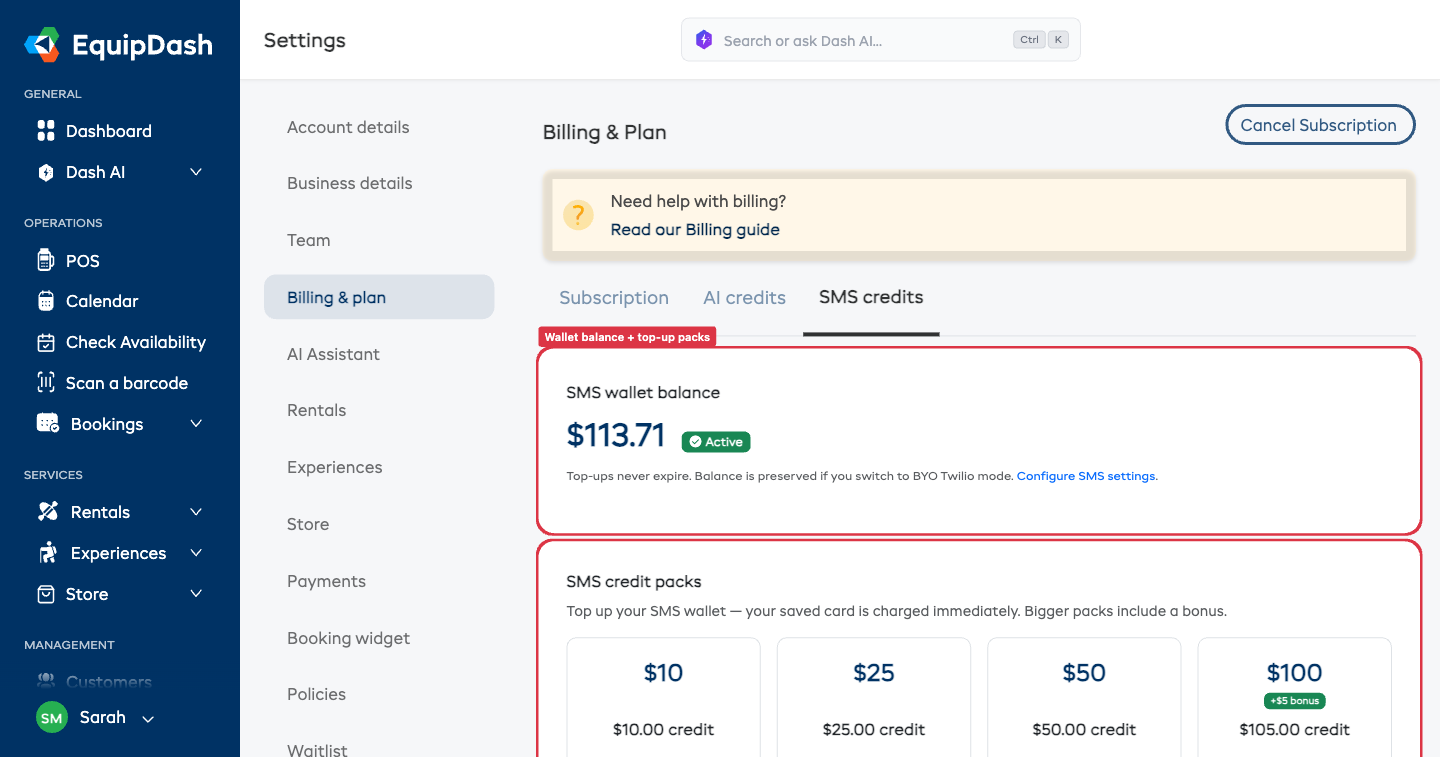
How to Top Up
- Go to Settings → Billing & plan → SMS credits
- Pick a top-up pack:
- $10, $25, $50, or $100 (+ $5 bonus credit)
- Click the pack
- Confirm the charge — it goes through on your saved Stripe payment method (no Checkout redirect)
Your wallet credits within seconds of payment confirmation.
The $100 pack includes a $5 bonus credit ($105 total) — that's the only pack with a bonus.
Top-Ups Never Expire
Unspent balance stays on your account indefinitely. If you switch to BYO Twilio mode and back, the credit is still there.
Low-Balance Alerts
You'll get an email + dashboard banner when your wallet drops below your configured threshold (default $5). To change the threshold, scroll down on the SMS credits page to Low-balance alert threshold.
The alert respects a 24-hour cooldown — a low balance doesn't generate hourly emails. The cooldown resets after a successful top-up.
Auto Top-Up
If you don't want to manually top up, enable Auto top-up on the same page:
- Tick Automatically top up when balance is low
- Set the trigger threshold (e.g. $10) and the recharge amount (e.g. $25)
- Click Save
When the balance drops below the threshold, we'll charge your saved Stripe payment method and credit the wallet automatically.
If your card is declined, auto top-up is disabled and you'll get an alert email — the system won't keep retrying a declined card.
What Happens When the Wallet Hits Zero
- Transactional SMS sending pauses immediately
- A red banner appears at the top of Settings → SMS ("SMS paused — top up to resume")
- Email continues to send as a fallback — your customers always get the notification, just via email instead of SMS
- Any send attempts during this window log a row in the delivery log with status
insufficient_balanceso you can see exactly what didn't go out
To resume sending, just top up.
Cost Per Message
Cost varies by destination country. The full per-country rate table is shown live in Settings → SMS → Pricing.
Multi-segment messages (long bodies, emoji-heavy bodies, or special characters that force Unicode encoding) cost per segment. The template editor warns you when a body would exceed 1 segment so you can shorten it before saving.