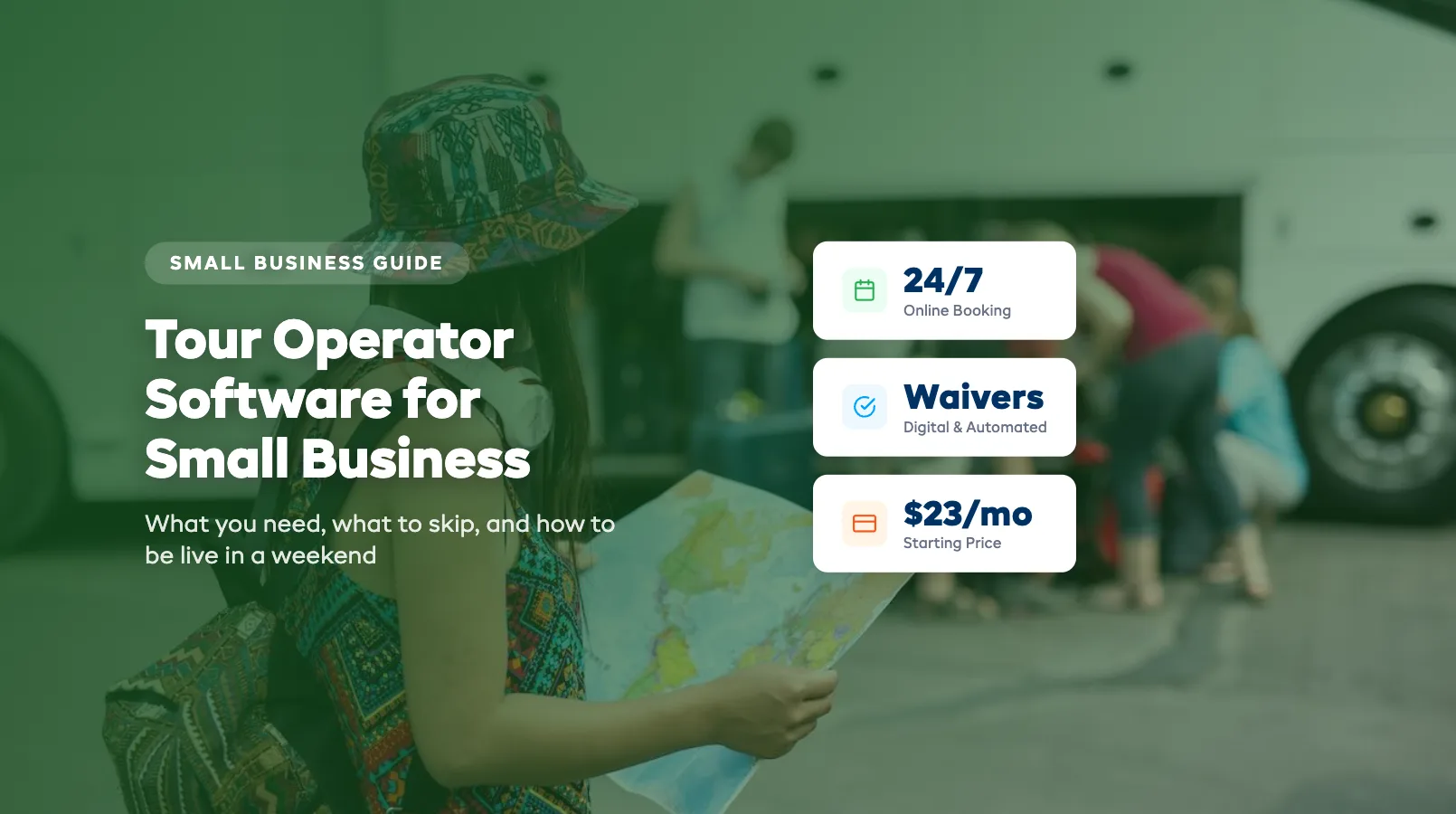
Tour Operator Software for Small Business
You run three kayak tours a week with two guides and a Google Calendar. You're not a "real" software buyer — you're just a small operation, right?
Wrong. That mindset costs small tour operators thousands of dollars a year in missed bookings, double-booked time slots, and evenings spent answering the same questions by text. Tour operator software for small business isn't about being big enough. It's about being efficient enough to grow without hiring someone just to manage your calendar.
This guide covers what you actually need, what you can skip, what it costs, and how fast you can be up and running. If you want the full breakdown of the category, start with our Tour Operator Software: The Complete Guide.
In this guide:
- You're Not Too Small (Here's Why)
- Features That Matter at Small Scale
- Features You Can Skip (For Now)
- Budget Options
- Setup: Realistically, How Long?
- FAQ
You're Not Too Small (Here's Why)
The "too small for software" trap catches operators at exactly the wrong time — when they're still small enough to fix problems manually but growing fast enough that manual processes are silently killing revenue.
Here's the math. Say you run 10 tours a week at $75 per person, averaging 6 guests per tour. That's $4,500 a week. If you're losing just two bookings a week because your availability isn't visible online after hours, that's $900 a month walking out the door. Over a six-month season, that's $5,400 — more than enough to pay for software five times over.
And that's just the booking gap. Add the time you spend on:
- Answering "is Saturday at 10am available?" texts and emails (15–30 minutes a day)
- Manually sending confirmations and day-before reminders
- Chasing waivers on the morning of the tour
- Updating a spreadsheet after every booking change
Most operators running 5–15 tours a week spend 8–12 hours per week on admin that software handles automatically. That's a full day you could spend on the water, marketing, or building partnerships with hotels and resorts.
The operators who adopt software early don't just save time. They book more — because their availability is live 24/7. A family browsing tours at 9pm on a Wednesday can book and pay without waiting for you to reply to an enquiry form the next morning.
Features That Matter at Small Scale
Not every feature on a platform's website matters when you're running a lean operation. Here are the ones that actually move the needle for small tour businesses:
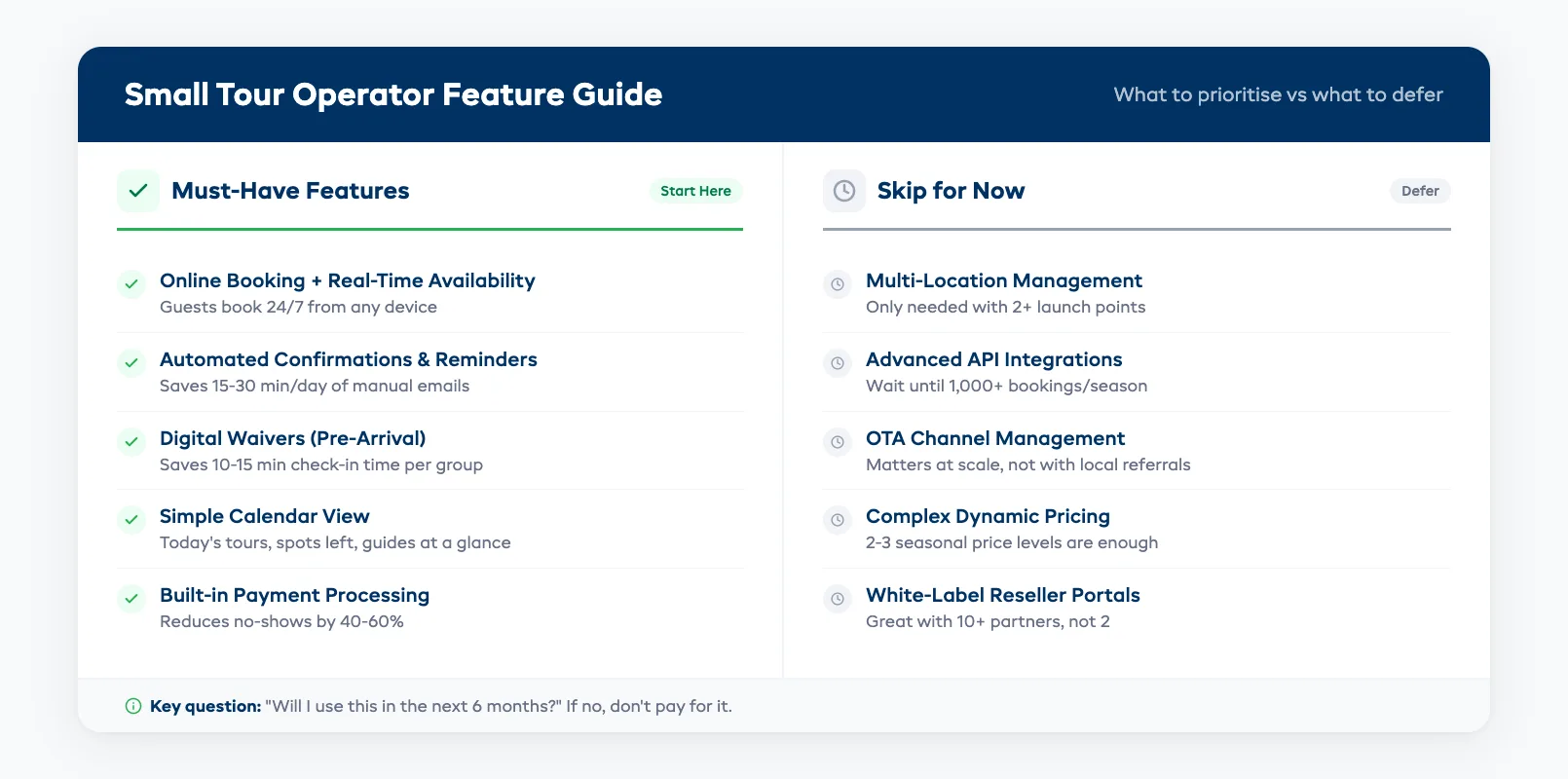
Online booking with real-time availability. This is the single highest-ROI feature. If guests can see open slots and book immediately — at midnight, on their lunch break, from an Instagram link — you capture revenue you'd otherwise lose. Look for platforms that embed a booking widget on your existing website.
Automated confirmations and reminders. Every confirmation email and "don't forget your sunscreen" reminder you send manually is time you'll never get back. Good software sends these on autopilot. The best platforms let you customize the message so it still sounds like you.
Digital waivers. Sending waivers before arrival saves 10–15 minutes of check-in chaos per group. It also reduces your liability exposure. Look for pre-arrival signing via email or SMS — not a tablet at the dock.
Simple calendar and schedule view. You need to see today's tours, who's booked, how many spots are left, and which guide is assigned — all in one glance. If you have to click through five screens, the tool is too complex. If you run time-slot activities rather than full tours, our activity booking software guide covers the specific features you need.
Payment processing. Taking deposits or full payments at booking time reduces no-shows by 40–60%. Built-in payment processing (Stripe or Square integration) means one less tool to manage.
For a deeper comparison of how these features stack up across platforms, see our best software for tour operators guide. For the full breakdown of the category, start with our Tour Operator Software: The Complete Guide.
Features You Can Skip (For Now)
Enterprise features sound impressive on a demo call. But paying for capabilities you won't use for two years is a waste. Here's what small operators can safely defer:
Multi-location management. Unless you're already running tours from two or more launch points, you don't need location-based dashboards or inter-location inventory transfers.
Advanced API integrations. Custom API connections to your accounting software or CRM can wait. Most small operators don't have a CRM — and that's fine. The booking platform's built-in customer list is enough until you're past 1,000 bookings a season.
OTA channel management. Distributing availability to Viator, GetYourGuide, and TripAdvisor simultaneously matters at scale. If you're filling tours through your own website and local referrals, this can wait.
Complex dynamic pricing. Surge pricing, day-of-week pricing tiers, and yield management algorithms are powerful for high-volume operators. At small scale, two or three seasonal price levels are enough.
White-label reseller portals. These let hotels and concierges book tours on your behalf through a branded portal. Great when you have 10+ referral partners. Unnecessary when you have two.
The key question before every feature: "Will I use this in the next six months?" If the answer is no, don't pay for it.
Budget Options
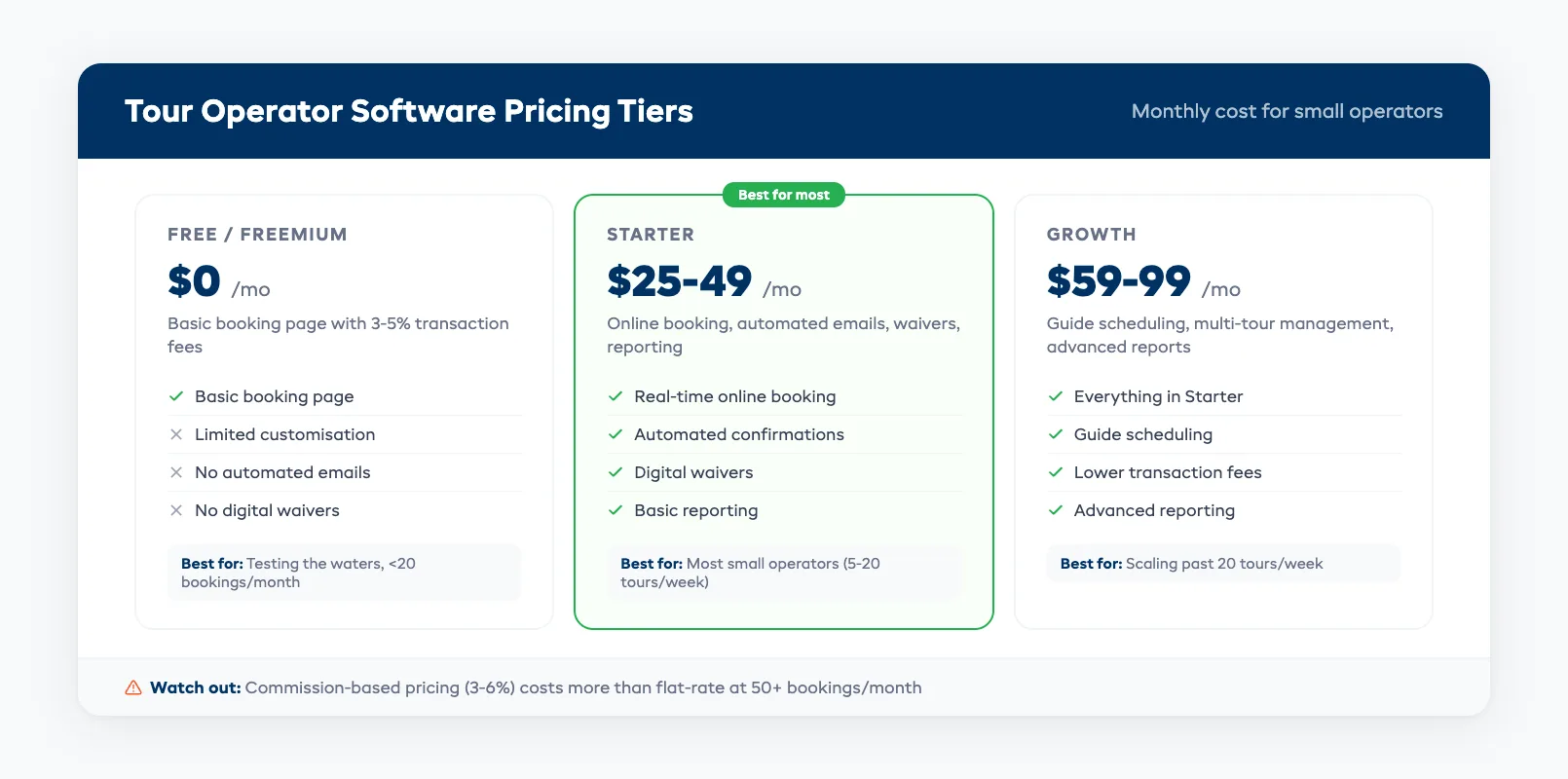
Tour operator software for small businesses typically falls into three pricing tiers:
| Tier | Monthly cost | What you get | Best for |
|---|---|---|---|
| Free / freemium | $0 | Basic booking page, limited customization, transaction fees 3–5% | Testing the waters, fewer than 20 bookings/month |
| Starter | $25–$49/mo | Online booking, automated emails, digital waivers, basic reporting | Most small operators (5–20 tours/week) |
| Growth | $59–$99/mo | Guide scheduling, multi-tour management, advanced reporting, lower transaction fees | Operators ready to scale past 20 tours/week |
A few things to watch for:
- Commission-based pricing charges 3–6% per booking on top of a monthly fee. At 50 bookings a month averaging $150 each, a 5% commission costs $375 — far more than a flat-rate subscription.
- Per-booking fees ($1–$3 per booking) add up faster than you'd think. Calculate your monthly volume before committing.
- Annual billing typically saves 15–20%. If you've tested the platform for a month and it works, switch to annual.
EquipDash's Starter plan, for example, runs $23/month (billed annually) with a 2% platform fee and no per-booking charges — including AI-powered automation that handles customer questions and operational reports through Dash AI.
The real cost of "free" tools is usually your time. If a free booking page saves you $0/month but costs you five hours a week in manual follow-up, it's the most expensive option.
Setup: Realistically, How Long?
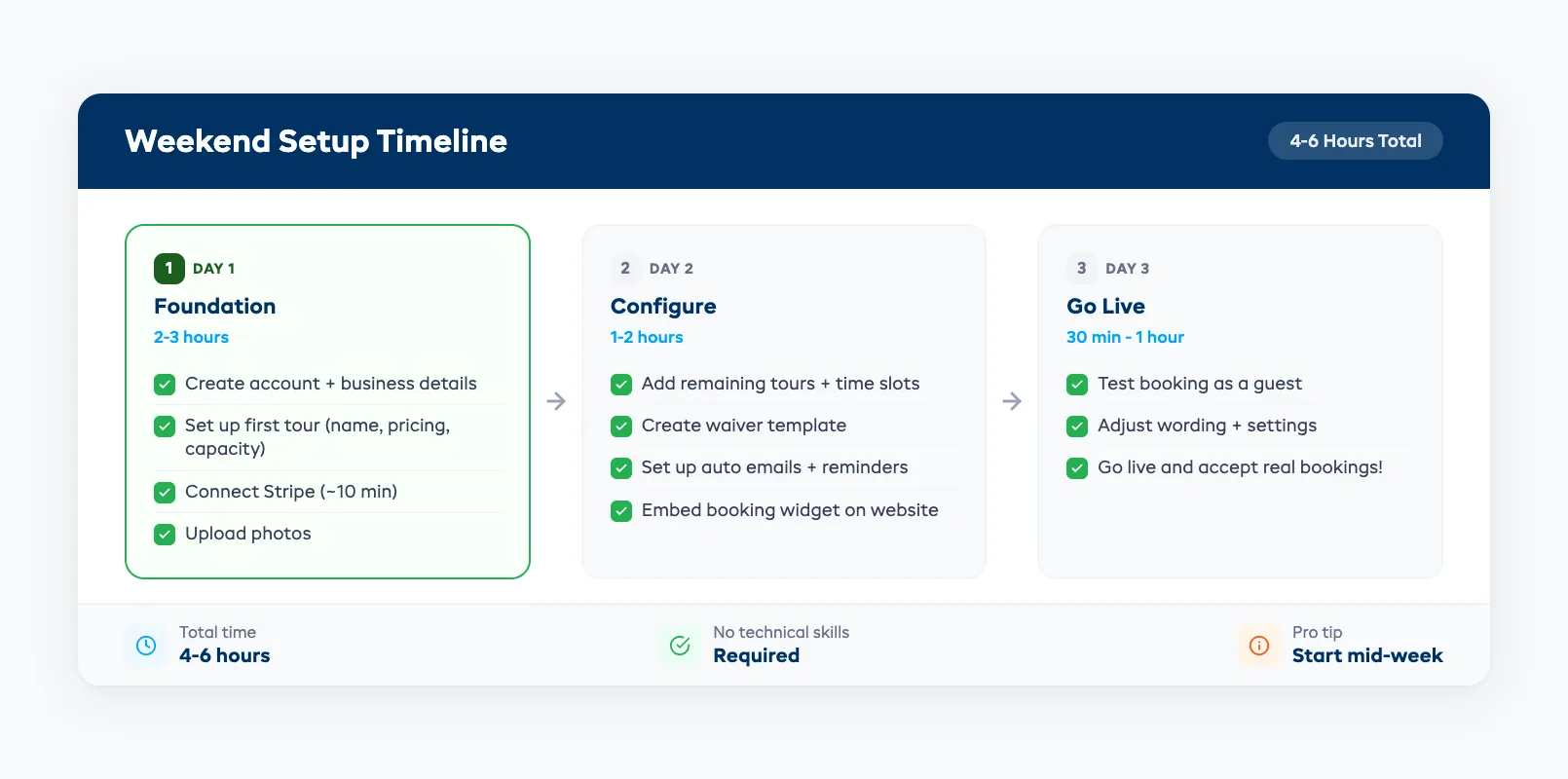
Most small tour operators are live and taking bookings within a weekend. Here's a realistic timeline:
Day 1 (2–3 hours):
- Create your account and add business details
- Set up your first tour (name, description, duration, pricing, capacity)
- Connect your payment processor (Stripe takes about 10 minutes)
- Upload a few photos
Day 2 (1–2 hours):
- Add your remaining tours and time slots
- Create your waiver template
- Set up automated confirmation and reminder emails
- Embed the booking widget on your website
Day 3 (30 minutes – 1 hour):
- Do a test booking from a guest's perspective
- Adjust any wording or settings
- Go live
Total: 4–6 hours spread over a long weekend. You don't need to block off a week, hire a consultant, or migrate a database. If your operation has fewer than 10 tour types, setup is straightforward.
One tip: start mid-week when your tour load is lighter. Don't try to set up new software on a Friday afternoon before a packed Saturday morning.
The platforms that take weeks to set up are usually the enterprise ones with features you don't need yet. For a small operation, complexity is the enemy.
FAQ
Am I too small for tour operator software?
If you run at least three tours a week and take bookings, you're not too small. The break-even point is usually around 10–15 bookings per month — the time savings alone cover a $29–$49 monthly subscription.
What's the minimum I should expect to spend?
Budget $23–$49 per month for a starter plan that covers online booking, automated emails, and digital waivers. Avoid "free" tools that charge high per-booking commissions — they get expensive fast.
How quickly can I start taking real bookings?
Most small operators are fully set up within a weekend (4–6 hours total). You don't need technical skills — if you can build a basic social media profile, you can set up tour booking software.
Do I need to change my website?
No. Most platforms provide an embeddable booking widget that drops into your existing site. If you use WordPress, Squarespace, or Wix, it's usually a copy-paste embed code.
Should I pick a tour-only platform or an all-in-one?
If you only run tours, a tour-focused platform is fine. If you also rent equipment (kayaks, bikes, paddleboards), an all-in-one platform like EquipDash saves you from paying for two separate systems. We break down the trade-offs in detail in All-in-One Tour Operator Software: Is It Worth It?.
What happens to my existing bookings when I switch?
You don't need to migrate old data. Start taking new bookings through the software and let existing reservations play out on your current system. Most operators run both in parallel for two to four weeks.
Choosing tour operator software as a small business doesn't need to be complicated. Start with online booking, automated communications, and digital waivers. Skip the enterprise features you don't need yet. Pick a flat-rate plan that won't surprise you as bookings grow.
Your operation might be small today. The right software makes sure it doesn't stay that way.
in one place