AI for Equipment Rental Business: The Complete Operator's Guide (2026)
You've heard the pitch a hundred times. "AI will transform your business." Then you look at your rental shop — 40 kayaks, a wall of wetsuits, a booking calendar held together with highlighters and hope — and wonder what any of that has to do with you.
Here's the short answer: a lot. But not in the way most tech companies describe it.
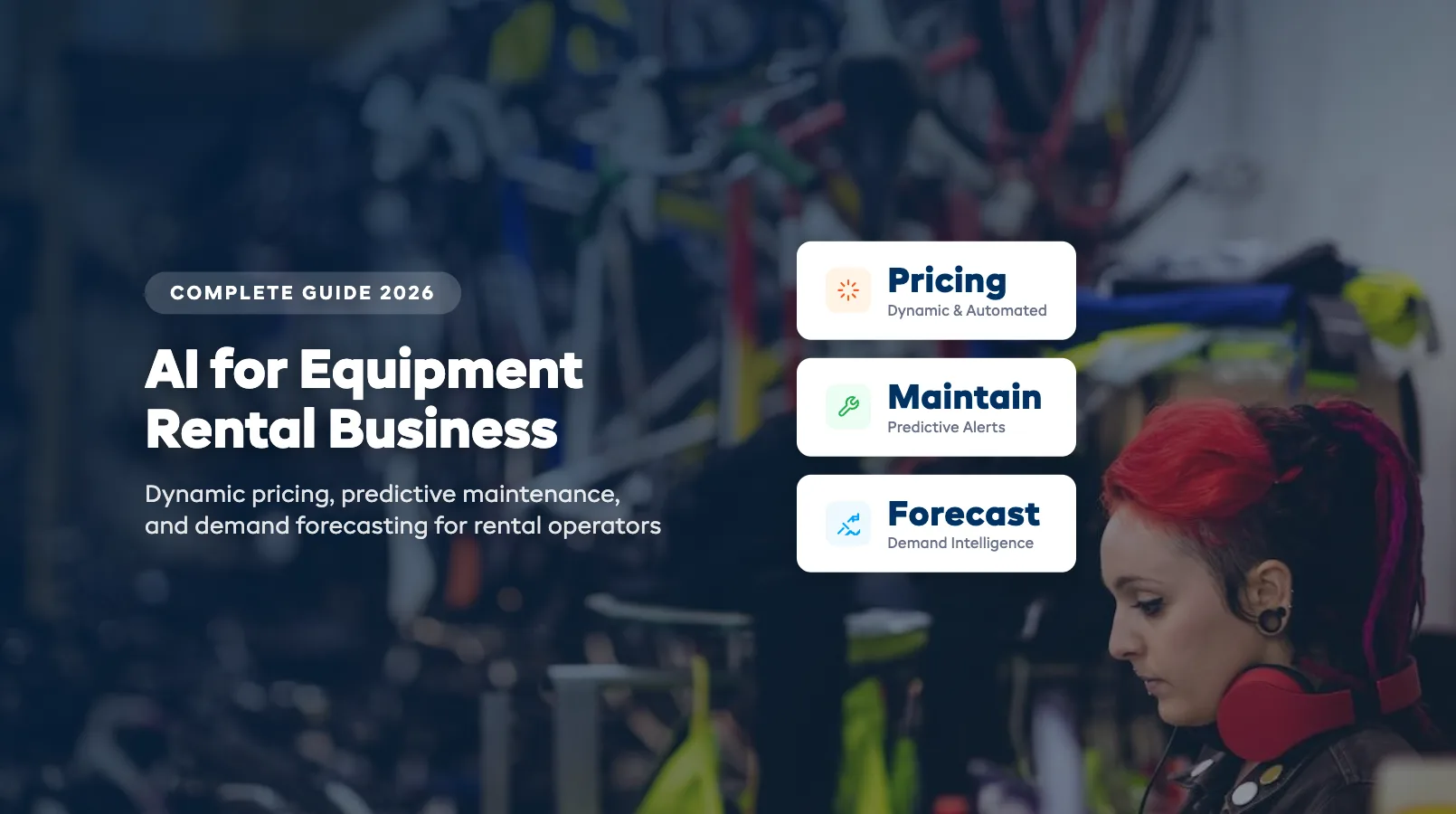
AI for equipment rental isn't about robots replacing your staff or some sci-fi dashboard that runs your shop. It's about eliminating the repetitive decisions that eat your day — setting rates, scheduling maintenance, reordering gear, answering the same questions at 11 PM. The stuff that doesn't need your judgment but still demands your time.
This guide covers the specific ways AI applies to outdoor equipment rental operations in 2026. No theory. No jargon. Just what works, what doesn't, and where to start.
What AI Actually Does for Equipment Rental Shops
Strip away the marketing language and AI does three things for rental operators:
-
It watches patterns you can't track manually. Your brain can hold maybe 20 data points — last weekend's bookings, tomorrow's weather, that one kayak with the slow leak. AI processes thousands of signals simultaneously: historical booking data, weather forecasts, local events, equipment usage cycles, customer behavior patterns.
-
It makes routine decisions faster. Should you raise SUP rates this Saturday? AI already checked the forecast (sunny, 28°C), cross-referenced last year's same-weekend bookings (94% utilization), and adjusted rates 15% up — three days ago.
-
It handles communication you'd otherwise skip. The booking confirmation at 2 AM. The maintenance reminder for kayak #17 at 200 rental hours. The follow-up review request 24 hours after return. These aren't complex tasks. They're just tasks you never get to.
The key distinction: AI doesn't replace your expertise as an operator. It replaces the busywork that keeps you from using that expertise. You still decide which gear to buy, how to train your team, and when to expand. AI handles the 40% of your workday that's pattern-matching and data-crunching.
For a broader look at which daily tasks can be automated (with or without AI), see our complete rental automation guide.
Dynamic Pricing: Let the Data Set Your Rates
Most rental shops set prices once per season and leave them. Maybe they have a "peak" rate and an "off-peak" rate. That's two price points for a business with 200+ variable conditions.
Dynamic pricing uses real-time data to adjust your rates automatically. Not randomly — based on rules you set.
What the data watches:
- Weather forecasts. Sunny weekend coming? SUP rates increase 10-20%. Rain forecast? Drop rates slightly and push covered activities. The adjustment happens 48-72 hours out — enough time for customers to see the new prices when they book.
- Booking velocity. If you're at 80% capacity for Saturday by Wednesday, rates go up for the remaining slots. If you're at 30% by Friday morning, rates drop to fill gaps.
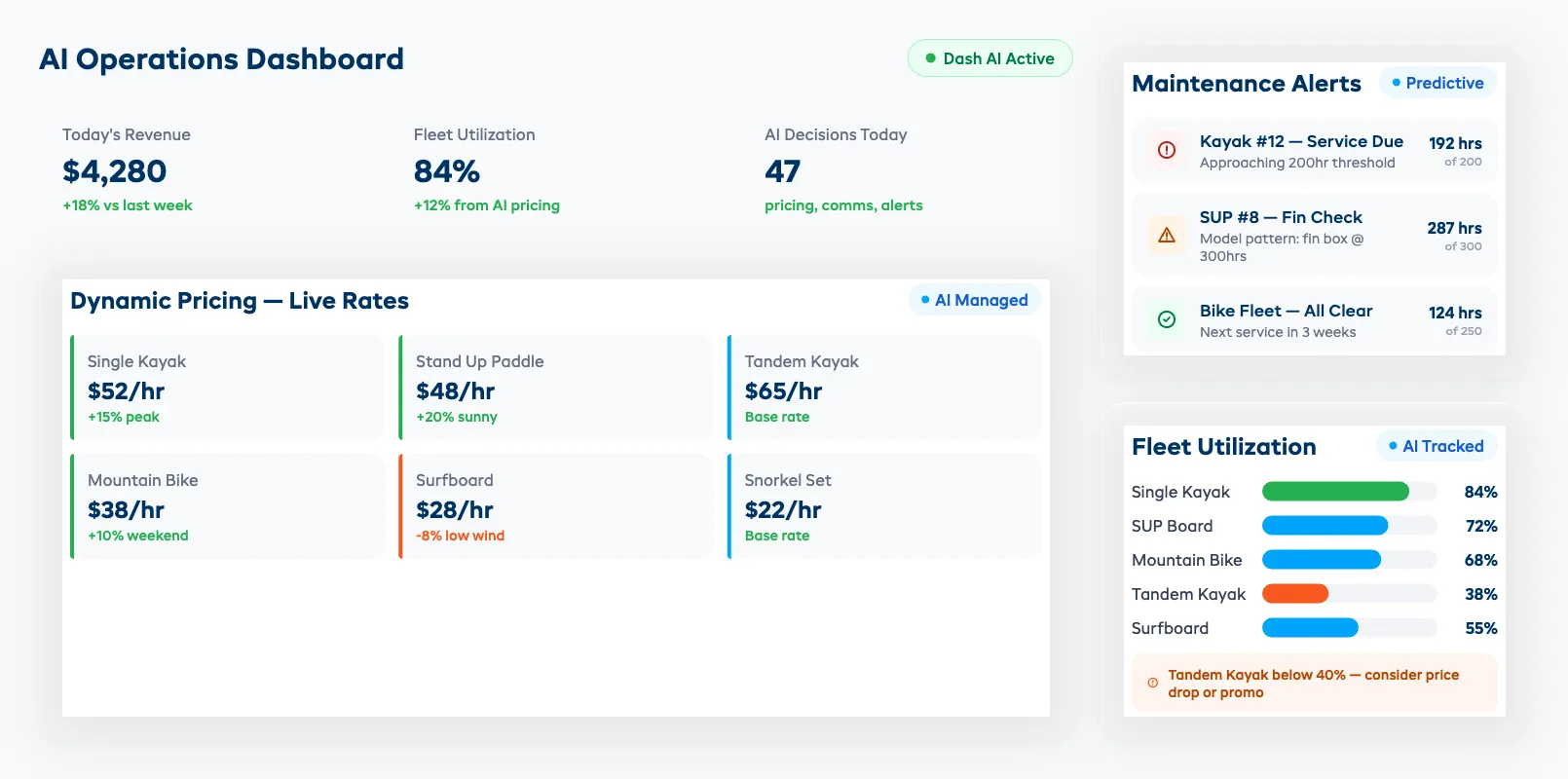
- Historical patterns. Last July 4th weekend you sold out at $45/hour for kayaks. This year, AI starts the holiday weekend at $52/hour and adjusts down only if demand doesn't match.
- Local events. Music festival in town? Triathlon weekend? AI cross-references event calendars with your booking history for similar events and adjusts accordingly.
- Competitor rates. Some systems monitor competitor pricing pages and flag when you're significantly above or below market.
The guardrails matter. You set the floor and ceiling. A $40/hour kayak rental might flex between $35 and $55 depending on conditions, but it never drops below your minimum margin or spikes past what customers will pay. Most operators start with a tight band — ±10% — and widen it after a few weeks when they see how the system behaves.
What about customer perception? This is the first thing operators worry about. Two customers standing next to each other who paid different rates. In practice, it's rarely an issue. Airline and hotel customers accept dynamic pricing without thinking twice. Rental customers who book on a sunny Saturday expect to pay more than someone who booked a rainy Tuesday. The key is transparency — show the rate clearly at booking time. No hidden surcharges after the fact.
What operators actually see: Shops using dynamic pricing report 12-22% revenue increases in the first season. The gain comes mostly from two areas: capturing more value on peak days where you were previously leaving $15-$20 per unit on the table, and filling slow midweek slots with lower rates that attract price-sensitive customers who wouldn't have booked at full price.
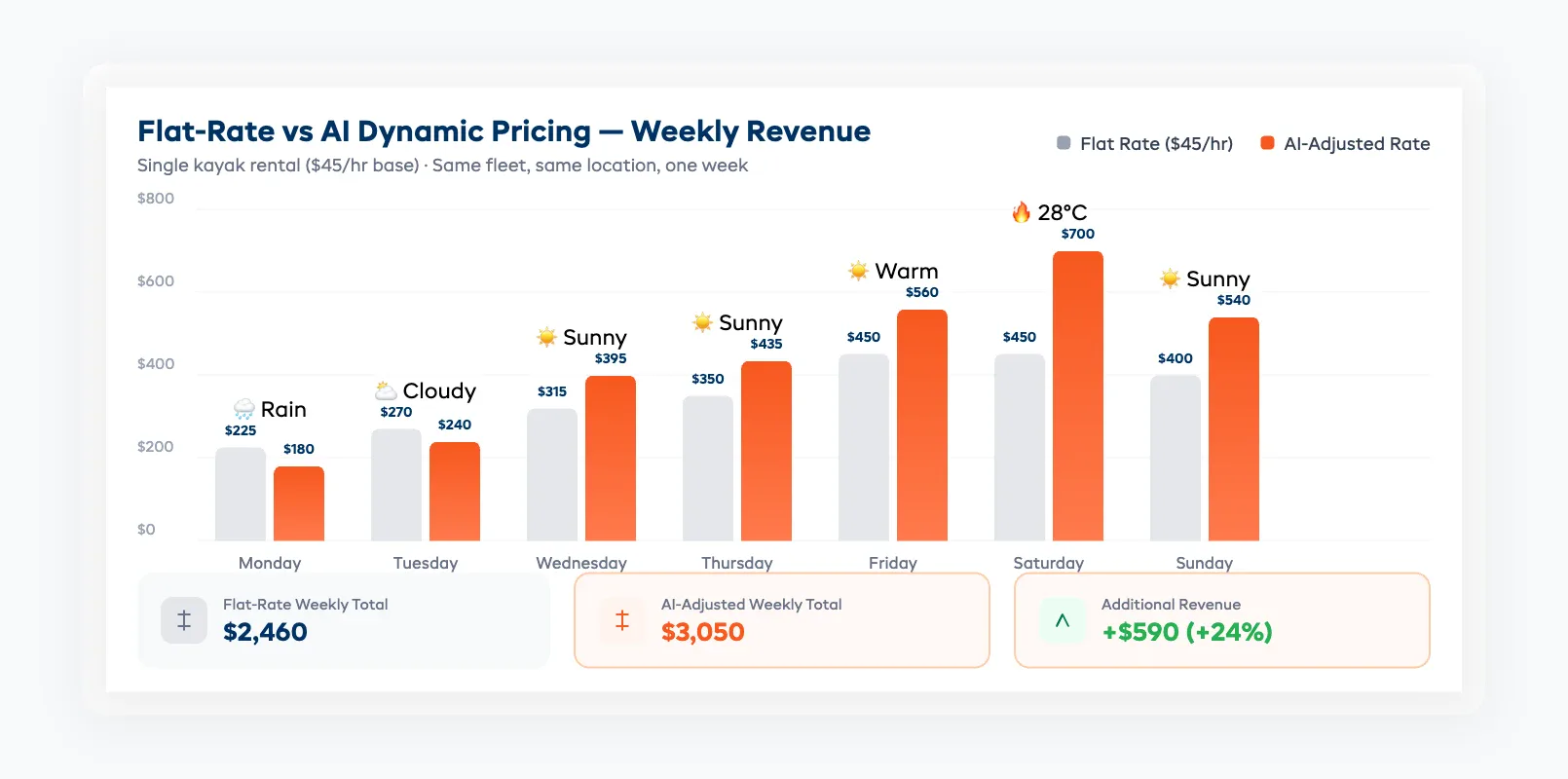
For a deeper dive into weather-based adjustments, competitor monitoring, and setting guardrails, see our AI Dynamic Pricing for Equipment Rental guide.
Predictive Maintenance: Fix It Before It Breaks
A broken kayak on a Saturday morning costs you more than the repair. It costs you the rental revenue, the scramble to find a replacement, and potentially a bad review from the customer who got downgraded.
Traditional maintenance is calendar-based: service every kayak every 30 days regardless of use. The problem? Your most popular kayak might do 25 rentals in those 30 days while another does 3. One is overdue for maintenance. The other is wasting your tech's time.
Usage-based AI maintenance tracks:
- Rental hours per unit. Kayak #12 has logged 180 hours since last service. Your threshold is 200 hours. It gets flagged for service next Tuesday — before the weekend rush.
- Condition report patterns. If three customers in a row note "seat feels loose" on their return check-in, the system escalates that unit regardless of hours.
- Seasonal wear curves. Wetsuits degrade faster in summer (more UV, more use). AI adjusts maintenance intervals by season instead of using a fixed calendar.
- Failure history. That specific model of paddleboard has a fin box issue at ~300 rental hours across your fleet. AI learns this and flags all boards of that model approaching the threshold.
The payoff is concrete. Operators report 30-45% fewer mid-rental equipment failures after switching to usage-based maintenance. That means fewer refunds, fewer bad reviews, and fewer Saturday morning scrambles.
You don't need sensors for this. If your rental management software tracks check-out/check-in times and condition reports, you have enough data for AI maintenance scheduling. For the full walkthrough — including usage-based vs calendar-based maintenance, setting up alerts, and the cost math — see our Predictive Maintenance for Rental Equipment guide.
Inventory Intelligence: Know What You Need Before You Need It
Running out of paddleboards on the busiest weekend of the year is bad. Having 15 extra mountain bikes sitting idle in January is also bad. Both cost money — one in lost revenue, the other in dead capital and storage.
AI inventory intelligence looks at your historical data and tells you:
What to stock, and when.
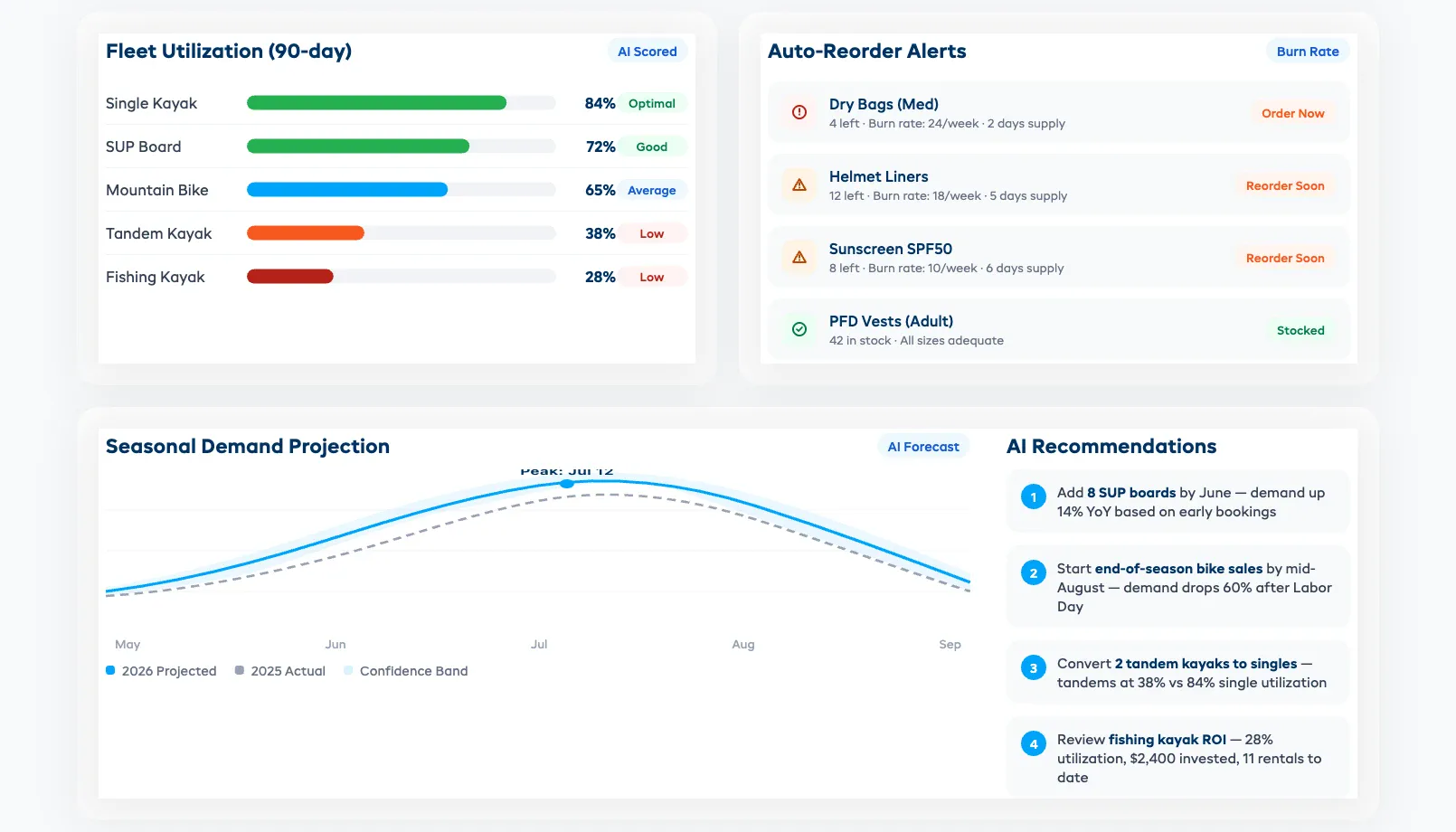
- Your SUP fleet needs 8 more boards by June based on last year's booking curve plus this year's early-season trend (up 14%)
- Mountain bike demand drops 60% after Labor Day — start end-of-season sales by mid-August
- Tandem kayaks are underutilized (38% utilization vs 72% for singles) — consider converting two to singles
Auto-reorder alerts.
When consumables or accessories hit a threshold — sunscreen, dry bags, helmet liners — AI triggers a reorder notification based on burn rate, not just current stock level. If you go through 24 dry bags per week in July but only 6 per week in May, the reorder timing adjusts automatically.
Fleet utilization scoring.
Every piece of equipment gets a utilization percentage. Items below 40% utilization over a rolling 90-day window get flagged. That $2,400 fishing kayak you bought in March? If it's only been rented 11 times by June, the system tells you — so you can adjust pricing, marketing, or cut your losses.
Cross-category patterns. If you rent multiple equipment types, AI spots connections you'd miss. Windy days kill paddleboard bookings but boost kayak demand (lower center of gravity, more stable). AI shifts your promotional spend and pricing automatically based on conditions — pushing kayaks when wind picks up, highlighting SUPs when it's calm.
For a deep dive into inventory tracking methods — manual vs software — see our rental inventory management guide.
Customer Communication on Autopilot
The average rental shop sends booking confirmations and maybe a return reminder. Everything else — follow-ups, review requests, rebooking nudges, weather updates — gets skipped because nobody has time.
AI handles the full communication lifecycle without sounding like a robot:
Pre-arrival (24-48 hours before rental):
- Weather-aware preparation email: "Sunny and 26°C tomorrow. Sunscreen, water shoes, and a hat recommended. Your 2-hour SUP rental starts at 10 AM at Dock B."
- Waiver reminder if unsigned
- Parking and check-in instructions
During rental:
- Weather alerts if conditions change (high wind warning)
- Extension offers if availability exists: "Having fun? We have your boards available until 4 PM — reply YES to extend by 2 hours at $35."
Post-rental (1-24 hours after return):
- Thank-you message with photos (if you capture them)
- Review request with direct link
- Damage deposit release confirmation
Re-engagement (7-30 days later):
- Rebooking offer based on their rental type and local conditions
- Seasonal promos tied to their past activity
- Birthday or anniversary rental credits
The key rule: One AI mention per touchpoint is the maximum. These messages should feel like they're coming from your shop — not from a computer. The best AI communication is invisible.
Operators running automated communication sequences see 25-40% higher review rates and 15-20% repeat booking increases within the first season.
Demand Forecasting for Seasonal Businesses
Seasonal rental businesses make 60-80% of annual revenue in 3-4 months. Getting staffing, inventory, and pricing wrong for those months means you either leave money on the table or burn cash on excess capacity.
AI demand forecasting combines:
- Your historical booking data — same week last year, same weather conditions, same local events
- Forward-looking signals — weather forecasts (10-14 day), hotel occupancy rates in your area, flight bookings to nearby airports, event calendars
- Trend data — is paddleboarding up 20% YoY in your market? Is bike rental flattening?
What you get:
Weekly demand projections, 4-6 weeks out. Not exact numbers — ranges. "Week of July 12: expect 85-110 kayak bookings (vs 78 same week last year)." That's enough to make real decisions.
Staffing recommendations. If projected demand is 40% above your current staff capacity, you see the gap three weeks before it hits. Enough time to schedule part-timers or adjust hours.
Inventory pre-positioning. Multi-location operators can shift gear between locations based on projected demand. Your lakeside location shows 90% projected utilization while your downtown shop shows 55%? Move 6 boards across before the weekend.
Event spike alerts. A 10K run is happening in your town on June 8. Last time there was a major event on a Saturday, your bike rentals spiked 35%. AI flags this two weeks out so you can adjust pricing and staffing.
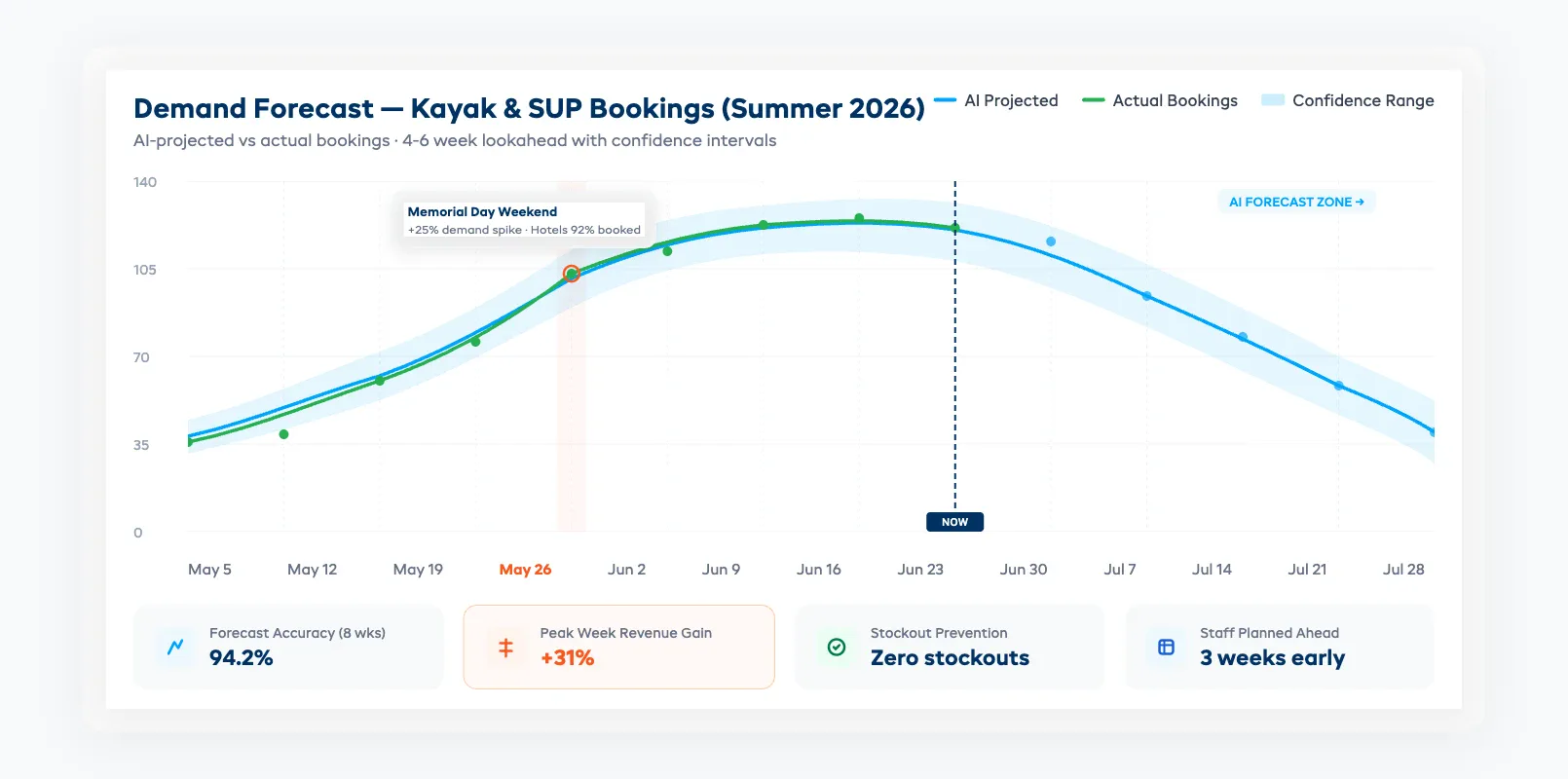
Real example: A lake-based kayak and SUP rental operator in the Southeast U.S. used demand forecasting for their third season. The system projected a 25% demand spike for the Memorial Day weekend based on hotel occupancy data and weather forecasts. They pre-positioned extra inventory from their secondary location, scheduled two additional part-time staff, and bumped pricing 12%. Result: 31% more revenue that weekend compared to the prior year, with zero stockouts and no overtime scramble.
The honest limitation: Forecasting is probabilistic, not guaranteed. AI gets better with more data — a shop with 3 seasons of booking history gets significantly better forecasts than one in its first year. If you're new, start with simple weather-based pricing rules and build toward full forecasting as your data grows.
Where forecasting doesn't help: Sudden weather changes (tomorrow's thunderstorm that wasn't in the 10-day forecast), one-off local emergencies, or regulatory changes. AI can't predict black swan events. What it can do is help you recover faster — by adjusting pricing and sending rebooking offers to affected customers automatically.
Getting Started: AI Implementation Without the Headache
You don't need to implement everything at once. The operators who succeed with AI start small and expand based on results.
Start here (Week 1-2):
-
Automated booking confirmations and reminders. This is the lowest-risk, highest-impact starting point. No pricing changes, no inventory decisions — just messages that go out automatically instead of manually. Most rental platforms include this. If yours doesn't, that's a sign to switch.
-
Basic weather-aware pricing rules. Set simple rules: sunny forecast + weekend = rates increase 10%. Rain forecast = drop 5% and add a promo code for rain gear add-ons. You can do this with two rules and see results immediately.
Add next (Month 1-2):
-
Usage-based maintenance tracking. Start logging rental hours per unit if you aren't already. Set hour-based service thresholds instead of calendar dates. Even without AI, this alone reduces equipment failures.
-
Post-rental review automation. Set up an automated review request 12-24 hours after every return. Include a direct link to your Google Business listing. This single automation can double your review volume.
Scale up (Month 3-6):
-
Full dynamic pricing. Once you have 1-2 months of data with your new system, enable dynamic pricing with conservative guardrails (±15% from base rate). Widen the range as you gain confidence.
-
Demand forecasting and inventory optimization. This requires the most data and delivers the most value once it's working. Give it at least one full season of data before trusting the projections for staffing decisions.
Common mistakes to avoid:
- Don't automate what you haven't standardized. If your maintenance process is chaos, AI maintenance scheduling will be organized chaos. Clean up your workflows first, then automate.
- Don't set it and forget it. AI pricing rules need review every 2-4 weeks, especially in your first season. Check the adjustments it's making. Are peak rates too aggressive? Are off-peak discounts attracting the wrong crowd?
- Don't try to implement everything during peak season. Start in your shoulder season when stakes are lower and you have time to troubleshoot.
What to look for in an AI-powered rental platform:
- Dynamic pricing with operator-set guardrails (floor/ceiling rates)
- Usage-based maintenance alerts (not just calendar reminders)
- Automated communication sequences (booking → arrival → post-rental → re-engagement)
- Demand forecasting with at least weekly granularity
- Inventory utilization reporting at the individual unit level
- Integration with your existing payment processor and booking widget
For a full breakdown of rental software features and how they compare, see our equipment rental software guide.
For a quick-reference roundup of all the ways operators are putting AI to work, see our 8 AI equipment rental use cases overview.
FAQ
How much does AI rental software cost compared to traditional booking systems?
Most AI-powered rental platforms run $29-$149/month depending on fleet size and features. That's comparable to traditional booking software. The difference is what you get for that price — dynamic pricing, maintenance alerts, and automated communication are included, not add-ons. The ROI usually covers the cost within the first month through better pricing alone.
Do I need technical skills to use AI for my rental business?
No. Modern AI rental tools are designed for operators, not developers. You set rules in plain language ("increase rates 10% when forecast is sunny and it's a weekend"), and the system handles the rest. If you can use a smartphone, you can use AI rental software.
How long before I see results from AI pricing?
Most operators see measurable revenue increases within 2-4 weeks of enabling dynamic pricing. The first wins come from peak-day pricing — days where you were previously charging flat rates while demand outstripped supply. Full optimization takes 2-3 months as the system learns your specific demand patterns.
Will AI replace my staff?
No. AI handles repetitive tasks — confirmations, pricing adjustments, maintenance scheduling, review requests. Your staff still handles everything that requires judgment, customer interaction, equipment fitting, safety briefings, and relationship building. Most operators report that AI frees up 10-15 hours per week of staff time, which gets redirected to customer-facing work.
What data does AI need to work effectively?
At minimum: booking history (dates, equipment, pricing), equipment inventory with unique IDs, and customer contact information. The more data you have, the better the predictions. Weather integration and event calendar connections improve forecasting further. A shop with one full season of digital booking data has enough to start seeing meaningful AI results.
Can AI handle multiple equipment types (bikes, kayaks, SUPs, etc.)?
Yes. AI systems work across equipment categories. In fact, they're better at managing mixed fleets because they can identify cross-category patterns — like customers who rent kayaks on windy days switching to bikes, which lets you adjust inventory and pricing across categories simultaneously.
Is AI worth it for a small rental shop with fewer than 50 units?
Absolutely. Small shops benefit the most from AI on a per-unit basis because the operator is usually doing everything — pricing, maintenance tracking, communication, and customer service — themselves. Automating even two of those tasks saves 8-12 hours per week. At $29/month, that's less than $1/day per hour saved.
AI isn't a magic upgrade that fixes a broken operation. But for rental shops already running well, it's the difference between working in the business and working on it. Start with one automation. See the results. Then decide what's next.
in one place