Ticket scanning

Scan the QR ticket and the guest is checked in

Every booking comes with a QR ticket. Scan it with the EquipDash app and the guest list updates for everyone.

No credit card. 21-day free trial.

A staff member scanning a guest's QR ticket on a phone

One scan checks in the whole booking, or one guest when each guest has a ticket.

A ticket with every booking

The QR code is in the confirmation email.

Scan with your phone

In the EquipDash mobile app.

Runs 300+ operations

Ask Dash AI who hasn’t arrived yet.

21 days free

No card to start. Cancel anytime.

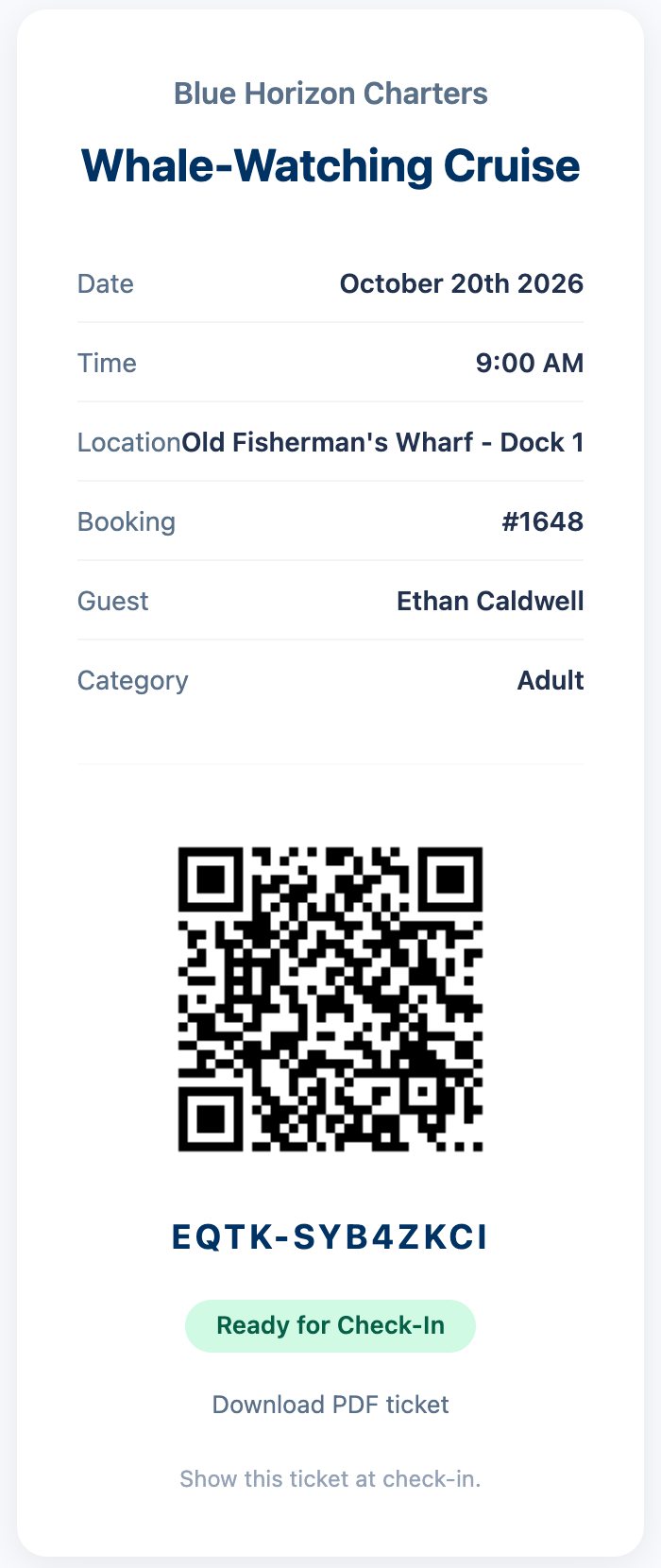
A real QR ticket page from Blue Horizon Charters: Whale-Watching Cruise, October 20th at 9:00 AM, Old Fisherman's Wharf Dock 1, guest Ethan Caldwell, Ready for Check-In

A QR ticket with every booking

Each experience booking gets its own QR ticket, sent with the confirmation email. Guests show it on their phone, so nothing needs printing.

  • One ticket per guest once you add each guest's name
  • Guests can also download it as a PDF
  • Opens on any phone, with no app to install
Start your 21-day free trial

Scan to check in from your phone or the desk

Scan with the EquipDash mobile app, or with a scanner at the desk. The guest list updates for guides and front desk at once.

  • Scanned twice? You see when it was first checked in
  • No waiver yet? Check-in waits until it's signed
  • Scan again after the trip to mark the guest back
Start your 21-day free trial
A QR ticket is scanned, the guest is checked in and the departure count goes from 7 to 8 of 12

See who has arrived and who is still expected

Every session shows its check-in progress as guests are scanned, so no-shows are easy to spot when it starts.

A Ridgeline Adventures session in EquipDash: 12 seats, 10 booked, 10 to check in, 2 left, with Check all in, Export CSV, Print and a Scan ticket barcode or enter code box

No-shows can be marked, and a Dash Bot can follow up with them.Ask Dash AI who hasn't checked in yet.

Let guests check themselves in

Turn on self check-in and guests check in from their own ticket, inside the time window you set.

  • They sign the waiver first if it's missing
  • Print a Scan to check in poster for the meeting point
  • Any gear checklist stays for the guide to finish
Start your 21-day free trial

EXPLORE MORE FEATURES

All-in-one solution that runs your entire business

The ultimate all-in-one solution that runs your entire business from one dashboard.

  • Bookings
  • Customer Experience
  • Resource Management
  • Operations
  • Dash AI & Bots
  • Scheduling & Logistics
  • Integrations

AI-powered bookings, made easy

Online booking, POS, and automated workflows keep customers booking and you stress-free.

AI-powered customer experience

Build lasting relationships with CRM, digital waivers, loyalty programs, gift cards, and automated campaigns — all from one dashboard.

AI-powered control over every resource

Track inventory across locations, coordinate guides, manage product and experience catalogs, and plan for seasonal demand — all in real time.

Run every operation with AI

Manage your team, maintain equipment, track performance with real-time reports, and connect your favorite tools through integrations.

AI that runs your operations

Dash AI is your always-on operator — ask it to handle bookings, pull reports, or check inventory. Dash Bots work autonomously, running follow-ups, alerts, and daily summaries 24/7.

AI-powered planning and logistics

Build guest lists, generate trip manifests, and roster staff across locations — so you are always prepared, even during your busiest weeks.

Connect the dots with the tools you love

Stop wrestling with disconnected systems—EquipDash brings it all together.

GetYourGuide

GetYourGuide

Stripe

Stripe

HubSpot

HubSpot

QuickBooks

QuickBooks

Xero

Xero

Viator

Viator

Tripadvisor

Tripadvisor

Shopify

Shopify

Google Calendar

Google Calendar

Google Drive

Google Drive

Zapier

Zapier

WordPress

WordPress

FREQUENTLY ASKED QUESTIONS

Ticket scanning questions

Tickets, scanning and check-in. Contact us if yours isn't here.

Contact Us

How are tickets created?

A QR ticket is created when an experience booking is confirmed. It is in the confirmation email, and guests can also download it as a PDF.

What do I scan tickets with?

Can guests show tickets on their phone?

What happens if a ticket is scanned twice?

Does it work with group bookings?

Can guests check themselves in?

Can I see who checked in after the session?

Can Dash AI help with check-ins?

Check in every guest with one scan

Start your free 21-day trial and send QR tickets with your next booking.