All-in-One Tour Operator Software: Is It Worth It?

You're running bookings in one app, waivers in another, payments through a third, and guide scheduling on a whiteboard. Every morning starts with the same question: did anything fall through the cracks overnight?
If that sounds familiar, you've probably looked at all-in-one tour operator software and wondered whether one platform can actually replace four or five. The short answer is yes, but only if you pick the right one. The wrong one trades five problems for one bigger problem.
This guide breaks down when consolidation makes sense, what trade-offs to watch for, and how to evaluate an all-in-one platform without getting burned. For the full category overview, start with our Tour Operator Software: The Complete Guide. If you run time-slot activities rather than full-day tours, see our Activity Booking Software guide for the features that matter most.
In this guide:
- The Problem With 5 Tools That Don't Talk to Each Other
- What "All-in-One" Should Actually Mean
- The Trade-Off: Depth vs Breadth
- How to Evaluate an All-in-One Platform
- When to Consolidate vs When to Keep Separate
- FAQ
The Problem With 5 Tools That Don't Talk to Each Other
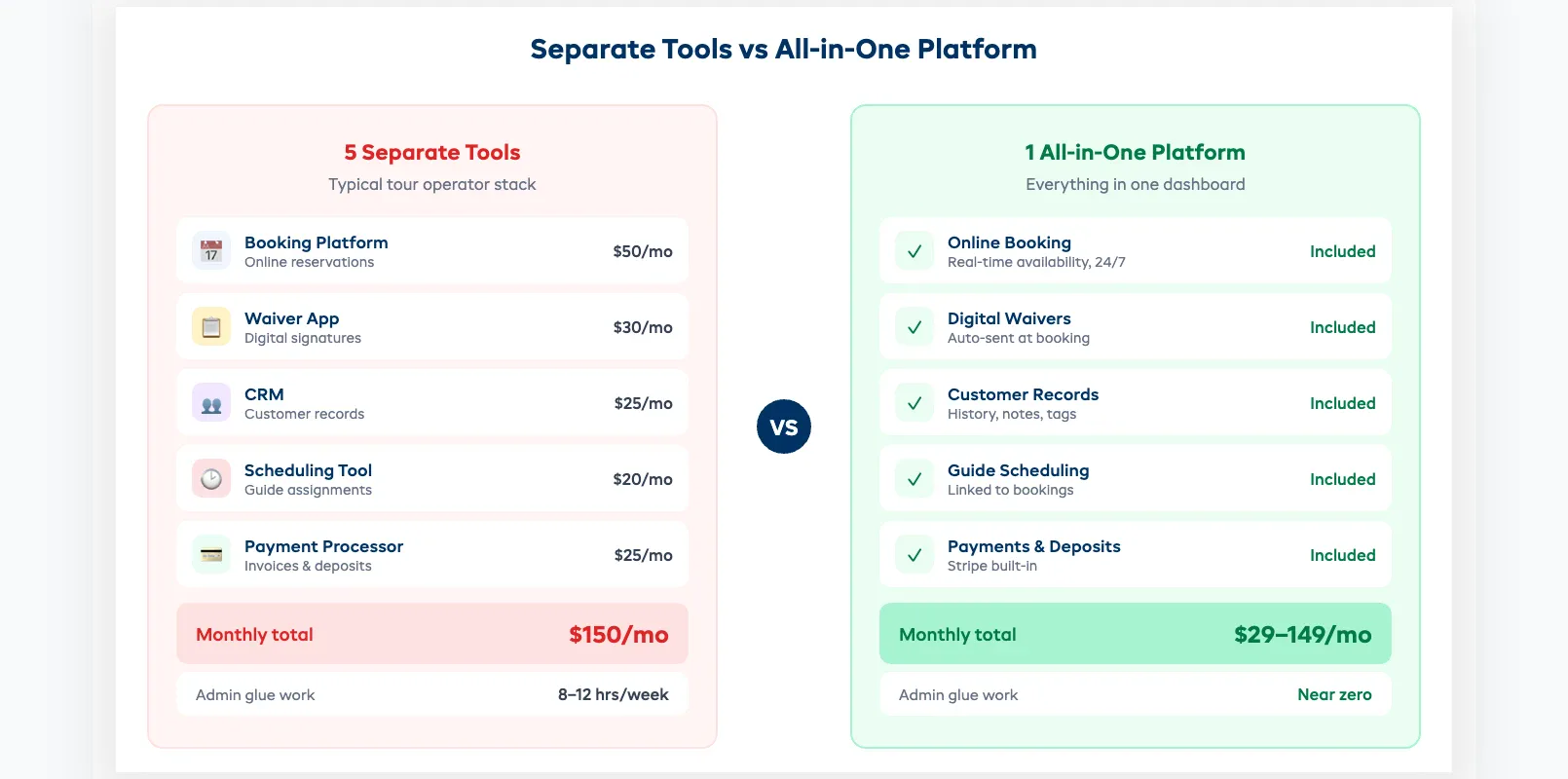
Most tour operators don't set out to build a Frankenstein tech stack. It happens gradually. You start with a free booking calendar. Then you add a waiver app. Then a payment processor. Then a CRM for repeat customers. Then a scheduling tool for guides.
Before long, you're paying for five subscriptions and spending an hour a day copying data between them. A guest books a sunset kayak tour through your booking widget. You manually create their waiver link. You text the guide separately. You log the payment in a spreadsheet. One missed step and things unravel.
The real cost isn't the subscriptions. It's the gaps between them. Common failures:
- Double bookings because your calendar doesn't sync with your booking widget in real time
- Waivers not collected because the booking tool doesn't trigger them automatically
- Guide no-shows because the scheduling app isn't connected to bookings
- Lost revenue data because payments live in Stripe, bookings live in Calendly, and your actual business picture lives nowhere
One operator we spoke with estimated she spent 12 hours a week on "glue work" — tasks that exist only because her tools don't talk to each other. That's a full day and a half every week that could be spent running tours or marketing.
What "All-in-One" Should Actually Mean
The phrase "all-in-one" gets thrown around loosely. Some platforms call themselves all-in-one because they offer booking plus payments. That's a low bar.
For a tour operator, a genuinely all-in-one platform should cover:
- Online booking with real-time availability: guests see open slots and book instantly, 24/7
- Automated waivers: sent at booking, signed before arrival, stored permanently
- Guide and staff scheduling: tied directly to bookings, not managed separately
- Payment processing: deposits, full payments, refunds, all in one ledger
- Customer records: booking history, contact details, notes, all searchable
- Automated communications: confirmations, reminders, follow-ups without manual effort
If the platform you're evaluating doesn't cover at least five of those six, it's not all-in-one. It's "most-in-one," and you'll still need a separate tool to plug the gap. For a ranked list of platforms that actually deliver, see Best Software for Tour Operators.
The Trade-Off: Depth vs Breadth
Here's the honest concern: does an all-in-one platform do everything at 60% quality instead of one thing at 100%?
Sometimes, yes. Generic "do everything" platforms often have a booking engine built by people who've never run a tour. The waivers module feels bolted on. The scheduling feature is an afterthought.
But platforms built specifically for tour and activity operators are different. They're designed around your workflow: booking triggers waiver, waiver triggers confirmation, confirmation includes guide details. Each feature exists because operators asked for it, not because a product team checked a box. If you run time-slot activities rather than full tours, our activity booking software guide breaks down the specific features that matter.
The key distinction: horizontal all-in-one (tries to serve every industry) vs vertical all-in-one (built for your industry). A vertical platform gives you depth and breadth because the features are purpose-built for how you actually operate.
What you're really trading off:
| Factor | Best-of-breed (separate tools) | Vertical all-in-one |
|---|---|---|
| Feature depth per function | Potentially higher | Built for your workflow |
| Data sync | Manual or via Zapier | Native — automatic |
| Monthly cost | $150–300+ across 4-5 tools | $29–149 for one platform |
| Admin time | 8–12 hrs/week glue work | Near zero |
| Single point of failure | Low (but more failure points) | Higher (mitigated by uptime SLAs) |
For most operators running 10–50 tours a week, the vertical all-in-one wins on total cost of ownership, not just subscription price, but time saved.
How to Evaluate an All-in-One Platform
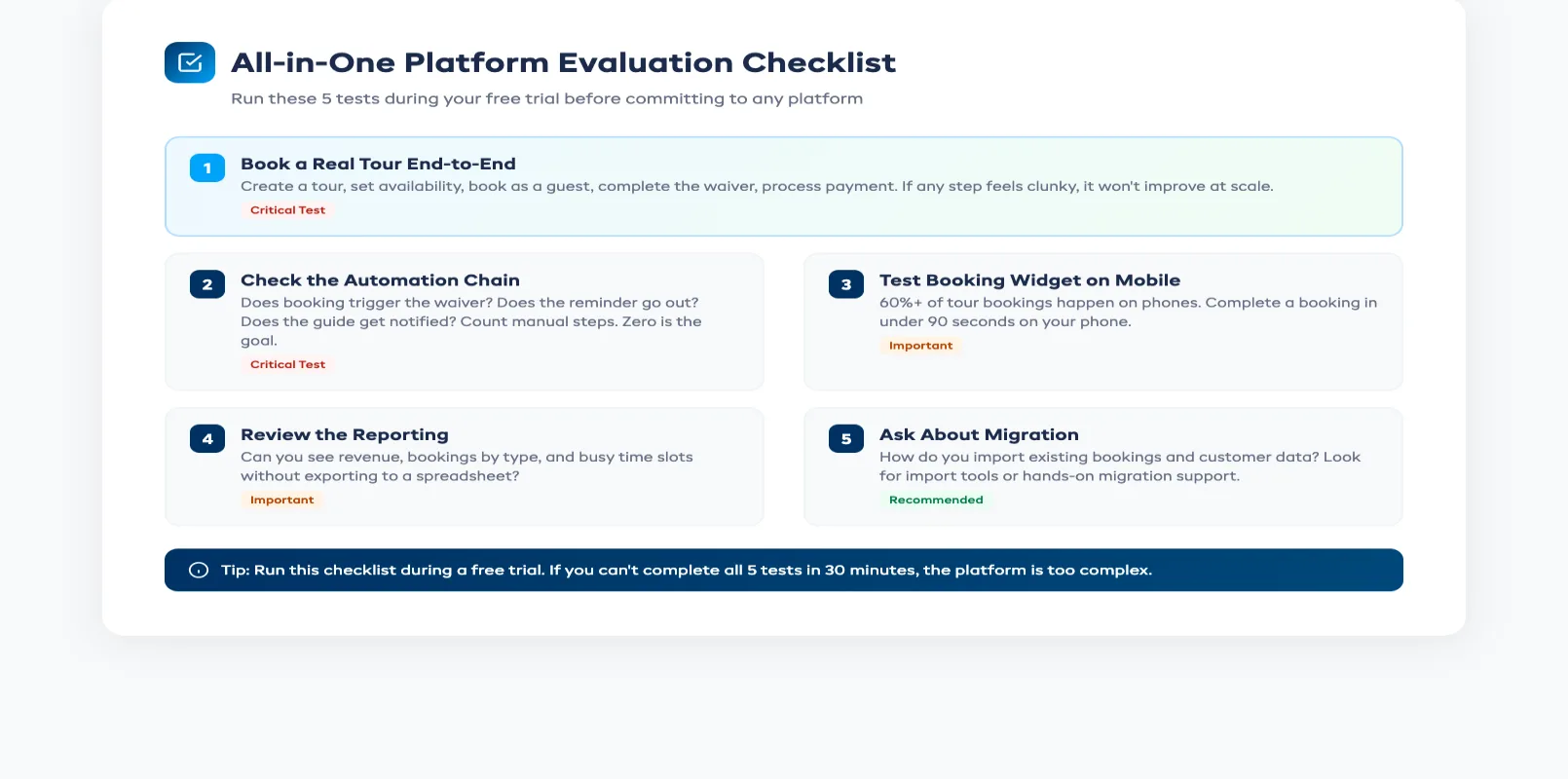
Before you commit, run this checklist during your trial:
1. Book a real tour end-to-end. Create a tour, set availability, book as a guest, complete the waiver, process the payment. If any step feels clunky or requires a workaround, it won't improve at scale.
2. Check the automation chain. Does booking automatically trigger the waiver? Does the reminder go out without you pressing a button? Does the guide get notified? Count the manual steps. Zero is the goal.
3. Test the booking widget on mobile. Over 60% of tour bookings happen on phones. Open your booking page on a phone and try to complete a booking in under 90 seconds. If you can't, your guests won't either.
4. Look at the reporting. Can you see today's revenue, this week's bookings by tour type, and your busiest time slots, all without exporting to a spreadsheet? If reporting requires CSV exports and Excel formulas, it's not all-in-one where it counts.
5. Ask about migration. How do you get your existing bookings, customer list, and tour data into the new platform? The best platforms offer import tools or hands-on migration support. If the answer is "re-enter everything manually," factor that time into your decision.
If you're a smaller operation evaluating your first platform, our guide to tour operator software for small business covers what to prioritize on a tight budget.
When to Consolidate vs When to Keep Separate
Consolidation isn't always the answer. Here's a simple framework:
Consolidate when:
- You're spending more than 5 hours a week on admin that exists because tools don't sync
- You've had double bookings or missed waivers in the past 3 months
- You're paying for 3+ separate tools that overlap in functionality
- You're growing and need a system that scales without adding more tools
Keep separate when:
- You have one tool that's genuinely best-in-class for a critical function and nothing else comes close
- Your current stack is working smoothly and your admin overhead is low
- You're mid-peak-season and migration risk outweighs the benefit (wait for the off-season)
For most operators, the tipping point is clear: once you're running more than 10 tours a week across multiple tour types, the glue work between separate tools starts eating into revenue-generating time. That's when consolidation pays for itself, usually within the first month.
FAQ
Can one platform really replace 4-5 separate tools? Yes. If it's built for tour operators specifically. Vertical platforms designed for your industry cover booking, waivers, payments, scheduling, and CRM natively. Generic tools that serve every industry usually have gaps.
What's the risk of putting everything in one system? The main risk is vendor lock-in and single point of failure. Mitigate this by choosing a platform with data export capabilities, an uptime SLA above 99.5%, and no long-term contracts. Most modern platforms let you export your customer and booking data at any time.
Will I lose features I currently rely on? Run a feature audit before switching. List every feature you use daily across all current tools. During your trial, verify each one exists in the new platform. Most operators find they use about 30% of their current tools' features, and the all-in-one covers that 30% plus automation they didn't have before.
How long does migration take? For a typical small operation (under 20 tours a week), expect 1–3 days of setup and data import. Most platforms offer guided onboarding. The best time to switch is during your off-season or a slow week when booking volume is low.
Is all-in-one software more expensive than separate tools? Usually less. A typical stack of booking tool ($50/mo) + waiver app ($30/mo) + CRM ($25/mo) + scheduling tool ($20/mo) + payment processing fees runs $125–200/mo. A purpose-built all-in-one platform starts at $29/mo with everything included.
What if I only run a few tours a week? All-in-one still makes sense — arguably more so, because you don't have time to waste on glue work between tools. A smaller operation benefits from automation even more than a large one, because every hour of admin is a bigger percentage of your work week.
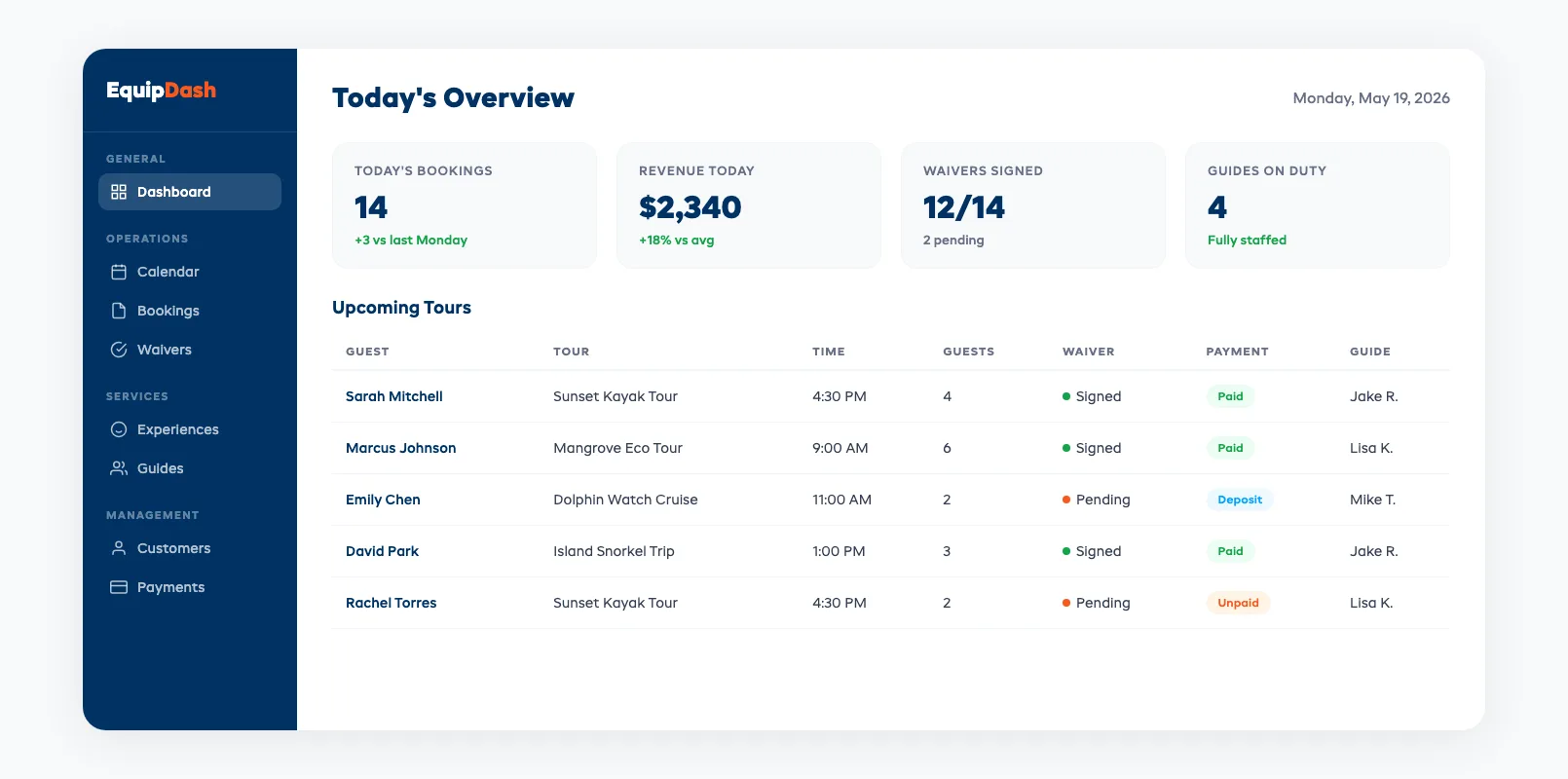
The operators who consolidate don't just save money on subscriptions. They get hours back every week, catch fewer things slipping through cracks, and spend more time doing the work that actually matters — running great tours. If you're juggling more tools than you can count, it might be time to stop managing your tech stack and start managing your business.
in one place