AI Chatbot for Rental Business: Handle Inquiries 24/7 Without Hiring
Your phone rings at 9:14pm on a Wednesday. Someone wants to know if you have three mountain bikes free this Saturday. You don't answer -- you're watching TV with your kids. By morning, they've booked with the shop down the road.
This happens more than you think. Industry data shows 40-60% of booking inquiries arrive outside business hours. Every unanswered message is a potential booking walking out the door.
An AI chatbot doesn't replace you. It answers the questions you'd answer if you were standing at the counter -- availability, pricing, hours, policies -- while you're sleeping, eating dinner, or helping the customer who's actually in front of you.
This guide covers what a rental chatbot realistically handles, where it falls short, and what it takes to set one up. For the broader picture of AI in rental operations, see our AI for Equipment Rental Business guide.
In this guide:
- What a Rental Chatbot Actually Handles
- Availability Checks and Booking Queries
- Pricing Questions and Package Recommendations
- After-Hours Coverage
- Setup: What It Takes to Get Running
- What Stays Human (and Should)
- FAQ
What a Rental Chatbot Actually Handles
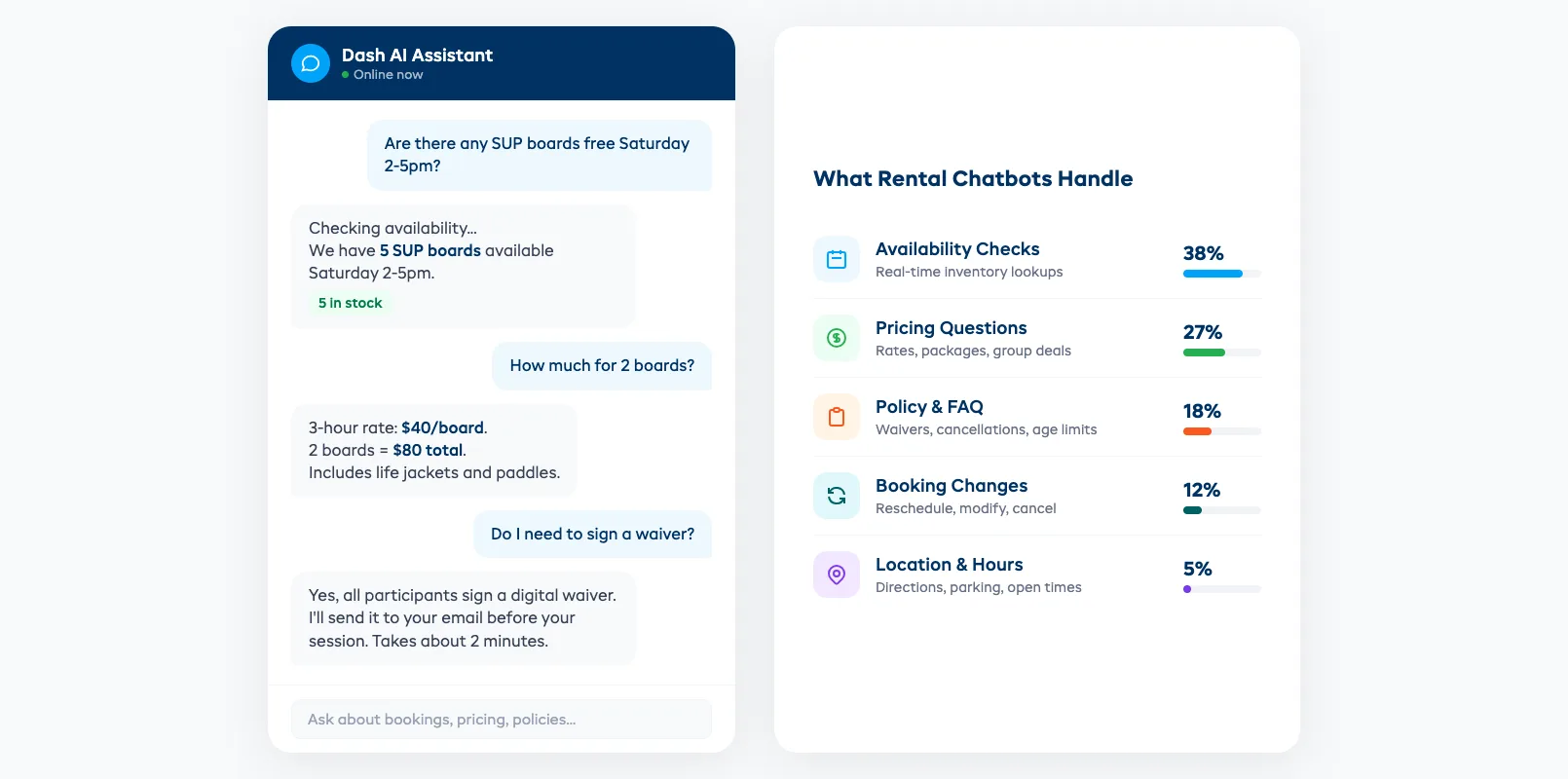
Forget the sci-fi version. A rental chatbot in 2026 isn't having philosophical conversations with your customers. It's answering the same 8-10 questions your staff answers 50 times a day.
The repetitive stuff that eats your hours:
- "Do you have a SUP board available Saturday afternoon?"
- "How much is a half-day kayak rental?"
- "What's your cancellation policy?"
- "Do you offer group discounts?"
- "Where are you located? What are your hours?"
- "Can I modify my booking from Sunday to Monday?"
- "Do kids need helmets?" / "What's the minimum age?"
- "Is there parking at your location?"
These aren't complex conversations. They're lookups. The chatbot checks your live inventory, pulls your pricing table, reads your policy page, and gives a straight answer. No hold music. No "let me check and call you back."
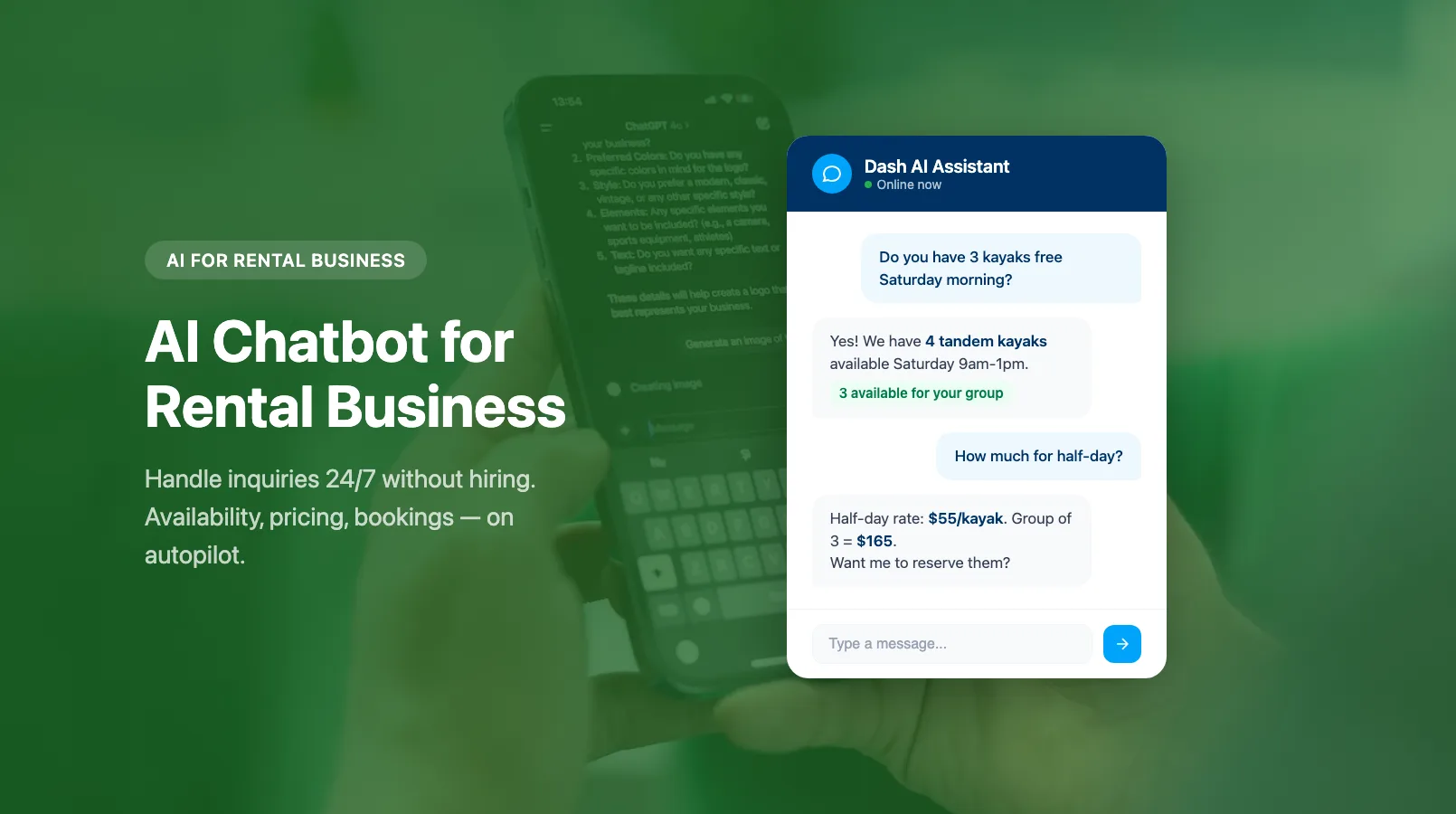
The difference between a useful chatbot and an annoying one comes down to one thing: does it have access to your real data? A chatbot that says "please call us for availability" is worthless. One that says "Yes, we have 3 SUP boards available Saturday 1-5pm at $45/hour" is doing the job.
Availability Checks and Booking Queries
Availability questions are the single biggest category of customer inquiries for rental shops. They're also the most time-sensitive -- if a customer can't get an answer in minutes, they move on.
What a connected chatbot can do:
- Real-time availability. The chatbot queries your booking system directly. Not cached data from yesterday. Live inventory, right now. "We have 4 mountain bikes available Saturday 9am-1pm."
- Multi-item checks. Customer needs 3 kayaks, 2 life jackets, and a dry bag for the same time slot? The chatbot checks all three against your calendar in one response.
- Booking modifications. "Can I change my reservation from 2pm to 10am?" The chatbot checks if the earlier slot is open, confirms the price is the same, and makes the switch. No phone call needed.
- Waitlist additions. If the requested time is full, the chatbot offers to add them to a waitlist. "Saturday afternoon is fully booked, but I can notify you if a spot opens up. Want me to add you?"
The key is integration. A chatbot that's bolted onto your website but can't see your booking calendar is just a fancy FAQ page. The real value comes when it reads and writes to the same system your front desk uses.
If you're using AI inventory management, the chatbot inherits that accuracy -- it knows not just what's booked, but what's actually available after accounting for maintenance holds and cleaning windows.
Pricing Questions and Package Recommendations
"How much?" is the second most common question after "Is it available?" Customers want numbers before they commit.
A chatbot handles this well because pricing is structured data:
- Standard rates. "Mountain bike rental is $35/hour, $65/half-day, or $95/full-day."
- Package suggestions. "For a 4-hour ride, the half-day rate ($65) saves you $75 compared to hourly." Customers don't always know your best deal. The chatbot can point them to it.
- Group pricing. "Groups of 5+ get 15% off. Your group of 6 would be $332 instead of $390."
- Seasonal rates. If you run dynamic pricing, the chatbot quotes the current rate automatically. No stale prices on a PDF somewhere.
- Add-on recommendations. Customer asks about a kayak? The chatbot suggests a dry bag, waterproof phone case, or guided tour add-on. Not pushy upselling -- relevant suggestions based on what other customers typically add.
Where pricing gets tricky: Custom quotes for large events, corporate bookings, or multi-day rentals with special requirements. These should route to a human. The chatbot's job is to handle the 85% of pricing questions that have a clear answer, and flag the 15% that don't.
After-Hours Coverage
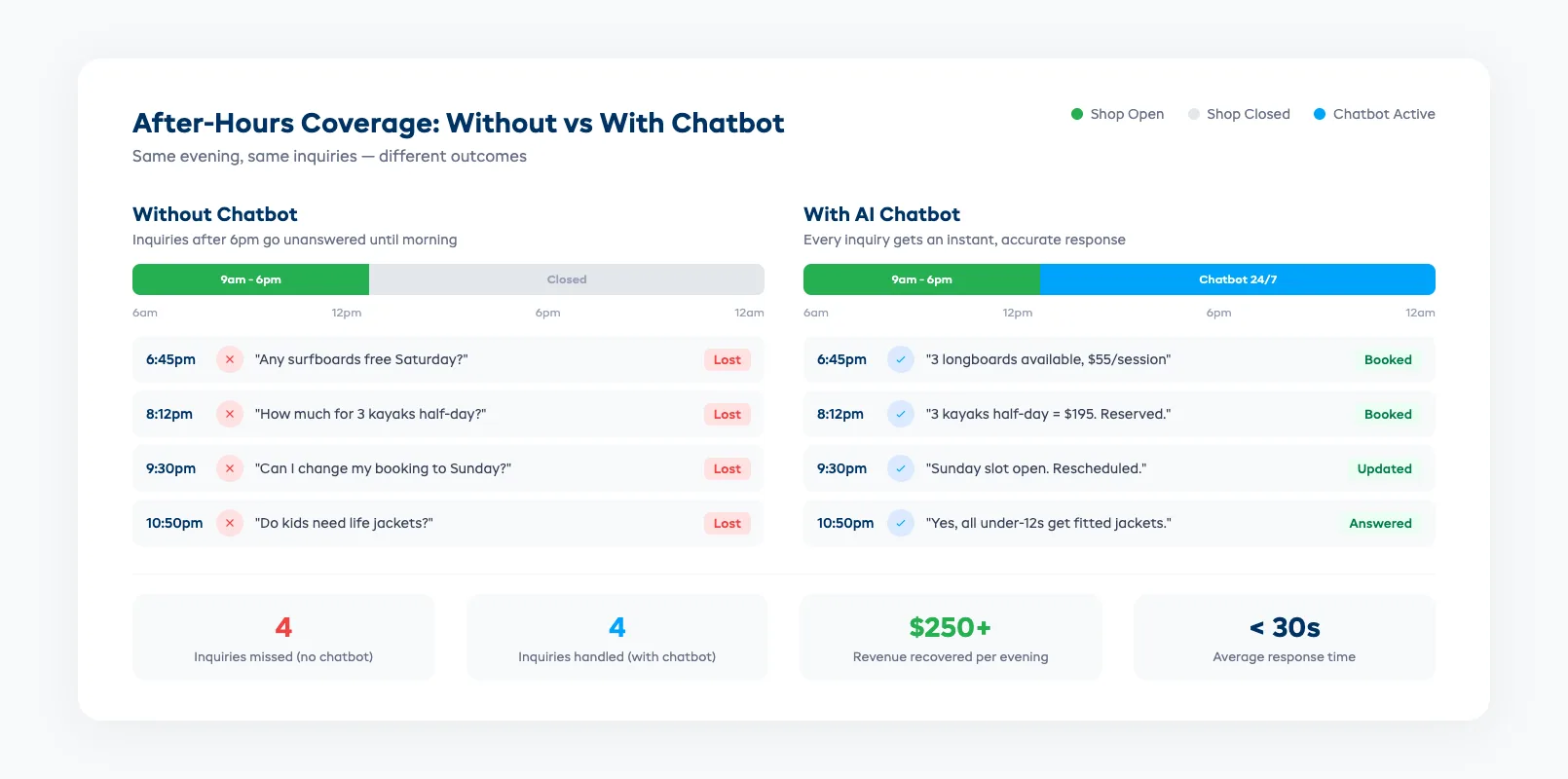
This is where chatbots earn their keep. Your shop closes at 6pm. Your customers browse rental options at 9pm from their couch.
The after-hours gap in numbers:
Most rental shops see 35-50% of their website traffic between 6pm and 9am. Without a chatbot, every one of those visitors who has a question either bounces or sends an email you'll answer tomorrow. By then, they've found another option.
A chatbot turns after-hours browsers into confirmed bookings. It answers their question, shows availability, and if your booking system supports it, completes the reservation right there at 10pm on a Tuesday.
What after-hours coverage looks like in practice:
- Customer lands on your site at 8:30pm, asks if you have surfboards for Saturday
- Chatbot confirms 3 longboards available, quotes $55/2-hour session
- Customer asks about wetsuit rentals as an add-on
- Chatbot adds $15 wetsuit to the quote, total $70
- Customer books and pays -- all without a human involved
For shops that operate in areas with international tourists, the time zone benefit multiplies. Someone in Tokyo planning a holiday trip to your coastal town is browsing at 2am your time. The chatbot doesn't care.
Pairing this with AI demand forecasting means the system can anticipate busy periods and proactively surface popular time slots or suggest alternatives when peak hours are nearly full.
Setup: What It Takes to Get Running
Setting up a rental chatbot isn't a six-month IT project. But it's not flipping a switch either.
The three things you need:
-
A booking system with API access. Your chatbot needs to read your inventory and availability in real time. If your booking system is a spreadsheet or a closed platform with no integrations, you'll need to solve that first. Dash AI connects directly to your booking calendar, inventory, and pricing -- no middleware needed.
-
Your business knowledge, documented. The chatbot needs to know your policies, your FAQ answers, your location details, your operating hours, and your pricing structure. Most of this already exists on your website. You're just feeding it into the chatbot's knowledge base.
-
Escalation rules. Define what gets handed to a human. Damage claims, complaints, large group quotes, anything involving refunds over a threshold. The chatbot should know its limits and hand off cleanly -- with the full conversation context, so the customer doesn't have to repeat themselves.
Realistic timeline:
- Day 1-2: Connect to your booking system, import pricing and policies
- Day 3-5: Test with your team, refine answers, adjust tone
- Week 2: Soft launch on your website with a human monitoring responses
- Week 3+: Full deployment, review weekly for gaps
Cost reality: Most AI chatbot solutions for small businesses run $30-$100/month. Compare that to a part-time staff member answering the same questions. Even one extra booking per week from after-hours coverage pays for the tool.
What Stays Human (and Should)
A chatbot that tries to handle everything will annoy your customers. The best chatbots know when to step aside.
Keep these human:
- Damage disputes. A customer claims they returned the bike undamaged. Your team found a bent derailleur. This needs empathy, judgment, and sometimes negotiation. Not a script.
- Safety concerns. "Is this kayak trip safe for my 6-year-old who can't swim?" requires a real assessment. Liability questions need a human who understands your specific conditions. If predictive maintenance flags a piece of equipment as needing inspection, a human should decide whether to pull it from the fleet.
- Complex custom requests. Wedding party of 20 wants matching bikes, a guided route, and a picnic setup at the halfway point. This is a consultative sale, not a transactional lookup.
- Emotional situations. Customer's rental was stolen. Customer had a bad experience. Customer is upset about a charge. These need a person who can listen, empathise, and make a judgment call.
- High-value bookings. A corporate team building event for 40 people at $3,000+? Worth a personal touch. The chatbot can qualify the lead and route it to your sales contact.
The handoff matters. When the chatbot escalates, it should pass along the full conversation. Nothing frustrates a customer more than explaining their situation twice. A good chatbot says: "Let me connect you with our team. I've shared our conversation so they'll have the context."
The goal isn't to eliminate human interaction. It's to make sure humans spend their time on conversations that actually need them. A chatbot is one of 8 AI use cases that rental operators are putting to work right now.
FAQ
How much does an AI chatbot cost for a small rental business? Most solutions run $30-$100/month. Some platforms like EquipDash include AI assistant capabilities in their existing subscription, so there's no separate chatbot fee.
Will customers know they're talking to a bot? Yes, and that's fine. Modern chatbots are upfront about being AI. Customers prefer an instant bot answer to waiting until morning for a human reply. Transparency builds trust.
Can a chatbot actually complete bookings, or just answer questions? If your chatbot is connected to your booking system, it can check availability, quote prices, and walk customers through the booking process. Some systems complete the full transaction including payment.
What if the chatbot gives wrong information? This is why integration matters. A chatbot pulling from your live booking system gives accurate availability and pricing. One using static FAQ text can go stale. Review chatbot conversations weekly for the first month to catch gaps.
How long does it take to set up? Most rental-focused chatbot setups take 1-2 weeks from start to full deployment. The bulk of the time is documenting your policies and testing edge cases, not technical configuration.
Does it work on mobile? Yes. Most rental chatbots appear as a widget on your website that works on both desktop and mobile browsers. Some also integrate with WhatsApp, Facebook Messenger, or SMS.
What languages can it handle? Most AI chatbots support 20+ languages automatically. This is particularly valuable for rental shops in tourist areas where customers speak different languages. The chatbot responds in whatever language the customer uses.
An AI chatbot won't replace your front desk. It will handle the 50 availability checks and pricing questions that kept your staff from focusing on the customer standing right in front of them. Start with the repetitive stuff. Let the bot prove itself. Then expand.
For more on how AI fits across your rental operation -- from dynamic pricing to demand forecasting -- see our AI for Equipment Rental Business guide.
in one place