Digital Waivers for Rental Businesses: Complete Guide
Every rental shop owner knows the scene. A family of five walks up to the counter at 9:02 AM. Behind them, six more groups are waiting. You hand over five clipboards, explain what to sign, realize the pen doesn't work, find another pen, watch Dad squint at the fine print, then chase down the teenager who wandered off before signing.
That's 12 minutes burned — per group. Multiply by a Saturday morning rush and you've lost an hour of prime rental time to paperwork that exists for one reason: protecting your business if something goes wrong.
Digital waivers solve this. Customers sign before they show up. Signatures are timestamped, stored automatically, and tied to the booking. No clipboards, no filing cabinets, no "I thought I already signed that."
This guide covers everything you need to switch — legality, minor waivers, pre-arrival workflows, and how to pick the right tool. If you're looking for a broader view of automating your rental operations, our complete automation guide covers the full picture.
Why Paper Waivers Are Costing You
Paper waivers aren't just slow. They're a liability risk dressed up as liability protection.
Here's what goes wrong with paper:
- Lost forms. A filing cabinet full of waivers means nothing if you can't find the right one when you need it. After a year, good luck locating a specific signature from last July.
- Illegible signatures. Rushed handwriting on a clipboard doesn't hold up well in disputes. Courts want clear evidence the signer understood and agreed.
- Slow check-in. Every minute spent on paperwork at the counter is a minute customers aren't on the water, trail, or mountain. Peak-season mornings lose 30-60 minutes to waivers alone.
- No tracking. With paper, you discover missing signatures after the customer is already gone — sometimes days later.
- Storage costs. Depending on your jurisdiction, you may need to retain waivers for 3-7 years. That's a lot of boxes.
The real cost isn't the paper. It's the time your staff spends managing it and the gaps it leaves in your legal protection.
Are Digital Waivers Legally Valid?
Short answer: yes, in almost every jurisdiction that matters for rental businesses.
The U.S. ESIGN Act (2000) and state-level UETA laws give electronic signatures the same legal standing as handwritten ones. Canada's PIPEDA and provincial electronic commerce acts provide similar coverage. The EU's eIDAS regulation recognizes electronic signatures across all member states.
What makes a digital waiver legally enforceable:
- Clear presentation. The full waiver text must be displayed — not hidden behind a link or collapsed accordion.
- Affirmative consent. The signer must take a deliberate action (tap to sign, draw signature, type name). Pre-checked boxes don't count.
- Timestamp and IP logging. Record when and where the signature happened. This is automatic with any decent waiver platform.
- Immutable storage. Once signed, the document can't be altered. The stored version must match what the signer saw.
Digital waivers are often stronger than paper because the audit trail is automatic. A timestamped, IP-logged signature with the full document attached is harder to dispute than a scribble on a clipboard.
One caveat: always have a local attorney review your waiver language. The technology is legally valid — but the content of your waiver still matters. A poorly written waiver is a poorly written waiver, digital or not.
Pre-Arrival vs On-Site Signing
The biggest operational win from digital waivers isn't the paperless part. It's moving the signing step before the customer arrives.
Pre-arrival signing works like this:
- Customer books online.
- System sends an automated email or SMS with a waiver link.
- Customer signs on their phone from the couch — hours or days before arrival.
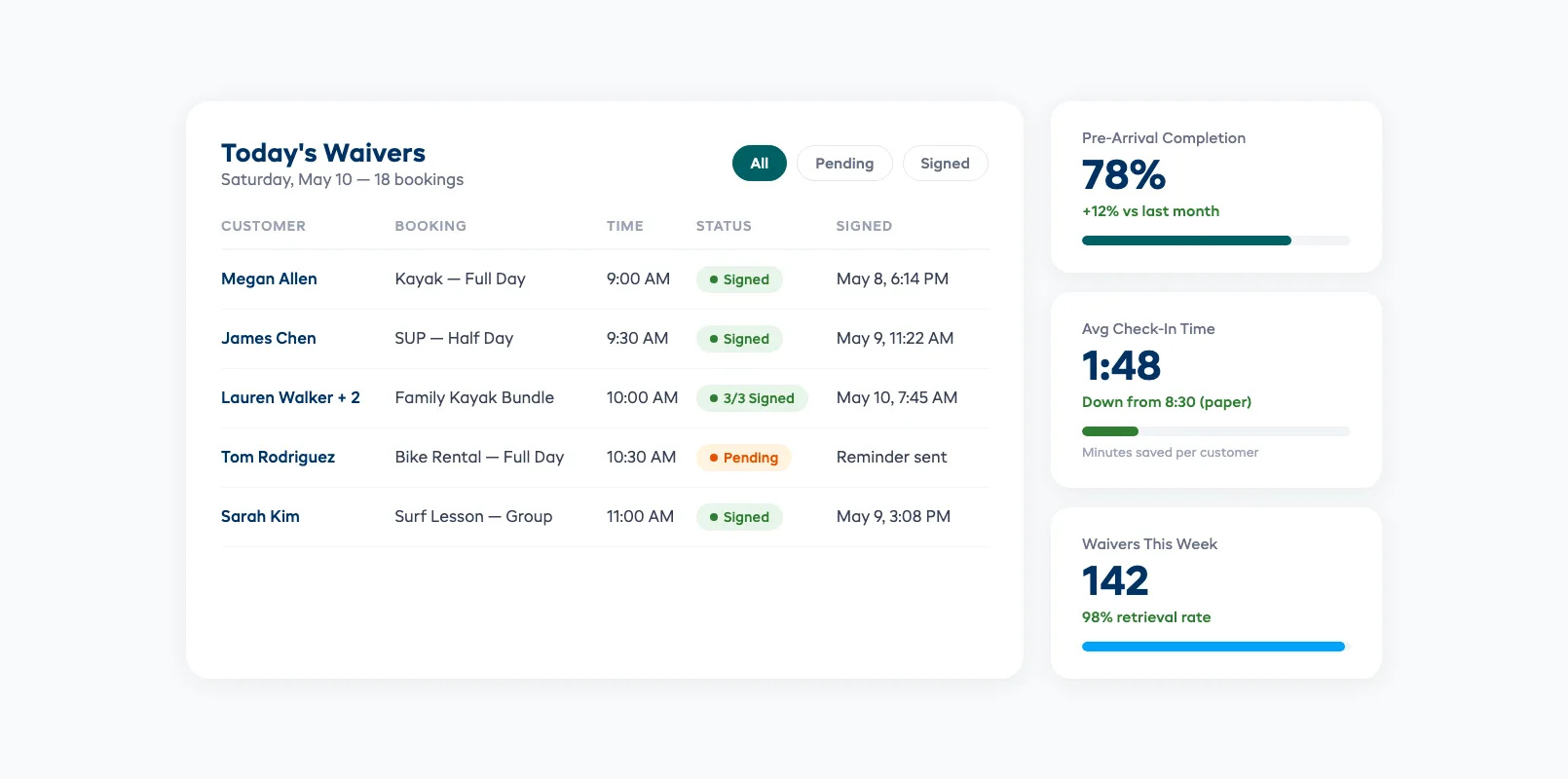
- Staff sees a green checkmark next to the booking when the customer shows up.
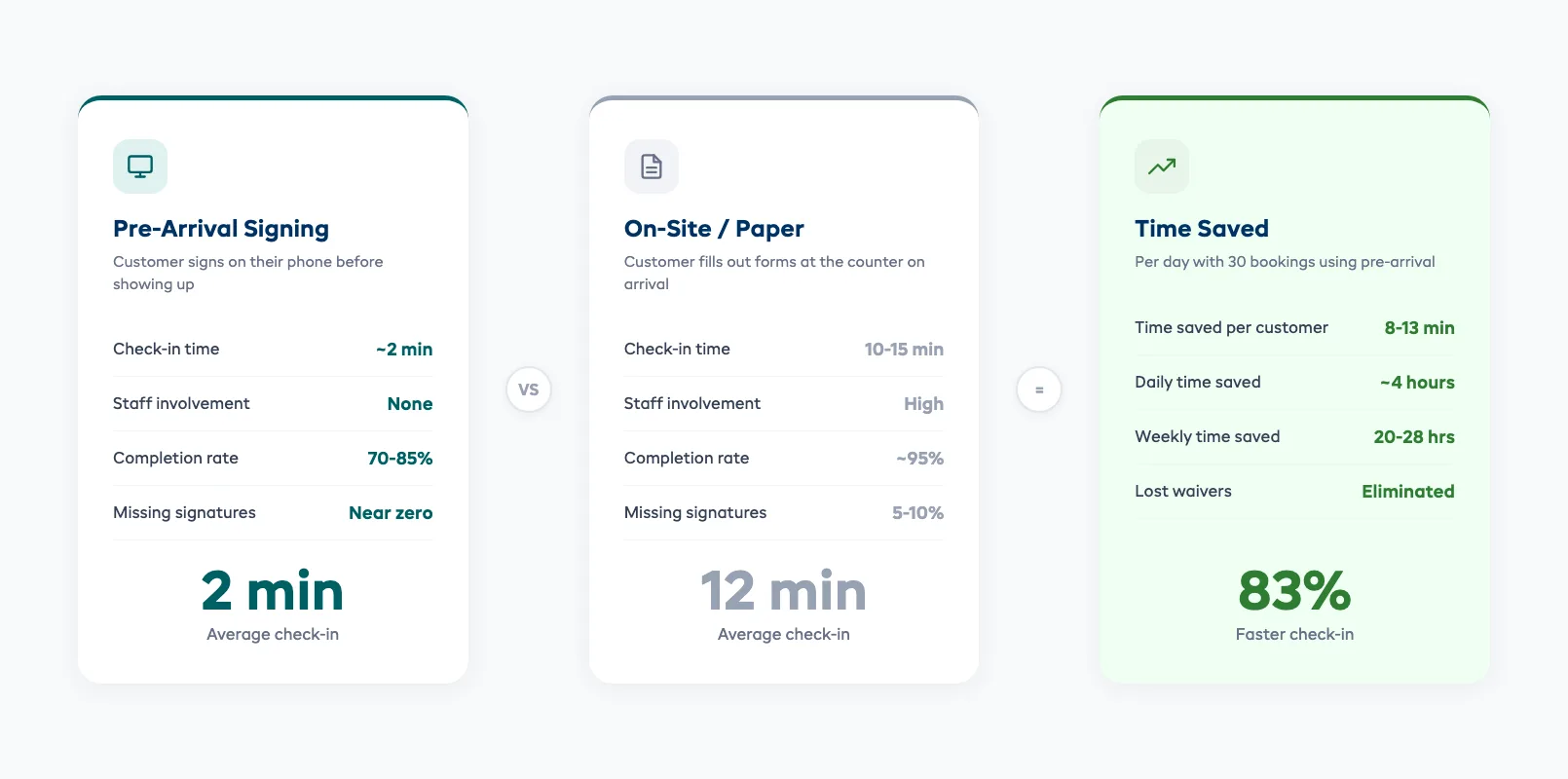
Check-in drops from 10-15 minutes to under 2 minutes. Your morning rush moves twice as fast.
When on-site signing still makes sense:
- Walk-in customers who didn't book ahead
- Group bookings where not every participant was named at the time of booking
- Equipment upgrades or additions that require supplemental waiver language
The smart setup handles both. Send waivers automatically with the booking confirmation, then have a tablet or QR code at the counter for anyone who missed it. Most shops see 70-85% of waivers completed before arrival once the automated flow is running.
Minor Waivers and Families
Family bookings are where paper waivers completely fall apart. One parent, three kids, each needing a separate waiver section — it's a mess on paper and an easy miss.
Digital systems handle this cleanly:
- Parent/guardian signing. The parent signs once, then adds each minor's name and details. One flow, one session, multiple participants covered.
- Age verification. The system flags anyone under your minimum age automatically. No mental math at the counter.
- Per-activity waivers. If your kayak waiver differs from your paddleboard waiver, each activity can trigger the correct document.
- Group management. A family of five shows as one booking with five signed waivers — all linked, all trackable.
The legal nuance with minors varies by jurisdiction. In most U.S. states, a parent can sign a waiver on behalf of a minor, but the enforceability is weaker than adult waivers. Some states (like California and New York) limit the enforceability of pre-injury waivers for minors entirely.
Best practice: use a waiver template that includes a separate indemnification clause for minors, clearly stating the parent accepts responsibility. Have your attorney review it.
Built-In vs Standalone Waiver Tools
You have two choices: a standalone waiver app (like WaiverSign, Smartwaiver, or WaiverForever) or a booking platform with waivers built in.
Standalone waiver tools:
- Dedicated waiver features — custom branding, multiple waiver templates, kiosk mode
- Usually $50-$150/month depending on volume
- Requires manual linking between your booking system and the waiver app
- Customer gets two separate emails — one for the booking, one for the waiver
Built-in waivers (inside your booking platform):
- Waiver is part of the booking flow — customer completes everything in one session
- Automatic linking — signed waivers are attached to the booking record
- Staff dashboard shows waiver status alongside booking details
- No extra subscription cost
The tradeoff is clear. Standalone tools offer more waiver-specific features. Built-in tools eliminate the gap between booking and waiver — which is where signatures get lost.
For most rental shops, built-in wins. The fewer steps between "customer books" and "waiver signed," the higher your completion rate. EquipDash includes digital waivers directly in the booking flow — customers sign during checkout, and staff see the status on every booking.
Storage and Compliance
Signed waivers need to be stored securely and retained for the right amount of time. This is where digital beats paper by a wide margin.
Retention periods (check your local requirements):
- General liability: 3-6 years in most U.S. states (matches the statute of limitations for personal injury claims)
- Minors: until the minor reaches the age of majority PLUS the statute of limitations — potentially 20+ years
- Commercial insurance requirements: your insurer may specify retention periods in your policy
What your storage system needs:
- Encryption at rest. Signed documents contain personal information (names, signatures, sometimes medical disclosures). Encryption is table stakes.
- Automated retention. Set it and forget it — the system holds documents for the required period, then flags them for deletion.
- Search and retrieval. When you need a specific waiver, you should find it in seconds by booking number, customer name, or date.
- Export capability. If you switch platforms, you need to take your waivers with you. Insist on PDF or CSV export.
Cloud storage solves the filing cabinet problem permanently. No boxes, no water damage, no "the intern moved the 2024 folder." Your waivers live in the same system as your bookings, searchable and secure.
Setting Up in Your Booking Flow
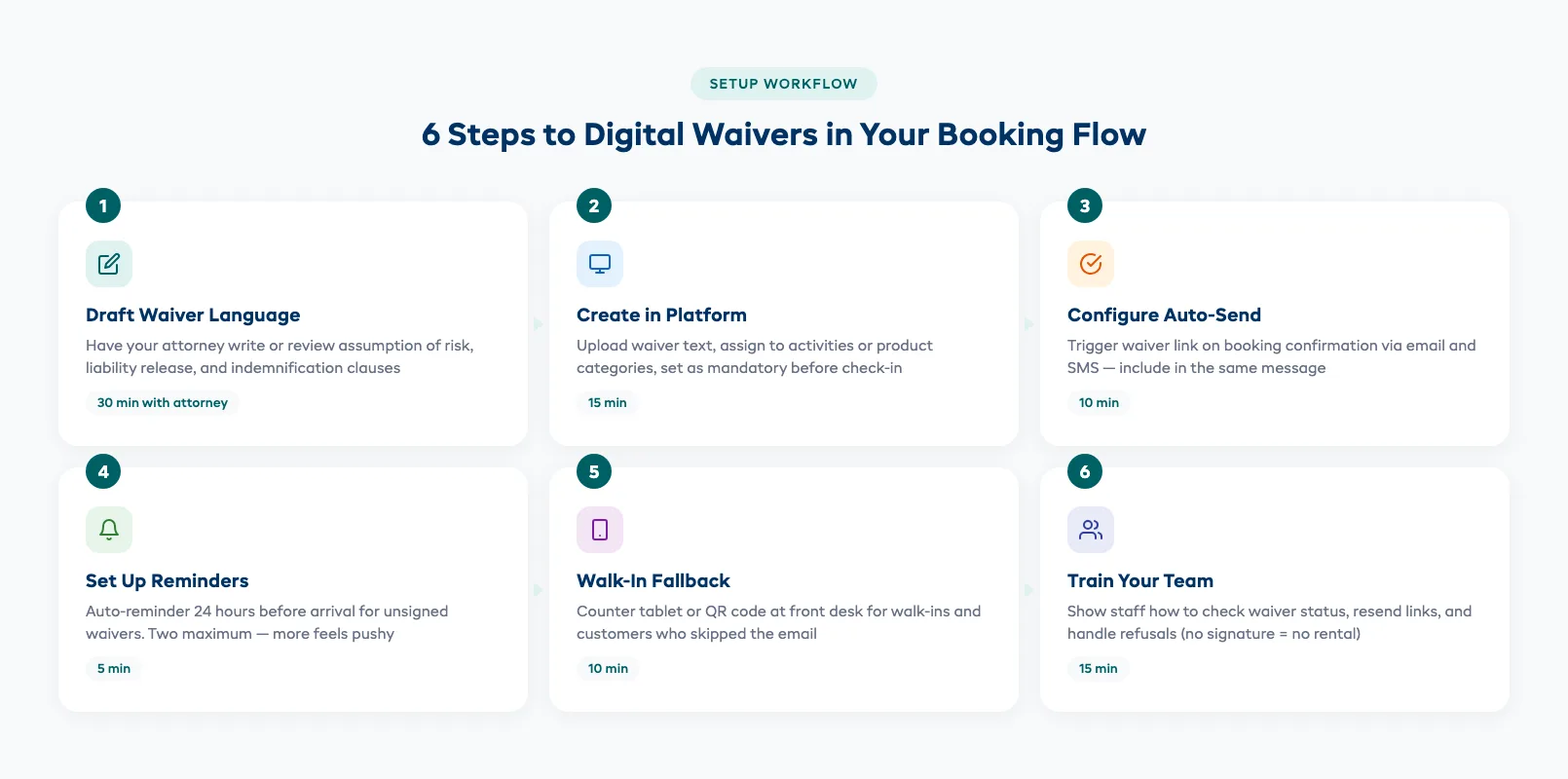
Getting digital waivers running takes less time than you think. Here's the setup in order:
1. Write (or update) your waiver language. Have your attorney draft or review the document. Include assumption of risk, release of liability, indemnification, and a medical disclosure section if relevant.
2. Create the waiver in your platform. Upload the text, set which activities or product categories require it, and configure whether it's mandatory before check-in.
3. Configure the automation trigger. The waiver link should send automatically when a booking is confirmed — via email, SMS, or both. Include it in the confirmation message, not as a separate follow-up.
4. Set up a reminder. If the waiver isn't signed 24 hours before the booking, send one reminder. Two reminders maximum — more than that feels pushy.
5. Add a walk-in fallback. Put a tablet at the counter or print a QR code that links to the waiver form. Walk-ins and no-shows can sign on the spot.
6. Train your team. Staff should know how to check waiver status on the dashboard, how to resend a link, and what to do if a customer refuses to sign (hint: they don't get the equipment).
Most shops go from zero to fully operational in under an hour. The hard part isn't the tech — it's getting the waiver language right.
FAQ
Do digital waivers hold up in court? Yes. Under the U.S. ESIGN Act, UETA, and similar laws globally, electronic signatures carry the same legal weight as handwritten ones — provided the waiver was clearly presented and the signer took an affirmative action to agree.
Can a parent sign a digital waiver for a minor? In most jurisdictions, yes. A parent or legal guardian can sign on behalf of a minor. However, enforceability varies by state — California and New York, for example, have limitations on pre-injury waivers for minors.
What happens if a customer refuses to sign? Same as paper: no signature, no rental. Your staff should be trained to explain that waivers are required for safety and legal reasons — and that it takes less than 60 seconds on their phone.
How long do I need to keep signed waivers? Typically 3-6 years for adults (matching your state's statute of limitations for personal injury). For minors, retain until they reach the age of majority plus the limitation period — potentially 20+ years.
Can I use digital waivers for walk-in customers? Absolutely. Set up a tablet at the counter or display a QR code. The customer scans, signs on their phone, and you see the completed waiver in your dashboard within seconds.
Do I need a separate waiver app? Not necessarily. If your booking platform includes digital waivers, you avoid the hassle of syncing two systems. Standalone apps work but add complexity.
What if my internet goes down? Most waiver platforms cache locally on the tablet or device. The signature syncs once connectivity returns. For extra safety, keep a small stack of paper waivers as a backup — just scan them into the system later.
Digital waivers aren't a nice-to-have anymore. They're how modern rental shops protect themselves legally, speed up check-in, and stop losing signatures in filing cabinets. The switch takes an afternoon. The time savings start on day one.
If you're ready to streamline more than just waivers, take a look at how automating your full rental workflow can free up hours every week. And if you're juggling multiple disconnected tools, our guide to consolidating your rental business tools shows how to bring everything under one roof.
in one place