How to Automate Your Rental Business: The Complete Guide

You opened a rental shop to help people get outside — not to spend three hours a day on confirmation emails, waiver chasing, and spreadsheet updates. Yet here you are, buried in admin work that doesn't directly serve a single customer.
You're not alone. The average rental or tour operator spends 15–20 hours per week on repetitive tasks that software can handle in seconds. That's half a full-time salary going to work that a computer does better, faster, and without errors.
This guide walks through the specific tasks eating your time, which ones you can automate today, and exactly where to start. No vague promises about "digital transformation" — just practical steps that free up your day so you can focus on what actually grows your business.
The Admin Tasks Eating Your Day
Before you can automate anything, you need to know where your time actually goes. Most rental shop owners underestimate how much admin they do — it sneaks up in five-minute chunks throughout the day.
Here's what a typical day looks like for a busy rental operator:
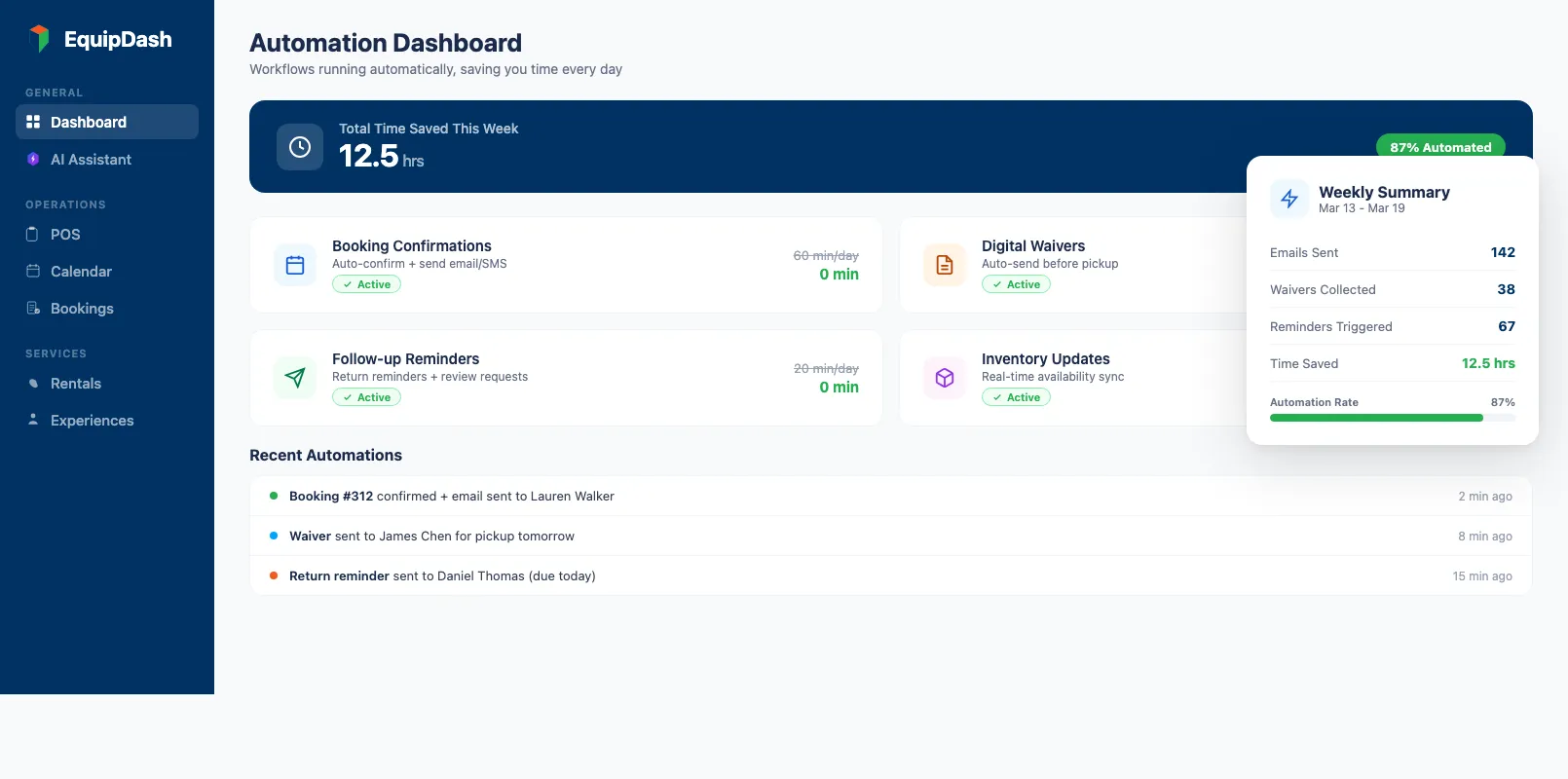
- Booking confirmations — Every new reservation triggers a manual email or text confirming dates, times, location, and what to bring. At 15 bookings per day, that's 30–60 minutes.
- Waiver collection — Tracking who's signed, chasing those who haven't, printing paper copies, filing them. Another 20–30 minutes daily.
- Availability updates — Checking what's rented, what's returned, updating your calendar or spreadsheet so you don't double-book. This alone can take 45 minutes.
- Follow-up communications — Post-rental thank-you messages, review requests, return reminders, damage deposit refund notifications. Often skipped entirely because who has the time?
- Reporting — End-of-day revenue tallies, utilization checks, maintenance scheduling. Usually done on scraps of paper or not at all.
Add it up: 2.5 to 4 hours every day on tasks that don't require human judgment, creativity, or a friendly face. Over a month, that's 50–80 hours of payroll spent on work a system handles automatically.
The good news? Every single item on that list can be automated. Not next year. Today.
What Can Be Automated (And What Can't)
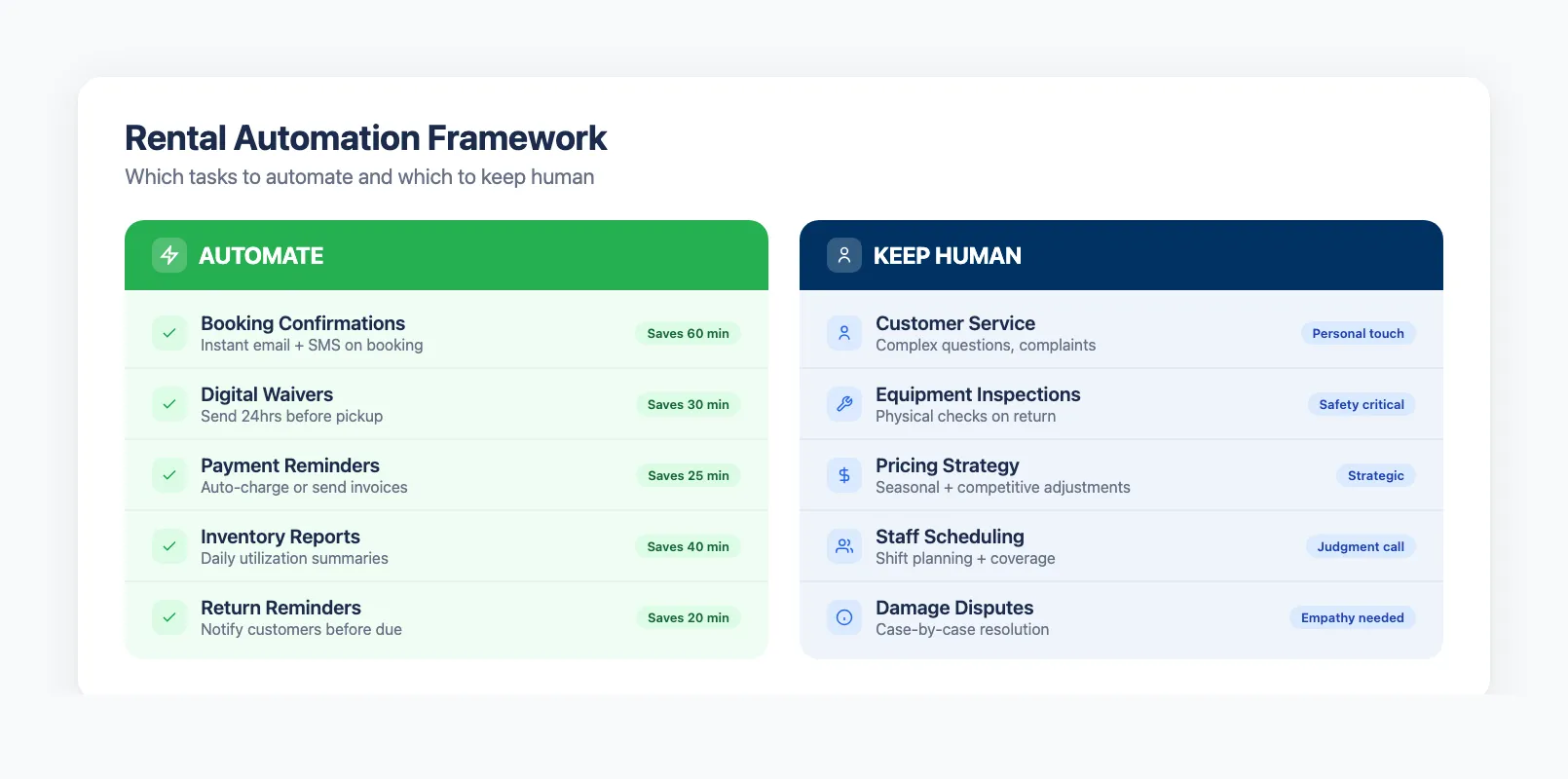
Automation works best for tasks that follow a predictable pattern — the same steps, the same triggers, every time. Here's a simple framework:
Automate these (repetitive, rule-based, no judgment needed):
- Booking confirmations and calendar updates
- Payment receipts and deposit processing
- Waiver delivery and signature tracking
- Reminder emails and SMS notifications
- Return reminders and late-fee alerts
- Review request emails after rental completion
- Daily/weekly revenue and utilization reports
- Availability syncing across channels
Keep these human (require judgment, empathy, or physical presence):
- Customer service for complex issues or complaints
- Equipment safety inspections and maintenance decisions
- In-person fitting and instruction
- Pricing strategy and seasonal adjustments
- Staff scheduling for peak days
- Vendor negotiations and purchasing
The pattern is clear. Anything that starts with "every time X happens, do Y" is a candidate for automation. Anything that starts with "it depends" stays with your team.
For a deeper look at how equipment rental software handles these workflows, our complete guide covers the full technology stack. Here, we'll focus specifically on the automation wins.
Automation #1: Booking Confirmations and Reminders
Time saved: 45–90 minutes per day
This is the biggest quick win for most rental shops. Every booking triggers an automatic sequence:
- Instant confirmation — Customer books online or in-store. Within seconds, they receive an email with their reservation details, payment receipt, and directions.
- 24-hour reminder — The day before their rental, an automated email or SMS confirms the booking with check-in time, location, and what to bring.
- Morning-of reminder — A text message on the day with final details.
- Return reminder — The day before their rental period ends, an automatic nudge to return equipment on time.
Without automation, your staff types these manually — or worse, forgets entirely. Missed reminders lead to no-shows. Vague confirmations lead to confused customers calling for details you already sent (if you'd sent them).
The no-show impact is real. Rental shops using automated reminders report 30–50% fewer no-shows compared to shops that rely on manual communication. At an average booking value of $85, preventing just two no-shows per week saves $8,840 per year.
Most rental inventory management systems include automated confirmations as a core feature. The setup takes about 15 minutes — you write the email templates once, set the timing rules, and never think about it again. For a deeper look at what makes a great booking experience, see our guide on equipment rental booking software.
Automation #2: Digital Waivers
Time saved: 20–40 minutes per day
Paper waivers are a nightmare. Customers arrive, fill out a form with an illegible pen, your staff files the paper in a folder that nobody will ever look at again unless there's an incident — and then you can't find it.
Digital waivers fix every part of that process:
- Pre-arrival signing — The waiver goes out automatically with the booking confirmation. Customers sign on their phone before they arrive. No clipboard, no pen, no waiting.
- Automatic tracking — The system flags any unsigned waivers on the day's booking list. Your staff knows exactly who needs to sign at check-in.
- Searchable storage — Every waiver is stored digitally, linked to the booking, and searchable by name, date, or booking number. Compliance questions answered in seconds.
- Minor handling — Waivers for children automatically require a parent/guardian signature. The system enforces this before the booking is confirmed.
The time savings aren't just about signature collection. It's the chasing, the filing, the searching, and the "did they actually sign?" conversations that disappear completely.
For the full breakdown — legality, minor waivers, pre-arrival flows, and platform choices — see our complete guide to digital waivers for rental businesses.
Automation #3: Follow-Up Emails and Review Requests
Time saved: 15–30 minutes per day
Follow-ups are the first thing to get dropped when you're busy. And you're always busy. But they're also some of the highest-value communications your business sends.
An automated follow-up sequence handles three things:
Thank-you email (sent 2 hours after return): A quick message thanking the customer, confirming their deposit refund, and including a link to your review page. This is when the experience is freshest and they're most likely to leave a positive review.
Review request (sent 24 hours after return): If they didn't leave a review from the first email, a gentle nudge with a direct link to Google Reviews or TripAdvisor. Shops using automated review requests see 3–5x more reviews than those that ask manually (or don't ask at all).
Seasonal re-engagement (sent 30–90 days later): An email before the next peak season reminding past customers to book early. This turns one-time renters into repeat customers — and repeat customers are 5x cheaper to acquire than new ones.
None of this requires your staff to remember, draft, or send anything. Set the rules once, and the system handles every customer, every time.
Automation #4: Inventory and Availability Updates
Time saved: 30–60 minutes per day
Double-bookings happen when your availability information lives in multiple places — a Google Calendar, a whiteboard, and your head. The fix isn't "be more careful." The fix is a single system that updates everywhere automatically.
Here's what automated inventory management looks like:
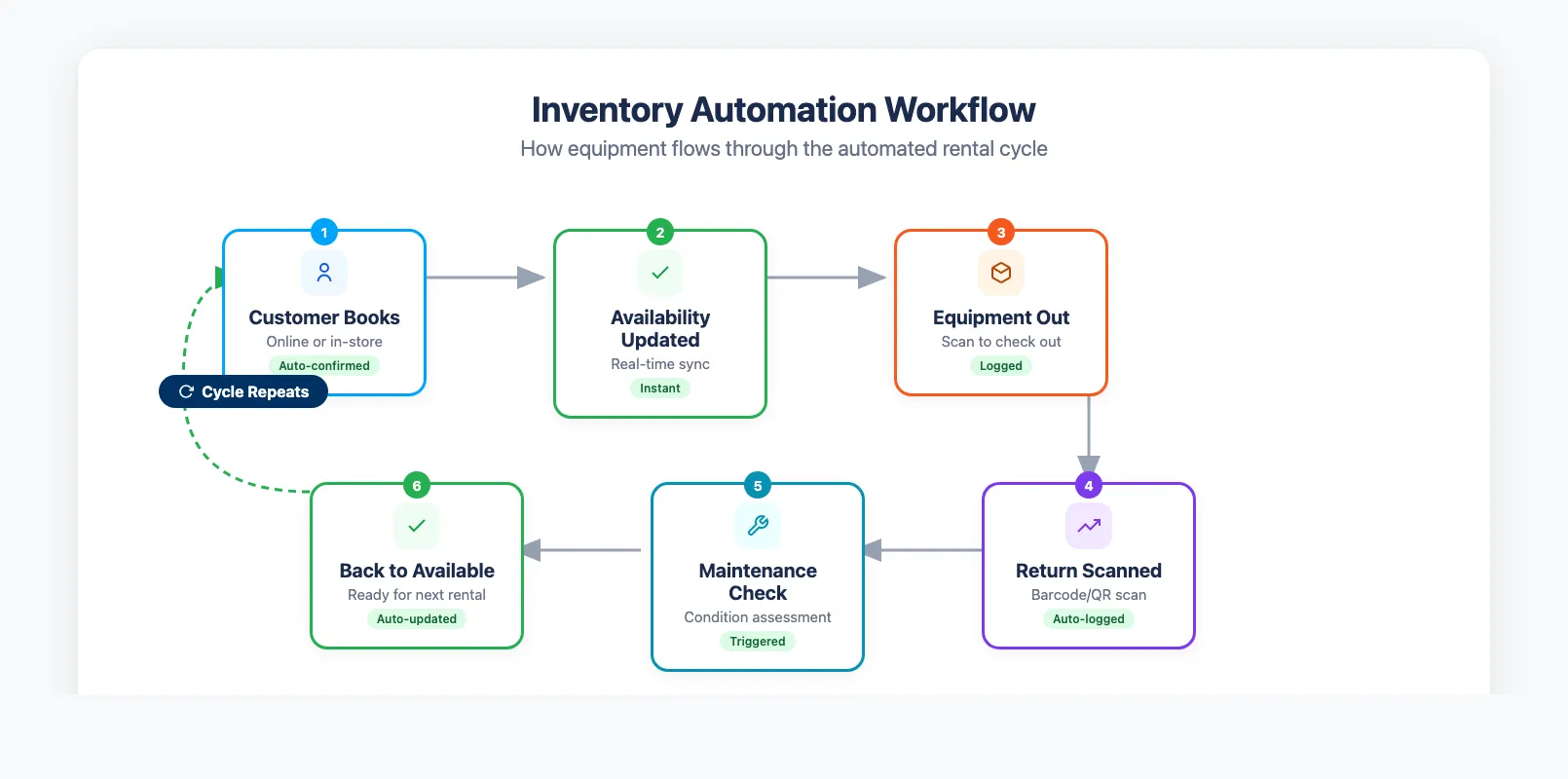
- Real-time availability — When a customer books a mountain bike for Saturday, that bike is immediately unavailable for other Saturday bookings — across your website, in-store system, and any third-party channels.
- Automatic return processing — When equipment is checked back in, it's immediately available for the next booking. No manual calendar update needed.
- Maintenance scheduling — The system tracks rental cycles and flags items due for maintenance. After 50 rentals, bike MB-042 gets pulled from availability automatically until your team marks it serviced.
- Low-stock alerts — Running low on surfboards for the weekend? The system sends your team an alert before you're caught short.
This connects directly to your online booking system. With cloud-based equipment rental software, your team can manage availability from any device — shop counter, phone, or home. When the booking engine and inventory system share one database, double-bookings become physically impossible. Our guide on double booking prevention covers the full checklist for eliminating conflicts across every channel.
If you're running five or six tools that overlap, the real win might be consolidating your rental business tools into one platform before automating individual workflows.
Automation #5: Reporting and Business Insights
Time saved: 1–2 hours per week
Most rental operators know roughly how their business is doing. Roughly. But "roughly" doesn't tell you which items are underperforming, which days need more staff, or whether your pricing is leaving money on the table.
Automated reporting gives you answers without the spreadsheet gymnastics:
- Daily revenue summary — Delivered to your inbox every morning. Yesterday's bookings, revenue, no-shows, and cancellations in one glance.
- Utilization tracking — See which equipment sits idle and which items are booked solid. Adjust your fleet accordingly.
- Seasonal trends — Compare this month to the same month last year. Spot patterns before they become problems.
- Customer metrics — Average booking value, repeat customer rate, review scores. All calculated automatically.
The difference between a shop running on gut feel and a shop running on data is the difference between surviving and scaling. And you don't need to build a single spreadsheet to get there.
For tour operator software users, reporting also includes participant numbers, guide utilization, and experience-specific metrics that help you decide which tours to run more (or drop entirely).
How to Prioritize: Start With the Biggest Time Drain
You don't need to automate everything on day one. Start with the task that burns the most time and causes the most pain. For most shops, the order looks like this:
Week 1: Booking confirmations and reminders This is the fastest win. Write your confirmation template, set your reminder timing, and you've just freed up an hour per day. Your customers also get a better experience — instant confirmation instead of waiting for someone to email them back.
Week 2: Digital waivers Upload your waiver, connect it to your booking flow, and paper disappears. This is also the easiest one to measure — count the waivers that arrive before check-in vs the old clipboard approach.
Week 3: Follow-up emails Create your thank-you, review request, and re-engagement templates. This one pays dividends for months — the reviews keep coming, and the seasonal emails bring customers back.
Week 4: Inventory automation If you're still using spreadsheets for availability, this is where the real transformation happens. Moving to equipment rental software with inventory tracking that automates availability eliminates double-bookings and gives your team back an hour per day.
Ongoing: Reporting Once everything else is automated, the data flows in automatically. Set up your daily email summary and weekly dashboard review.
The total time savings? 10–15 hours per week. That's the equivalent of a part-time employee — except you don't pay salary, benefits, or overtime. Even small rental shops with just a handful of employees can reclaim significant hours with the right setup. If you're just getting started, our guide on how to start an equipment rental business covers the full setup process including choosing the right tools from day one.
The Role of AI in Rental Business Automation
Traditional automation handles "when X happens, do Y." AI takes it further by handling tasks that require judgment — the kind that used to need a human.
Here's what AI can do for rental businesses today:
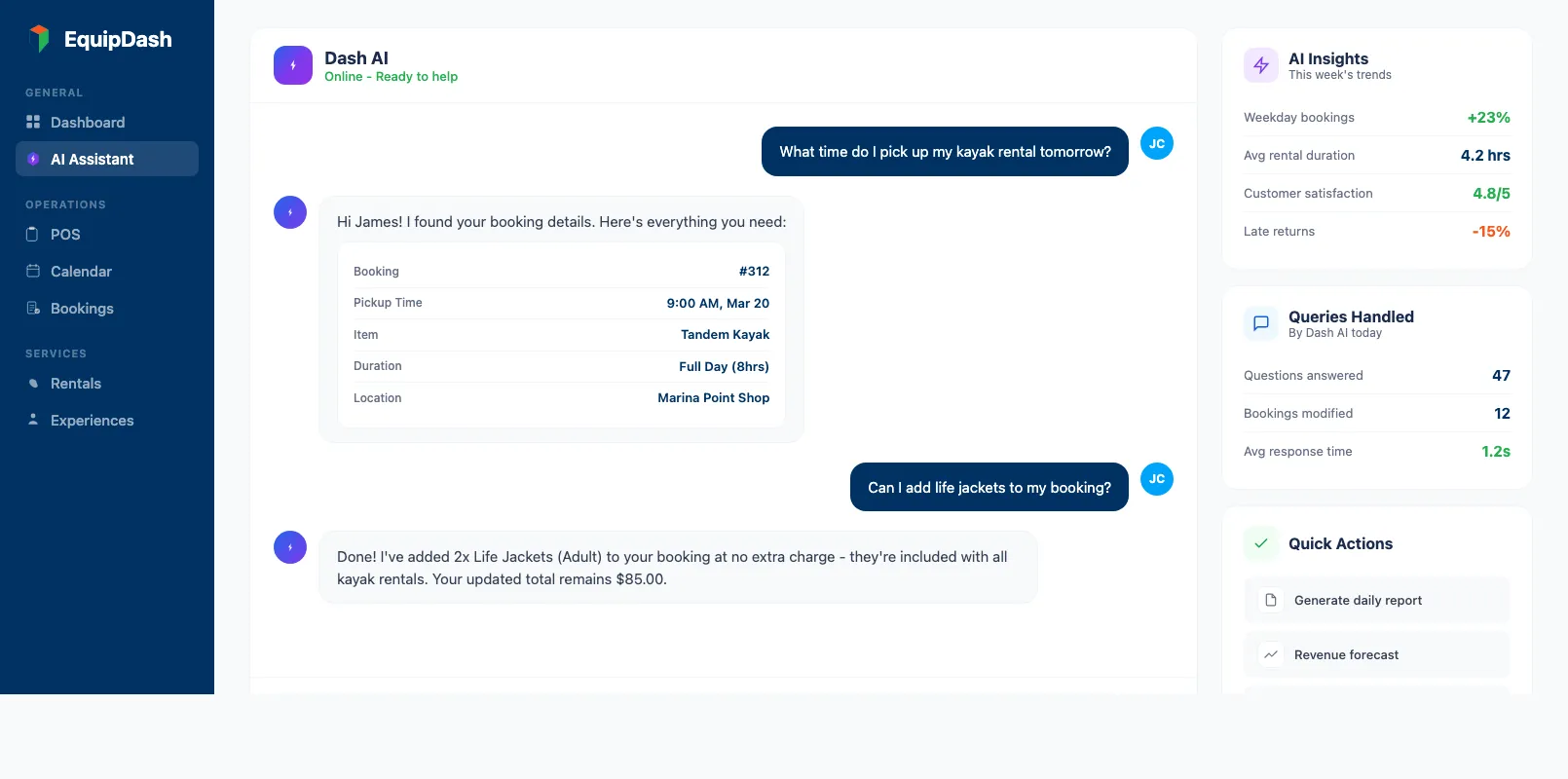
Answer customer questions 24/7 An AI assistant handles the questions your staff answers 20 times a day: "What's included in the rental?", "What time do I pick up?", "Can I extend my booking?" It responds instantly, accurately, and at 2am when nobody's at the shop.
Draft communications Need to send a custom email to a group booking? AI drafts it in seconds based on the booking details. You review, tweak if needed, and send.
Spot patterns in your data AI can analyze your booking history and flag trends: "Weekday bookings are up 23% year-over-year" or "Customers who book paddleboards also book life vests 68% of the time — consider a bundle."
Suggest pricing adjustments Based on demand patterns, weather forecasts, and competitor activity, AI can recommend pricing changes for specific items or time periods.
EquipDash includes Dash AI, a built-in AI assistant that automates 80+ daily tasks — from answering customer questions to generating reports. It's the only rental platform with this capability built in, and it works alongside the traditional automations covered in this guide.
The key with AI is this: it's an assistant, not a replacement. It handles the repetitive thinking so your team can focus on the work that actually needs a human — safety, hospitality, and the smile when a customer picks up their gear.
FAQ
How much time will automation actually save?
Most rental shops save 10–15 hours per week by automating booking confirmations, waivers, follow-ups, inventory updates, and reporting. The exact savings depend on your booking volume — shops processing 20+ bookings per day see the biggest impact. At an average staff cost of $18–25/hour, that's $9,000–$19,500 per year in recovered productivity.
Do I need technical skills to set up automation?
No. Modern equipment rental software handles automation through simple settings — toggle a switch, write an email template, set a time trigger. If you can send an email, you can set up automation. Most shops are fully configured within a week.
What's the best software for rental business automation?
Look for platforms that include booking automation, digital waivers, inventory management, and reporting in one system. All-in-one platforms like EquipDash (starting at $23/month with annual billing) eliminate the need for separate tools. For a head-to-head feature comparison of the top platforms and what you'll actually pay, see our equipment rental software comparison.
Will automation make my service feel impersonal?
The opposite. Automation handles the mechanical stuff — confirmations, reminders, follow-ups — so your team has more time for personal interactions. Customers don't want a handwritten confirmation email. They want instant, accurate information and a friendly face when they arrive.
Can I automate if I'm still using spreadsheets?
You can automate some communications with email tools like Mailchimp, but you'll miss the biggest wins (inventory syncing, waiver integration, booking-triggered workflows). The real value comes from a connected system where bookings, inventory, and communications share one database. Our guide on spreadsheets vs software covers exactly when to make the switch.
How does automation help during peak season?
Peak season is when automation pays for itself. Your booking volume doubles or triples, but your staff doesn't. Automated confirmations, waivers, and inventory updates handle the surge without extra hires. Shops using automation report handling 40–60% more bookings without adding staff.
What should I automate first?
Start with booking confirmations and reminders — it's the fastest win and the easiest to set up. Most operators notice the impact within the first day: fewer phone calls, fewer no-shows, and happier customers who feel informed. Then move to waivers, follow-ups, and inventory automation over the following weeks.
in one place