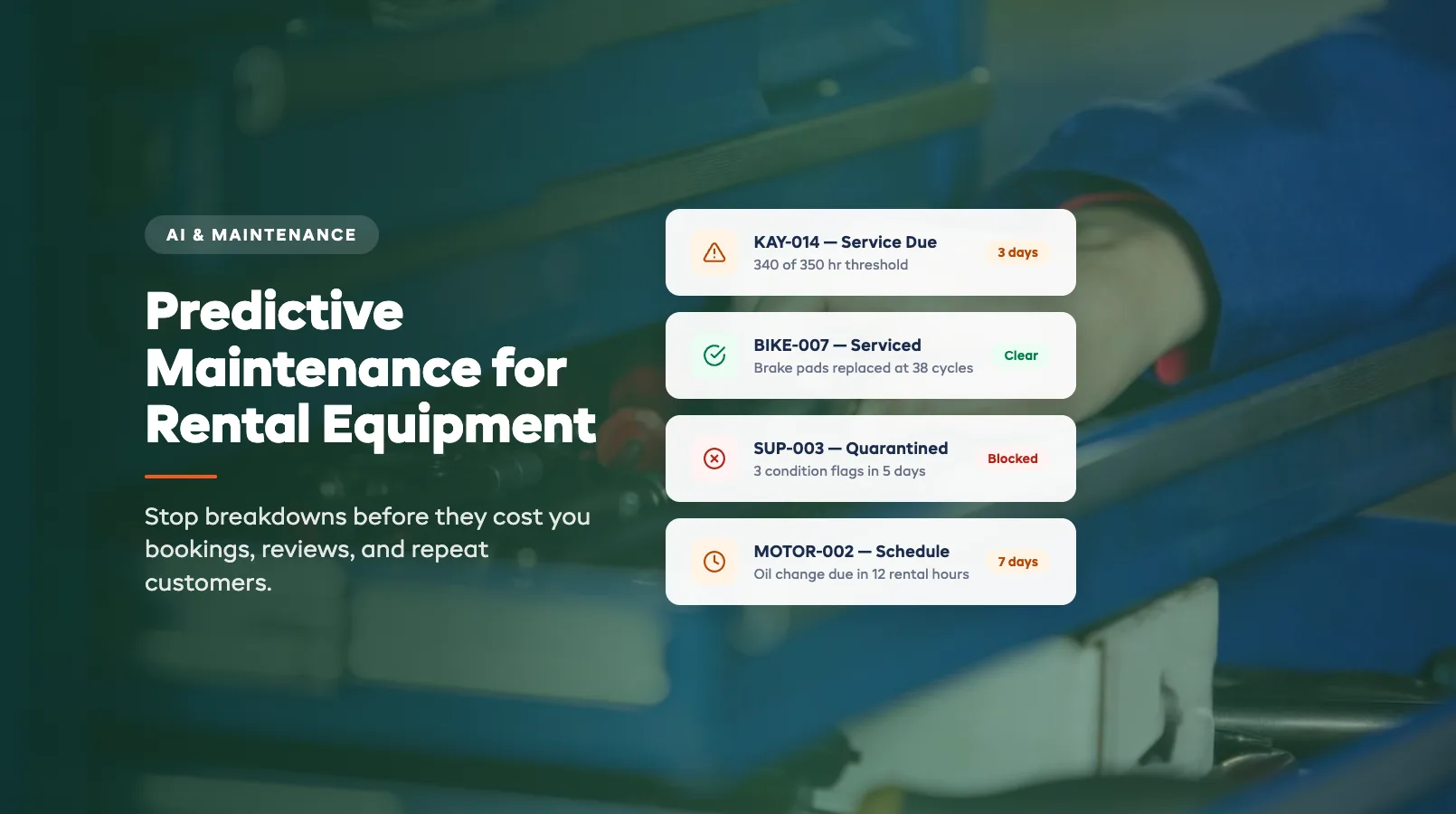
Predictive Maintenance for Rental Equipment: Stop Breakdowns Before They Cost You
A cracked paddle on a Saturday morning doesn't just cost you $120 to replace. It costs the $85 booking you have to cancel. The 1-star review from the family who drove 40 minutes. The three referrals that family would have sent you next month.
Reactive maintenance -- fixing things after they break -- is the most expensive way to run a rental fleet. You're not just paying for the part. You're paying for lost revenue, lost trust, and the scramble to reorganize a full day's bookings around a piece of gear that should have been flagged last Tuesday.
Predictive maintenance flips this. Instead of waiting for equipment to fail, you track usage patterns and catch problems before they hit a customer. It's not about sensors and lab coats. It's about knowing that kayak #14 has done 340 rental hours this season and the seat mount typically loosens at 350.
This guide covers how predictive maintenance works for rental operators, what to track, and how to get started without buying a single sensor. For the full picture of AI across your operation, see our AI for Equipment Rental Business guide.
In this guide:
- What Predictive Maintenance Actually Means for Rentals
- Usage-Based vs Calendar-Based Maintenance
- How AI Flags Equipment Before It Fails
- Setting Up Maintenance Alerts
- Cost Savings: Reactive vs Predictive
- Getting Started Without Sensors
- FAQ
What Predictive Maintenance Actually Means for Rentals
In manufacturing, predictive maintenance involves vibration sensors, thermal imaging, and oil analysis. In equipment rental, it's simpler than that. It means using the data you already collect -- booking records, check-in condition reports, maintenance logs -- to predict when a piece of gear will need service.
Every rental creates a data point. A kayak goes out for 4 hours, comes back, gets a quick visual check, and goes on the rack. That's one cycle. After 80 cycles, the hull shows UV wear. After 120 cycles, the hatch seals start to degrade. After 200 cycles, the seat hardware loosens.
These patterns are consistent across equipment of the same type. Your 10 single kayaks will all follow roughly the same wear curve. If kayak #3 failed at 190 cycles, kayaks #4 through #10 should get a preventive check at 170.
The "predictive" part isn't magic. It's pattern recognition applied to your own fleet data. The AI looks at when similar items needed repairs, how many rental hours preceded each repair, and what the environmental conditions were (saltwater degrades faster than freshwater, gravel trails wear brake pads faster than paved paths).
You don't need a PhD to benefit from this. You need a system that counts rental hours per item and compares them against historical maintenance events.
Usage-Based vs Calendar-Based Maintenance
Most rental shops run calendar-based maintenance. Check every bike on the first Monday of the month. Inspect all PFDs before the start of season. Service the outboard motors every 90 days.
The problem: calendar-based maintenance ignores how hard each piece of equipment actually works.
Calendar-based example: You service all 20 mountain bikes on March 1st. Bike #7, which sat in the rack for most of February, gets the same inspection as bike #12, which did 45 rentals on muddy trails. Bike #7 didn't need the service. Bike #12 probably needed it two weeks ago.
Usage-based example: Your system tracks rental hours, distance (for GPS-equipped bikes), and condition-report flags per unit. Bike #12 triggers a maintenance alert at 40 rental cycles because that's when your fleet data shows brake pad wear typically needs attention on trail bikes. Bike #7 doesn't trigger until mid-April because it hasn't hit the threshold yet.
The difference in practice:
| Metric | Calendar-Based | Usage-Based |
|---|---|---|
| Over-servicing (wasted labor) | Common -- low-use items get serviced unnecessarily | Rare -- service triggers only when needed |
| Under-servicing (missed issues) | Common -- high-use items degrade between fixed checks | Rare -- heavy-use items trigger earlier |
| Labor allocation | Spiky -- all maintenance happens at once | Spread evenly across the week |
| Downtime during peak | Higher -- calendar dates don't respect busy weekends | Lower -- alerts shift to avoid peak conflicts |
Usage-based maintenance doesn't eliminate scheduled checks entirely. You still want a pre-season deep inspection of everything. But between those seasonal checkpoints, usage data should drive daily and weekly maintenance decisions.
How AI Flags Equipment Before It Fails
AI maintenance prediction works in three layers:
Layer 1: Simple threshold alerts. This is where every operator should start. Set a rental-hour or rental-cycle threshold for each equipment category. "Service mountain bikes every 35 rental cycles. Inspect kayak hulls every 250 rental hours. Replace PFD buckles every 150 uses."
These thresholds come from your own history. Look at your last two seasons of maintenance records. When did things actually break? Count backwards to find the usage level just before failure. Set your alert at 80% of that number.
Layer 2: Condition-report pattern matching. Every time a piece of equipment comes back, your check-in staff (or self-serve customer return) logs a quick condition report. Scratches, dings, stiff mechanisms, unusual sounds. Individually, a "minor scratch" is nothing. But AI can spot when the same item gets three minor-scratch reports in a row -- a pattern that often precedes a structural crack.
Dash AI scans condition reports for escalating patterns: increasing frequency of flags, severity progression (minor → moderate), and multi-system flags on the same unit (a bike with both brake complaints and gear-shift complaints is more likely to need a full overhaul than one with just brake complaints).
Layer 3: Environmental correlation. This is the most advanced layer. AI correlates maintenance needs with environmental factors. Equipment used in saltwater corrodes faster. Bikes rented on rainy days accumulate more chain wear per hour. SUPs used in rocky areas get more hull damage per rental.
If your booking system tracks location or conditions, the AI adjusts maintenance thresholds automatically. Kayak #14, which operates in a saltwater estuary, gets flagged 20% earlier than kayak #15, which operates in a freshwater lake.
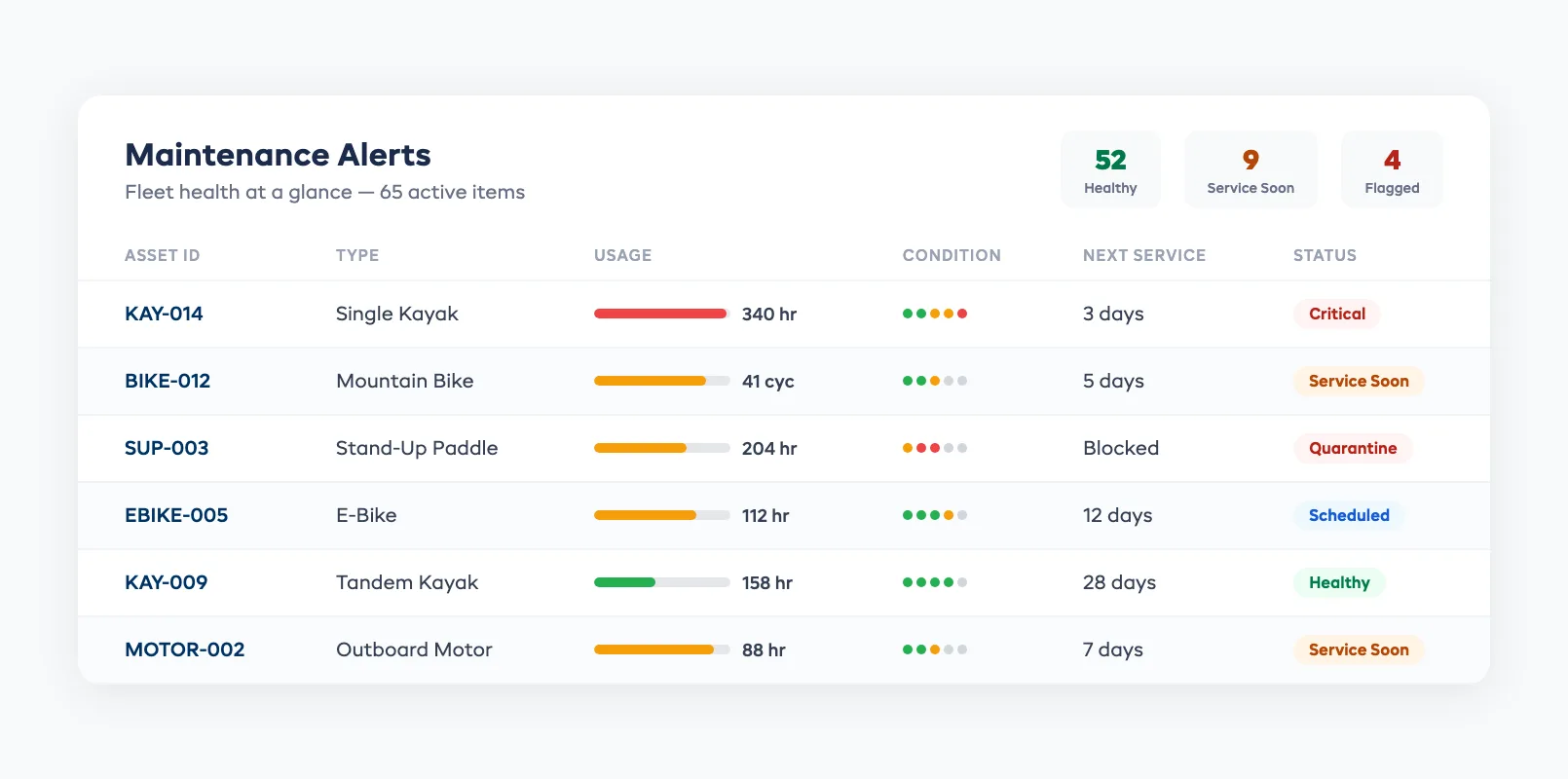
Setting Up Maintenance Alerts
Start with what you have. You don't need new hardware. You need to connect three data sources you already own:
1. Booking data → rental cycle counts. Your booking system already knows how many times each item has been rented. If items aren't tracked individually (just by category), that's the first change to make. Assign asset IDs. Even a simple numbering system (KAY-001 through KAY-020) gives you per-unit tracking.
2. Condition reports → quality signals. Build a 30-second check-in process. Staff (or customers via a mobile form) answer three questions: "Any visible damage? Rate equipment condition 1-5. Any issues to report?" That's enough to feed the pattern-matching layer.
3. Maintenance logs → historical baselines. Log every repair with the item ID, rental hours at time of repair, and what was fixed. After one season, you'll have enough data to set accurate thresholds. After two seasons, the AI has enough to start predicting.
Alert routing matters. A maintenance alert that goes to a general inbox gets ignored. Route alerts to the person who does the work:
- Urgent alerts (safety-critical items) → shop manager's phone immediately
- Standard alerts (service due within 7 days) → morning maintenance queue
- Planning alerts (service due within 30 days) → weekly maintenance planning board
Set a "quarantine" rule: if an item triggers a safety-critical alert, it automatically blocks from new bookings until cleared. No human decision required. The system pulls it from availability.
Cost Savings: Reactive vs Predictive
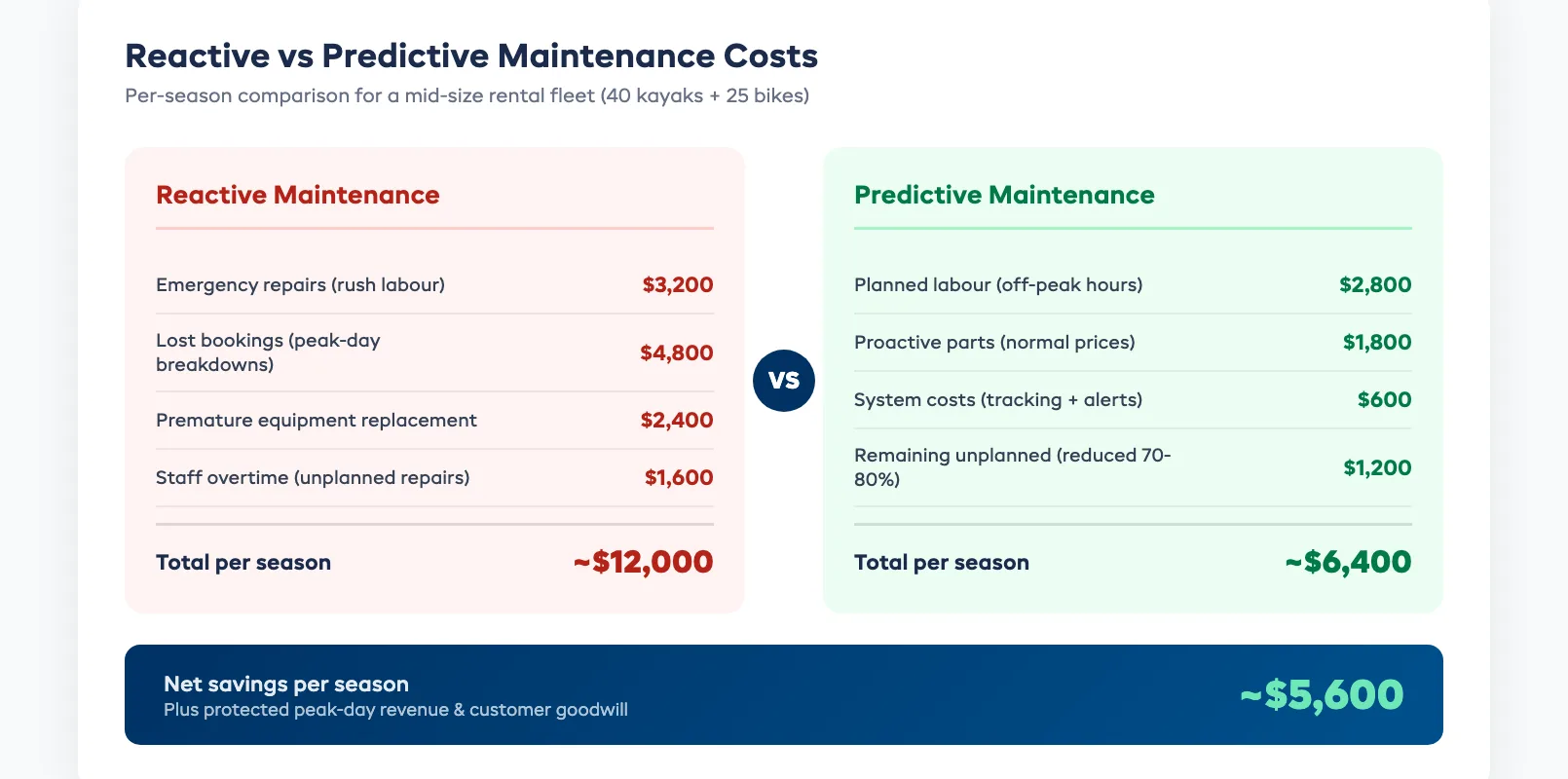
The math on predictive maintenance is straightforward. Here's what it looks like for a mid-size rental operation running 40 kayaks and 25 bikes:
Reactive maintenance costs (per season):
- Emergency repairs during operating hours: $3,200 (parts + rush labor)
- Lost bookings from broken equipment on peak days: $4,800 (average 2 canceled bookings per breakdown, 12 breakdowns per season)
- Replacement equipment purchased due to damage that could have been caught earlier: $2,400
- Staff overtime for unplanned repairs: $1,600
- Total: ~$12,000/season
Predictive maintenance costs (per season):
- Planned maintenance labor (scheduled during off-peak hours): $2,800
- Parts replaced proactively (bought at normal prices, not rush-ordered): $1,800
- System costs (tracking + alerts): $600
- Remaining unplanned breakdowns (reduced by 70-80%): $1,200
- Total: ~$6,400/season
Net savings: ~$5,600/season -- and that doesn't count the revenue protected by avoiding peak-day cancellations or the customer goodwill from never handing someone a piece of gear that shouldn't have left the rack.
The biggest hidden cost of reactive maintenance isn't the repair bill. It's the peak-day revenue you lose when equipment goes down on a Saturday. A single kayak that breaks during a fully booked weekend can cost $200-$400 in canceled or reshuffled bookings. Prevent three of those per season and you've paid for the entire system.
Getting Started Without Sensors
You don't need IoT sensors, GPS trackers, or any new hardware to start predictive maintenance. Here's the minimum viable setup:
Week 1: Asset IDs. Number every piece of rentable equipment. Sticker, engraving, or barcode -- anything that lets you track individual units. If you have 30 kayaks, they're KAY-001 to KAY-030.
Week 2: Check-in reports. Add a 30-second condition check to your return process. Digital form, paper checklist, or a quick staff entry in your booking system. Three fields: item ID, condition rating (1-5), and freeform notes.
Week 3: Maintenance logging. Start recording repairs with the item ID and total rental hours at time of repair. This builds your historical baseline. Even a spreadsheet works for the first season.
Week 4: Set thresholds. If you have historical data, calculate your first maintenance thresholds. If you're starting from scratch, use manufacturer recommendations as a starting point and adjust based on your actual experience.
Month 2 onwards: Automate. Connect your booking data to your maintenance alerts. When an item crosses its rental-hour threshold, the alert fires automatically. No manual counting required.
Sensors and GPS can come later -- they add precision but aren't the foundation. The foundation is per-unit tracking and consistent condition reporting. Get those right first.
For operators already using AI-driven pricing, adding predictive maintenance creates a powerful feedback loop. Pricing adjusts based on fleet availability, and maintenance schedules adjust based on booking demand. The two systems make each other smarter.
Predictive maintenance is one of 8 practical AI use cases that rental operators are adopting today.
FAQ
How many rental cycles do I need before predictive maintenance works?
One full season of per-unit tracking gives you a usable baseline. You need at least 5-10 maintenance events per equipment category to identify patterns. A fleet of 20 kayaks that each do 80 rentals per season generates enough data within the first year.
Can I use predictive maintenance without individual asset tracking?
Not effectively. Category-level tracking ("kayaks need service every 3 months") is just calendar-based maintenance with extra steps. The value comes from knowing that kayak #14 has done 340 hours while kayak #7 has done 180. Per-unit tracking is the minimum requirement.
What equipment types benefit most from predictive maintenance?
High-turnover items with mechanical components: bikes (brake pads, chains, tires), motorised watercraft (engines, fuel systems), and e-bikes (batteries, motors). Simple items like SUP boards and basic kayaks still benefit, but the ROI is highest on equipment with more moving parts.
Does predictive maintenance replace my pre-season deep inspection?
No. Pre-season inspection is a full safety audit of every item. Predictive maintenance handles the in-season monitoring between those deep checks. Think of the pre-season inspection as your baseline and predictive alerts as the ongoing monitoring.
How do I handle maintenance during peak season without losing bookings?
Schedule predictive maintenance during your lowest-demand windows -- typically midweek mornings. If an item triggers an alert on Friday, queue it for Tuesday morning service unless it's a safety-critical flag. Safety-critical items come out of service immediately regardless of demand.
What's the difference between predictive maintenance and condition-based maintenance?
Condition-based maintenance reacts to current equipment state: "This brake pad is worn, replace it." Predictive maintenance forecasts future state: "Based on usage patterns, this brake pad will need replacement in 15 rental cycles -- schedule it for next Tuesday." Predictive catches problems earlier because it acts before visible degradation.
Predictive maintenance is one part of a broader AI strategy for rental operators. For dynamic pricing, inventory intelligence, and automated communications, read our AI for Equipment Rental Business guide.
in one place