AI Dynamic Pricing for Equipment Rental: Set Rates That Maximize Revenue
You set your kayak rate at $45/hour in March. It stayed at $45/hour when the July 4th weekend hit 98% humidity and every family in town wanted a paddleboard. It stayed at $45/hour on that rainy Tuesday when you had 30 boats sitting on the rack doing nothing.
That's the problem with flat-rate pricing. It treats every hour of every day the same -- even though your demand swings 300% between a sunny Saturday and a gray Wednesday.
AI dynamic pricing fixes this. Not by guessing. By watching the same signals you'd watch if you had the time -- weather, bookings, competitor rates, local events -- and adjusting your prices automatically within rules you control.
This guide covers how it works, what to automate first, and what rental operators actually see in revenue impact. For the full picture of how AI applies across your rental operation, start with our AI for Equipment Rental Business guide.
In this guide:
- How AI Dynamic Pricing Works for Rentals
- Peak Season vs Off-Season Rate Automation
- Weather-Based Pricing Adjustments
- Competitor Rate Monitoring
- Setting Pricing Rules and Guardrails
- ROI: What Operators Actually See
- FAQ
How AI Dynamic Pricing Works for Rentals
Dynamic pricing isn't new. Airlines have done it for decades. Hotels adjust rates every night. What's new is that it's finally practical for a 30-kayak operation on a lake.
Here's the basic loop:
- Data collection. The system pulls signals -- your booking calendar, local weather forecasts, historical rental data, event calendars, and optionally competitor pricing.
- Pattern matching. AI identifies correlations you'd never track manually. "When temperature exceeds 27 degrees Celsius and it's a weekend within 3 days of a local festival, SUP utilization hits 95%."
- Rate suggestion. Based on those patterns, the system proposes a price adjustment. Up 15% for Saturday's kayaks. Down 10% for Tuesday's bikes.
- Rule check. Your guardrails kick in. Is the suggested rate within your floor-to-ceiling range? Does it violate any maximum daily change cap? If it passes, the rate goes live on your booking widget.
- Feedback loop. After the rental period, actual booking data feeds back into the model. Did the higher rate reduce bookings? Did the lower rate fill the gap? The system gets smarter every cycle.
The whole point is that you're not picking prices from a gut feeling. You're letting data pick the optimal price -- within boundaries you define.
Most operators start with a simple version: two or three pricing tiers that shift automatically based on calendar and weather. You don't need a PhD in machine learning. You need a booking system that watches the signals for you.
Peak Season vs Off-Season Rate Automation
The biggest revenue leak in equipment rental is charging the same rate year-round. Or worse -- having just two rates (summer and winter) when your actual demand curve has dozens of peaks and valleys.
AI rate automation breaks your calendar into micro-seasons based on real booking data:
Peak windows you're probably underpricing:
- Long weekends (3-4 day holiday blocks)
- School holiday first and last weeks (parents book early, demand spikes)
- Local event weekends (triathlons, festivals, regattas)
- Heat waves and unexpected weather windows
Off-peak windows you're probably overpricing:
- Midweek mornings (Tuesday through Thursday before noon)
- Shoulder season edges (the 2-3 weeks where bookings haven't fully kicked in)
- Post-holiday Mondays (everyone's back at work)
- Days with marginal weather forecasts (cloudy but not raining)
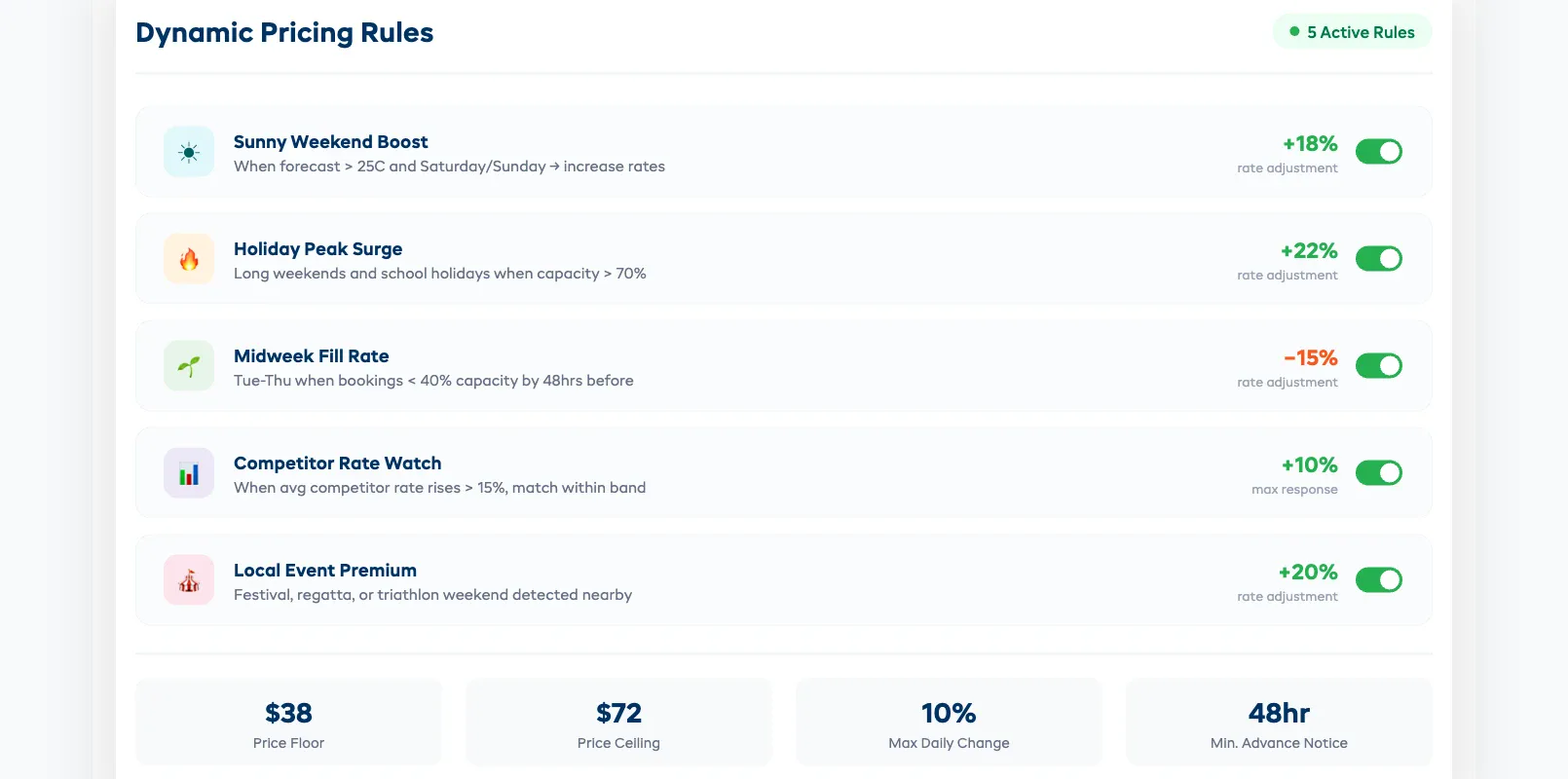
Manually adjusting for all of this is a full-time job. With automated rate rules, you set the pattern once. "If it's a weekday in shoulder season and bookings are below 40% capacity, drop rates 15%. If it's a holiday weekend and bookings are above 70% by Wednesday, increase rates 20%."
The system executes these rules every day without you touching it. You review the results weekly and tighten or loosen the bands.
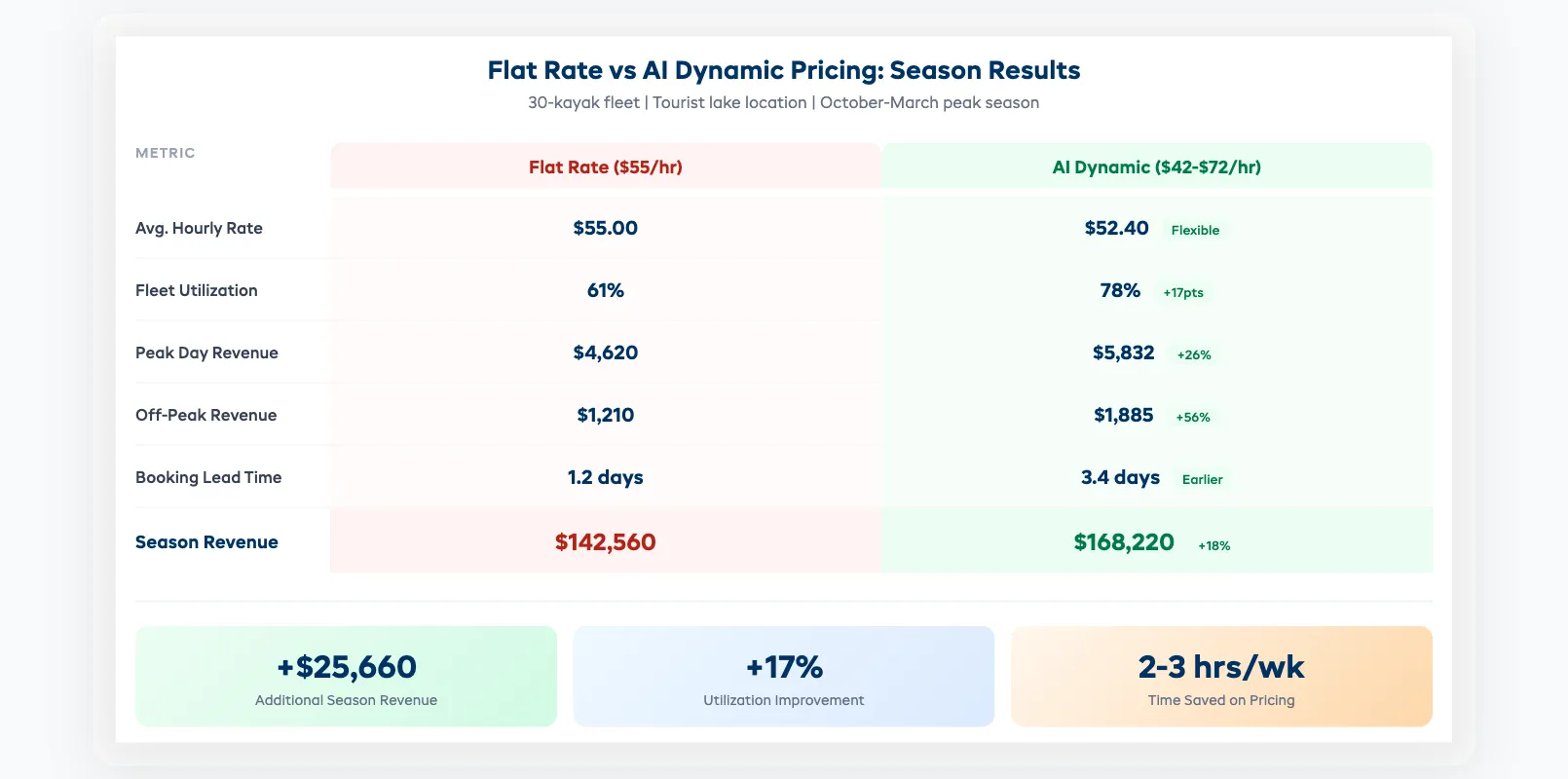
Real example: A paddleboard rental shop in Queensland ran flat pricing at $55/hour year-round. After switching to automated peak/off-peak rules, their average rate was $52/hour (lower overall), but utilization jumped from 61% to 78%. Net result: 18% more revenue on the same fleet.
Weather-Based Pricing Adjustments
Weather is the single biggest demand driver in outdoor equipment rental. And it changes faster than any operator can manually adjust for.
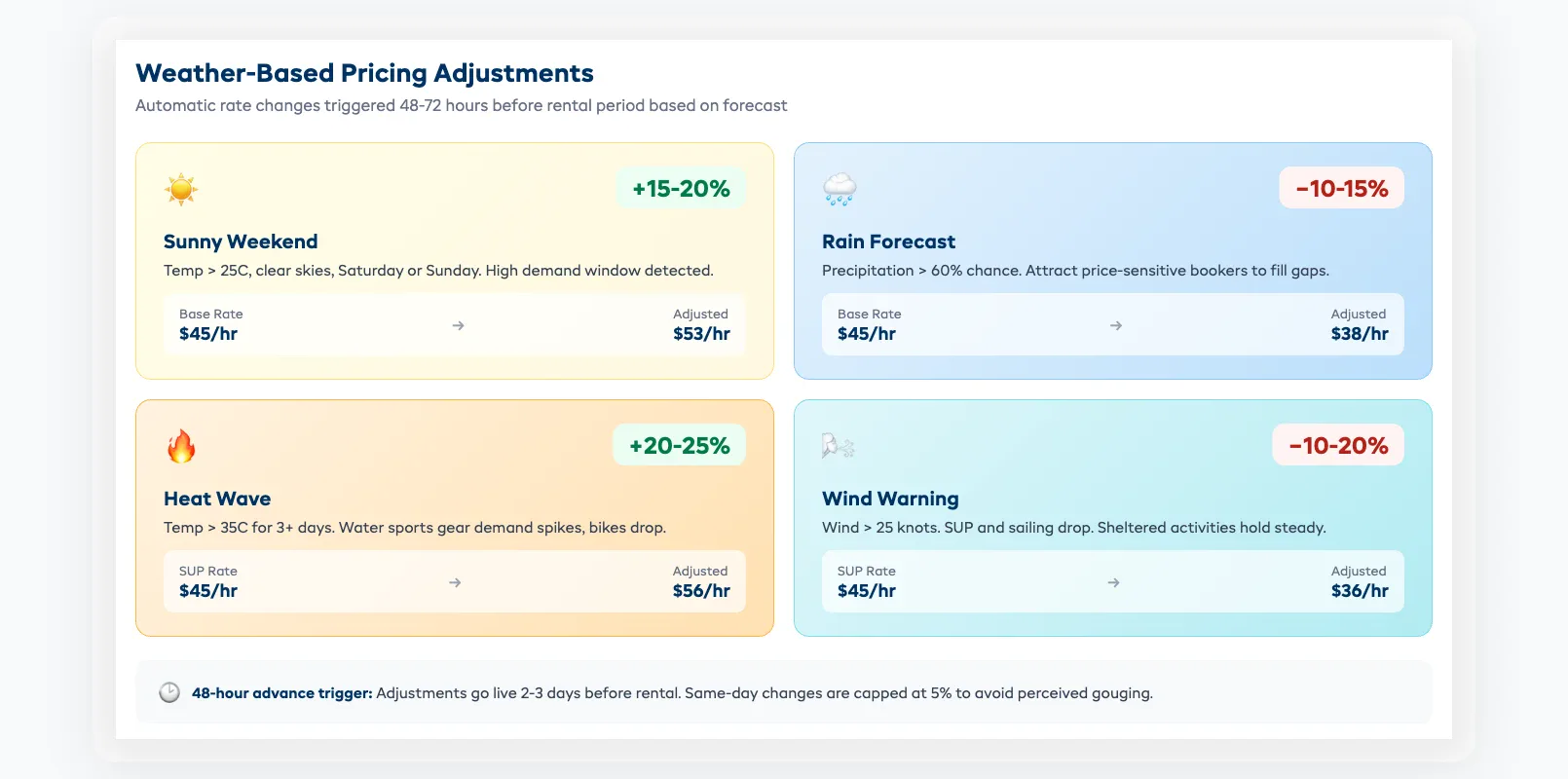
AI weather-based pricing works on a 48-72 hour forecast window:
- Sunny weekend incoming? Rates increase 10-20% automatically 2-3 days out. Customers booking on Wednesday for Saturday see the adjusted rate. By the time demand peaks, you've already captured the value.
- Rain forecast? Rates drop 10-15% to attract price-sensitive bookers who might otherwise skip the day. A kayak rented at $38 is better than a kayak sitting on the rack at $45.
- Heat wave? Water sports gear (SUPs, kayaks, snorkel sets) gets a premium bump. Bike rentals might drop slightly -- fewer people want to cycle in 38-degree heat.
- Wind warnings? Sailing and SUP rates drop. Sheltered activities or land-based rentals hold steady.
The adjustment isn't just about the forecast itself. It's about the forecast relative to what's normal. A 25-degree day in January (in Australia) is unremarkable. A 25-degree day in late September, after a week of 18-degree weather? That's a demand spike, and the system catches it.
The key rule: weather adjustments should trigger 48+ hours before the rental period. Changing prices same-day feels like gouging. Changing them three days out feels like market pricing.
Competitor Rate Monitoring
You probably check competitor prices once a season -- maybe twice. AI can check them daily.
Competitor rate monitoring works by scanning publicly listed prices on competitor booking pages. It doesn't need insider data. It just needs a public-facing rate card or booking widget.
What it tracks:
- Base hourly/daily rates for matching equipment categories
- Seasonal rate changes (when competitors switch to peak pricing)
- Promotional discounts and flash sales
- New product additions or category changes
How to use it without racing to the bottom:
The goal isn't to always be cheapest. It's to know where you stand. If every competitor in your area charges $50-$60/hour for kayaks and you're at $42, you're leaving money on the table. If you're at $70 and bookings are slow, you know why.
Set alerts for significant changes -- when a competitor adjusts rates by more than 15%, or when a new operator enters your market. Don't react to every $2 fluctuation. React to trends.
Dash AI can flag competitor rate changes alongside your own booking data. If a competitor drops prices and your bookings don't change, you don't need to match them. If a competitor raises prices and your bookings spike, you're probably still underpriced.
Setting Pricing Rules and Guardrails
Dynamic pricing without guardrails is a recipe for customer complaints. The system needs boundaries.
Essential guardrails every operator should set:
-
Price floor. The absolute minimum you'll accept. Calculate this from your per-unit cost (depreciation + maintenance + insurance + storage) divided by expected rentals per month. If your kayak costs you $8/hour to own, your floor should be at least $25-$30/hour to maintain healthy margins.
-
Price ceiling. The maximum customers will tolerate before they drive to the next town. Test this by incrementally raising peak rates and watching booking conversion rates. When conversions drop more than 10%, you've found your ceiling.
-
Maximum daily change. Limit how much a rate can swing in 24 hours. A 5-10% daily cap prevents whiplash. Customers who checked prices yesterday shouldn't see a 40% jump today.
-
Minimum advance notice. Price changes should apply to future bookings only. Never reprice a confirmed reservation. Set a 24-hour minimum between a rate change and its effective date.
-
Category consistency. If a double kayak costs more than a single, that relationship should hold regardless of dynamic adjustments. Set relative pricing rules: "doubles are always 1.6-1.8x the single rate."
-
Manual override. You should always be able to lock a rate for a specific day. Local charity event? Lock at your base rate. Staff appreciation day? Lock at cost. The system suggests; you decide.
Start conservative. Most operators begin with a narrow band -- their base rate plus or minus 10%. After a month of data, widen to 15-20%. After a full season, you'll have enough data to let the system run with a 25-30% range confidently.
ROI: What Operators Actually See
The pitch sounds great on paper. But what do rental shops actually experience when they switch from flat-rate to AI-driven pricing?
Revenue impact:
- Average revenue increase in the first season: 12-22%
- Most of the gain comes from peak-day capture (charging more when demand supports it), not from volume increases
- Off-peak discounting adds 5-10% more bookings on traditionally slow days -- at lower per-unit revenue but better than zero
Utilization changes:
- Fleet utilization typically increases 8-15 percentage points
- The improvement is almost entirely on off-peak days. Peak days were already near capacity -- now they just generate more revenue per booking
Customer behavior:
- Booking lead time increases. When customers know prices go up closer to the date, they book earlier. Earlier bookings mean better planning, less last-minute staffing chaos
- Price complaints are rare when the rate is shown clearly at booking time. Transparency eliminates surprise
- Repeat customers adapt within one or two visits. They learn that booking midweek or in advance gets them a better rate
Time savings:
- Operators report saving 2-3 hours per week they previously spent manually adjusting rates, checking competitor prices, and debating pricing decisions with staff
What doesn't work:
- Dynamic pricing on equipment with very low demand (specialty items rented once or twice a month) -- not enough data for meaningful patterns
- Aggressive discounting below cost to "fill every slot" -- this trains customers to wait for low prices
- Changing prices without communicating the model to front-desk staff -- they need to explain it confidently when asked
The bottom line: if you run 20+ units of any single equipment category and operate in an area with weather-driven demand swings, AI dynamic pricing pays for itself within the first season. The operators who see the best results are the ones who set clear guardrails, review weekly, and resist the urge to override the system every time it suggests a rate they wouldn't have picked manually.
Dynamic pricing is one of 8 AI use cases that rental operators are putting to work today -- and it's often the first one that pays for itself.
FAQ
Does dynamic pricing mean I'm price-gouging customers?
No. Dynamic pricing adjusts rates based on real demand signals -- the same way airlines and hotels have operated for decades. You set the floor and ceiling. The system stays within your defined range. Customers see the rate at booking time with full transparency.
How much historical data do I need before AI pricing works?
One full season of booking data gives the system enough patterns to work with. You can start with basic calendar and weather rules from day one and layer in AI pattern matching as data accumulates. Even 3-4 months of data produces useful correlations.
Will customers complain about different prices on different days?
Rarely. Most customers already expect weekend and peak-season rates to differ from weekday prices. The key is transparency -- display the rate clearly during booking. Don't show one price and charge another. Operators who switch report fewer than 1 in 200 bookings generating a pricing complaint.
Can I exclude certain customer types from dynamic pricing?
Yes. Most systems let you lock rates for specific customer groups -- corporate accounts, loyalty members, group bookings, or customers with pre-negotiated rates. Dynamic pricing applies to your public booking widget while custom agreements stay fixed.
What happens if the AI sets a bad price?
Your guardrails catch it. The price floor prevents rates from dropping below your minimum margin. The ceiling prevents rates from spiking past what customers will pay. The daily change cap prevents wild swings. And you can always manually override any rate for any date.
How does dynamic pricing interact with promo codes and vouchers?
Promo codes and vouchers typically apply as a discount on top of the current dynamic rate. If a kayak is priced at $55/hour (dynamically adjusted) and a customer has a 10% off promo code, they pay $49.50. Set your price floor to account for maximum discount stacking so you never go below cost.
Is this worth it for a small operation with 10-15 units?
It depends on your demand variability. If you're in a tourist area with strong weekend/weekday swings and weather-driven demand, even 10 units can benefit. If demand is steady year-round, the gains will be smaller. The break-even point is typically around 15-20 units of a single category.
AI dynamic pricing is one piece of the puzzle. For a complete view of how AI transforms equipment rental operations -- from maintenance to inventory to customer communication -- read our AI for Equipment Rental Business guide. And if you want to keep your fleet running while those prices do their work, see Predictive Maintenance for Rental Equipment.
in one place