Understanding Availability
Availability is at the heart of the rental system. It determines whether a customer can book a product for their requested dates and times. EquipDash calculates availability in real time based on your inventory, active bookings, and items in the workshop.
How Availability Is Calculated
For any given product and date range, EquipDash runs this calculation:
Available = Total Stock - Reserved - Picked Up - In Workshop
| Factor | Description |
|---|---|
| Total Stock | The total number of inventory units you own for this product |
| Reserved | Units assigned to confirmed bookings that overlap with the requested dates |
| Picked Up | Units currently out with customers |
| In Workshop | Units currently in the workshop for maintenance |
If the result is greater than zero, the product is available. If it is zero or negative, the product is fully booked (or you have a shortage).
Example
You have 10 surfboards:
- 3 are reserved for upcoming bookings
- 2 are currently picked up by customers
- 1 is in the workshop
Available: 10 - 3 - 2 - 1 = 4 surfboards
Availability with Variations
When a product has variations (e.g., sizes), availability is calculated per variation. A customer booking a Medium wetsuit only sees availability for Medium units, not the total across all sizes.
Availability with Item Tracking
With item-level tracking, each individual unit has its own status. EquipDash checks the status of every unit to determine the count in each category (reserved, picked up, in workshop, available).
Availability with Group Tracking
With group-level tracking, the total stock is a single number. EquipDash deducts bookings from this number to calculate what is available. You do not track which specific item goes to which customer.
Buffer Time and Availability
If you have set up buffer time on a product (e.g., 1 hour before and after each booking for cleaning), EquipDash includes the buffer periods when checking for overlaps. This means:
- A booking from 9:00 AM to 5:00 PM with a 1-hour buffer blocks the item from 8:00 AM to 6:00 PM.
- Another customer trying to book from 5:00 PM will see the item as unavailable until 6:00 PM.
Rental Period Limits and Availability
If you have set minimum or maximum rental durations on a product, customers will be prevented from booking outside those limits -- even if inventory is available.
Minimum Booking Notice and Availability
If you require a minimum booking notice (a lead time before a rental can start), a pickup inside that window is treated as unavailable on customer-facing channels -- even if inventory is free. For example, with a 2-hour notice a customer cannot book a pickup that starts within the next two hours; the earliest selectable pickup moves forward by the notice period.
The "earliest available pickup" shown in the notice message is a real, bookable slot: it is rounded up to the next 15-minute increment and respects your opening hours, rolling to the next open day if the lead time would land after you close.
How it is applied depends on the channel:
- Customer widget and API -- the pickup is blocked outright.
- Point of sale -- staff can book inside the window; the item stays available and one warning above Create booking says the notice will be skipped. A shop can turn this off with Staff can book inside the notice at the POS in Rentals settings; the card then reads Min notice required.
- AI assistant -- staff can book inside the window.
Set it per product, or as a Rentals default for all products.
Pickup Window Capacity and Availability
Separately from per-product stock, you can cap how many pickups happen in each time window across your whole business (for example, "5 pickups per 15 minutes"). This protects your counter from a rush when lots of bookings would otherwise start at once.
EquipDash counts the pickup (start) time of each booking against fixed time-window buckets aligned to the start of the day. It does not count rentals that are merely out during the window, and it does not count returns -- only pickups starting in that bucket. When a bucket reaches the cap, the window behaves like this:
- Customer widget and API -- the pickup time is blocked. In the listing the product shows as Not available, and the product page displays a Fully Booked banner, so a customer cannot book that pickup time.
- Point of sale and the AI assistant -- staff can still book into a full window; the item stays available and a warning is shown so the override is intentional. Configure it as a Rentals default under Settings → Rentals → General Settings.
Gear Still Out Past Its Return Time
A rental that was picked up and not yet marked returned keeps counting as out, even after its return time has passed. Until you mark it returned, those items are not offered to anyone else: on your booking page, in POS, in Quick Book, through the API or by Dash.
For example, you own 46 tables and a customer has 8 that were due back an hour ago. Availability shows 38, not 46, until you mark the return. Times that have already passed are not affected.
Real-Time Updates
Availability is calculated in real time. When:
- A new booking is created, availability decreases immediately.
- A booking is canceled, availability increases immediately.
- An item is sent to the workshop, availability decreases.
- An item is returned from the workshop, availability increases.
There is no delay -- the widget and calendar always show current availability.
Shortages
A shortage occurs when you have more reservations than stock for a given date. This can happen if:
- Bookings were created before inventory was fully set up.
- Stock was reduced after bookings were made.
- Items were sent to the workshop that were already reserved.
- You chose to keep selling past your stock -- see below.
EquipDash highlights shortages in the availability report so you can take action (e.g., contact customers to reschedule or source additional stock).
Keep Taking Bookings When Sold Out
Some items you can get hold of at short notice -- a supplier down the road, a second branch, a partner you hire from. For those, turning a customer away because the last one is booked costs you a sale you could easily have filled.
Keep taking bookings when sold out lets a product carry on selling past zero. The booking goes through as normal and EquipDash flags it, so you know to find the extra item before pickup. Nothing is silently oversold -- every booking that went past your stock shows up on one list.
It is off for every product until you turn it on, so nothing changes for the rest of your catalog.
Turning it on
- Go to Rentals > Products and click the edit icon on the product.
- Move to Step 3: Additional Information.
- Open Advanced settings at the bottom of the step.
- Switch on Keep taking bookings when sold out?
- In Up to how many extra? -- the box to the right of the label -- enter how many you are confident you can source for any one date. Leave it blank and EquipDash allows one.
- Click Update Product.
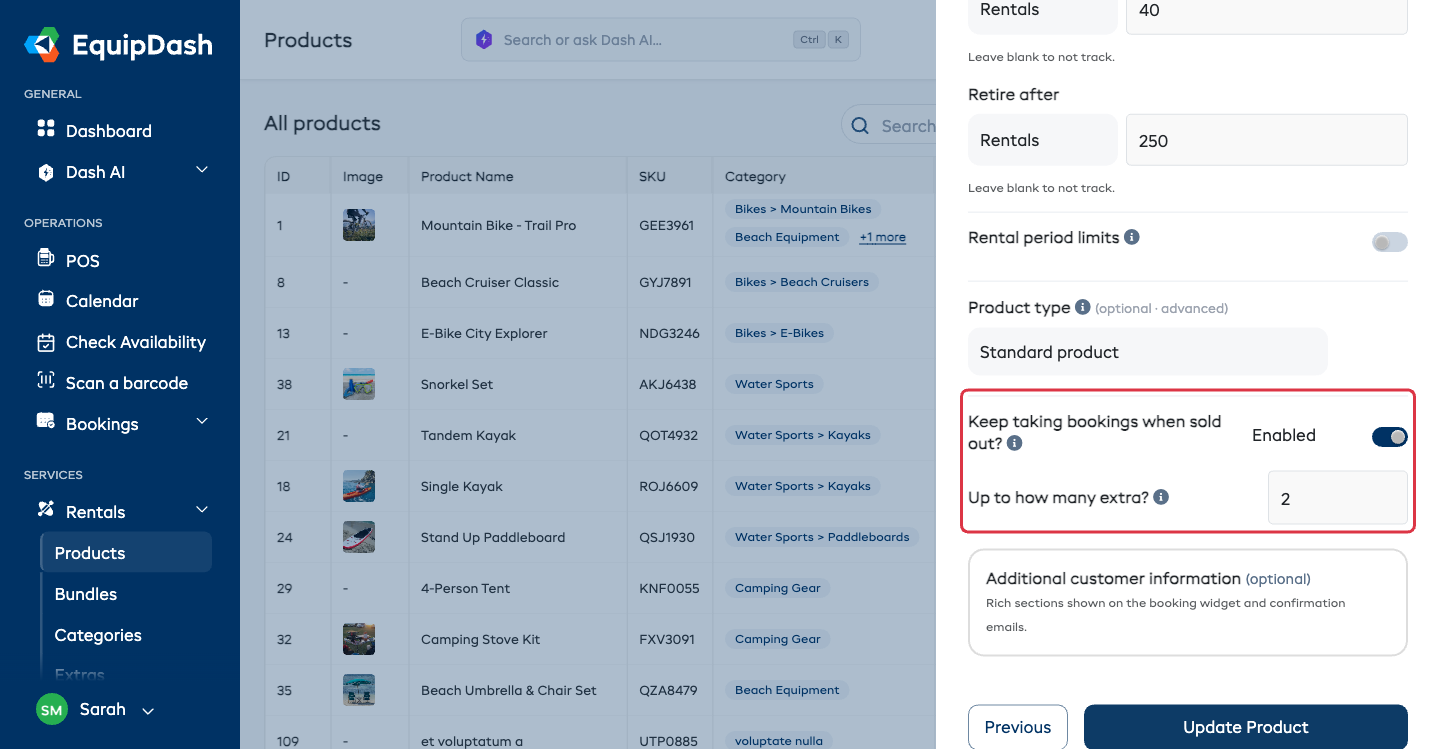
The setting only appears once Inventory tracking is on. A product with no stock count is already unlimited, so there is nothing to go short of.
What your team sees
Once the last one is booked, the product card in New booking stays sellable and reads Sold out -- book 2 more, counting down as the allowance is used. Hover the label for the full sentence. When the allowance runs out, the card goes fully sold out and behaves exactly as it does today.
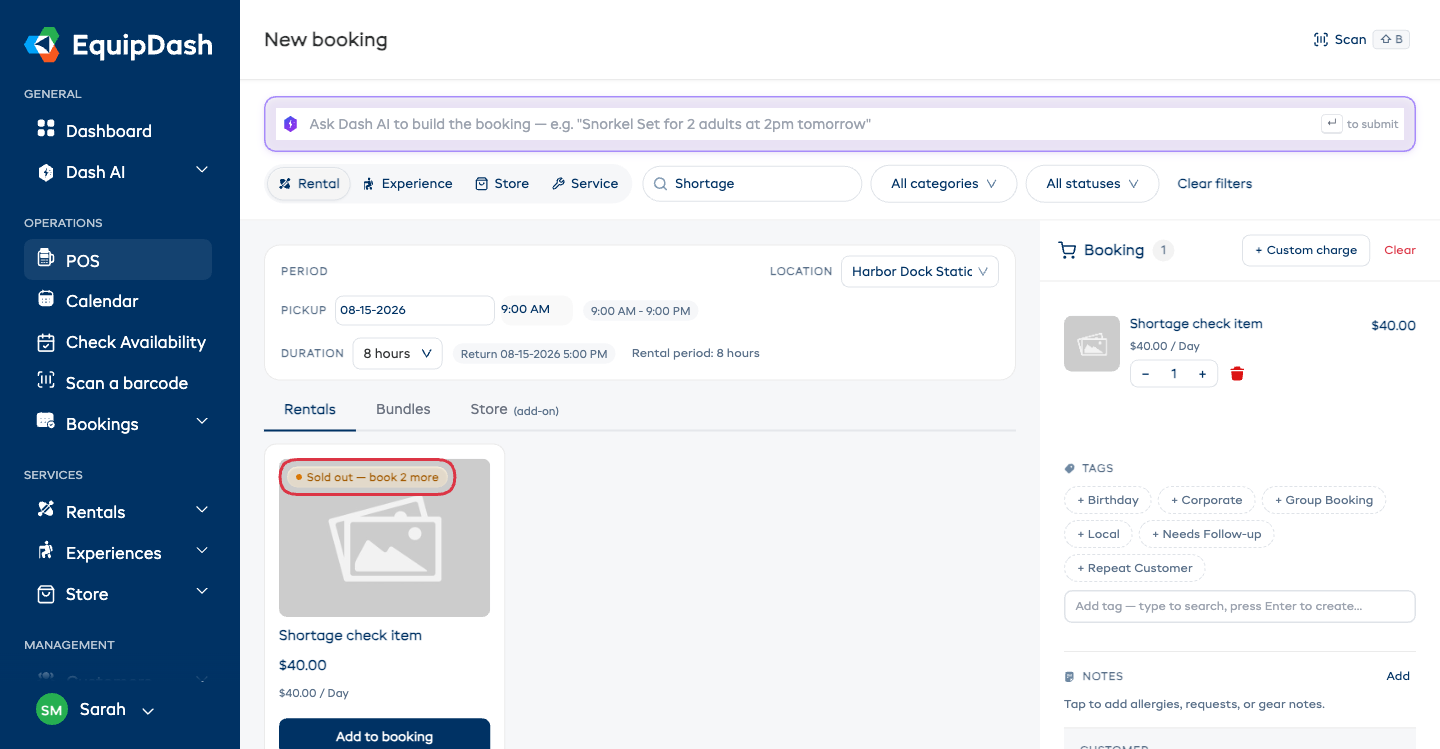
The line in the booking panel keeps counting too -- it reads Available: 1 left while there is still allowance, and only says Fully booked once the item really cannot be added.
Customers never see the wording. On your booking page the item simply reads Available, and the quantity picker stops at your limit.
Finding the bookings that need stock
Every booking that went past your stock is flagged in three places:
- Bookings > Rentals -- the row carries a Short 1 item badge, and Filters > Stock > Needs extra stock narrows the list to just those bookings.
- The booking itself opens with a Booked past stock -- inventory not assigned note saying how many items are short, and each affected line in Items in booking shows an amber N not assigned flag in its Inventory column, so you can see exactly which units still need sourcing. Once you have them, click Dismiss to clear the note.
- Your Dashboard shows a 1 booking needs extra stock chip on the Rentals row. Click it to jump straight to the filtered list.
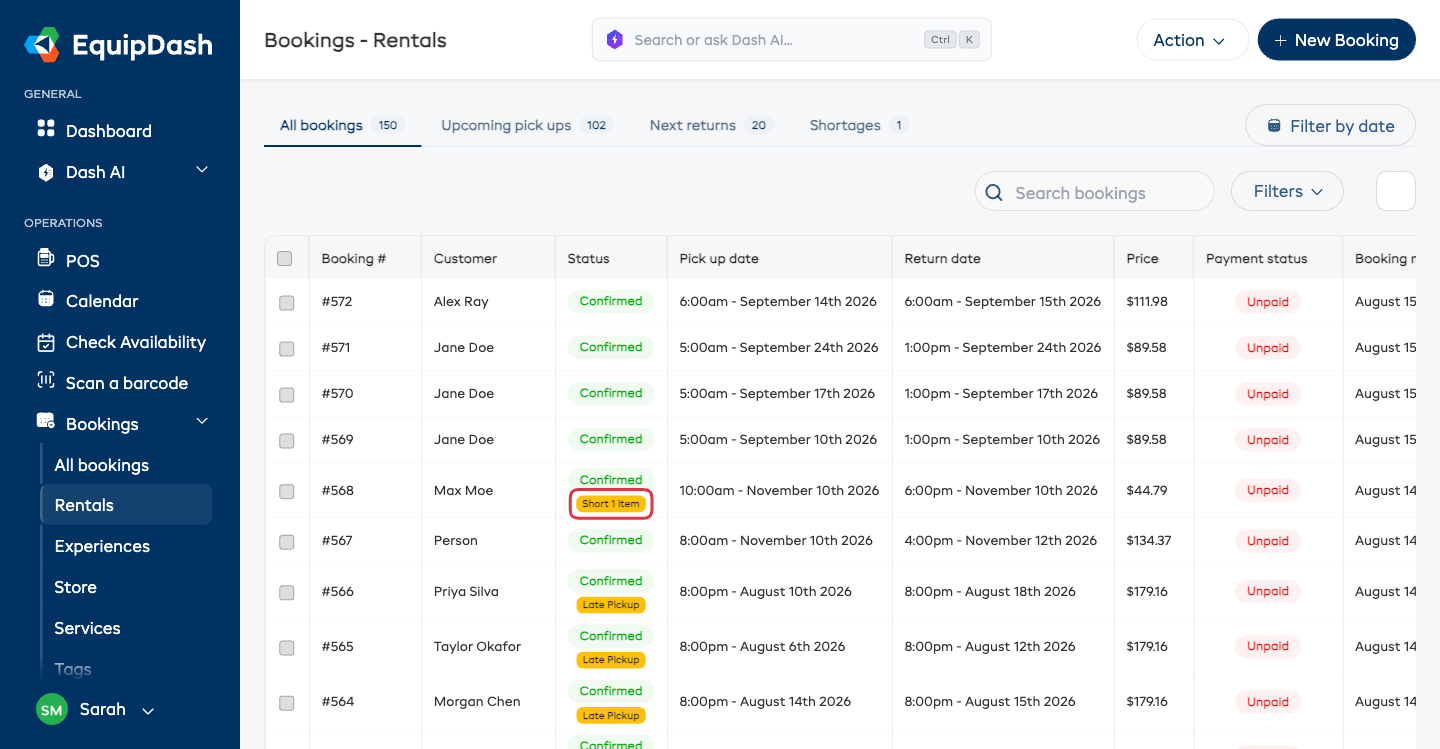
The limit is a running total for each date, not per booking. With a limit of 2, one booking can go 2 over, or two bookings can go 1 over each -- either way the third sale is blocked.
Related Guides
- Checking Availability -- Using the availability checker tool.
- Availability Reports -- Viewing utilization and availability data.
- Inventory Units -- Managing your physical inventory.
- How the Workshop Works -- How the workshop affects availability.
- Bookings Overview -- Filtering the bookings list, including Needs extra stock.