How the Workshop Works Growth+This feature requires the Growth+ plan or higher
The Workshop is a maintenance tracking system built into EquipDash. When a rental item needs repair, cleaning, or servicing, you send it to the workshop. While it is there, the item is automatically taken out of your available inventory so it cannot be booked. Your team can work through standardised checklists, add notes, and track progress. Once the work is done, you mark it as complete and the item goes back into circulation.
Why Use the Workshop
- Prevent double-bookings -- Items in the workshop are automatically unavailable for booking, so customers will never be assigned a broken item.
- Track maintenance history -- Every workshop entry is logged, building a complete service history for each item.
- Standardise inspections -- Attach checklists so every team member follows the same steps, every time.
- Catch safety issues -- Critical checklist items can block an item from being returned until they pass.
- Stay organized -- See at a glance which items are out for repair, which are overdue, and which are ready to rent.
Workshop Concepts
Workshop log
Each time you send an item to the workshop, a workshop log entry (also called a workshop job) is created. The log records:
- Which item was sent
- When it was sent
- The reason for the workshop visit
- Notes from the person who sent it
- Assigned staff members
- Attached checklists and their completion status
- When the work was completed (once done)
Workshop statuses
Items in the workshop go through these stages:
| Status | Meaning |
|---|---|
| In Workshop | The item is currently undergoing maintenance or repair |
| Scheduled | The item is scheduled for a future workshop visit |
| Overdue | The item's scheduled workshop end time has passed without completion |
| Left Workshop | The work is done and the item has been returned to available inventory |
Summary stat cards
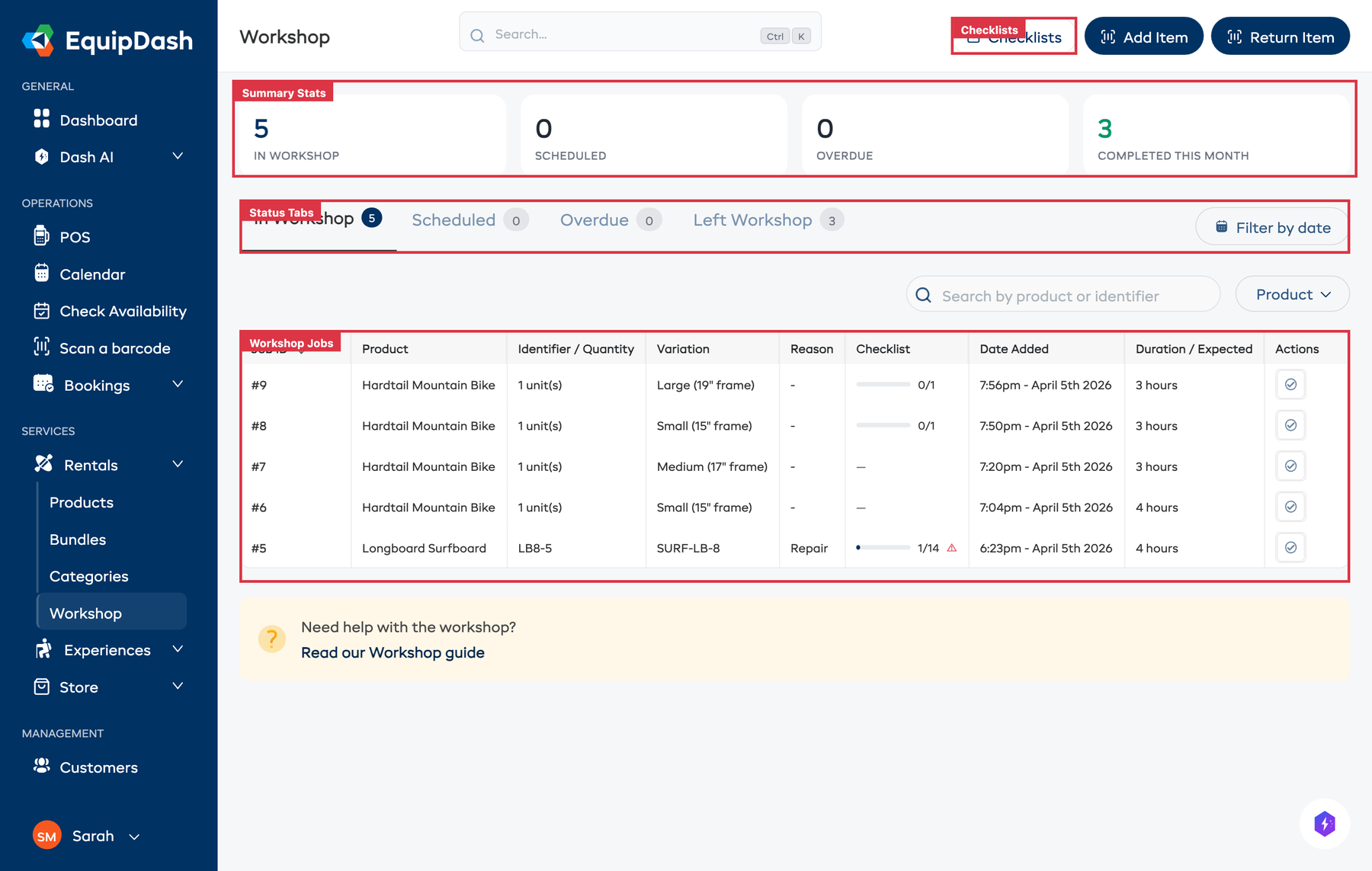
At the top of the Workshop page, four summary cards give you an at-a-glance view of your workshop activity:
- In Workshop -- The number of items currently being worked on.
- Scheduled -- The number of items scheduled for a future visit.
- Overdue -- The number of items past their expected completion date.
- Completed This Month -- The number of items that have been through the workshop and returned this month.
Click any card to jump straight to that tab.
Workshop tabs
The workshop page has four tabs:
- In Workshop -- Shows all items currently being worked on. The tab badge shows the count.
- Scheduled -- Shows items that are scheduled for a future workshop visit.
- Overdue -- Shows items whose scheduled end time has passed without being completed.
- Left Workshop -- Shows the history of items that have been through the workshop and returned.
Checklist progress
When a workshop job has checklists attached, a checklist progress column appears in the table showing how many items have been completed (e.g., "4/12") along with a progress bar. If any critical checklist item has failed, a warning icon appears next to the progress.
Checklists are optional. You can use the workshop for simple tracking without any checklists at all, or attach checklists when you need structured inspections.
Accessing the Workshop
- Go to Rentals > Workshop in the left sidebar.
- You will see the workshop table with summary stat cards at the top and your current items below.
Automatic Workshop Routing from Damaged Returns
When a staff member marks an item as Damaged during the return process, the item is automatically sent to the workshop. No manual action is needed -- the system creates a workshop job with the reason Returned Damaged, includes the staff member's condition notes, and removes the item from available inventory immediately.
This means your team can focus on documenting the damage at return and trust that the item will not be accidentally rented out before it is repaired.
How It Affects Availability
When an item is sent to the workshop:
- Its inventory unit status changes to In Workshop.
- The unit is excluded from availability calculations.
- Any availability reports will show the item as "In Workshop" rather than "Available".
- The product's available count decreases by the number of units in the workshop.
When the item is completed:
- Its status changes back to Available.
- The unit is included in availability calculations again.
- The available count goes back up.
Workshop with Barcodes
If you have barcodes enabled, you can scan an item's barcode to quickly send it to or return it from the workshop. This is especially useful on a busy shop floor.
- Click the Add Item button to scan an item in.
- Click the Return Item button to scan a completed item back out.
Searching and Filtering
The workshop table includes several tools to help you find what you need:
- Search -- Type to search by product name, identifier, or job ID.
- Product filter -- Filter the table to show only items from a specific product.
- Date filter -- Filter by date range to narrow down results.
Related Guides
- Sending Items to Workshop -- How to send an item for repair.
- Completing Workshop Items -- Marking items as fixed.
- Workshop Checklists -- Using checklists for standardised inspections.
- Workshop Activity Log -- Viewing workshop history.
- Inventory Units -- Managing individual inventory items.
- Booking Fulfillment -- Logging condition at pickup and return.