What the Rental Agreement Is
The rental agreement is your own terms — what the customer is taking, when it's due back, who pays for damage — put in front of them and signed before they walk away with anything.
You write the wording once. EquipDash fills in the rest for every booking: your business details, the customer's details, the items, the dates, the price and the security deposit. Nothing to retype, nothing to print unless you want to.
It's Not the Same as a Waiver
You'll probably use both, and they answer different questions.
| Rental agreement | Waivers & forms | |
|---|---|---|
| What it's about | The booking — the items, the dates, the money, the deposit | The people — their fitness, their consent, their details |
| How many | One per booking, signed by whoever is paying | One per person on the booking |
| How many can you have | One set of terms for the whole business | As many as you need — a liability waiver, a health questionnaire, a photo consent |
| Who gets it | Every booking, automatically | Only bookings that include the items you attached the form to |
| What's in it | Your terms, plus that booking's items, dates and amounts filled in | Whatever questions and fields you build |
| When it goes out | The moment the booking is made | With the confirmation email, or whenever you send it |
The short version: the agreement is the contract for the booking; a waiver is what each person signs about themselves. On a weekend booking for a group, the agreement covers what's going out, when it's due back and who pays for damage — the waiver is where each person confirms they're fit to take part.
The waiver builder is flexible enough to build almost any document, so you can build something agreement-shaped in there — plenty of businesses did before this existed. Two things the rental agreement does that a waiver can't: it fills itself in with the booking's own items, dates and amounts, and it turns up on every booking without you attaching it to anything.
If you already have a form doing this job, you don't have to move it. Most businesses end up with the agreement for the booking and waivers for the people.
How It Works
- You write the wording under Settings → Rentals → Agreement. It starts empty — the terms are yours, so we don't supply any. Type them in or paste them from your own document.
- Every booking gets its own agreement, with that booking's details already filled in.
- It's emailed automatically the moment the booking is made, whichever way it came in.
- The customer signs it — from the link in the email, from the confirmation page straight after booking, or on your screen at the counter.
- A signed PDF is saved on the booking, along with who signed, when, and from where.
What the Customer Sees
The agreement is one clean page: your business at the top, their details and dates, what they've booked with the amounts, your terms, and a box to sign in.
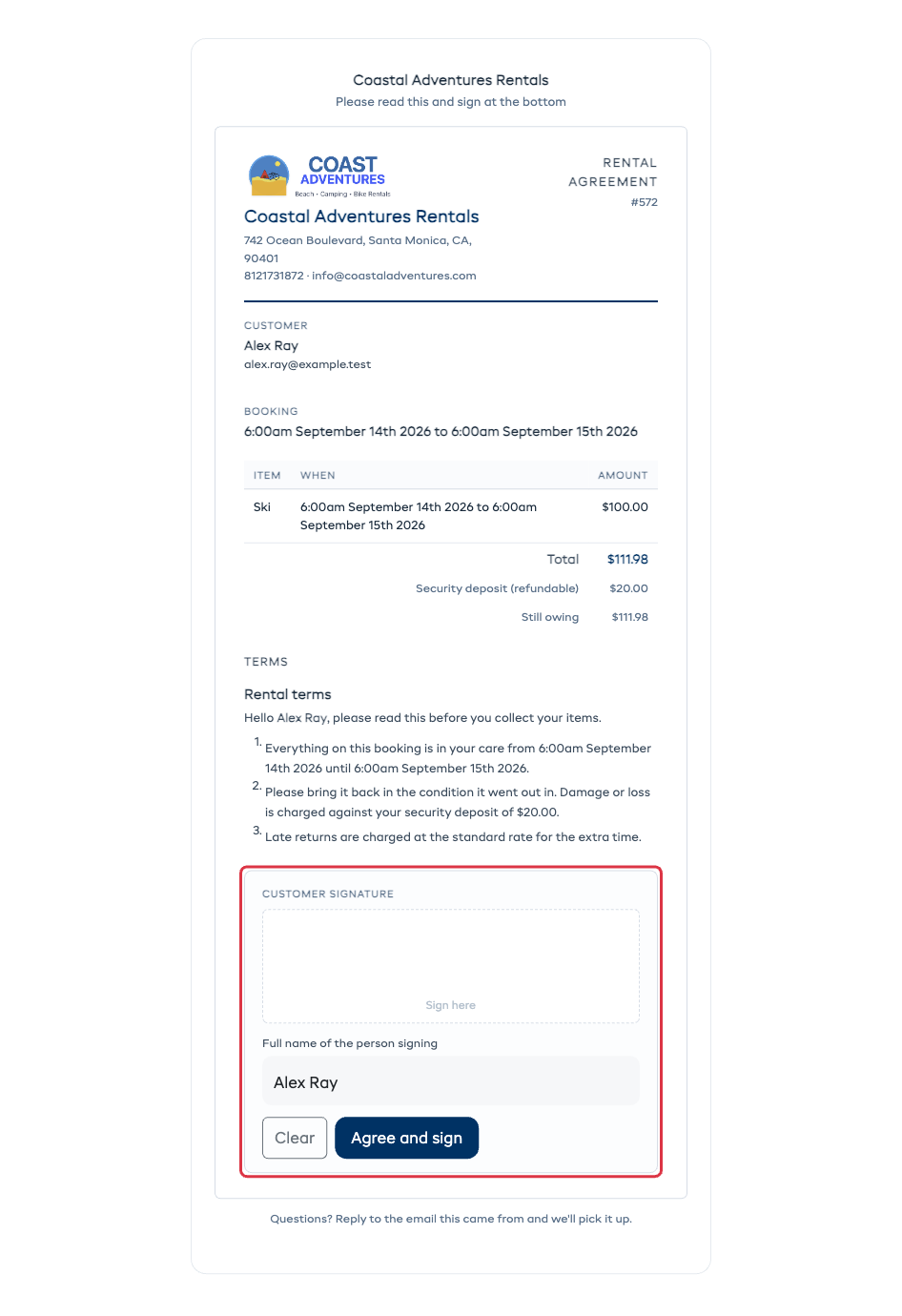
They don't need an account and they don't need a password — the link is all it takes. It works the same on a phone, a tablet or a laptop, and it's in the language the booking was made in.
Where the Signed Copy Lives
Once it's signed, the agreement sits in the Documents card on the booking, next to the invoice. Open it any time to read it back or download the PDF.
The signing record — the name typed in, the date and time, and the address it was signed from — is printed on the agreement itself, so the copy you download is the whole story.
Next
- Setting Up Your Agreement — turn it on and write the wording.
- Getting It Signed — the email that goes out on its own, and signing at the counter.