Workshop Activity Log Growth+This feature requires the Growth+ plan or higher
Every workshop action is logged, giving you a complete maintenance history for each inventory item. The activity log helps you track how often items need repairs, identify recurring issues, review past checklist results, and plan preventive maintenance.
Workshop Detail Page
The workshop detail page is the most complete view of a single workshop visit. To access it:
- Go to Rentals > Workshop.
- Click on any workshop entry in the In Workshop or Left Workshop tabs.
- The detail page shows a two-column layout:
Left column:
- Details -- Job ID, product, variation, identifier, current status, and reason.
- Checklists -- All attached checklists with their items, completion status, pass/fail results, and any notes or photos recorded during inspection.
- Notes -- A log of all notes added during the workshop visit, with the date, author, and content. You can add new notes inline using the Add a note... input and Post button.
Right column:
- Timeline -- A vertical timeline with a connecting line showing when the item was added, key events, and when it left the workshop (if completed). Shows the total duration.
- Assigned To -- Staff members assigned to the job, shown with avatars.
- Duration -- How long the item was (or has been) in the workshop.
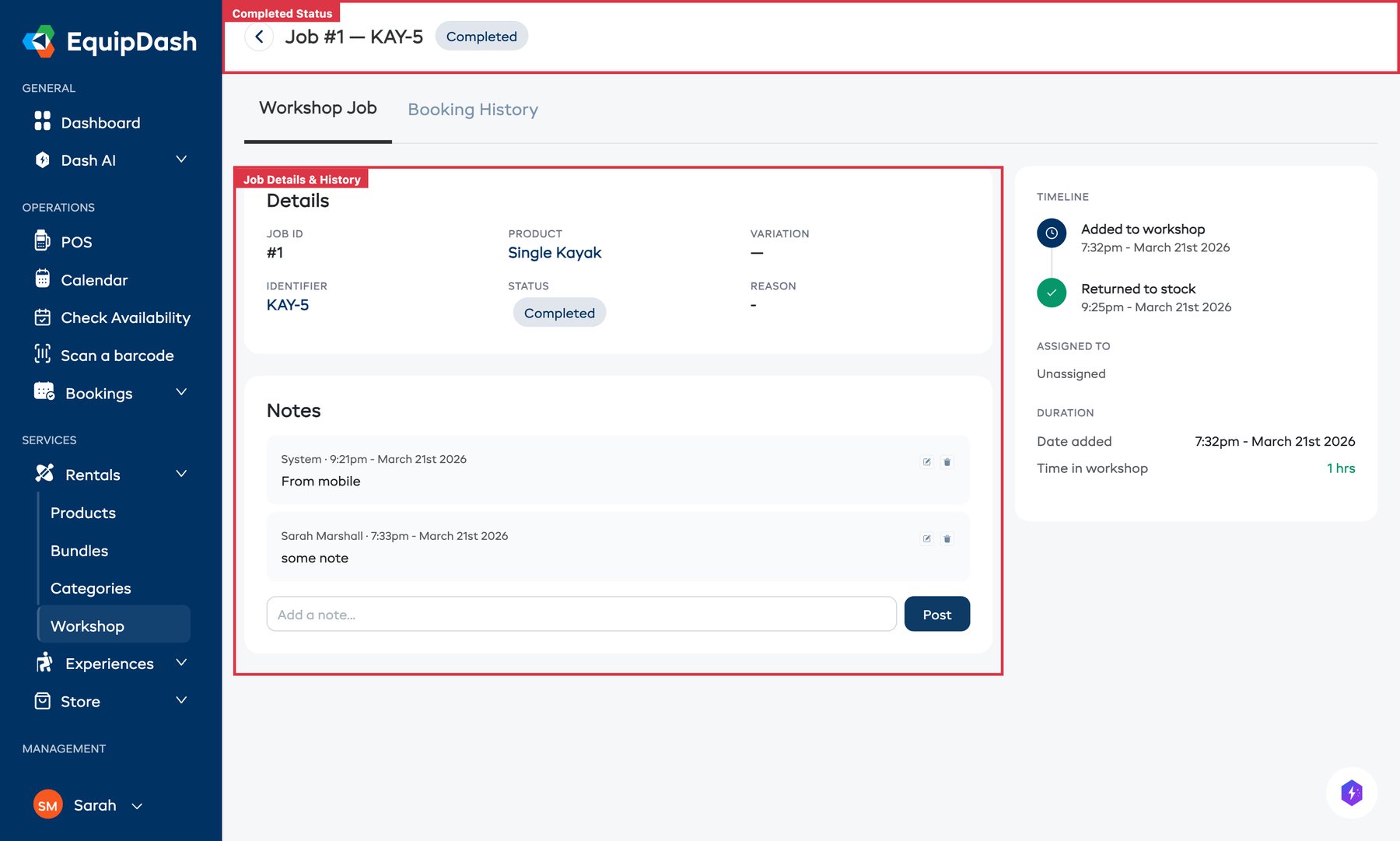
The detail page has two tabs at the top: Workshop Job and Booking History. Switch to Booking History to see the item's rental history alongside its maintenance record.
Viewing Workshop History
From the Workshop page
- Go to Rentals > Workshop.
- Click the Left Workshop tab to see all completed workshop entries.
- Click on a specific entry to open its detail page with the full log for that visit, including completed checklists.
From the Inventory Detail page
- Go to Rentals > Products, click a product, then click an inventory unit.
- On the inventory detail page, the Activity Log tab shows all historical activity for that specific unit, including every workshop visit, booking assignment, and status change.
What the Activity Log Records
Each workshop log entry includes:
| Field | Description |
|---|---|
| Date sent | When the item was sent to the workshop |
| Date completed | When the item was marked as complete (if applicable) |
| Reason | Why the item was sent (repair, cleaning, maintenance, etc.) |
| Assigned staff | Staff members who were assigned to the job |
| Checklists | All attached checklists with their completion status, individual item results, notes, and photos |
| Notes | Notes added during the workshop visit |
| Duration | How long the item was in the workshop |
Checklist History
When a workshop job has checklists attached, every completed checklist is saved as part of the activity log. This gives you a detailed inspection record for each visit, including:
- Which checklist template was used
- The result of each individual item (pass, fail, measurement, notes, or photos)
- Who completed each item and when
- Whether any critical items failed
- The overall checklist status (completed, completed with failures)
This history is invaluable for spotting patterns -- for example, if the same item keeps failing the same safety check, it may be time to repair or retire it.
Filtering the Workshop History
On the Workshop page, you can filter the completed items by date:
- Click the Filter by date button.
- Choose a filter option (e.g., Date Added or Date Completed).
- Set the Start Date and End Date.
- Click Apply.
You can also use the search bar to find specific items by product name, identifier, or job ID, and the product filter to narrow results to a specific product.
Using the Activity Log for Maintenance Planning
The workshop activity log can help you:
- Spot problem items -- If the same unit keeps coming back to the workshop, it might be time to retire or replace it.
- Review inspection results -- Look at past checklist results to see what was found during previous visits.
- Track maintenance costs -- Use the notes to record parts replaced or costs, building a picture of your maintenance expenses.
- Plan preventive maintenance -- Review how often items typically need servicing and schedule workshop time proactively.
- Demonstrate compliance -- For insurance or safety audits, show a complete record of inspections with pass/fail results and photos.
Related Guides
- How the Workshop Works -- Overview of the workshop feature.
- Sending Items to Workshop -- Sending items for maintenance.
- Completing Workshop Items -- Marking items as fixed.
- Workshop Checklists -- Creating templates and managing checklists.
- Inventory Units -- Managing individual inventory items.