Deposit rules
Most shops hold one deposit for everyone, and that is what Settings → Rentals → Deposits is for. Leave this page alone if that works.
Deposit rules are for the shops where one figure does not fit. A booking that runs for a month ties up your gear far longer than one that runs for a day. A customer three states away is harder to chase than one down the road. A rule lets you say so.
Where to find it
Settings → Rentals → Deposits → Advanced deposit rules.
It sits collapsed right under the deposit it can override, so you see both in one place.
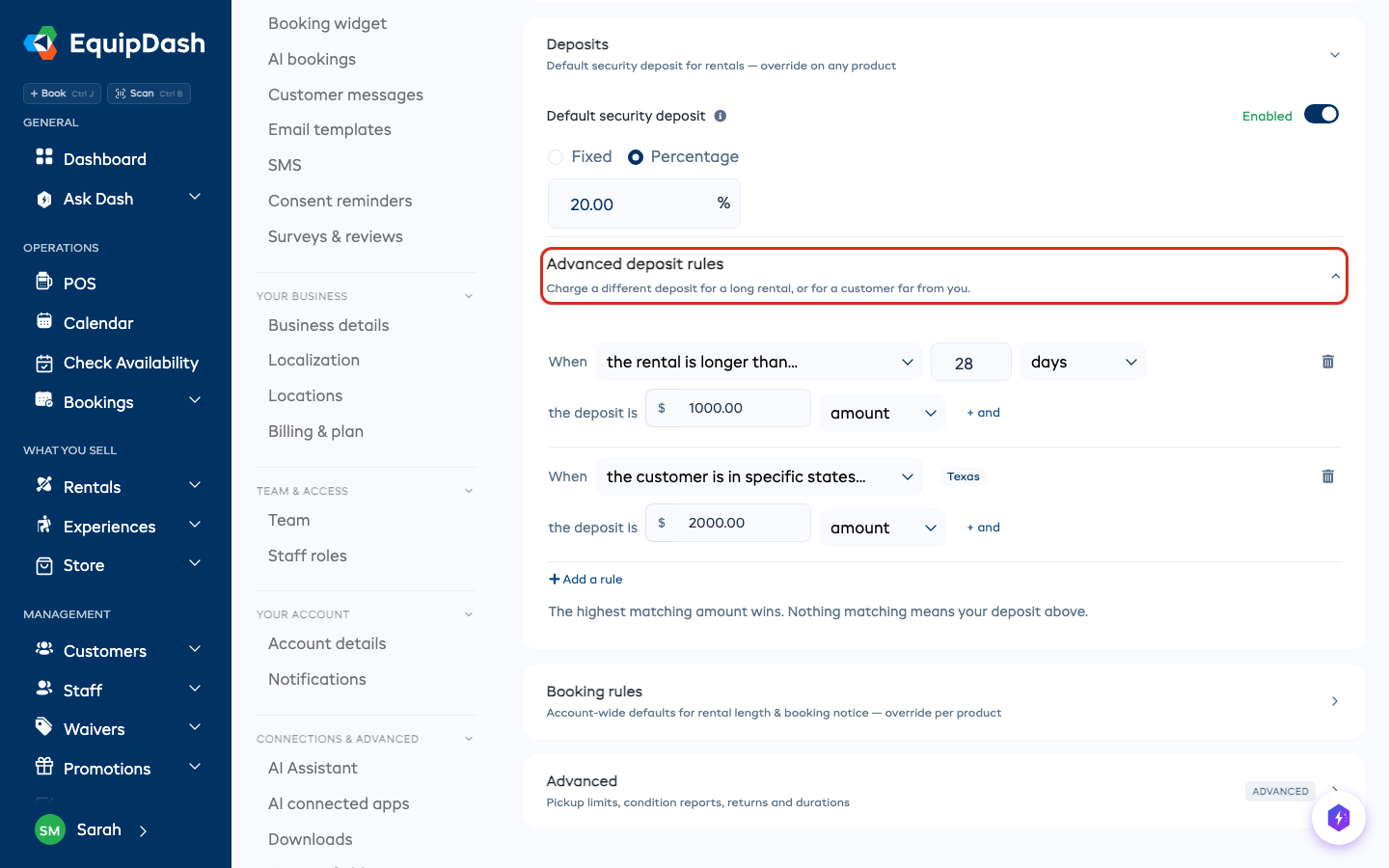
Open it and it starts empty, and empty means nothing has changed: every booking uses the deposit you set above. You will see:
No rules. Every booking uses the deposit above.
Adding a rule
Click Add a rule. Each rule is one sentence:
When the rental is longer than 28 days the deposit is $1,000
You pick the situation, then type the amount. There are three situations:
| Situation | What it reads |
|---|---|
| The rental is longer than… | How long the booking runs. Type a number and pick minutes, hours or days. |
| The customer is outside your area | Your own state or region, taken from your business address. |
| The customer is in specific states | Opens a list of your own country's states, provinces or regions so you can tick the ones you mean, and a postcode box for anything finer. |
The amount can be a figure, or a percentage of the booking. A shop whose items run from cheap to very expensive usually wants the percentage.
Ticking places, and typing postcodes
The list only holds places inside your own country, because that is the word your customers give you an address in. Tick as many as you like.
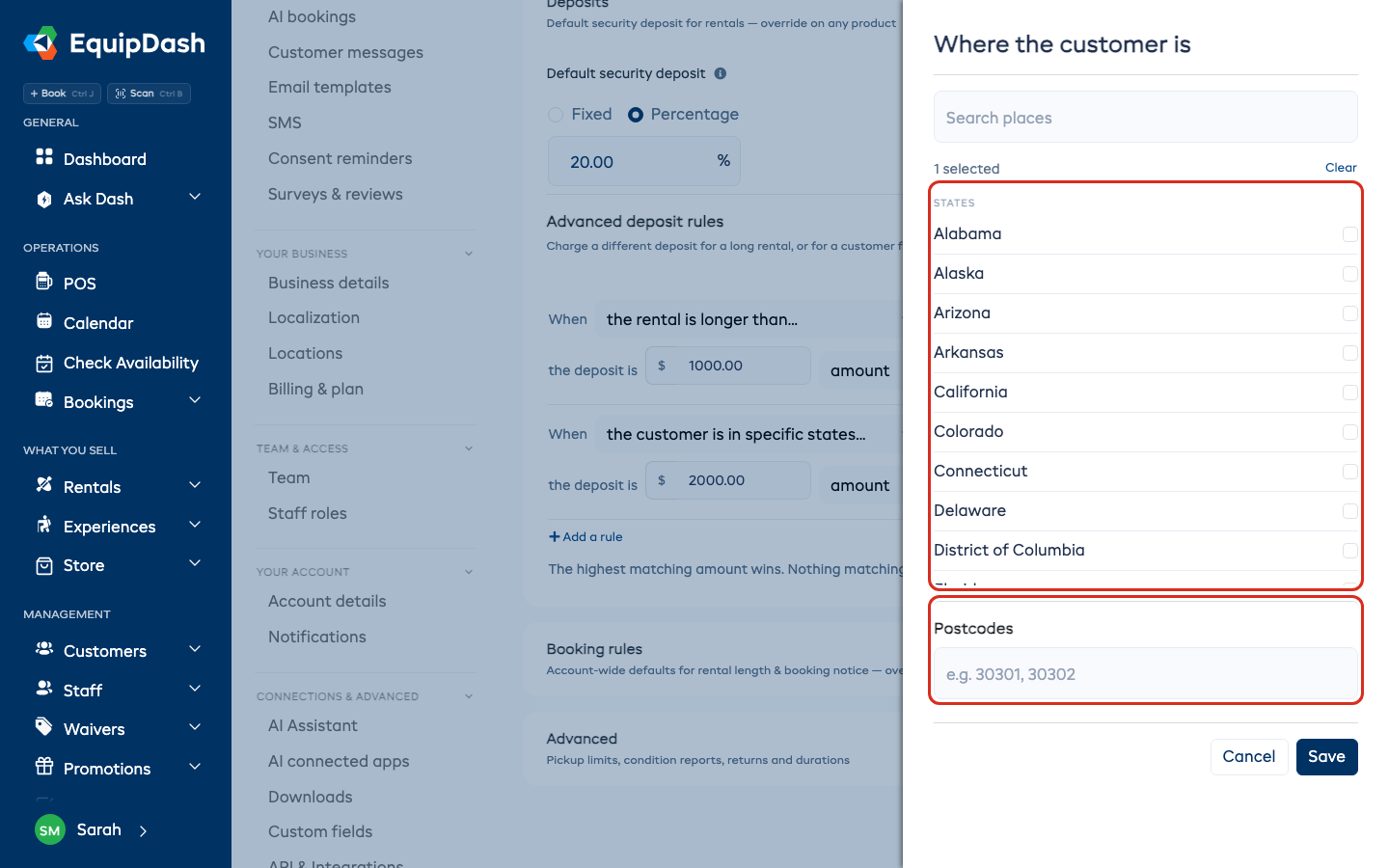
The postcode box underneath is for when a state is too broad. Type the start of a postcode and anything beginning with it matches, so 302 covers every postcode from 30200 to 30299. Separate several with commas.
Ticks and postcodes add together. A rule with Texas ticked and 302 typed applies to a customer in Texas or a customer whose postcode starts 302 — you do not have to pick one way of answering.
Which rule wins
The highest matching amount wins. Nothing matching means the deposit you set above.
So if you have these three:
When the rental is longer than 28 days → $1,000 When the customer is outside Georgia → $1,500 When the customer is in New York, Texas or California → $2,000
then a month-long booking to Texas matches all three, and you hold $2,000. You never have to work out an order, and you never have to write a rule for every combination.
Two things at once
If a situation only deserves a bigger deposit when something else is also true, click + and under the rule and add a second situation. That rule then only applies when both are true:
When the rental is longer than 28 days and the customer is outside Georgia the deposit is $2,500
Two situations is the limit. Past that a rule stops reading as a sentence, and you would not be able to guess what it does.
One item that needs its own deposit
Rules are your shop-wide setting. A single high-value item can still carry its own figure: open that item, go to Additional information → Advanced, turn on Security deposit by default and type an amount. That amount wins, and no rule is applied to it. This is exactly how it already worked against your normal deposit.
What your customer sees
If you have a rule that reads where the customer is, your booking page asks them for it — one field, labeled for their own country. Until they answer, the deposit shows as "from" the lowest amount rather than a final figure, so nobody is surprised at the last step. Once they answer, it firms up before they pay.
If none of your rules read location, your booking page does not change at all.
Checking a booking later
Open any booking and the deposit line says which rule set it. That stays correct even if you change or delete the rule afterwards, because the booking keeps a note of what applied at the time.
Worth knowing
The place comes from the address your customer gives you. Someone can give a local address and take the gear a long way. A rule sets the starting figure; you can still change the deposit on the booking itself.