Choosing Which Events Send SMS
The Which texts to send section, on the Texts tab in Settings → SMS, is where you pick which booking events trigger an SMS. Each event has two columns:
- To customer — SMS goes to the booking customer (the person who booked)
- To me — SMS goes to you (per admin user — turning this on for one admin doesn't enable it for the rest of your team)
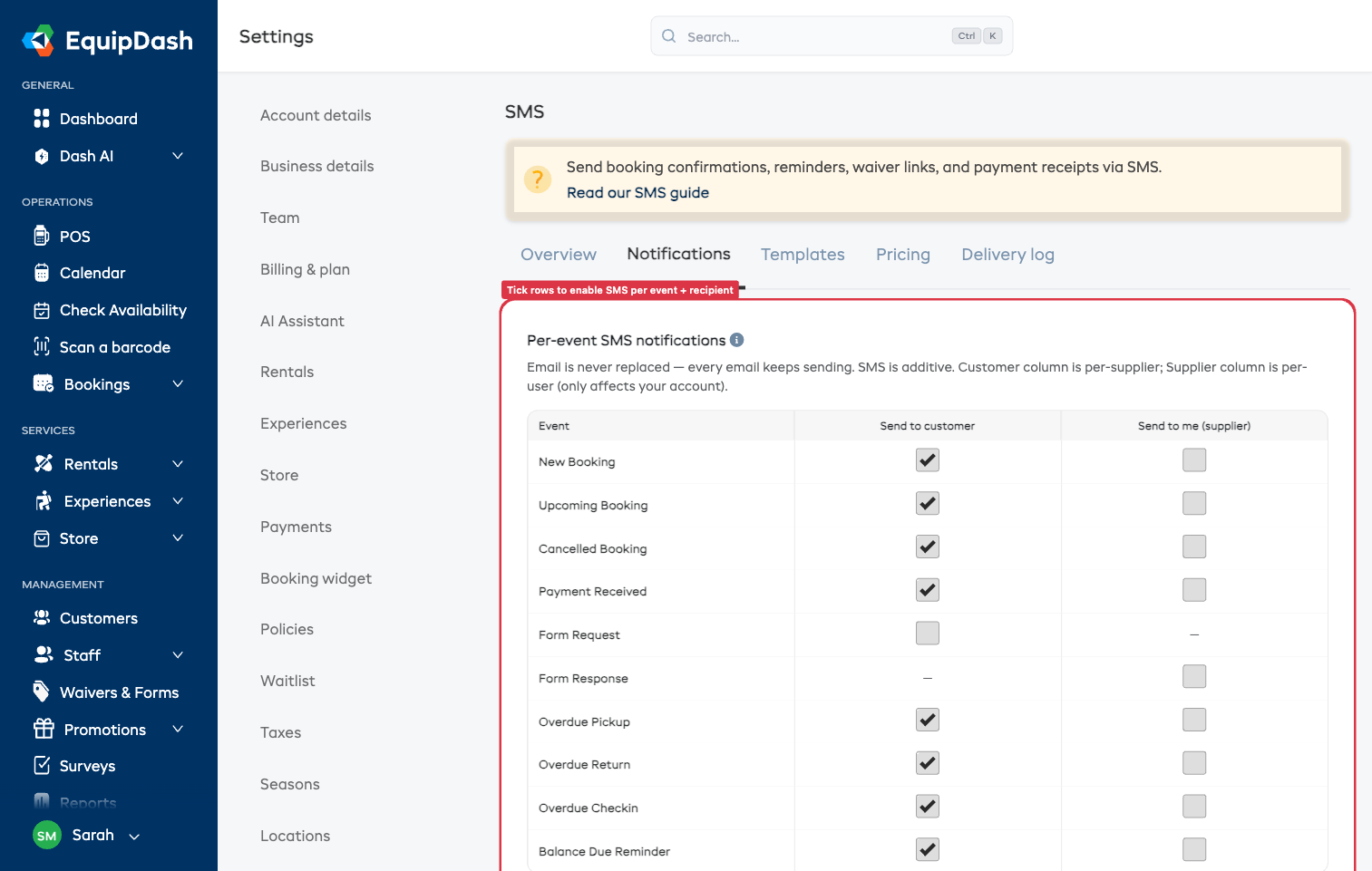
Email is never replaced — SMS is purely additive. Turning a row on means email AND SMS go out for that event.
How to Configure
- Go to Settings → SMS and stay on the Texts tab
- In Which texts to send, flip the switch on for each event + recipient combination you want
Each switch saves automatically — you'll see a Saved confirmation in the corner. Settings apply immediately — no re-login needed.
What Each Event Does
| Event | Customer SMS | Supplier SMS |
|---|---|---|
| New Booking | "Booking confirmed" | "New booking from [name]" |
| Upcoming Booking | 24-hour reminder | "Heads up — booking tomorrow" |
| Cancelled Booking | "Your booking is cancelled" | "Booking #X cancelled" |
| Payment Received | "Payment received, thanks" | "Payment of $X received" |
| Form Request | Waiver / form link | — (supplier doesn't get nudged about waivers they sent) |
| Form Response | — (no customer-facing SMS) | "[Customer] completed their waiver" |
| Late pickup | "Please collect ASAP" | "Customer is late for pickup" |
| Late return | "Please return ASAP" | "Customer is late returning" |
| No show | "Please check in" | "Customer hasn't checked in" |
| Balance Due Reminder | "Balance of $X due" | "Reminder sent — $X outstanding" |
A dash (—) in the grid means that event doesn't apply to that recipient — for example, customers don't get an SMS when they complete their own waiver, only the supplier does.
Customer vs. Supplier Toggles — Who Sees What
The customer column is per-supplier: switching To customer on for New Booking turns it on for everyone in your account, and every booking customer receives the SMS.
The supplier column is per-user: switching To me on only enables it for you. Each admin user opts in individually under their own account. This stops every team member's phone buzzing for every event.
To enable a teammate's SMS notifications, they need to log into their own account and tick the boxes themselves — admins can't toggle it on someone else's behalf.
Recommended Defaults
For a typical rental / experience business:
Customer column:
- ✅ New Booking — confirmation
- ✅ Upcoming Booking — 24-hour reminder (biggest no-show reduction)
- ✅ Form Request — if you use waivers
- ✅ Payment Received — receipt
- ✅ Cancelled Booking — confirmation
- ❌ Overdue Pickup / Return / Check-in — fine for high-trust markets, can feel naggy elsewhere
- ❌ Balance Due Reminder — rare; email is usually enough
Supplier column (per admin):
- ✅ New Booking — instant alert when a booking lands
- ✅ Form Response — know when waivers come back
- ❌ Upcoming Booking — usually too noisy
- ✅ Overdue Pickup / Return / Check-in — chase customers proactively
Customers Without Phone Numbers
If a customer doesn't have a phone number on file, the SMS is silently skipped — the email still sends. The delivery log records skipped sends with status no_phone so you can see what happened.
If a customer has replied STOP to a previous SMS, all future sends to that number are skipped until they reply START to opt back in.