Bring Your Own Twilio Account
If you already have a Twilio account or you send high enough volume that the managed-mode margin matters, you can connect your own Twilio credentials and pay Twilio directly.
EquipDash takes no margin in BYO mode.
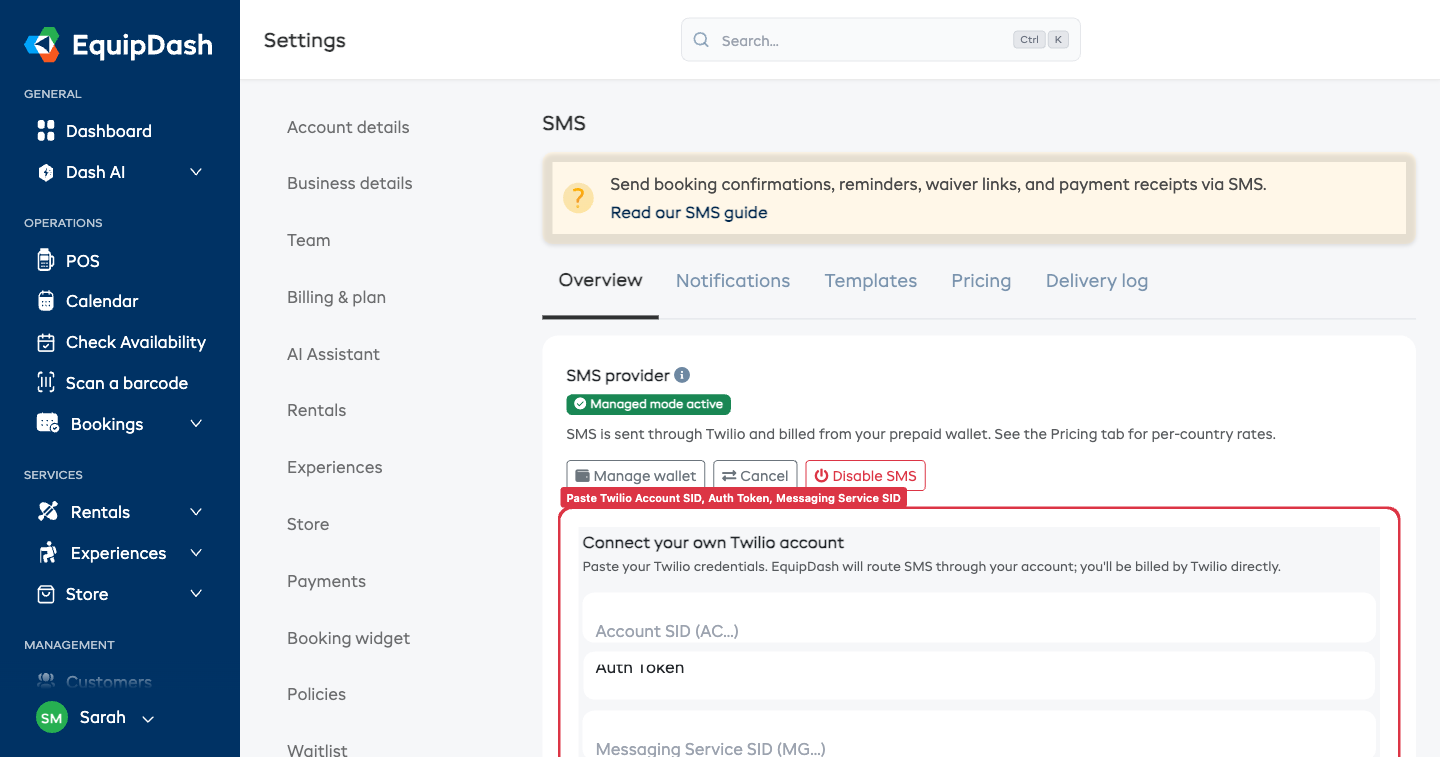
Setup
- In your Twilio Console, create or pick a Messaging Service for transactional SMS — note the SID (starts with
MG…). - From the Twilio dashboard, copy your Account SID (starts with
AC…) and Auth Token. - In EquipDash, go to Settings → SMS → Overview
- Click Switch to BYO Twilio if you're currently on managed mode.
- Paste:
- Account SID
- Auth Token (we encrypt it at rest before saving)
- Messaging Service SID
- Click Connect Twilio
We immediately probe your credentials. On success, you'll see the status flip to Active and SMS sending starts working with your account. On failure, you'll see the Twilio error message — most often a typo in the SID or a revoked token.
Webhooks
For inbound STOP / START handling and delivery status callbacks, configure your Twilio Messaging Service with these webhook URLs:
- Inbound:
https://app.equipdash.com/sms/inbound - Status callback:
https://app.equipdash.com/sms/status
Without the inbound webhook, customer STOP keywords won't reach EquipDash and you'll keep sending to people who opted out — bad for deliverability and compliance.
Daily Revalidation
Every day, EquipDash re-probes your Twilio credentials. If your token gets rotated or your account suspended, we'll mark the connection invalid and surface a banner in the dashboard. Sends fall back to email until you re-connect.
Switching Back to Managed
You can switch back to managed mode anytime from the same Overview tab — your wallet balance (if any) is preserved. Switching only flips which provider sends future messages.
A2P 10DLC Compliance (US)
For sending to US numbers, you're responsible for completing your own A2P 10DLC brand + campaign registration in your Twilio console. Without it, US carriers (especially T-Mobile) will silently filter or drop your messages.
Steps in your Twilio console:
- Brand registration — Twilio Console → Messaging → Regulatory Compliance → A2P 10DLC → Brands → Create. Use the Low-Volume Standard tier ($4 one-off) unless you exceed 6,000 US messages per day.
- Campaign registration — same section, Campaigns → Create. Use case: Mixed. Paste 3–5 of your default templates as message samples.
- Attach to your Messaging Service — once Brand + Campaign approve (24–48 hours).
Approval is usually automatic for legitimate businesses. While vetting is in progress, US deliverability is reduced — non-US destinations are unaffected.
In managed mode, EquipDash handles 10DLC on the master account so you don't have to.
When BYO Is Worth It
| Volume | Recommendation |
|---|---|
| Up to ~2,000 SMS/month | Managed — saves you the registration overhead, pricing is comparable |
| 2,000+ SMS/month | BYO can be worth the setup time — Twilio's per-segment cost drops with volume tiers |
| Already have an active Twilio account | BYO — no second account to manage |