Rental + Experience Bundles Growth+This feature requires the Growth+ plan or higher
A mixed bundle pairs a rental with a guided experience — and, if you like, store add-ons too — and sells them together for one price. Think "Discovery Tour": a guided paddle and a kayak rental, booked in one go, with a deal on the kayak and one tidy security hold covering everything.
It's just a bundle that happens to include an experience. Everything about bundles still applies — you're adding three things: an experience inside the bundle, "pick one" choices so the customer chooses their own gear and tour, and a deal on any part you choose.
Add up the items (with deals) also shows savings when the selected items cost less together. Prices by rate type shows the chosen rate counts and the whole-bundle total.
What a mixed bundle is, in plain terms
You sell things that go together — gear, a guided trip, maybe a small add-on — and you want them booked as one thing:
- The customer picks one rental and picks one experience (you offer the options; they choose).
- You can put a deal on any part — the rental, the experience, or a store add-on. Leave a part alone and it simply stays full price.
- On a rental you can make the deal bigger the longer they rent (e.g. a better discount on a 2-hour hire than a 1-hour one). On a "pick one" choice, set one discount for the whole group so every option gets it — and override a single option only if you want.
- They pay once, get one confirmation, and you take one security hold for the whole bundle instead of several.
When a customer books, you get one booking holding both the gear and the tour, which you run independently — hand over the gear and check in the tour separately — exactly like any rental + experience booking.
One bundle price for each rate
Choose Prices by rate type when the whole package has a set price for each rate, such as Adult and Child. Enter the prices in the existing create panel or Details > Pricing. Customers choose their rate counts once for all included experiences. The rate price covers the whole bundle once, including rentals and store items.
Set each rental or store item to Each person or The whole booking, and choose whether it applies to Everyone or a specific rate. See Creating a Bundle for the quantity rules.
Before you start
Have the pieces in your catalog already:
- The rentals to choose from — see Creating a Product.
- The experiences to choose from — see Creating an Experience.
- Any store add-ons — see your Store products.
Bundles are part of Bundles, available on the Growth plan and above.
Building a mixed bundle
1. Create the bundle
- Go to Rentals → Bundles and click + Add Bundle.
- Name it — for example, "Discovery Tour".
- Set How is it priced? to Add up the items (with deals) — this is the one that lets you put a deal on the rental.
- Click Create Bundle. You land on the Bundle Detail page.
2. Add the gear, the experience, and any add-on
On the What's included tab, use the two buttons:
- Add a customer choice (pick one) — make a group named Watercraft and add your kayaks (e.g. Single Kayak and Tandem Kayak). The customer picks one.
- Add a customer choice (pick one) again — a Tour group with your experience options, if there's more than one.
- Add standard inclusion — anything every customer gets, like the guided tour itself or a store add-on (e.g. wax). Pick rental, experience, or store add-on from the dropdown.
You can mix gear, experiences, and add-ons freely in one bundle.
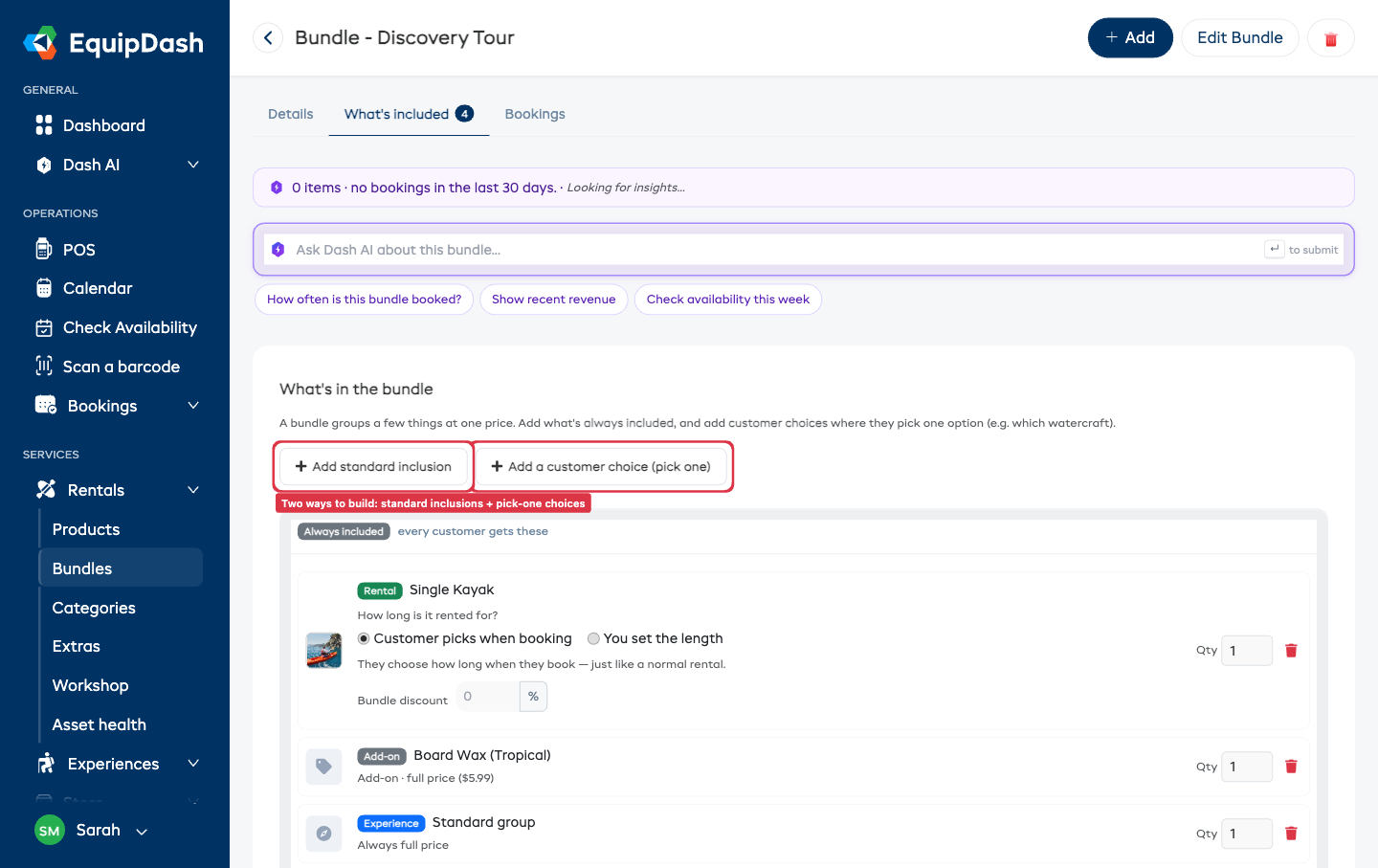
3. Set your deals
Add a discount to any part of the bundle. The customer only ever sees the bundle total and the dollars saved — never the percentages.
- On a rental, choose You set the length and set a deal per length — for example 2 hours = 20% off, 4 hours = 15% off. Only the lengths you set are offered inside the bundle (a 1-hour hire you rent on its own simply isn't an option here). Or leave it on Customer picks when booking and set one flat Bundle discount %.
- On an experience or a store add-on, set a flat Bundle discount % right on the item. Leave it blank to keep that part at full price.
- On a "pick one" choice, set Discount for any choice once at the top of the group and every option inherits it. Want one option cheaper? Set a rate on that option to override the group — the rest keep the group rate.
4. Decide when the rental is used
On the Details tab, turn on Rentals are used during the activity when the rental is equipment the customer uses in the activity. The rental starts with the chosen departure and stays reserved until the activity ends. A longer rental length still keeps it reserved for that full length.
Leave this off when the rental is a separate part of the day. The customer then chooses its start time, and times that overlap an activity in the bundle are unavailable.
5. Take one flat security hold
Instead of a separate hold for the gear and the tour, take one flat hold for the whole bundle. On the Details tab, set the security hold to One flat hold and an amount — for example, $4,000. The customer sees one hold, you place one pre-authorization, and you release or capture it as a single amount. The flat hold isn't affected by the discount — it's your safety net on the equipment.
6. (Optional) Charge for extra people on the tour
If the experience lets extra people join, that per-person charge rides along automatically — you set it on the experience itself (e.g. $39 per extra passenger) and the bundle adds it on top. If you've put a bundle discount on the experience, it comes off the whole experience line, the per-person charge included.
7. (Optional) Let the activities be on different days
By default the whole bundle happens on one day. If your customers sometimes want the activities on separate days — one activity on one day and another later — turn on Activities can be on different days on the Details tab, under Booking days. (The setting only appears for bundles that mix an experience with a rental.) With it off, the bundle stays on a single day, which is what most bundles want.
When it's on, the customer gets a Same day / Different days selector on the booking page (see below). Switching to Different days lets them set a separate date for each activity; each activity then books on its own day, and you run the two sides on their own dates, exactly as you would for any rental + experience booking.
What the customer sees
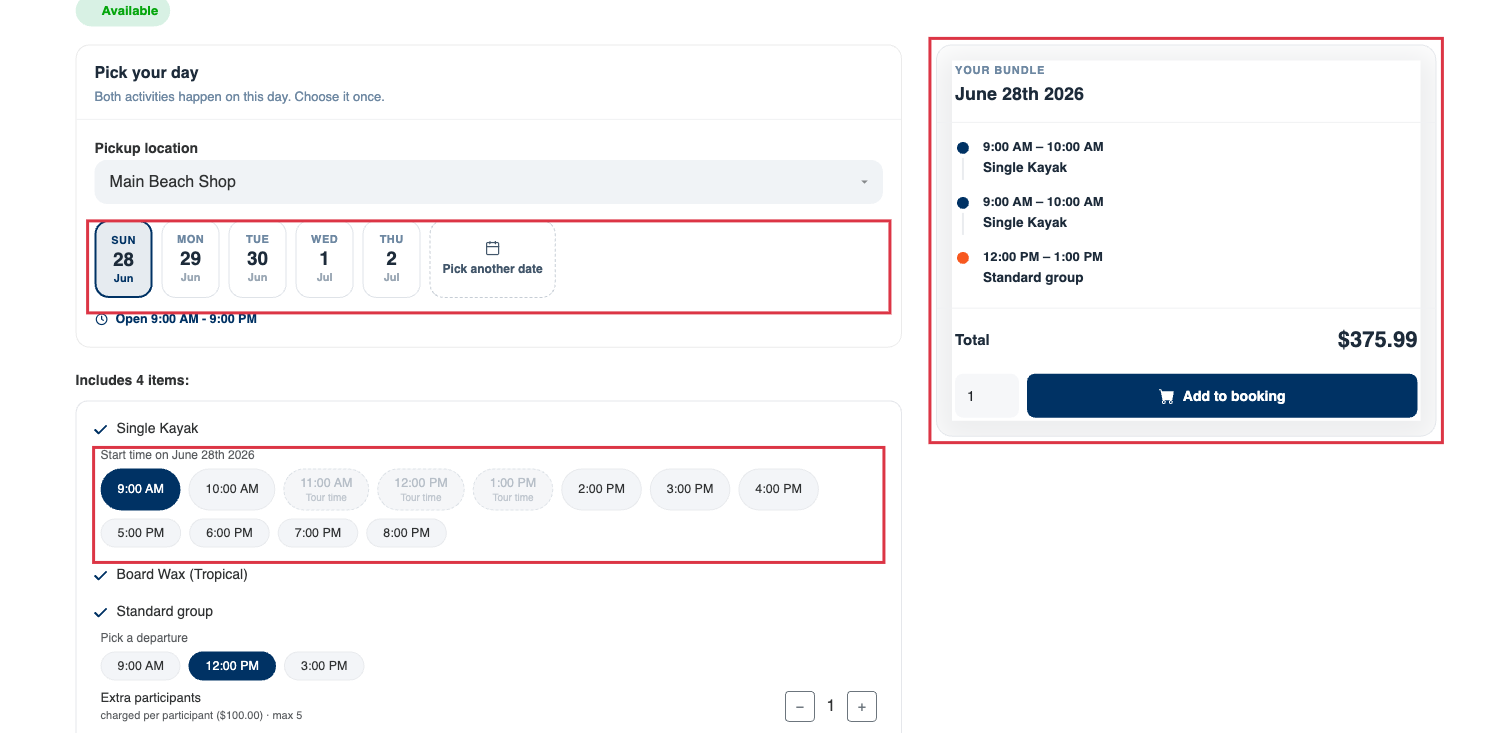
On your booking widget, the mixed bundle is one clean package built around a single idea: pick the adventure day once at the top, then set each activity's time right next to it. The customer:
- Opens the bundle — for example, Discovery Tour. At the top is a Pick your day card with a row of day buttons and a Pick another date pill. They tap one day and everything in the bundle uses that day. (A bundle that's only rentals shows a Booking dates card here instead, with a pickup time and rental length.)
- Picks their watercraft (the "pick one" group) and any other choices.
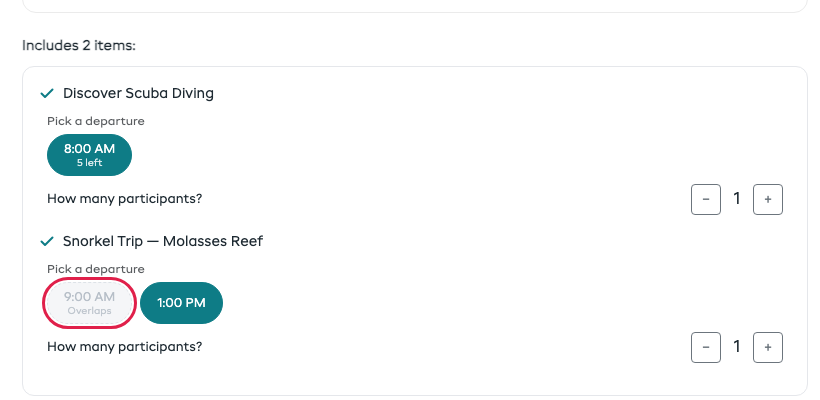
- Sets the tour time — under the experience, Pick a departure lists the real upcoming start times for the chosen day, with sold-out times greyed out. A departure must be chosen; if the tour has no upcoming departures, the bundle can't be added until one is available. When the bundle holds two or more experiences, the first one sets the day: any departure of the next one that would overlap it is greyed out and labelled Overlaps, and the next clear time is picked for the customer. Move the first experience and the others move around it. Back-to-back is fine.
- Uses the timing you set. When Rentals are used during the activity is on, the gear starts with the chosen departure and there is no separate start-time row. When it is off, a Start time on … row appears and times that overlap an activity are unavailable. A fixed rental length still appears under How long? and can keep the gear reserved after the activity ends.
- (If you allowed it) Splits the activities across days — when Activities can be on different days is on for the bundle, the Pick your day card shows a Same day / Different days selector. Same day (the default) keeps the one shared day at the top. Switching to Different days gives each activity its own little date picker right next to it, so the customer can set a separate date per activity. The summary then lists each activity with its own day. Most customers leave it on Same day.
- Checks their plan in the summary — the panel on the right is a live Your bundle itinerary: every activity in order with its time (or "Time not picked yet" until they choose), and its date when activities fall on different days, then the bundle total, any saving from item deals, and the Add to booking button.
- Optionally adds Extra participants, each at your flat per-person price.
- Pays once and gets one confirmation showing the trip time and the gear window, plus one security hold.
With Add up the items (with deals), customers see the total and their saving. With Prices by rate type, they see their chosen counts and the whole-bundle total; no saving is calculated against separate item prices.
After they book
A mixed-bundle booking is one booking with two sides — a gear side and a tour side — that you run independently. Hand over the gear and check in the tour on their own clocks, in any order. When both sides are finished and the gear is back, the booking reads Completed and you release the one hold. This works exactly like any other rental + experience booking.
Tips
- Keep the choices short. Two or three options per "pick one" group beats a long list.
- Show what the price includes. List the activities, gear, and any add-ons covered by the bundle total.
- Discount whatever you like. Sweeten the gear, the trip, or an add-on — or set one Discount for any choice across a "pick one" group and override a single option only if you need to.
- One hold, not several. The flat security hold is what makes the bundle feel like one purchase.
Related Guides
- Creating a Bundle — the basics of grouping items into a package.
- Managing Bundles — filtering, ordering, activating, and deleting.
- Book a Rental and an Experience Together — how a mixed booking runs on your side after the customer pays.
- Security Deposits — how holds work across a booking.
- Widget for Rentals — how bundles appear to customers.