Book a Rental and an Experience Together
A customer can rent gear and book an experience in the same order — for example, hire two paddleboards for the afternoon and join the 5pm guided tour. It all goes into one cart, they pay once, and you get one booking to manage instead of two.
This is called a mixed booking: one booking that holds both rental items and an experience.
There is no setting to enable. If you sell both rentals and experiences, your customers can add both to one cart automatically. A business that only sells one type never sees a mixed cart, because customers can only add what is in your catalog.
Why this is useful
Before, a customer who wanted both a rental and an experience had to do two separate checkouts — pay twice, get two confirmation emails, and leave you with two bookings to manage for one family. Now it is one cart, one payment, one confirmation, and one booking detail screen.
How a customer books both at once
On your booking widget, the customer simply adds both types of item to the same cart:
- Open your booking widget.
- Add a rental to the cart — for example, two paddleboards for this afternoon. (See Widget for Rentals.)
- Without emptying the cart, add an experience — for example, the 5pm guided tour. (See Widget for Experiences.)
- Both items now sit in the cart together. The cart total is the rental plus the experience, with tax, as a single amount.
- The customer enters their details, applies any promo code or voucher, and pays once.
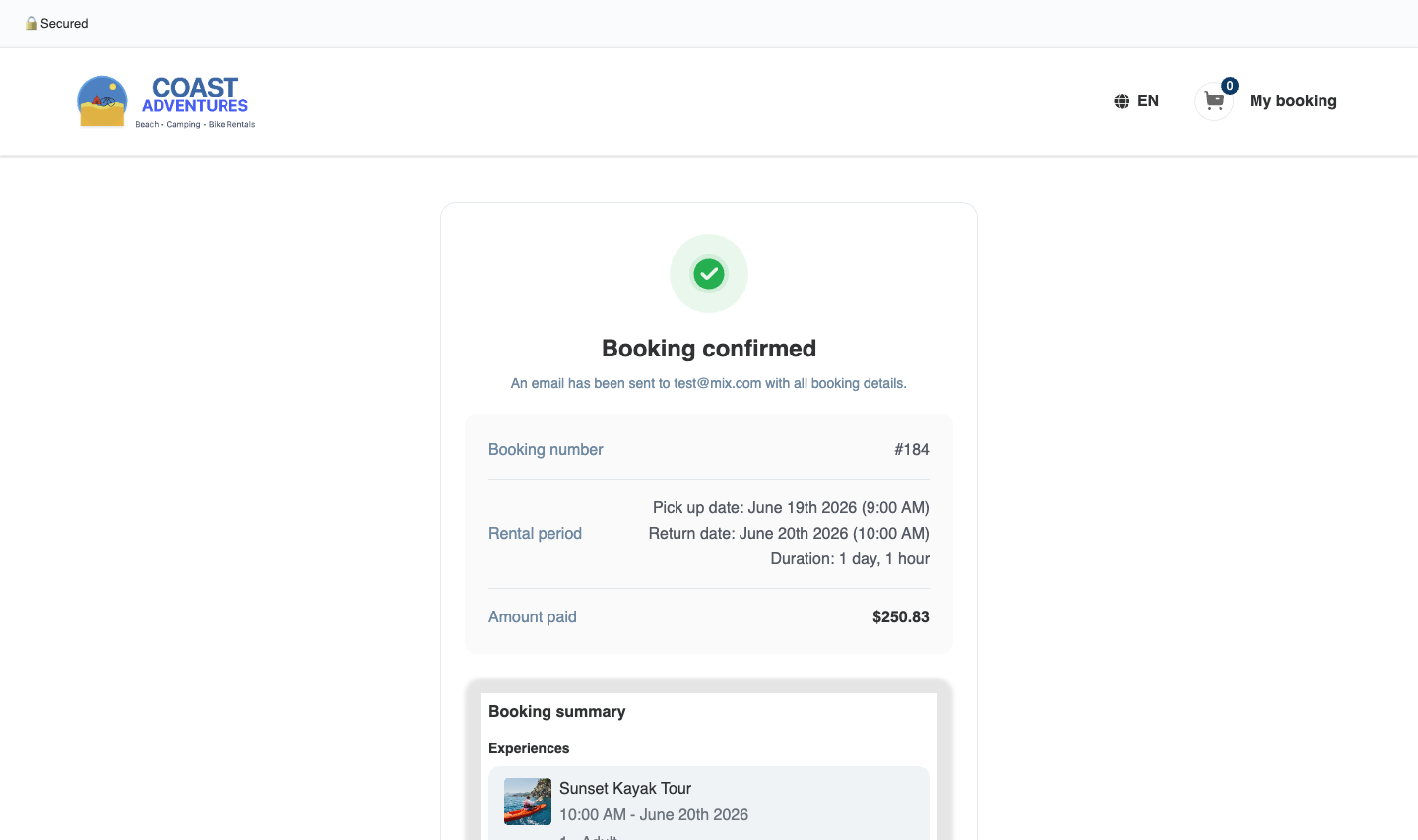
The customer receives one confirmation email and receipt showing both the rental (with its pickup and return dates) and the experience (with its time).
A voucher or order-level discount applies across the whole mixed booking. A promo code scoped to "all rentals" applies only to the rental part. See Promotions.
What you see on your side
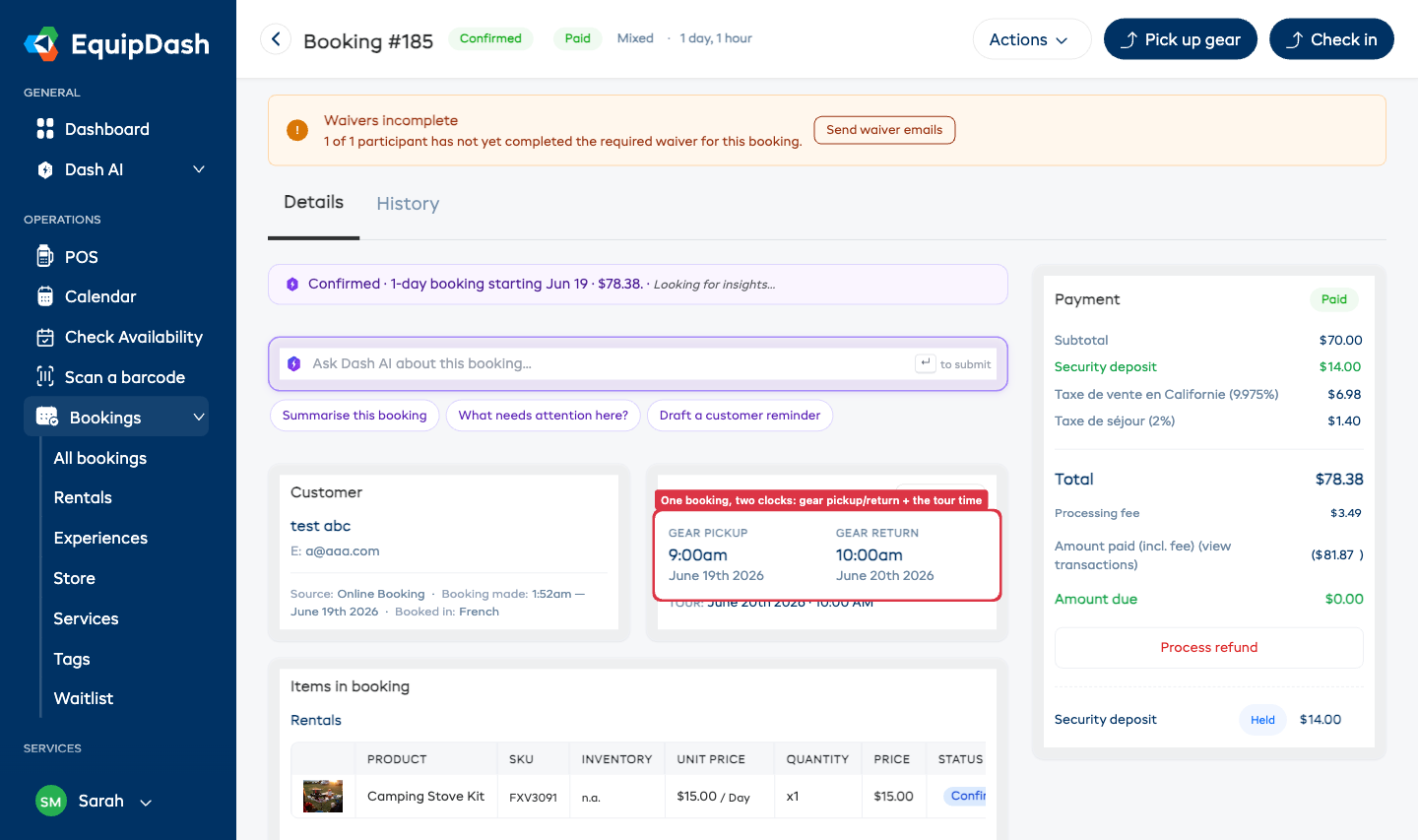
A mixed booking is one order with two independent tracks — a gear track and a tour track. Each runs on its own clock (the gear might go out at 1pm and the tour start at 5pm — even on different days) and in any order. Neither track waits for the other.
Open the booking from the bookings table and you will see:
- One booking showing both the paddleboards and the tour on a single screen.
- Two actions available at the same time: Pick up (for the gear) and Check in (for the tour).
- Each part shows its own status, so you always know what is out and what has happened.
Fulfilling the two tracks
You handle each track on its own — see Booking Fulfillment for the full pickup, return, and check-in steps.
- When the customer collects the gear, mark it Picked Up. The tour is unaffected and still shows Check in.
- When the customer arrives for the tour, Check in the experience. The gear track is unaffected.
- When the gear comes back, mark it Returned.
- Mark the tour Completed (experiences also auto-complete one day after they end).
Once both tracks reach their finish line — gear Returned and tour Completed — the whole booking reads Completed.
In the bookings table, a mixed booking shows two small chips (for example, Gear: to pick up and Tour: to check in) so you can see the state of each track at a glance, rather than one combined status.
It appears on both lists
Because it is one booking that contains both types of item:
- It shows on your Rentals list.
- It also shows on your Experiences list.
- It appears on the Calendar on both the rental window and the tour time.
It is the same single booking in every place — not a duplicate.
Deposits on a mixed booking
If both the rental and the experience take a security deposit, the customer is held one combined deposit (the gear deposit plus the tour deposit, as a single hold). You can release or capture each part as needed when the gear returns and the tour finishes.
Changing the dates
A mixed booking can be rescheduled like any other — by you from the booking detail screen ("Move dates"), or by the customer from the link in their confirmation email.
Because a mixed booking has two times, the reschedule screen shows both on one page:
- a pick-up / return date picker for the gear, and
- a time-slot picker for the tour.
Change either one, or both. The new price difference (extra to pay, or a refund) is worked out and shown before anything is confirmed, and the gear and the tour are each re-checked for availability. See Rescheduling a Booking.
Fixing mistakes
- Cancel the whole booking in one step — the customer gets one cancellation, and the refund follows your cancellation policy across both parts. See Cancelling a Booking.
There is no "cancel just the tour" or "cancel just the gear" option — cancelling removes the entire booking (both parts together). If a customer needs to keep one part and drop the other, cancel the booking and re-book the part they're keeping.
What is protected
- Neither part can oversell because the other is in the cart. If a customer tries to add more paddleboards than you own, or more tour spots than seats left, they are stopped — exactly as on a rental-only or experience-only booking.
- The combined total is always one payment to one booking — there is never a double charge.
Booking a mixed order yourself (POS)
You can also build a mixed booking at the counter from the Point of Sale: add rental items and an experience to the same booking cart, then create the booking as usual.