Card Fees and Payouts in Your Books Growth+This feature requires the Growth+ plan or higher
When a customer pays by card through Stripe, the money reaches your bank days later, minus fees. EquipDash records each step in Xero or QuickBooks, so every Stripe payout matches the deposit in your bank feed.
This works the same for online payments and the card reader.
What lands in your books
| What happens | What you see in Xero or QuickBooks |
|---|---|
| A customer pays by card | A payment into a Stripe account, for the full amount the customer paid. |
| The customer paid a card surcharge | A Card fee line on the booking's invoice, so the invoice matches what they paid. |
| Stripe takes its fee | A cost out of the Stripe account, with Stripe's tax on the fee when Stripe charged it. |
| EquipDash takes its fee | A cost out of the Stripe account. See Tax on EquipDash fees. |
| Stripe pays you out | A transfer from the Stripe account to the bank account in Deposit Payments To. It matches the deposit in your bank feed. |
| You refund a card payment | Money out of the Stripe account, so a payout with a refund in it still matches. |
| You lose a dispute | The amount comes off your sales, and the dispute fee is a cost. |
| You pay an EquipDash invoice | A bill from EquipDash. |
Payments taken another way (cash, bank transfer, another card provider) still go straight to Deposit Payments To, as before.
The two accounts
EquipDash picks both accounts for you. To change them:
- Go to Settings > API & Integrations, then open Xero or QuickBooks.
- Click Refresh from Xero (or Refresh from QuickBooks) so your accounts load.
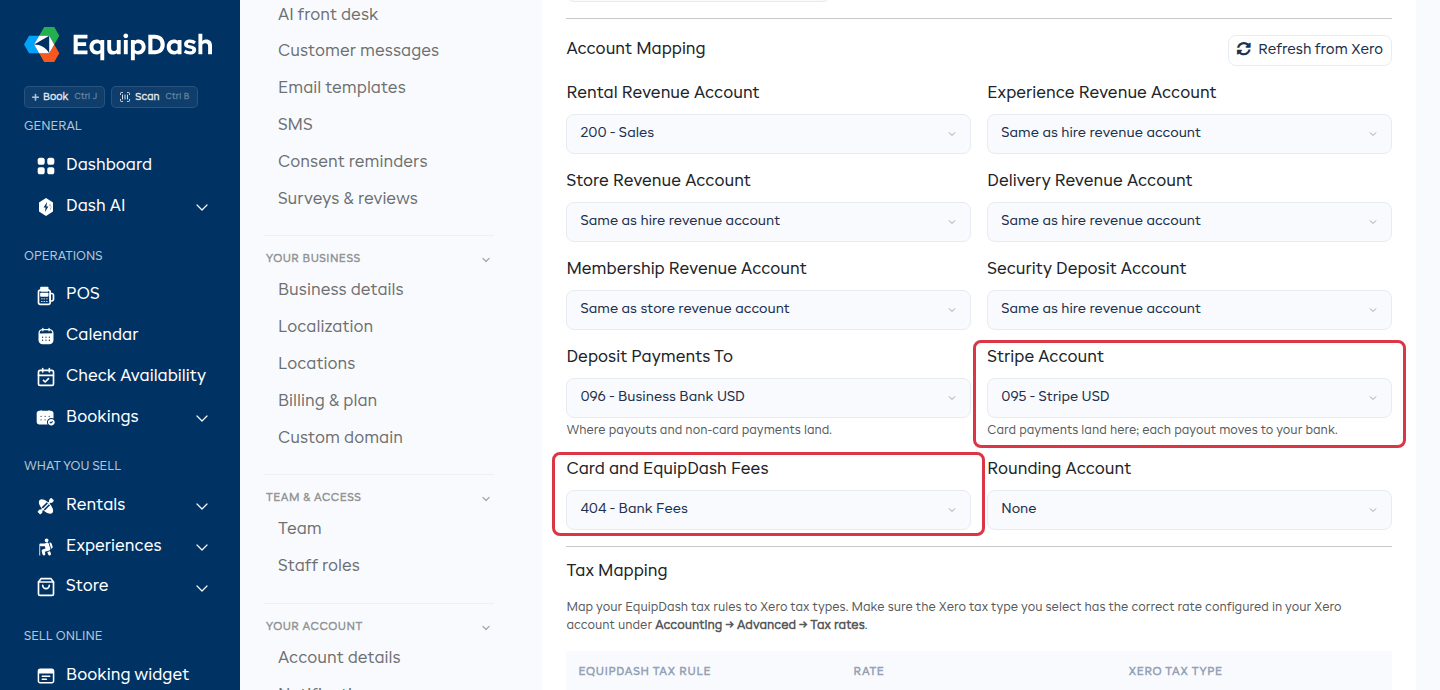
- Under Account Mapping, set:
- Stripe Account -- where card payments land before each payout moves them to your bank. Leave it as Create one called Stripe and EquipDash makes it for you.
- Card and EquipDash Fees -- the expense account the fees go to.
- Click Update.
Your bank feed shows each Stripe payout as one deposit. Match it to the transfer EquipDash created and it reconciles in one click.
Tax on EquipDash fees
EquipDash does not charge VAT or GST on its fees. Where your books have a reverse charge tax type, the EquipDash fee uses it. Otherwise the fee goes in with no tax.
Stripe's fee carries the tax Stripe charged you, if any.
Xero: reconnect once
If you connected Xero before this update, the Xero settings page shows Reconnect Xero to send card fees and staff hours. Click Reconnect Xero and approve the new access in Xero. You only do this once, and your settings stay as they are.
When something is skipped
Sync History on the Xero or QuickBooks settings page names anything EquipDash could not record, and what to change:
| Sync History says | What to do |
|---|---|
| Stripe settled this in one currency but your Stripe account is in another | Pick a Stripe Account in the currency Stripe pays you in, or ask Stripe to pay out in your account's currency. |
| This payout was in one currency but your bank under Deposit Payments To is in another | Pick a bank in the payout's currency under Deposit Payments To. |
| Deposit Payments To and Stripe Account are the same account | Pick your bank under Deposit Payments To. |
Only that fee, payout or dispute entry is left out. Fix the account, and the next one goes in.