Sending Staff Hours to Xero Payroll Growth+This feature requires the Growth+ plan or higher
Hours your team clocks on the time clock go to Xero Payroll every night as draft timesheets. You check them and approve them in Xero, then run your pay run as usual.
Xero Payroll is available for businesses in Australia, New Zealand and the UK. It is not available for US Xero organizations.
Before you start
- Payroll is set up in your Xero organization.
- The person who connects Xero is a payroll admin in Xero.
- Each employee has a pay frequency (weekly, fortnightly and so on) set in Xero.
If you connected Xero before payroll was added, click Reconnect Xero on the Xero settings page when it asks you to.
Setting it up
- Go to Settings > API & Integrations, then open Xero.
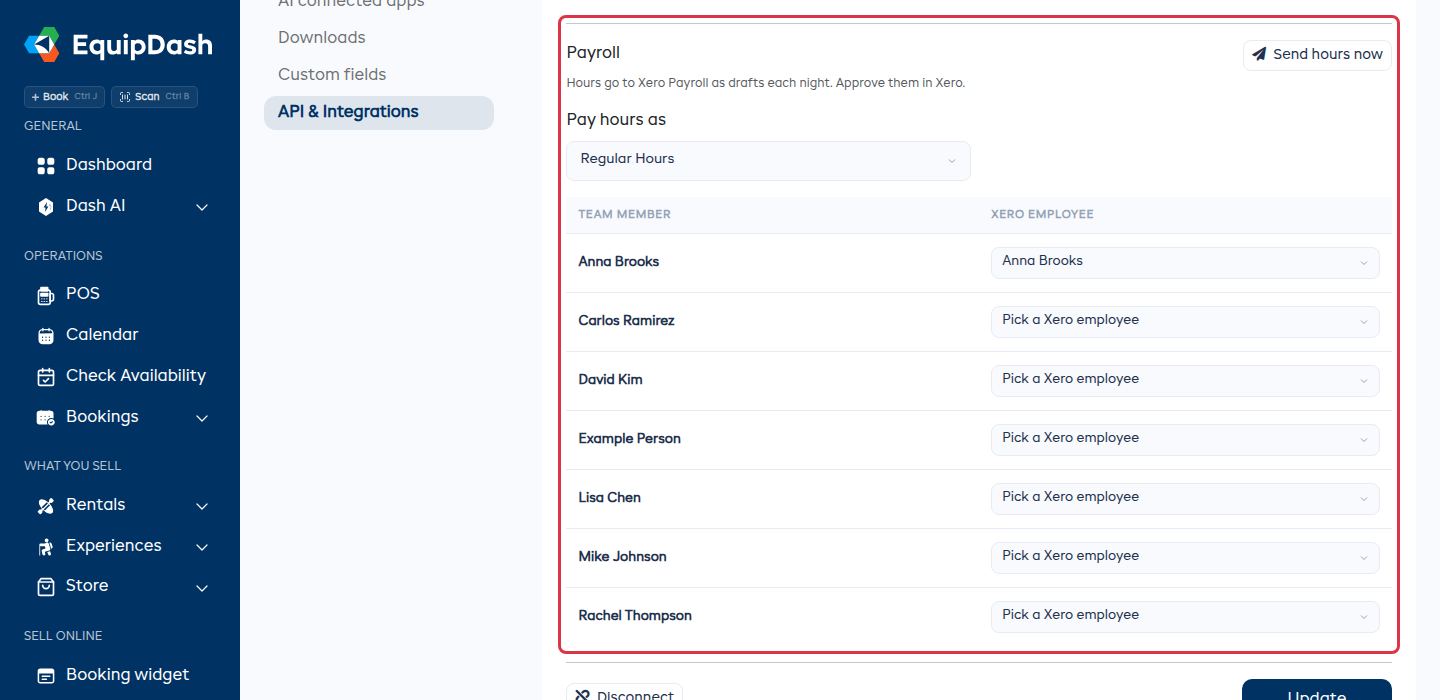
- Scroll to Payroll.
- Check the Xero employee next to each team member. EquipDash matches them for you, first by email, then by name.
- Fix any that are wrong or missing. Pick Not in Xero payroll for anyone you pay another way.
- Under Pay hours as, pick the pay item the hours go to. It starts on your ordinary hours.
Each choice saves as soon as you make it.
What gets sent
- Every night, each matched team member's hours for the current pay period go to Xero as a draft timesheet. The pay period that just ended is sent too, so late fixes still get there.
- Break time is already taken off.
- Click Send hours now to send them straight away instead of waiting for the night.
After you approve in Xero
EquipDash never changes a timesheet you approved in Xero. If someone's hours change in EquipDash afterwards, the Dash card on Staff > Timesheets tells you whose hours changed and for which pay period, so you can update that timesheet in Xero.
Checking on Timesheets
The Dash card at the top of Staff > Timesheets tells you:
- the pay period the hours are in, with Send now;
- anyone with hours but no Xero employee, with a link to match them;
- anyone whose hours did not reach Xero, with Try again;
- anyone whose hours changed after you approved them in Xero.
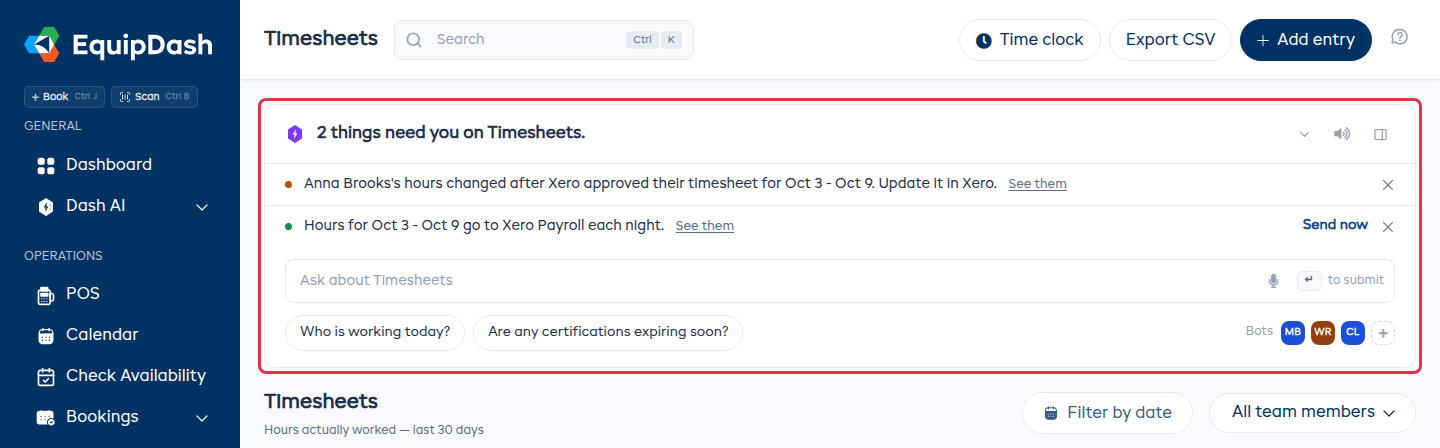
You can also ask Dash to "send hours to payroll".
Troubleshooting
| Issue | Solution |
|---|---|
| Payroll says Xero Payroll is not set up | Finish payroll setup in Xero, or reconnect Xero as a payroll admin, then click Try again. |
| A team member's hours are not in Xero | Check they have a Xero employee picked under Payroll, and a pay frequency in Xero. |
| Hours changed after you approved them | Update that timesheet in Xero by hand. EquipDash will not overwrite an approved timesheet. |
| No Payroll section on the Xero page | Your Xero organization is in a country Xero Payroll does not cover, such as the US. Export a CSV from Timesheets instead. |