Store Settings
The Store settings page lets you control how your store operates across EquipDash. From here you can enable or disable the store module, set your low stock alert level, configure backorders, and control cancellation policies. Each change you make saves automatically — there's no Save button to press.
Accessing Store Settings
- Click Settings in the left sidebar.
- Click Store from the settings menu on the left.
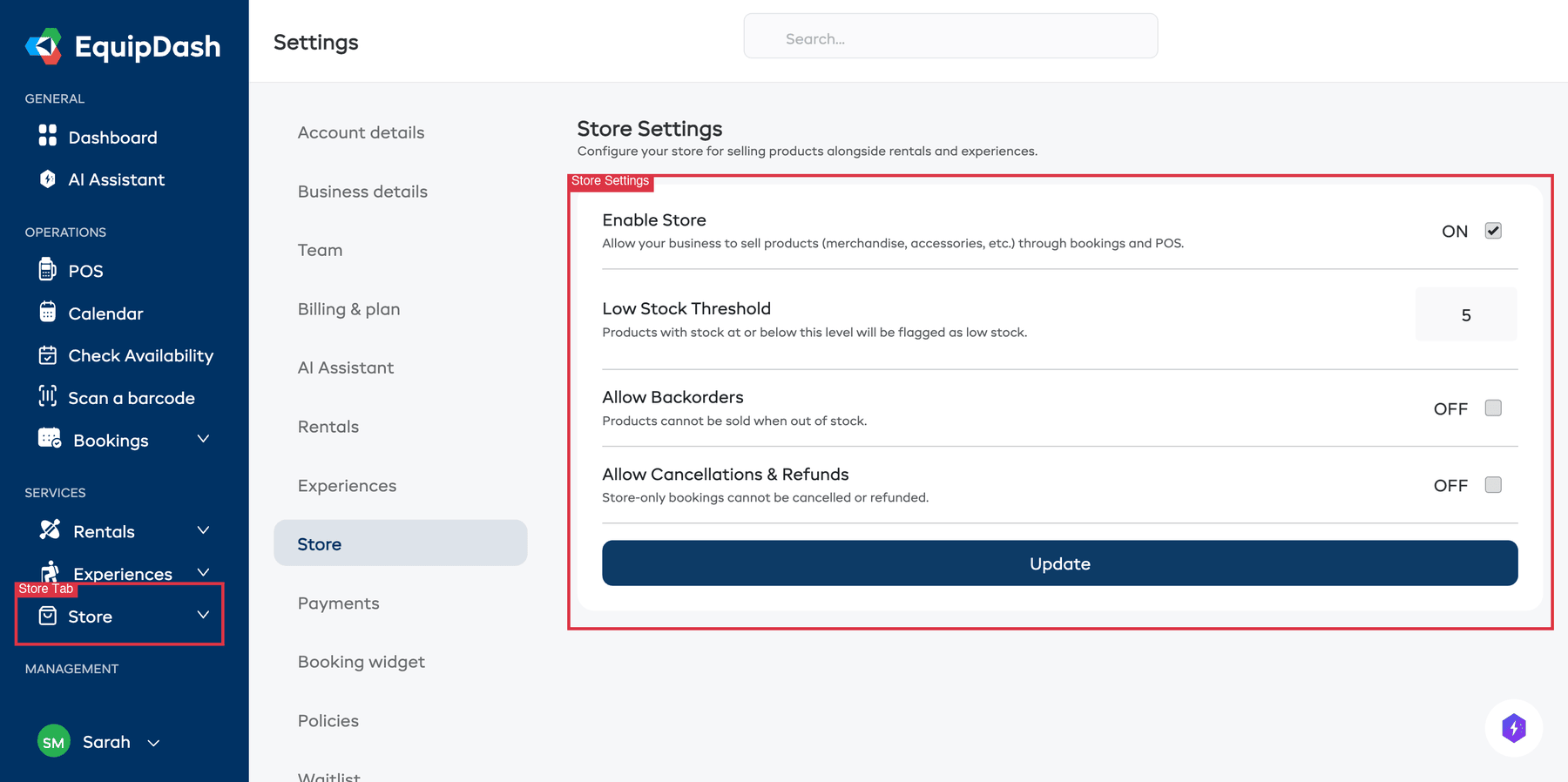
Enable Store
At the top of the Store settings page is a Store module card with a toggle switch. This controls whether the Store module is active for your business.
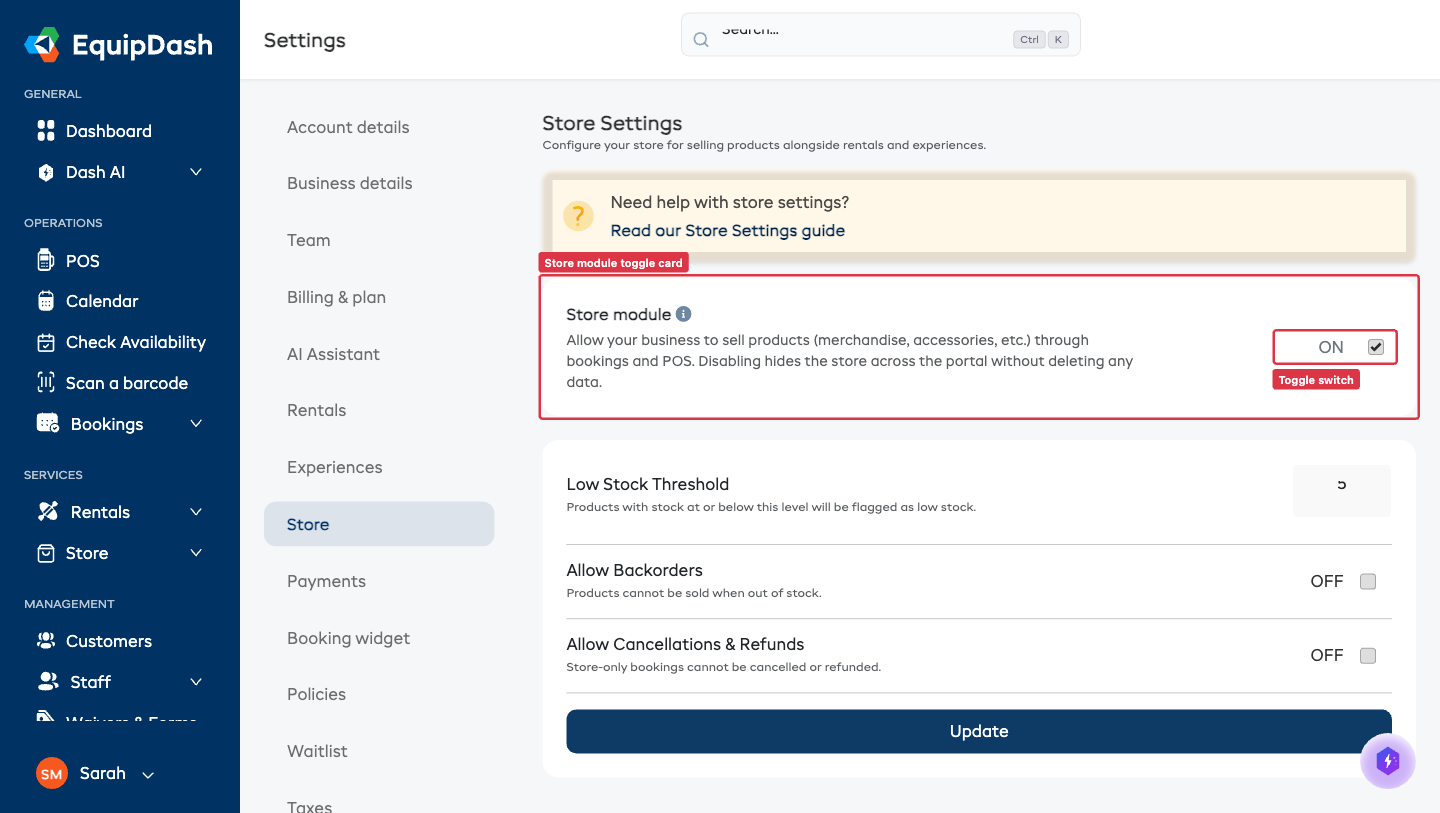
- ON — The Store section appears in your sidebar, store products can be added to bookings, and the store widget is available for embedding on your website.
- OFF — The Store section is hidden, store products cannot be added to bookings, and the store widget is not accessible.
To enable or disable the store, click the toggle switch. Turning it OFF opens a confirmation modal — click Disable store to confirm. The page reloads so the sidebar and dashboard update straight away.
Disabling the store does not delete your products or categories. Everything is preserved and will reappear when you re-enable the store.
When EquipDash will block disabling
EquipDash refuses to disable Store in two situations:
- Upcoming store bookings — if any future-dated bookings (not cancelled, not completed) include store products, the toggle is blocked. Cancel or complete them first.
- Last enabled module — at least one of Rentals, Experiences, or Store must always be enabled. If Store is your only enabled module, enable Rentals or Experiences first.
The Store settings page itself stays accessible even when the module is off, so you can always re-enable.
For more about how EquipDash's three modules work together, see Modules.
Low Stock Threshold
The Low stock alert at field determines when a product is flagged as "Low Stock". This is a global setting that applies to all store products with inventory tracking enabled. You'll find it in the Stock section.
- Enter a number in the Low stock alert at field (e.g.,
5). - Your change saves automatically — you'll see a "Saved" confirmation appear in the corner.
When a product's stock quantity reaches or falls below this number:
- The product shows a "Low Stock" warning badge in the product table.
- The product appears in the Low Stock Products section on the Store tab of your dashboard.
Set your threshold based on how long it takes to restock. If your supplier delivers in one week and you typically sell three units per week, a threshold of 5 gives you a comfortable buffer.
Allow Backorders
The Allow backorders toggle controls what happens when a product runs out of stock. You'll find it in the Advanced section.
When Backorders Are OFF (Default)
- Products with zero stock are marked as "Out of Stock".
- Customers cannot purchase out-of-stock products on the store widget.
- Staff cannot add out-of-stock products to bookings in the POS.
- This is the safest option for most businesses.
When Backorders Are ON
- Products can be sold even when stock is at zero.
- Stock quantities can go negative, representing backorder quantities.
- Customers can still purchase out-of-stock products on the store widget.
- Staff can add out-of-stock products to bookings in the POS.
To change the backorders setting:
- Toggle Allow backorders on or off.
- Your change saves automatically — you'll see a "Saved" confirmation appear in the corner.
Only enable backorders if you have a reliable restocking process. Accepting orders for products you do not have in stock creates a commitment to the customer that you must fulfill.
Allow Cancellations & Refunds
The Allow cancellations & refunds toggle controls whether store products can be canceled and refunded after a booking is completed. You'll find it in the Advanced section.
When Cancellations Are OFF (Default)
- Once a booking containing store products is completed, the store products cannot be individually canceled or refunded.
- This is appropriate for consumable goods or items that cannot be returned.
When Cancellations Are ON
- Store products in completed bookings can be canceled and refunded.
- Stock is automatically restored when a store product is canceled (if inventory tracking is enabled).
- This is useful for businesses that accept returns on physical goods.
To change the cancellations setting:
- Toggle Allow cancellations & refunds on or off.
- Your change saves automatically — you'll see a "Saved" confirmation appear in the corner.
Store Widget
When the store is enabled, your store widget becomes available at:
https://app.equipdash.com/widget/{your-slug}/store
You can embed the store widget on your website using an iframe, just like the rental and experience widgets. For detailed embedding instructions, see Embedding the Widget.
The store widget inherits the same color and branding settings as your other widgets. To customize the appearance, go to Settings > Widget > Customization. See Widget Customization for details.
Summary of Settings
| Setting | Default | Description |
|---|---|---|
| Enable Store | Off | Show/hide the Store module and store widget |
| Low stock alert at | 5 | Number at which products are flagged as low stock |
| Allow backorders | Off | Whether products can be sold when out of stock |
| Allow cancellations & refunds | Off | Whether store products can be canceled/refunded after booking completion |
Related Guides
- How the Store Works -- Understanding the Store module.
- Inventory Management -- Detailed guide to stock tracking, adjustments, and alerts.
- Store on the Booking Widget -- Configuring the customer-facing store widget.
- Embedding the Widget -- Adding the store widget to your website.
- Widget Customization -- Styling your widget.