Equipment Rental Software: The Complete Guide (2026)
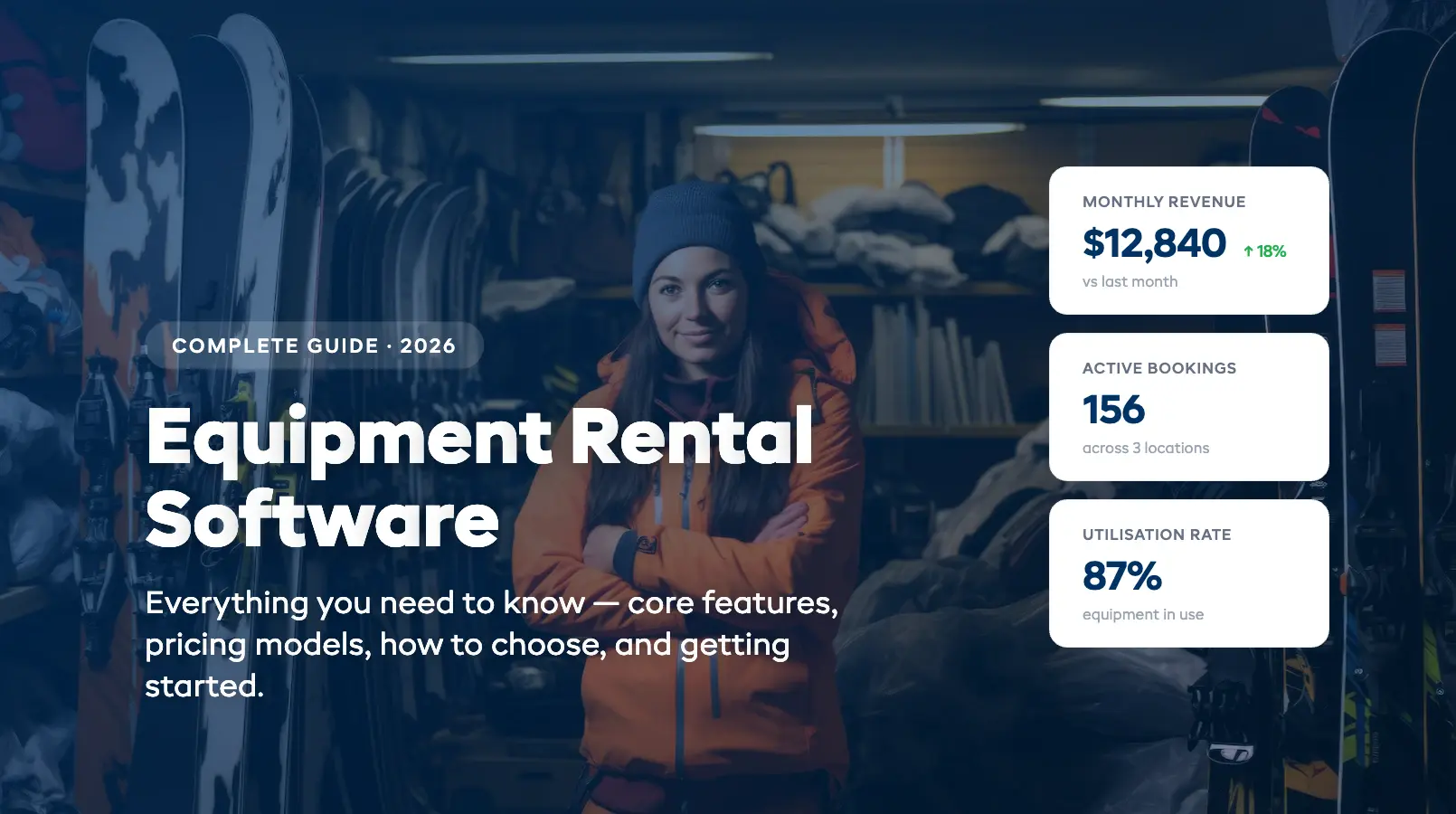
Equipment rental software is the operating system behind every rental shop that runs smoothly, from the ski shop that never double-books a pair of boots to the kayak outfitter that takes bookings at midnight while the owner sleeps. If you're still juggling spreadsheets, a separate booking tool, a payment processor, and a waiver app that doesn't talk to any of them, this guide is for you.
We built this guide to answer the three questions rental shop owners ask most: what features actually matter, when it's time to switch from spreadsheets, and what equipment rental software really costs. Whether you're running a 10-item bike rental or a 500-item multi-location operation, the fundamentals are the same.
Here's everything you need to know, no jargon, no fluff.
What Is Equipment Rental Software?
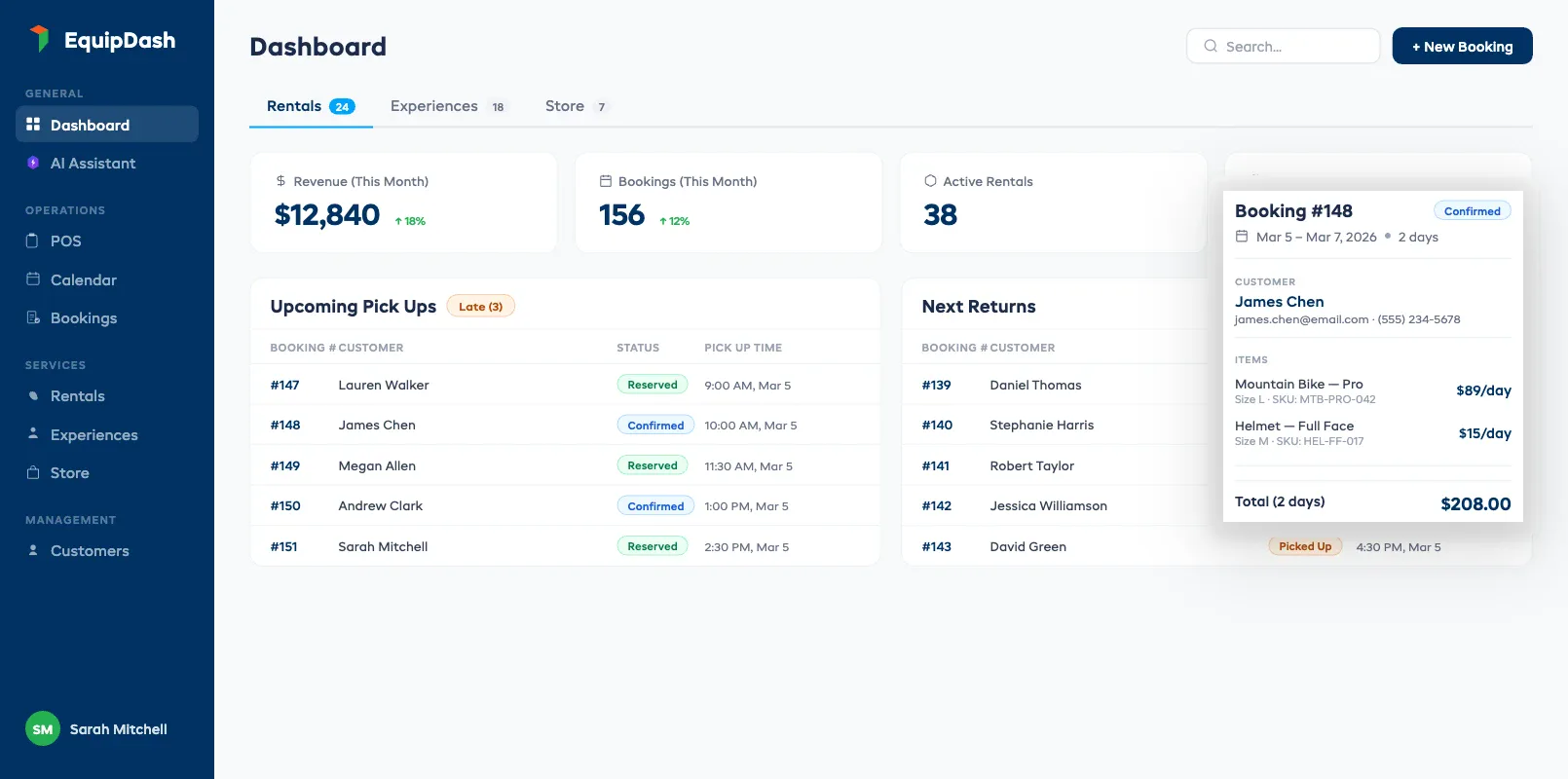
Equipment rental software is a platform that manages every part of your rental operation in one place: bookings, inventory, payments, customer records, waivers, and reporting. At its core, it's a rental management system purpose-built for shops that rent physical gear: replacing the patchwork of spreadsheets, paper forms, and disconnected tools that most rental shops start with.
Think of it as mission control for your rental business. A customer finds your website at 9pm, books a mountain bike for Saturday, signs a digital waiver, and pays a deposit. Your inventory updates automatically. Your staff sees the booking on the calendar the next morning. No phone call. No sticky note. No double-booking risk.
The category has grown fast. According to Grand View Research, the global equipment rental software market is expected to grow at a compound annual rate of over 10% through 2030 — driven by operators who want to move beyond manual processes and capture online bookings around the clock.
Modern equipment rental software typically handles:
- Online booking with real-time availability
- Inventory tracking by individual item (serial number, barcode, or QR code)
- Payment processing (deposits, full payments, refunds)
- Digital waivers signed before or at arrival
- Customer management (contact info, booking history, notes)
- Automated communications (confirmations, reminders, follow-ups)
- Reporting and analytics (revenue, utilization, popular items)
Some platforms, like EquipDash, go further by including a built-in AI assistant that handles tasks like answering customer questions, generating reports, and suggesting pricing adjustments. But the core value is the same across the category: one system that talks to itself so you don't have to be the middleman between five tools.
For a detailed look at what separates purpose-built booking tools from generic alternatives, see our guide on equipment rental booking software.
Core Features Every Rental Shop Needs
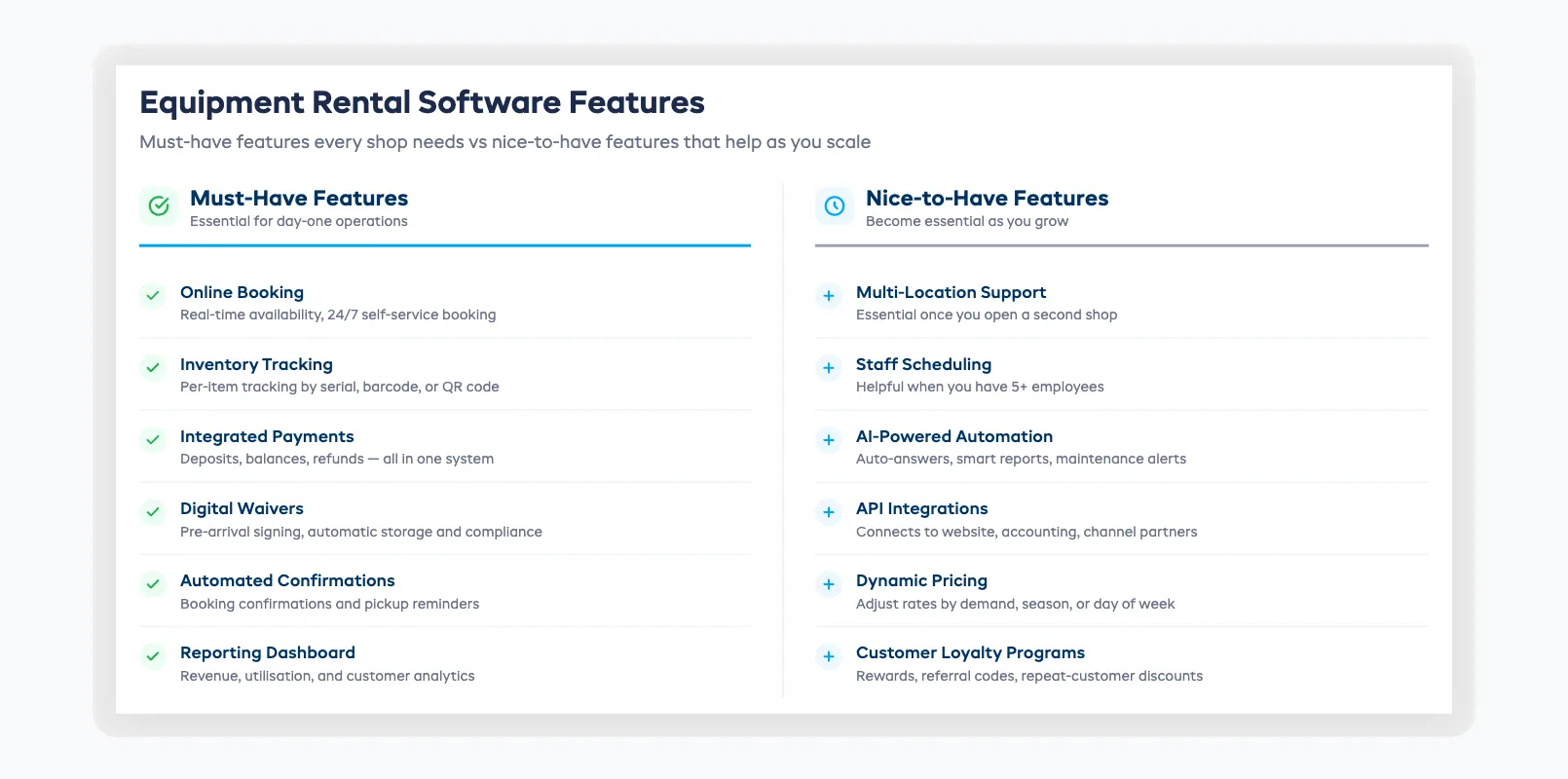
The must-have features of equipment rental software come down to what matters most during a busy Saturday morning: can you take bookings, track gear, collect payment, and get customers out the door without chaos? The right platform handles all of this from a single dashboard, so your team spends less time switching between tools and more time helping customers.
Here are the features that earn their keep every single day, and the ones that sound impressive but can wait.
Must-haves
1. Online booking with real-time availability Your customers expect to book online. Over 60% of consumers prefer self-service booking over calling a business, according to Salesforce's State of the Connected Customer report. Your rental platform needs to show what's available right now, not what was available when you last updated a spreadsheet. For a complete walkthrough of how online booking systems for rentals work, see our dedicated guide.
2. Inventory tracking by individual item Not just "we have 20 bikes", but which 20 bikes, where each one is, when it was last serviced, and whether it's currently rented, reserved, or in for repairs. A good rental management platform should track items by serial number, barcode, or QR code so you always know your stock in real time. For a deeper look at what this means in practice, see our guide to equipment rental software with inventory tracking. And for the full operational playbook on managing your rental fleet, our rental inventory management guide covers everything from tracking methods to utilization analysis.
3. Integrated payment processing Taking a deposit at booking, collecting the balance at pickup, and handling refunds or damage charges should all happen inside your rental platform. Separate payment tools create reconciliation headaches, slow down your checkout counter, and leave you without the records you need when a customer disputes a charge months later. If you also process walk-in transactions, see how a purpose-built equipment rental POS system differs from a standard retail register.
4. Digital waivers Paper waivers get lost, take time to process, and create filing cabinets full of legal liability you can barely search. Built-in digital waivers let customers sign before they arrive, reduce counter wait times, and store everything electronically with automatic compliance.
5. Automated confirmations and reminders Every booking should trigger an automatic confirmation email. Every upcoming rental should trigger a reminder. This isn't a nice-to-have. It's the single easiest way to reduce no-shows and free up your staff from phone tag.
6. Reporting dashboard If you can't answer "what was my utilization rate last month?" or "which items are making money?" in under 30 seconds, your rental platform isn't doing its job. Basic reports on revenue, bookings, inventory utilization, and customer trends should come standard.
Nice-to-haves (that become must-haves as you grow)
- Multi-location support: essential once you open a second shop
- Staff scheduling: helpful when you have 5+ employees
- AI-powered automation: handles repetitive tasks like answering FAQs, generating reports, and flagging maintenance issues
- API integrations: connects to your website, accounting software, or channel partners
- Dynamic pricing: adjusts rates based on demand, season, or day of week
How Equipment Rental Software Replaces Spreadsheets and Disconnected Tools
Equipment rental software replaces the patchwork of spreadsheets, standalone booking calendars, separate payment processors, and waiver apps with one connected system. Instead of manually updating five tools after every rental, the platform syncs everything automatically, so a single booking updates your inventory, calendar, payments, and customer records in real time.
Most rental shops start the same way. A Google Sheet for inventory. A separate booking calendar (or a paper one). A Stripe or Square account for payments. A waiver app. Maybe a Mailchimp account for emails. It works, until it doesn't.
The breaking point usually hits when one of these things happens:
- A double-booking because the spreadsheet wasn't updated after a walk-in. See our guide on how to prevent double bookings for the most common causes and fixes
- Lost gear because the checkout process didn't track which customer has which item
- A missed booking because someone called after hours and nobody was there to answer
- Peak season chaos because five different systems can't keep up with the volume
Equipment rental software solves this by replacing the patchwork with a single connected system. When a customer books online, the inventory updates. When inventory changes, the booking calendar reflects it. When a payment comes in, the financial report updates. Everything is connected because it's all in one place.
Here's what the switch typically looks like in practice:
| Before (spreadsheets + tools) | After (rental software) |
|---|---|
| Manual inventory updates after every rental | Real-time automatic updates |
| Phone-only bookings during business hours | 24/7 online booking with live availability |
| Paper waivers filed in binders | Digital waivers signed before arrival |
| Separate payment processor, manual reconciliation | Integrated payments with automatic reporting |
| End-of-month guesswork on performance | Real-time dashboards and automated reports |
| 4–6 disconnected tools | One platform |
The operators who've made the switch consistently report saving 10–15 hours per week on admin tasks. That's time back on the shop floor, or time back with your family. Our guide on how to automate your rental business breaks down exactly which tasks to automate first and the time savings you can expect from each one. If you're still on spreadsheets and wondering when to make the leap, our spreadsheets vs software guide covers the exact tipping points.
Types of Equipment Rental Software
Not all equipment rental software is built the same. Before you start comparing platforms, it helps to understand the two key distinctions: how the software is delivered (cloud vs on-premise) and what it covers (rental-only vs all-in-one).
Cloud-based vs on-premise
Cloud-based (SaaS) rental software runs in your web browser. You don't install anything. Updates happen automatically. You can access it from your shop counter, your phone, or your couch. Monthly subscription pricing. This is where the market has moved, and where it should be for most rental operators.
On-premise software is installed on your local computer or server. You own the license. You manage updates. You're responsible for backups. It can work for large operations with IT staff, but for shops with 1–50 employees, the overhead isn't worth it.
For most rental shops, cloud-based is the right call. It's cheaper upfront, requires no IT staff, and keeps your data safe with automatic backups. Our guide to cloud-based equipment rental software covers the key advantages and what to look for when choosing a SaaS platform.
Rental-only vs all-in-one
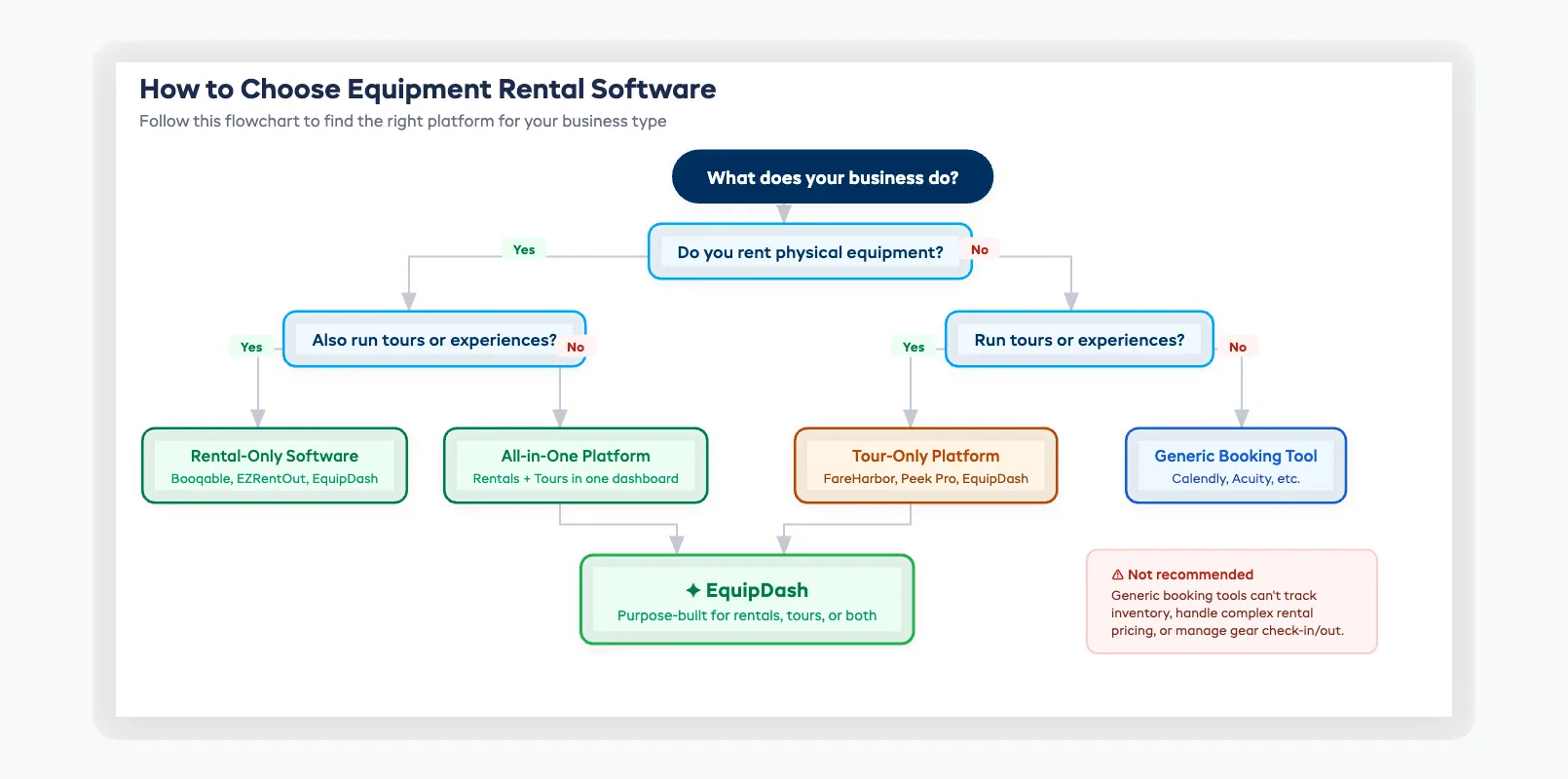
Rental-only platforms focus exclusively on equipment rentals. Inventory tracking, booking, payments, the core rental workflow. These work well if you only rent gear and don't run tours or experiences.
All-in-one platforms handle both equipment rentals and tours or experiences in a single dashboard. If you rent kayaks but also run guided river tours, an all-in-one platform means one system for both instead of two.
EquipDash, for example, was purpose-built as an all-in-one platform for operators who run both rental and tour businesses. Other platforms like Booqable focus primarily on rentals, while FareHarbor and Peek Pro focus on tours. Your choice depends on what you offer. If tours and experiences are a big part of your operation, our tour operator software guide covers the features and pricing models specific to that side of the business.
Rental software vs generic booking tools
A common mistake: choosing a generic booking tool (like Calendly or Acuity) and trying to make it work for equipment rentals. Generic tools don't understand inventory. They don't track individual items. They can't handle complex rental pricing (hourly, daily, weekly, seasonal). They'll work for appointment-based businesses, but they'll break under the weight of a real rental operation.
Gear rental software is built specifically for the unique demands of renting physical items, and that difference matters when peak season hits.
How to Choose the Right Equipment Rental Software
Choosing the right rental platform starts with understanding your operation. A solo-run paddleboard rental on a beach has different needs than a 30-employee ski shop with three locations. Here's a framework for narrowing it down.
Step 1: List your non-negotiables
Start with what you absolutely can't live without. For most shops, this means online booking, inventory tracking, and integrated payments. Write down your top 5 requirements before you look at a single platform.
Step 2: Match your business type
- Equipment rental only → Look at rental-focused platforms (Booqable, EZRentOut, EquipDash)
- Tours and experiences only → Look at tour platforms (FareHarbor, Peek Pro, Rezdy)
- Both rentals and tours → Look at all-in-one platforms (EquipDash)
Step 3: Check the pricing model
Some platforms charge a flat monthly fee. Others take a commission on every booking (often 3–6%). A few do both. At high volumes, commission-based pricing can cost you thousands more per year than flat-rate. Always calculate the annual cost at your expected booking volume. For the full breakdown, see our equipment rental software pricing guide (coming soon).
Step 4: Test before you commit
Most equipment rental software platforms offer free trials (typically 14–21 days). Use this time to test with real scenarios: create your inventory, set up a booking flow, process a test payment, generate a report. The trial will tell you more in one afternoon than any feature comparison page.
Step 5: Check reviews from operators like you
Look for reviews from shops similar to yours in size, industry, and location. A platform that works brilliantly for a 500-unit construction equipment company may be overkill for your 30-bike beach rental. G2, Capterra, and Software Advice are good starting points. For a side-by-side breakdown, see our equipment rental software comparison of 10 platforms ranked across six criteria. Or see our ranked list of the best equipment rental software platforms (coming soon).
What to Expect: Pricing Models and Hidden Costs
Rental software pricing typically falls between $29 and $300+ per month, depending on features, number of products, and number of locations. Some platforms also take a commission on every booking, which can add thousands to your annual cost. The sticker price only tells part of the story: hidden fees for waivers, onboarding, or overage charges can inflate the real cost significantly.
Common pricing models
Flat-rate monthly subscription: You pay a fixed price per month (e.g., $29, $69, or $149) based on the tier you choose. Higher tiers unlock more features, more products, or more locations. This is the most predictable model.
Commission-based: The platform takes a percentage of every booking (typically 3–6%). Low upfront cost, but expenses scale with your revenue. At $100,000/year in bookings, a 5% commission means $5,000/year in platform fees alone.
Hybrid: A monthly fee plus a smaller per-booking commission. Common in the tour operator space (FareHarbor, Peek Pro).
Hidden costs to watch for
- Transaction fees beyond standard credit card processing (2.9% + $0.30 is standard; anything above that is the platform's cut)
- Overage charges when you exceed product or booking limits on your plan
- Add-on fees for features like digital waivers, email marketing, or advanced reporting
- Setup or onboarding fees (some platforms charge $500–$2,000 for migration assistance)
- Annual contract lock-in with early termination penalties
EquipDash uses a transparent flat-rate model: $29/mo (Starter), $69/mo (Growth), or $149/mo (Pro), with a declining platform fee (2%/1.5%/1%) and a 21-day free trial. No hidden fees, no surprise commissions. Annual billing saves 20%.
The most important calculation: total annual cost at your expected volume. A "cheap" plan with commissions can cost more than a higher flat-rate plan once bookings ramp up. We break down rental software pricing in detail, including hidden costs most vendors don't mention (guide coming soon).
Getting Started: Implementation and Onboarding
Setting up equipment rental software doesn't need to take weeks. Most cloud-based platforms can be operational within 1–5 days for a small shop. Here's what to expect.
Day 1: Account setup and inventory import
Create your account, import your inventory (most platforms accept CSV uploads), set your pricing, and configure your business hours and locations.
Day 2: Booking flow and payments
Set up your online booking page or widget, connect your payment processor, and configure your booking confirmation emails. Test the full flow yourself. Book, pay, confirm.
Day 3: Waivers and communications
Upload or create your waiver template. Set up automated reminders and follow-up emails. Configure any SMS notifications.
Day 4: Staff training
Walk your team through the daily workflow: how to check the booking calendar, process a walk-in, check gear in and out, and handle cancellations. Most rental software is intuitive enough that staff can learn the basics in under an hour.
Day 5: Go live
Embed the booking widget on your website, update your Google Business Profile with the booking link, and start accepting online reservations.
Pro tip: Don't try to migrate everything at once. Start with your core workflow (bookings + inventory + payments), get comfortable, then layer in extras like automated reporting, AI features, and advanced integrations.
FAQ
What is equipment rental software used for?
Equipment rental software manages the complete rental workflow (online bookings, inventory tracking, payment processing, digital waivers, and customer communications) in one connected platform. It replaces spreadsheets, paper forms, and disconnected tools with a single system that updates in real time.
How much does rental software cost?
Most platforms charge between $29 and $300 per month depending on features and business size. Some also charge commissions of 3–6% per booking, which adds up fast during peak season. Always calculate total annual cost at your expected booking volume, not just the monthly sticker price, and watch for hidden fees like onboarding charges or waiver add-ons.
Do I need equipment rental software for a small shop?
If you're taking more than a handful of bookings per week or managing more than 20 items, dedicated rental software will save you time and prevent errors. The ROI usually shows up within the first busy weekend — one prevented double-booking can pay for a month of software. Our small business software guide covers the 4 features that matter most and what you can safely skip.
What's the difference between rental software and a generic booking tool?
Generic booking tools like Calendly or Acuity handle time-based appointments, not physical inventory. Rental software tracks individual items by serial number or barcode, manages complex pricing structures (hourly, daily, weekly, seasonal), handles deposits and damage waivers, and syncs inventory across walk-ins and online bookings simultaneously. The difference becomes obvious during peak season when volume is high.
Can equipment rental software handle both rentals and tours?
Some platforms can. All-in-one platforms like EquipDash manage both equipment rentals and tours/experiences in a single dashboard. Rental-only platforms (Booqable, EZRentOut) and tour-only platforms (FareHarbor, Peek Pro) focus on one side. Choose based on what you offer.
How long does it take to set up rental software?
Most small shops are fully operational within 1–5 days. The biggest time investment is importing your inventory and configuring your pricing rules for different rental periods. Staff training typically takes under an hour for the daily workflow basics: checking the calendar, processing walk-ins, and handling check-ins and check-outs. Cloud-based platforms require no installation.
What features should I look for first?
Start with the essentials: online booking with real-time availability, inventory tracking by individual item, integrated payments, and automated confirmation emails. These four features cover the core rental workflow and deliver the fastest ROI. Everything else (AI automation, multi-location support, dynamic pricing, and advanced reporting) can come later as your operation grows and your team gets comfortable.
Is cloud-based or on-premise better for rental shops?
Cloud-based is the right choice for most shops with 1–50 employees. It's cheaper upfront, requires no IT staff, updates automatically, and lets you manage your business from anywhere. On-premise only makes sense for large enterprises with dedicated IT resources.
Conclusion: Your Rental Shop Deserves Better Than Spreadsheets
Equipment rental software isn't a luxury for big operations. It's the foundation that lets any rental shop run smoother, book more, and stress less. The right platform replaces the spreadsheet scramble with a system that works while you sleep. If you're just getting started, our guide on how to start an equipment rental business covers everything from market research to launch day.
If you're ready to see the difference, start with a free trial. No credit card, no commitment, just 21 days to test-drive a system built specifically for rental operators.
in one place