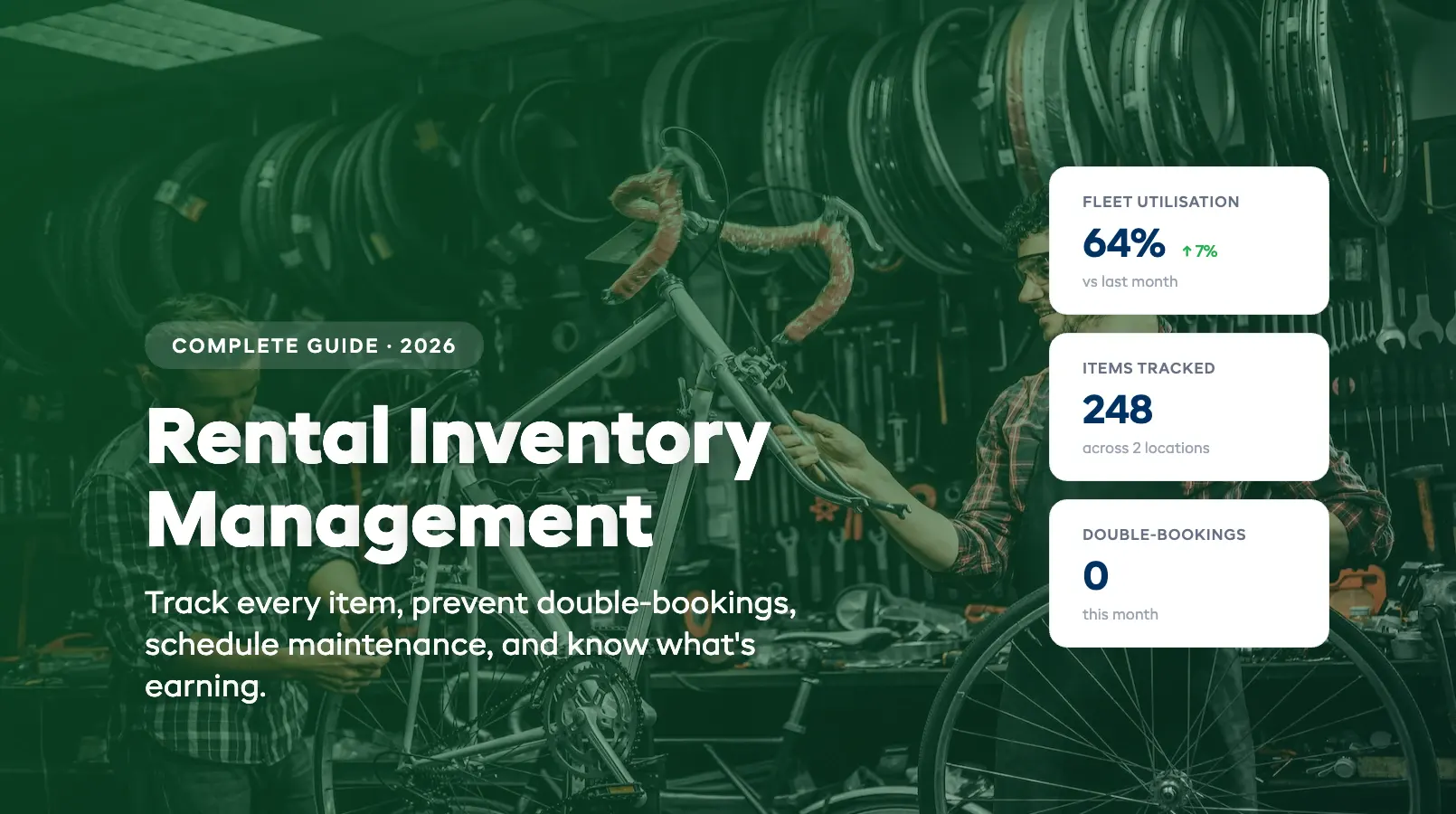
Rental Inventory Management: The Complete Guide
Rental inventory management is the difference between a shop that runs like clockwork and one where gear goes missing, bookings collide, and half your fleet sits idle while the other half falls apart. If you're tracking rental items with spreadsheets, sticky notes, or a mental map of what's where. This guide is for you.
We wrote this for the operator who knows exactly how it feels to check out a bike that should have been serviced last week, or to discover at 8am on a Saturday that the same kayak is booked for two different customers. Below you'll find how rental inventory management actually works, which tracking methods deliver results, how to schedule maintenance without guesswork, and how to spot which items earn their keep, and which ones don't.
Whether you manage 25 paddleboards or 500 pieces of ski equipment across multiple locations, the principles are the same. And the operators who get this right consistently report fewer losses, fewer double-bookings, and more revenue per item.
What Rental Inventory Management Actually Means
Rental inventory management is the system and process you use to track every rental item your business owns, where it is right now, who has it, when it's due back, what condition it's in, and whether it's making money. It covers the full lifecycle from the day you buy a piece of gear to the day you retire it.
This isn't warehouse management or retail stock control. Those disciplines track quantities on shelves. Rental inventory management tracks individual items that go out the door and come back, sometimes damaged, sometimes late, sometimes not at all. Every item has a status that changes multiple times per day: available, reserved, checked out, returned, in maintenance, retired.
For a rental business, inventory is the product. You don't sell it. You lend it, get it back, and lend it again. That cycle creates complexity that retail inventory systems weren't built to handle. According to a report by Software Advice, over 45% of small rental businesses cite inventory visibility as their top operational challenge — ahead of booking management and payment processing.
Good rental inventory management answers four questions at any moment:
- Where is every item? (In the shop, out with a customer, at another location, in for repairs)
- What's its current condition? (Ready to rent, needs maintenance, damaged, retired)
- Is it booked? (Available, reserved for a future rental, currently checked out)
- Is it profitable? (Revenue generated vs. maintenance and replacement costs)
When you can answer all four without opening a spreadsheet or walking to the back room, your rental inventory management is working. If you want a hands-on walkthrough of the process, our step-by-step guide on how to track rental equipment covers everything from building your master list to choosing between barcodes, QR codes, and RFID.
The Rental Item Lifecycle (Acquisition → Tracking → Maintenance → Retirement)
Every rental item follows a predictable lifecycle. Understanding this cycle is the foundation of strong rental inventory management, because each stage creates data you need to capture and decisions you need to make. Every rental inventory management system should support all four stages.
Stage 1: Acquisition
You buy or lease a new item. At this point, you record the item in your system: name, category, serial number (or assign a barcode/QR code), purchase date, purchase price, expected lifespan, and assigned location. This initial data entry is the starting point of rental inventory management, and it determines how well you can track the item from here on out.
Pro tip: Photograph every new item before its first rental. It gives you a baseline for damage claims later.
Stage 2: Active tracking
The item enters your rental pool. From here, its status changes constantly: available → reserved → checked out → returned → available again. Each status change needs to be captured in real time. Rental inventory software automates this. When a customer books online, the item moves to "reserved" automatically. When staff scan the barcode at checkout, it moves to "checked out."
This is where spreadsheets break down. A busy Saturday can generate dozens of status changes per hour across your fleet. Manual updates can't keep pace. If you're still using paper, our equipment sign-out sheet template covers the essential fields, but for the step-by-step digital setup, from tagging to check-in workflows, see our guide on how to track rental equipment.
Stage 3: Maintenance
Every rental item needs regular maintenance. Bikes need brake adjustments, kayaks need hull inspections, ski boots need buckle checks. The question is whether you catch maintenance needs on a schedule, or when a customer complains.
Effective rental inventory management includes automated maintenance triggers: after every X rentals, after a damage report, or on a calendar schedule. When an item enters maintenance, it should automatically be blocked from bookings until cleared. For a full breakdown of which rental tasks can be automated, see our guide on how to automate your rental business. For a step-by-step approach to building your own schedule, including time-based vs usage-based triggers, see our guide to equipment maintenance tracking for rental businesses.
Stage 4: Retirement
Every item has a finite life. Retire it too early and you waste money. Retire it too late and you risk customer safety, bad reviews, and liability. Retirement decisions should be based on data: total maintenance costs, revenue generated, customer complaints, and condition assessments, not gut feeling.
The best operators set retirement thresholds in their rental inventory management software: when cumulative maintenance cost exceeds 60% of replacement cost, flag it for review. When customer damage reports hit a certain frequency, pull it from the pool. For a deeper dive into fleet sizing, utilization benchmarks, and replacement cycles, see our rental fleet management guide.
Tracking Methods: Barcodes, QR Codes, Serial Numbers
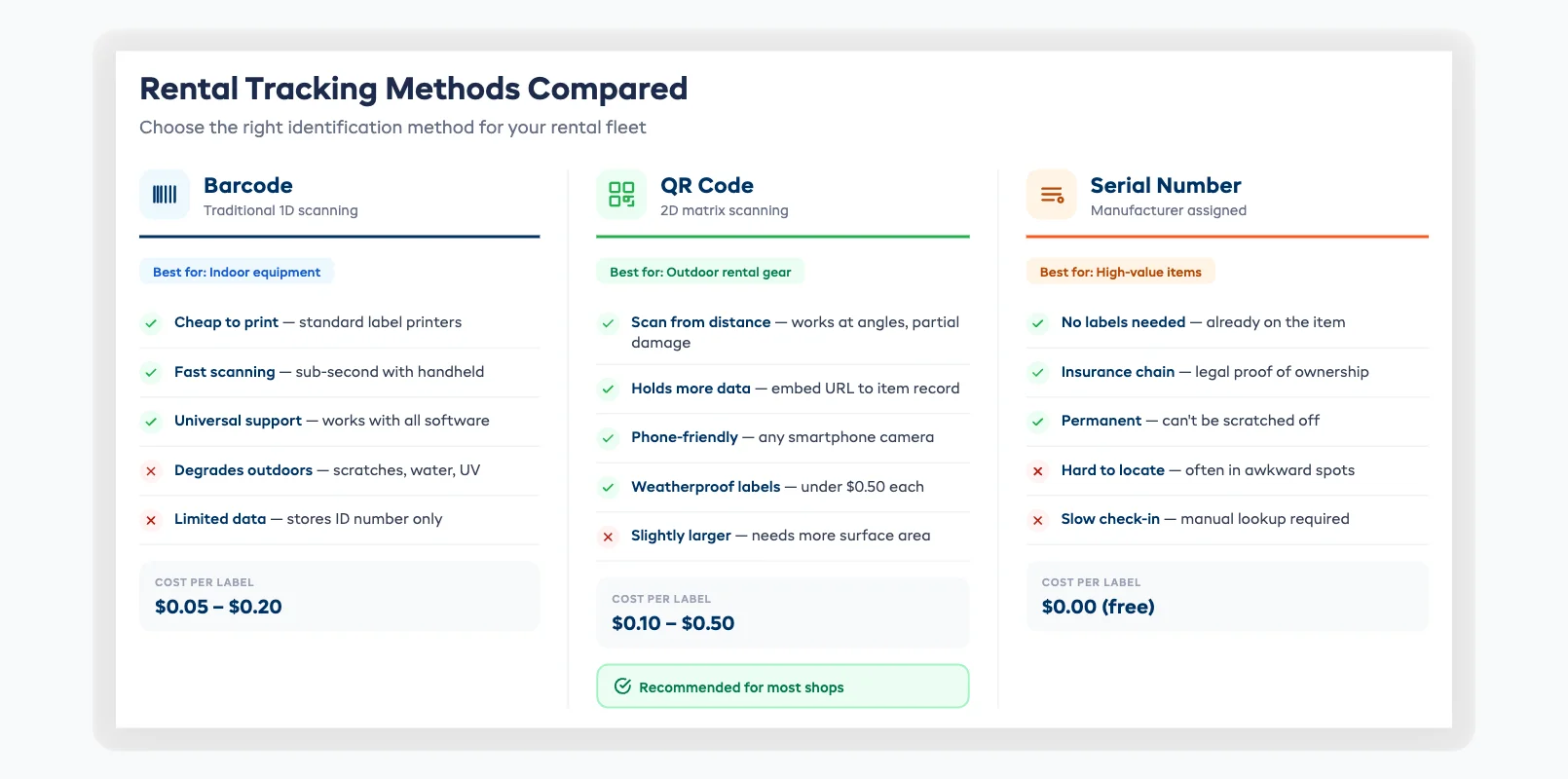
How you track hundreds of rental items without losing gear, or your mind, comes down to the identification method you put on each item. The right method depends on your fleet size, budget, and how rough your gear gets treated. All three approaches improve rental inventory management compared to relying on memory or handwritten logs.
Barcodes
Traditional barcodes are cheap to print and fast to scan. Most rental inventory software supports barcode scanning via a handheld scanner or smartphone camera. Barcodes work well for indoor operations where labels stay clean: think ski boots, helmets, or indoor equipment.
Downside: Barcodes scratch off easily on outdoor gear. Water, mud, and sun degrade them fast.
QR codes
QR codes hold more data than barcodes and can be scanned from farther away, at angles, and even when partially damaged. They're ideal for outdoor rental gear: bikes, kayaks, camping equipment, surfboards. You can embed a URL in the QR code that links directly to the item's record in your rental inventory management platform, making check-in and check-out instant.
Cost: Virtually free to generate. A weatherproof label costs under $0.50 per item.
Serial numbers
Every manufacturer assigns serial numbers. You can use these as your primary identifier without adding any labels. This works well for high-value items (boats, jet skis, e-bikes) where you have fewer units to track and each one is unique enough to identify quickly.
Downside: Serial numbers are often tucked away in hard-to-reach spots, making quick check-in/check-out slower.
What most operators choose
The sweet spot for most rental shops: QR codes as your primary method with serial numbers recorded as a backup identifier. QR codes are cheap, durable with weatherproof labels, and fast to scan. Serial numbers provide a fallback if a label gets destroyed and create a legal chain of custody for insurance claims.
For a practical walkthrough of choosing and applying each tagging method, see our guide on how to track rental equipment.
Preventing Double-Bookings and Overbooking
The single most important job of any rental inventory management system is making sure the same item isn't promised to two customers at the same time. Double-bookings destroy customer trust, create on-the-spot scrambles, and generate the kind of negative reviews that cost you future business.
Here's how double-bookings happen, and how to prevent them.
Why double-bookings occur
- Spreadsheet lag: A walk-in rents an item, but the spreadsheet doesn't get updated until later. Meanwhile, an online booking grabs the same item.
- No channel sync: You take bookings through your website, by phone, and through a partner. These channels don't talk to each other.
- Quantity-based tracking: You track "12 bikes available" instead of tracking each bike individually. When two bookings overlap, there's no way to know they've claimed the same physical item.
- Return delays: A customer brings gear back late. The next customer's booking starts before the item is actually available.
How to prevent them
1. Track individual items, not just quantities. This is the fundamental shift. When every bike has its own record and its own availability calendar, conflicts become visible immediately.
2. Use real-time availability sync. Every booking channel (website, phone, walk-in, partner) should pull from the same live inventory pool. Rental inventory management software does this automatically. Spreadsheets never will.
3. Build in buffer time. Add a turnaround window between rentals: 30 minutes, an hour, whatever your check-in and inspection process needs. This prevents back-to-back bookings that assume instant availability.
4. Set overbooking rules. Some operators intentionally overbook by a small percentage (like airlines) because they know a fraction of bookings will cancel or no-show. If you do this, do it deliberately with data, not accidentally with spreadsheets.
A study by the American Rental Association found that rental businesses using dedicated inventory management software reported 78% fewer booking conflicts than those relying on manual tracking methods. Rental inventory management pays for itself in avoided customer complaints alone. For a step-by-step breakdown of the most common causes and fixes, see our guide on how to prevent double bookings at your rental shop.
Maintenance Scheduling and Damage Tracking
Good rental inventory management doesn't just track where gear is. It tracks what shape it's in. The best way to handle maintenance scheduling is to combine calendar-based intervals with usage-based triggers, so gear gets serviced before it breaks down and never goes out to a customer in poor condition.
Here's how to build a rental inventory management approach that works.
Calendar-based maintenance
Set recurring maintenance checks regardless of usage. Every 30 days, every 90 days, or at the start and end of each season. This catches wear that accumulates even when items aren't being rented heavily: UV damage on inflatables, rust on metal frames, rubber degradation on tires.
Usage-based maintenance
Trigger inspections based on rental count. After every 20 rentals, schedule a full check. After every 50, schedule a deeper service. This catches high-demand items that might fly through calendar intervals without a maintenance window.
Damage tracking at check-in
Train your staff to inspect and log damage at every return, not just when something is obviously broken. Rental inventory management software with a check-in workflow makes this painless: scan the QR code, tap through a condition checklist, note any issues, attach a photo. Takes 60 seconds and creates a timestamped record that protects you in damage disputes.
The maintenance decision matrix
| Trigger | Action | Block from bookings? |
|---|---|---|
| Calendar interval reached | Schedule routine inspection | No. Until inspection confirms issue |
| Rental count threshold | Schedule full service | Yes. Until service completed |
| Damage reported at check-in | Flag for repair | Yes. Immediately |
| Customer complaint | Pull and inspect | Yes. Immediately |
| Retirement threshold hit | Review for replacement | Yes. Permanently |
Pro tip: Track maintenance costs per item. When the cumulative repair cost approaches 50–60% of the item's replacement value, it's usually time to retire it. Good rental inventory management software flags this automatically — spreadsheets can't. Our guide to equipment maintenance tracking covers the full cost-tracking workflow.
Utilization Tracking: Know What's Earning and What's Not
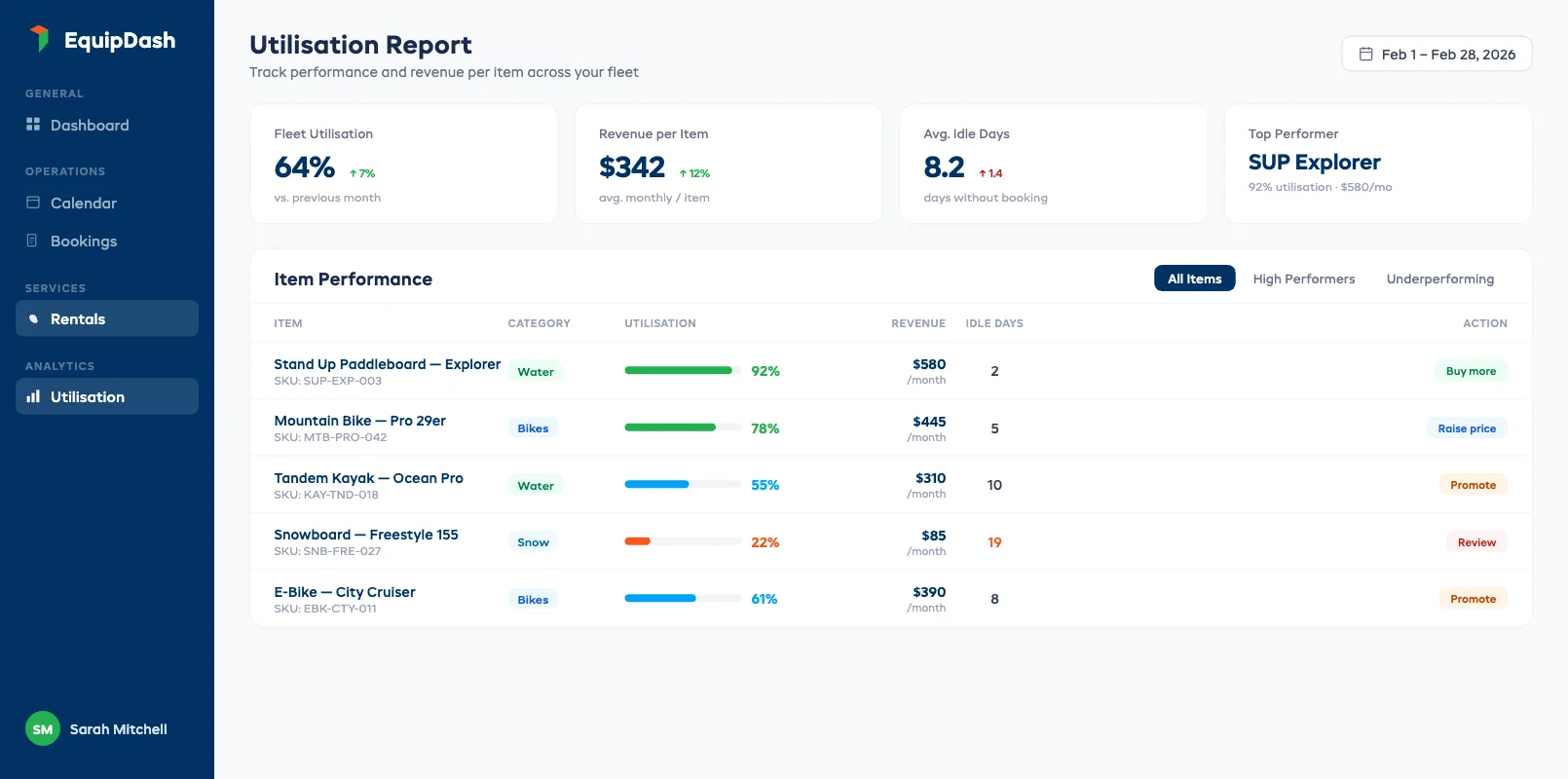
Knowing which items make money and which ones sit on shelves is the difference between growing your rental fleet strategically and buying gear based on hunches. Utilization tracking turns your rental inventory management from a logistics exercise into a revenue tool.
What utilization rate means
Utilization rate = (total hours or days rented ÷ total hours or days available) × 100.
A bike that's available 30 days in a month and rented for 18 of them has a 60% utilization rate. That's a healthy number for most rental categories. Below 30% means the item isn't earning its keep. Above 80% and you probably need more units to meet demand.
What to track beyond utilization
- Revenue per item per month: Is this item generating enough to justify its shelf space and maintenance cost?
- Revenue per category: Are mountain bikes outearning road bikes? Are 2-hour kayak rentals more profitable than full-day rentals?
- Seasonal patterns: When does demand spike? When does it drop? This drives purchasing and retirement decisions.
- Idle time: How many days has this item sat available but unbooked? Long idle periods signal pricing issues, poor listing visibility, or a fleet imbalance.
Using utilization data to make decisions
High utilization, high revenue → Buy more of this item. You're turning away demand.
High utilization, low revenue → Raise your price. Demand exceeds supply at the current rate.
Low utilization, high revenue per rental → Improve visibility. The item earns well when booked. It just needs more bookings. Better photos, better placement on your booking page, or a seasonal promotion.
Low utilization, low revenue → Cut it. Retire the item, sell it, or replace it with something customers actually want.
This kind of analysis is nearly impossible with spreadsheets. A rental inventory management platform calculates utilization, revenue per item, and idle time automatically, and surfaces the data in dashboards you can check in 30 seconds.
Spreadsheets vs Software (When to Switch)
Every rental business starts with spreadsheets. And for a tiny operation (a few items, a handful of bookings per week) they work fine. The question isn't whether spreadsheets are bad. It's when they start costing you more than the rental inventory management software that would replace them. If you're just launching, our guide on how to start an equipment rental business covers when to make the switch and what to look for.
When spreadsheets work
- You manage fewer than 20 items
- You take fewer than 10 bookings per week
- You're a solo operator or have one employee
- All bookings come through one channel (phone or walk-in only)
If this sounds like you, our guide on equipment rental software for small business covers exactly what features matter at this scale and what you can skip.
When it's time to switch
- You've had your first double-booking. That's the clearest signal. A single overbooking incident means your tracking system has a gap, and it will happen again.
- You can't answer basic questions. "What's my utilization rate?" or "Which items need maintenance?" If these take more than 30 seconds, you've outgrown manual tracking.
- You're taking bookings from multiple channels. Website plus phone plus partner referrals. Spreadsheets can't sync across channels in real time.
- You've hired your second staff member. Two people updating the same spreadsheet guarantees version conflicts and missed entries.
- You're losing gear. If items go missing and you don't notice until someone tries to book them, your rental inventory management process has a visibility problem that spreadsheets can't solve.
What the switch actually looks like
Moving from spreadsheets to dedicated rental inventory management software typically takes 1–3 days for a small shop. Export your item list from the spreadsheet, import it into the new platform (most accept CSV), assign barcodes or QR codes, and start tracking. The biggest time investment is the initial tagging, not the software setup. For a detailed walkthrough of exactly when to make the switch and how to migrate without losing data, see our spreadsheets vs software comparison.
The operators who've made this switch consistently report saving 8–12 hours per week on inventory admin. That's one to two full working days back in your week.
Choosing an Inventory Management System
Choosing the right rental inventory management platform comes down to three things: does it track individual items (not just quantities), does it connect to your bookings and payments, and does it fit your budget? Everything else is secondary.
What to look for
1. Individual item tracking. This is non-negotiable. You need to track each piece of gear by serial number, barcode, or QR code, not just "15 bikes available." Quantity-based systems cause double-bookings and make maintenance tracking impossible.
2. Real-time booking integration. Your inventory system and online booking system should be the same system, or tightly integrated. When a customer books online, inventory should update instantly. When an item enters maintenance, it should disappear from availability. No manual syncing. For guidance on evaluating booking features specifically, see our guide on equipment rental booking software.
3. Maintenance tracking. Calendar and usage-based triggers, a check-in damage workflow, and cost-per-item reporting. Without this, you're guessing when gear needs service.
4. Utilization and reporting. Revenue per item, utilization rates, seasonal demand, idle time. If the system can't surface this data, it's just a fancier spreadsheet.
5. Multi-channel sync. If you take bookings from your website, phone, walk-ins, and partners, the inventory pool needs to be shared across all channels in real time.
Standalone inventory tools vs all-in-one platforms
Standalone tools (like EZRentOut or Asset Panda) focus purely on asset tracking. They're good at it, but they don't handle bookings, payments, or customer communications. You'll still need a separate booking system, which means the integration problem persists.
All-in-one platforms (like EquipDash) combine rental inventory management with bookings, payments, waivers, and reporting in a single dashboard. One system, one login, one source of truth. For most operators with 1–50 employees, this is the simpler and more cost-effective path. If you also run guided experiences, tour operator software with built-in inventory tracking lets you manage both sides of your business from a single system. If inventory visibility is your top priority, our guide to equipment rental software with inventory tracking covers what to look for in a platform's tracking features. Not sure which platform fits? Compare rental software platforms side by side with objective scores, or see our best equipment rental software guide for detailed reviews of seven leading platforms (coming soon).
Pricing
Rental inventory management software typically costs $29–$150 per month depending on fleet size and features. See our equipment rental software pricing breakdown for a full cost comparison (coming soon). EquipDash starts at $23/mo on annual billing with a 21-day free trial, no credit card required. Most operators choose cloud-based equipment rental software because it requires no installation, updates automatically, and works from any device. The ROI usually shows up within the first week: fewer double-bookings, faster check-ins, and hours of saved admin time.
FAQ
What is rental inventory management?
Rental inventory management is the process of tracking every rental item your business owns (its location, condition, availability, and profitability) across the full lifecycle from purchase to retirement. It covers check-in and check-out tracking, maintenance scheduling, double-booking prevention, and utilization analysis to help you run a more profitable fleet.
How do I track rental inventory without expensive software?
You can start with a spreadsheet and a simple numbering system for items under 20 units. Assign each item a unique ID, log every check-out and return manually, and review your sheet daily for conflicts. Once you exceed 20 items or take bookings from multiple channels, switching to dedicated rental inventory software saves time and prevents costly errors.
What's the best way to prevent double-bookings?
Track individual items instead of quantities, use real-time availability sync across all booking channels, and build buffer time between rentals for inspection and turnaround. Rental inventory management software automates all three, while spreadsheets require manual discipline that breaks down during busy periods.
How often should rental gear be serviced?
Combine calendar-based and usage-based maintenance. Set calendar checks every 30–90 days depending on the item type, and trigger additional inspections after every 20–50 rentals. Always inspect at check-in with a quick condition checklist. Track cumulative maintenance costs per item and consider retirement when repairs approach 50–60% of replacement value. See our full guide on equipment maintenance tracking for rental businesses.
When should I switch from spreadsheets to inventory software?
The clearest signals: your first double-booking, taking bookings from multiple channels, hiring a second staff member, or managing more than 20 items. Any of these means your spreadsheet can't keep pace with real-time changes. The switch typically takes 1–3 days and most operators report saving 8–12 hours per week immediately.
What's a good utilization rate for rental equipment?
A healthy utilization rate for most rental categories falls between 40% and 70%. Below 30% means the item is underperforming: consider repricing, improving visibility, or retiring it. Above 80% suggests you need more units to meet demand. Track utilization monthly and by season to make informed purchasing and retirement decisions.
Can I manage rental inventory with a POS system?
Most POS systems track sales transactions, not rental item lifecycles. They don't handle reservations, availability calendars, maintenance schedules, or return tracking. A dedicated rental inventory management platform is built for items that leave and come back repeatedly, which is fundamentally different from retail point-of-sale.
How do QR codes work for rental tracking?
Each item gets a weatherproof QR code label linked to its record in your rental inventory management system. Staff scan the code with a smartphone at check-out and check-in, the item's status updates instantly. QR codes cost under $0.50 per label, hold more data than barcodes, and are the most popular tracking method for outdoor rental gear.
Conclusion: Your Gear Deserves Better Than a Spreadsheet
Rental inventory management isn't a back-office chore. It's the core system that keeps your rental business running, your customers happy, and your gear earning. The operators who get rental inventory management right (tracking items properly, scheduling maintenance proactively, and using utilization data to guide decisions) consistently outperform those who wing it.
If you're ready to stop guessing and start tracking, start with a free trial. No credit card, no commitment — just 21 days to see what real-time inventory visibility looks like.
in one place