Tour Operator Software With Built-In Waivers: Why One System Wins

If you run rafting trips, zip lines, climbing tours, or anything where a guest can get hurt, the signed waiver is the document that protects your business when something goes wrong. Yet most operators treat it as an afterthought: a paper form on a clipboard, or a separate waiver app that lives in its own silo, disconnected from the booking it belongs to. That gap is where the trouble starts: the guest who shows up without signing, the form that can't be found when an insurer asks for it, the minor whose parent never actually consented.
This guide makes the case for keeping waivers inside the same system that takes your bookings. We'll cover why built-in beats bolt-on, how a clean pre-trip signing flow actually works, how to handle minors and family groups without chaos at check-in, and what the law expects you to store and for how long. If you want the wider picture first, start with our guide to tour operator software.
Why Built-In Waivers Beat Separate Tools
A standalone waiver app does one thing well: it captures a signature. The problem is everything it doesn't do. It doesn't know who booked, which trip they're on, or whether they've paid. So you end up matching signatures to bookings by hand: scrolling two systems, cross-checking names, hoping the spelling matches. On a busy Saturday with three trips departing, that reconciliation is exactly the kind of manual work that gets skipped, and a skipped check means a guest on the water who never signed.
When waivers live inside your booking software, the waiver is attached to the booking automatically. You can see at a glance which guests on the 9am departure have signed and which haven't, chase the stragglers, and block check-in for anyone outstanding. One source of truth, no reconciliation, no guest slipping through.
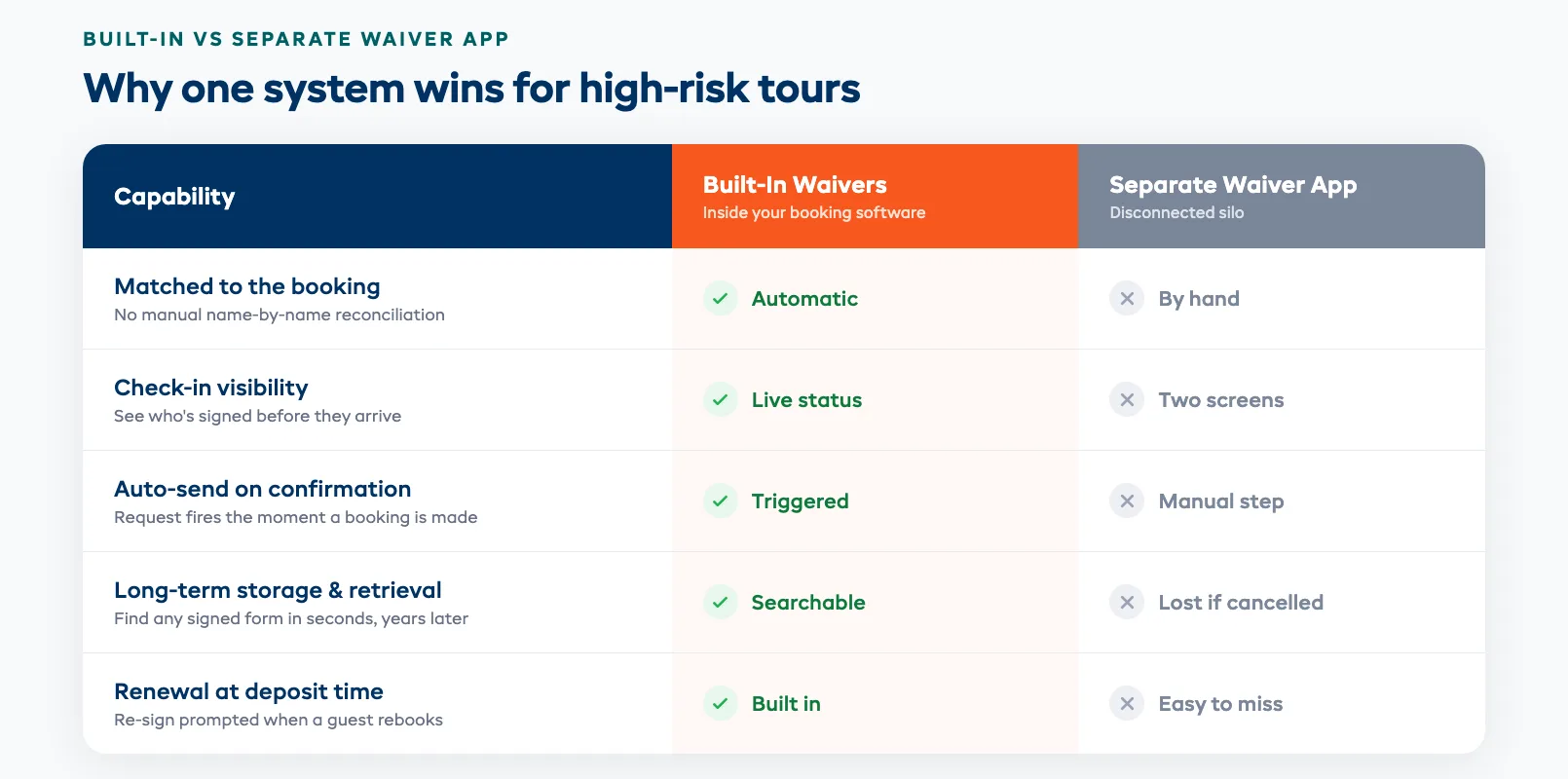
The integration matters most at the two moments that decide your exposure: when a guest books, and when they arrive. A separate tool can't trigger a waiver request the instant a booking is confirmed, and it can't tell your check-in screen who's cleared to go. Built-in does both. The same logic that makes integrated digital waivers work for rental shops applies doubly to tours, where the activity itself carries real risk.
The Pre-Trip Digital Waiver Flow
The goal is simple: every guest signs before they arrive, on their own phone, with zero clipboard scramble at the trailhead. A well-built flow gets you there without anyone on your team chasing paper.
It works like this. The moment a booking is confirmed, the system emails or texts the lead guest a link. They open it on their phone, read the waiver, type their name, and sign with a finger. The signed form attaches to their booking instantly. If they haven't signed within a day or two of departure, an automatic reminder goes out. By the morning of the trip, your check-in list shows a clean green tick beside everyone who's cleared, and a clear flag beside anyone who isn't.
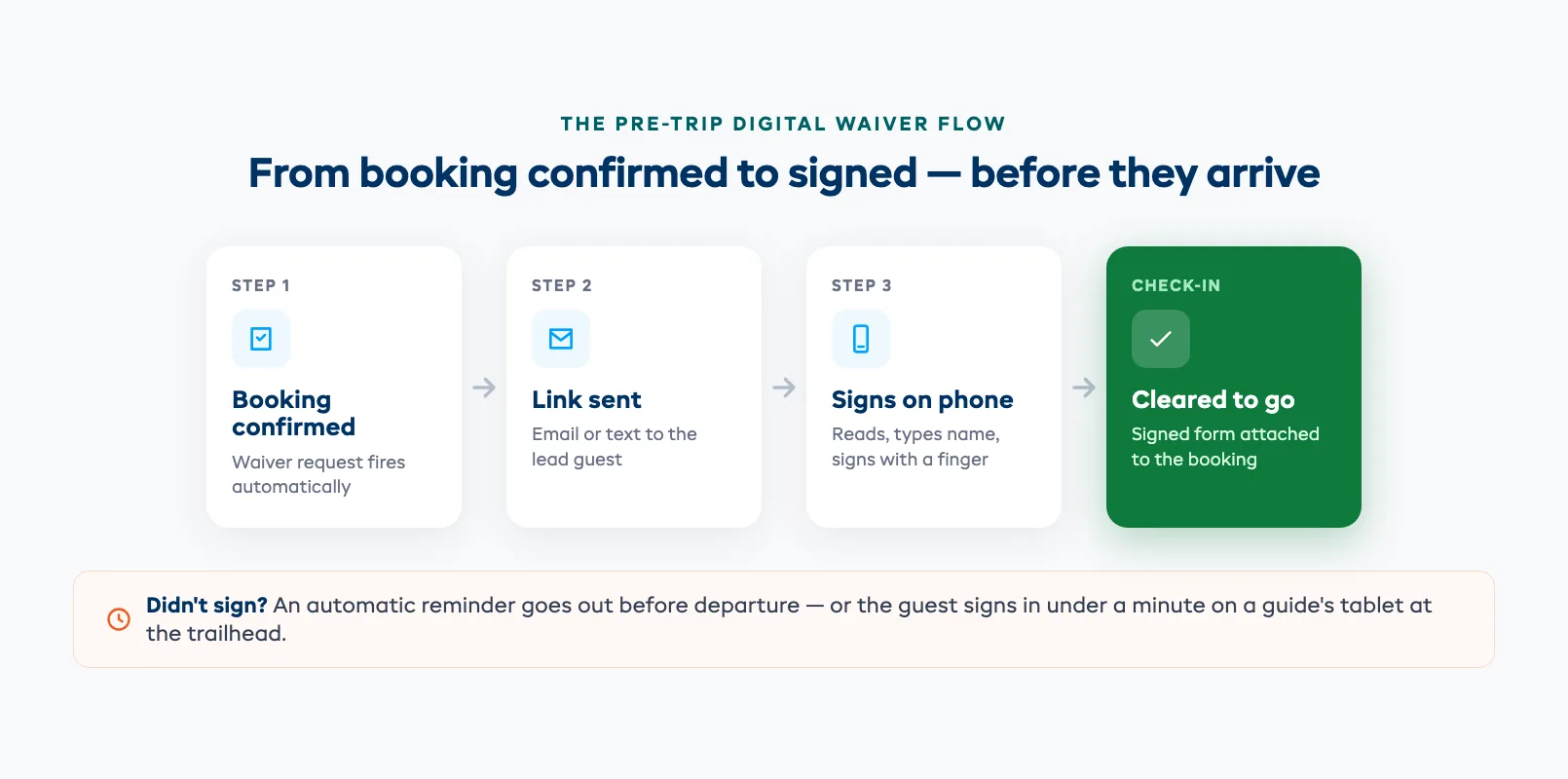
That last 10%, the guest who didn't sign, is where built-in earns its keep. Instead of discovering the gap at the riverbank, your guide opens the booking on a tablet, hands the guest a phone, and they sign on the spot in under a minute. Same record, same system, no separate app to log into. The whole point is that signing is a step in the booking, not a separate errand a guest has to remember.
Minor Waivers and Family Groups
Family trips break a lot of waiver tools, because the person signing isn't the person doing the activity. A 10-year-old can't legally waive anything: a parent or legal guardian has to consent on their behalf, and the form needs to capture that relationship clearly.
Good software handles this with a group waiver: one lead booker signs once, lists each minor in the party by name, and confirms their guardian relationship. You get a single signed document that covers the whole family, with each child named on it, not five separate forms or, worse, a parent forging signatures for kids they're rushing through check-in. For mixed groups of adults and minors, each adult signs for themselves and the guardian covers the children. The result is a record that actually holds up: it names every participant and shows exactly who consented for whom.
This is the kind of edge case that separate waiver apps tend to fumble and that matters enormously for outdoor adventure companies running family-friendly trips, where most bookings include at least one child.
Compliance and Storage
A waiver only protects you if you can produce it (signed, dated, and unaltered) months or years after the trip. That's where storage becomes a compliance question, not just a filing one.
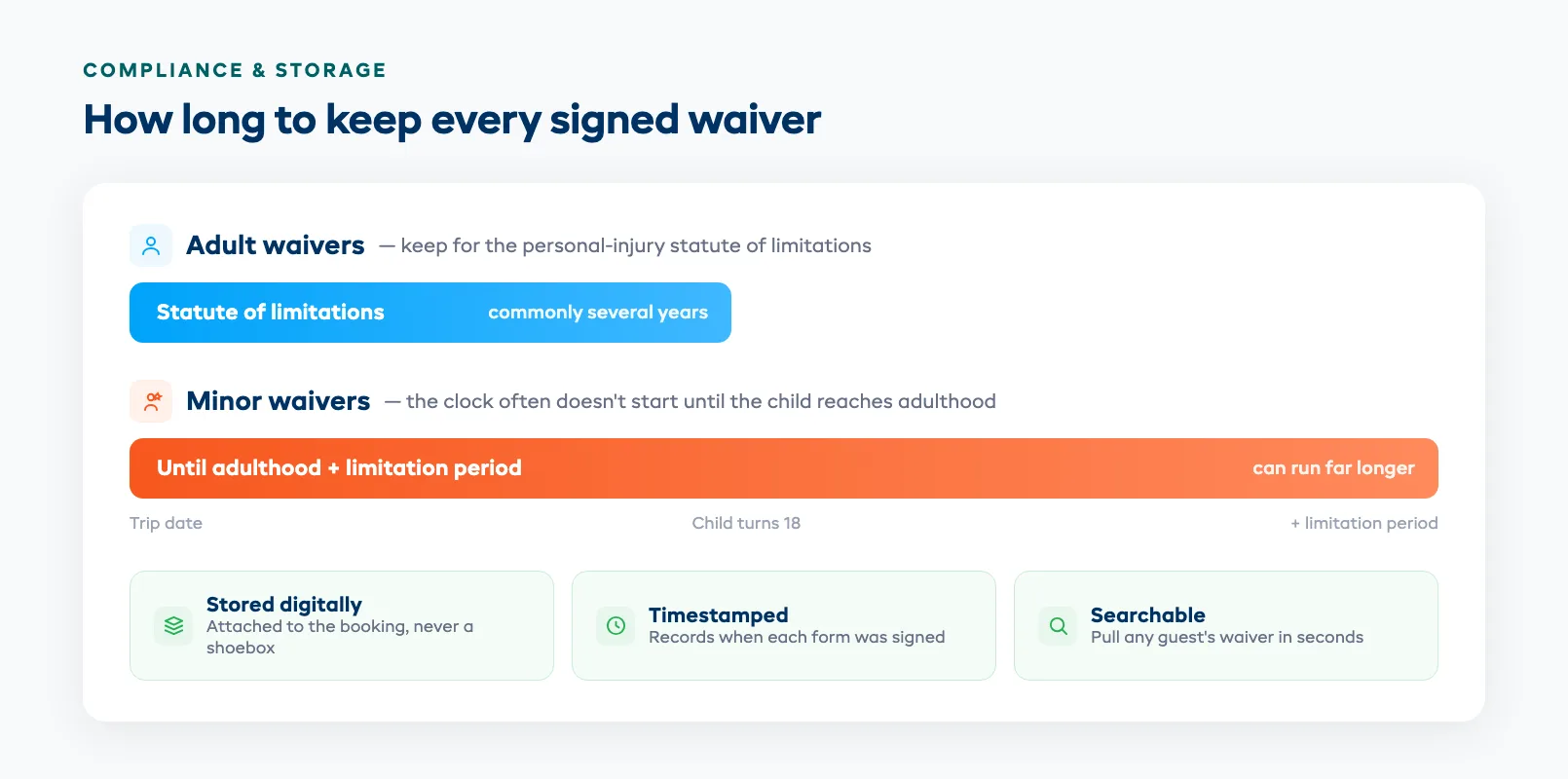
How long you need to keep signed waivers depends on your jurisdiction's statute of limitations for personal-injury claims, which commonly runs several years and can be much longer for claims involving minors, where the clock often doesn't start until the child reaches adulthood. The practical rule most operators follow: keep every signed waiver for at least the longest limitation period that could apply, and keep minors' waivers far longer. A paper clipboard or a waiver app you might stop paying for is no way to meet that bar.
Built-in storage keeps each signed waiver attached to its booking, timestamped, and searchable, so when an insurer or lawyer asks for the form a guest signed two years ago, you find it in seconds instead of digging through a shoebox or an export from a tool you've since canceled. Look for software that retains waivers indefinitely, records the signing timestamp, and lets you pull any guest's form on demand.
Software With the Best Waiver Integration
Not all "waiver support" is equal. When you're comparing platforms, the difference between a checkbox feature and genuine integration comes down to a few specifics worth testing before you commit:
- Automatic send on booking: the waiver request fires the moment a booking is confirmed, not as a manual step someone has to remember.
- Check-in visibility: your departure screen shows signed-versus-outstanding at a glance, and can block check-in for anyone who hasn't signed.
- On-site signing: a guest who shows up unsigned can complete the waiver on a guide's tablet, into the same record.
- Minor and group handling: one guardian can sign for multiple named children in a single form.
- Permanent, searchable storage: every waiver is kept, timestamped, and retrievable by guest or booking.
EquipDash builds waivers into the booking itself, so signing is part of the flow your guests already follow rather than a separate app bolted onto the side. That's the whole argument in one line: the waiver belongs to the booking, so keep them together. For where waivers fit alongside scheduling, payments, and guide management, see the full tour operator software guide.
FAQ
Should waivers be inside my booking software or a separate app?
Inside your booking software, in almost every case. A separate waiver app captures signatures but can't link them to the right booking automatically, can't tell your check-in screen who's cleared to go, and can't trigger a waiver request the moment a booking is confirmed. That leaves you manually matching names across two systems on busy days — exactly when a guest is most likely to slip through unsigned. Built-in waivers attach to the booking, show signed-versus-outstanding at check-in, and store everything in one place.
How do digital waivers work for minors on tours?
A minor can't legally waive liability, so a parent or legal guardian has to consent on their behalf. Good software handles this with a group waiver: the lead booker signs once, lists each minor in the party by name, and confirms the guardian relationship, producing a single signed document that covers the whole family with every child named on it. For mixed groups, each adult signs for themselves and the guardian covers the children. The key is that the record clearly shows who consented for whom.
How long do I have to store signed waivers?
It depends on your jurisdiction's statute of limitations for personal-injury claims, which commonly runs several years and is often much longer for claims involving minors, where the clock frequently doesn't start until the child turns 18. The practical rule most operators follow is to keep every signed waiver for at least the longest limitation period that could apply, and to keep minors' waivers far longer. Confirm the exact period with a local lawyer, and choose software that retains waivers indefinitely so storage is never the weak link.
What happens if a guest arrives without signing their waiver?
With built-in waivers, your check-in screen flags anyone outstanding, so you catch it before they board. The guide opens the booking on a tablet, hands the guest a phone, and they sign on the spot in under a minute, into the same record as everyone else. With a separate waiver app you'd be logging into another system and matching the signature back by hand, which is slow and error-prone right when a trip is about to depart.
Can I require a signed waiver before check-in?
Yes. That's one of the main reasons to keep waivers inside your booking system. Because the waiver is attached to the booking, the platform knows in real time who has signed and who hasn't, and can block check-in for anyone outstanding until they complete the form. A standalone app can't enforce this because it has no live link to the booking or the departure list.
Does built-in waiver software work for high-risk activities like rafting or climbing?
It's especially valuable for high-risk activities, where a signed, retrievable waiver is central to your liability protection. Built-in waivers ensure every participant signs before they take part, capture guardian consent for minors, timestamp each signature, and store the form permanently and searchably so you can produce it years later if a claim arises. The higher the risk, the less you want that document living in a disconnected app you might one day stop paying for.
in one place