Staff timesheets

Timesheets that fill themselves from the time clock

Every clock-in lands here with breaks taken off and the shift it belonged to, ready for payroll.

No credit card. 21-day free trial.

A clock-in lands on Maya's timesheet, the break comes off and the weekly total goes to 29h 47m
Hours from the time clock

Unpaid breaks already taken off.

CSV or Xero Payroll

Xero Payroll in Australia, NZ and the UK.

Runs 300+ operations

Ask Dash for anyone's hours.

21 days free

No card to start. Cancel anytime.

See hours actually worked, for any dates

Pick the last 7 days, the last 30 or your own pay period. Look at the whole team or one person.

  • Scheduled hours sit beside the hours worked, with late starts marked
  • A strip at the top shows who is on the clock now, and since when
  • Each person's hours are added up for the dates you picked
  • A Location column shows where each phone clock-in happened, and flags any off site
Start your 21-day free trial

Fix a missed punch in seconds

Someone forgot to clock out? Edit the entry, or add one by hand, and the worked time adds up again.
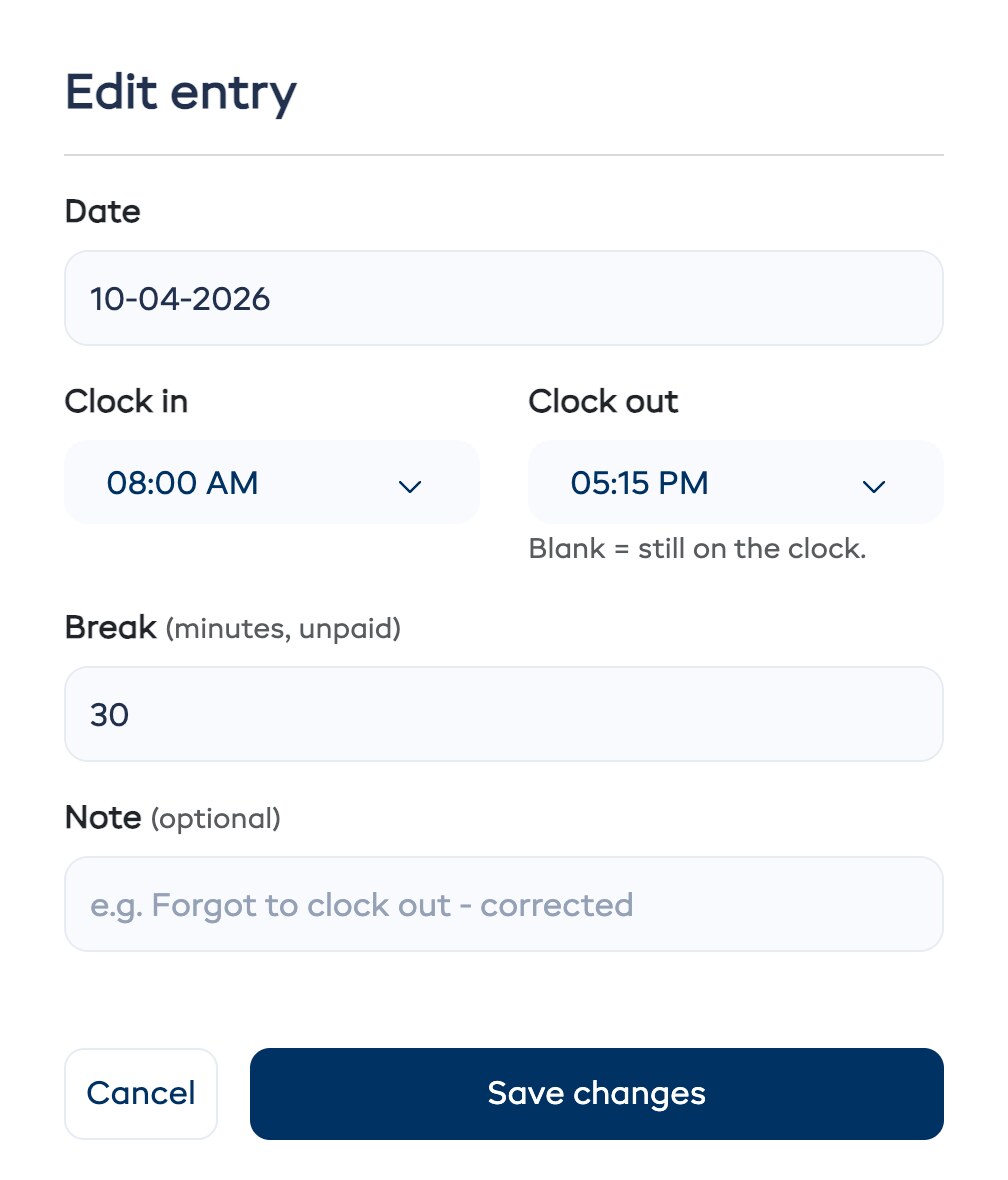
  • Leave Clock out blank for someone still on the clock
  • Add a note so you remember why it changed
  • Edited entries are marked, so you can tell them from clock-ins
Start your 21-day free trial
The Edit entry window in EquipDash timesheets: date, clock in 8:00 AM, clock out 5:15 PM, a 30 minute unpaid break and a note

Export a CSV for payroll in one click

The file has every entry for the dates you picked, with a total for each person.

Send the hours to Xero Payroll overnight

Each night the hours go to Xero as draft timesheets for the current pay period. You approve them in Xero.

  • Staff are matched to Xero employees by email, then by name
  • Pick which Xero earnings rate the hours are paid as
  • For Xero organizations in Australia, New Zealand and the UK
Start your 21-day free trial

EXPLORE MORE FEATURES

All-in-one solution that runs your entire business

The ultimate all-in-one solution that runs your entire business from one dashboard.

  • Bookings
  • Customer Experience
  • Resource Management
  • Operations
  • Dash AI & Bots
  • Scheduling & Logistics
  • Integrations

AI-powered bookings, made easy

Online booking, POS, and automated workflows keep customers booking and you stress-free.

AI-powered customer experience

Build lasting relationships with CRM, digital waivers, loyalty programs, gift cards, and automated campaigns — all from one dashboard.

AI-powered control over every resource

Track inventory across locations, coordinate guides, manage product and experience catalogs, and plan for seasonal demand — all in real time.

Run every operation with AI

Manage your team, maintain equipment, track performance with real-time reports, and connect your favorite tools through integrations.

AI that runs your operations

Dash AI is your always-on operator — ask it to handle bookings, pull reports, or check inventory. Dash Bots work autonomously, running follow-ups, alerts, and daily summaries 24/7.

AI-powered planning and logistics

Build guest lists, generate trip manifests, and roster staff across locations — so you are always prepared, even during your busiest weeks.

Connect the dots with the tools you love

Stop wrestling with disconnected systems—EquipDash brings it all together.

GetYourGuide

GetYourGuide

Stripe

Stripe

HubSpot

HubSpot

QuickBooks

QuickBooks

Xero

Xero

Viator

Viator

Tripadvisor

Tripadvisor

Shopify

Shopify

Google Calendar

Google Calendar

Google Drive

Google Drive

Zapier

Zapier

WordPress

WordPress

FREQUENTLY ASKED QUESTIONS

Staff timesheets questions

Hours, edits, exports and Xero Payroll. Contact us if yours isn't here.

Contact Us

Where do the hours on a timesheet come from?

Every clock-in and clock-out from the time clock or the mobile app lands on timesheets. Unpaid breaks come off, and each person's hours are added up for the dates you pick.

Can I edit or add an entry by hand?

Does it show scheduled hours next to worked hours?

Can I export timesheets for payroll?

Does it work with Xero Payroll?

Can I see where staff clocked in?

Can I see who is on the clock right now?

Run payroll on real hours

Start your free 21-day trial and turn every clock-in into a payroll-ready timesheet.