Activity Booking Software: What to Look For
You run zip-line tours, escape rooms, or guided kayak sessions. You Googled "tour operator software" and every platform looks built for multi-day safaris and European bus tours. Nothing fits your operation: fixed time slots, capacity caps, walk-up groups, and peak-hour pricing.
Activity booking software is built for time-slot-driven experiences with hard capacity limits, rapid turnover, and pricing that changes by the hour. This guide covers what to look for so you don't buy a tour platform and spend months forcing it to work for activities.
For the full breakdown of the tour and activity software category, start with our Tour Operator Software: The Complete Guide.
In this guide:
- Activity Booking vs Tour Booking: What's Different
- Time-Slot Management and Capacity Limits
- Group Bookings and Party Size Handling
- Dynamic Pricing for Peak Hours and Seasons
- What to Look For
- FAQ
Activity Booking vs Tour Booking: What's Different
Tour booking software assumes long-duration experiences: half-day wine tours, full-day charters, multi-day treks. The calendar works in days and departure times.
Activity booking software handles shorter, repeating time slots. A ropes course runs sessions every 90 minutes. An escape room resets every 75 minutes with 15-minute buffers. The booking engine needs to understand slot frequency, turnover gaps, and per-slot capacity, not just "Tuesday at 9am."
Here's where the mismatch hurts:
- Slot granularity. Tour platforms often let you set one or two departures per day. Activity platforms need 6–12 slots per day with different capacities per slot.
- Turnover time. Between a morning zip-line group leaving and the next one gearing up, you need 20 minutes. Tour software rarely models this.
- Walk-up availability. Tours are almost always pre-booked. Activities get 20–40% walk-up traffic. Your software needs real-time availability that staff can check and sell from instantly.
If you're running a small operation and wondering whether software is even worth it at your scale, our Tour Operator Software for Small Business guide covers the break-even math.
Time-Slot Management and Capacity Limits
This is the feature that separates activity booking software from generic scheduling tools. You need:
Recurring slot templates. Set up Monday through Friday with 10am, 11:30am, 1pm, 2:30pm, and 4pm slots, and have it repeat weekly without rebuilding the schedule. Seasonal changes (summer adds a 5:30pm slot, winter drops to three per day) should be one edit, not fifty.
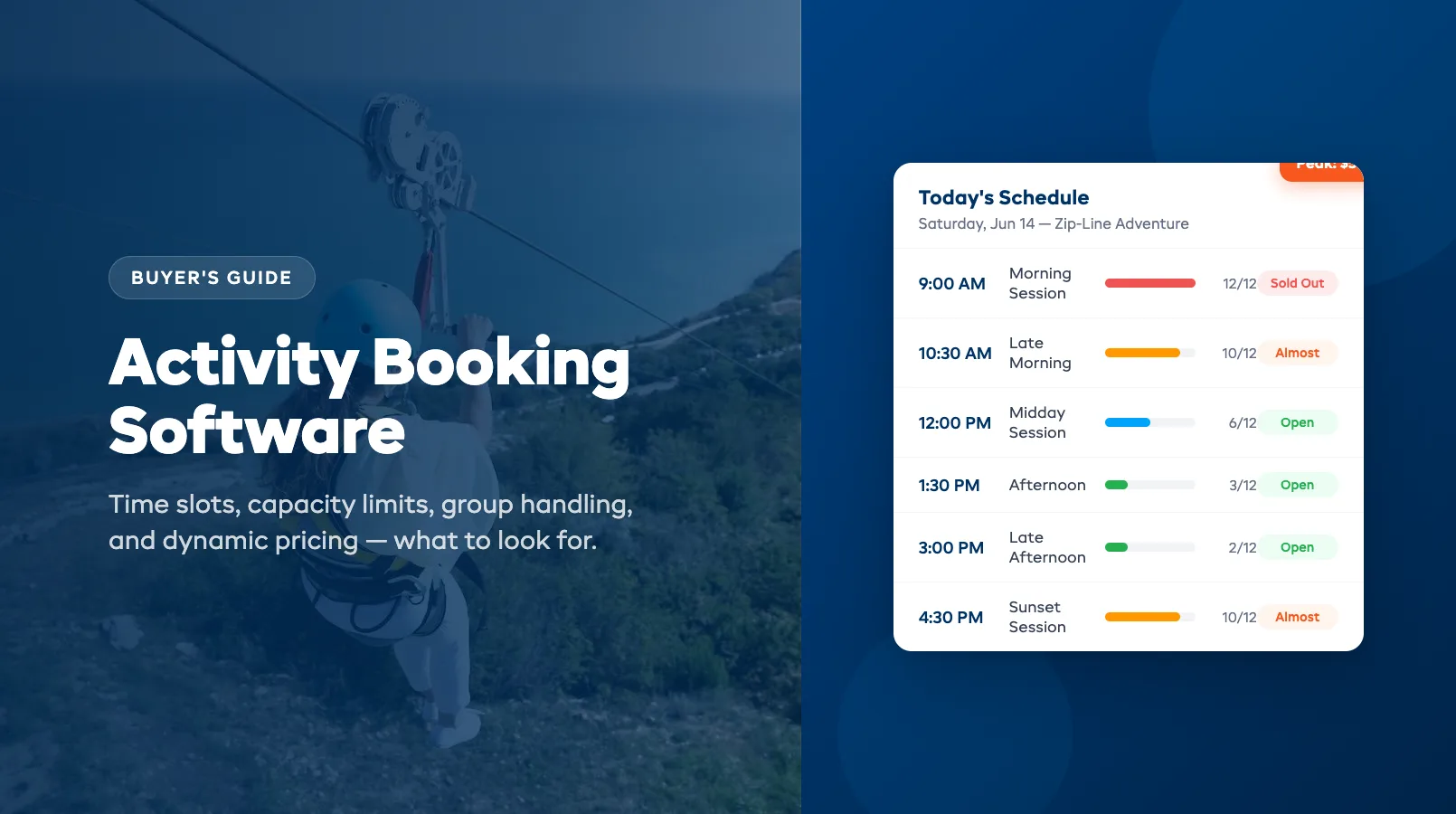
Per-slot capacity. Your morning kayak session holds 12 people. Your sunset session holds 8 because you run it with one guide instead of two. Each slot needs its own capacity ceiling, and the booking engine must stop selling when it's full, no overselling, no manual checks.
Buffer time between slots. If your escape room takes 60 minutes and needs 15 minutes to reset, the system should block the next slot automatically. This sounds basic, but many platforms treat it as an afterthought.
Cutoff times. Stop accepting online bookings 2 hours before a slot starts. Or 30 minutes, whatever your operation needs. This prevents last-second bookings that arrive after your guide has already started the safety briefing.
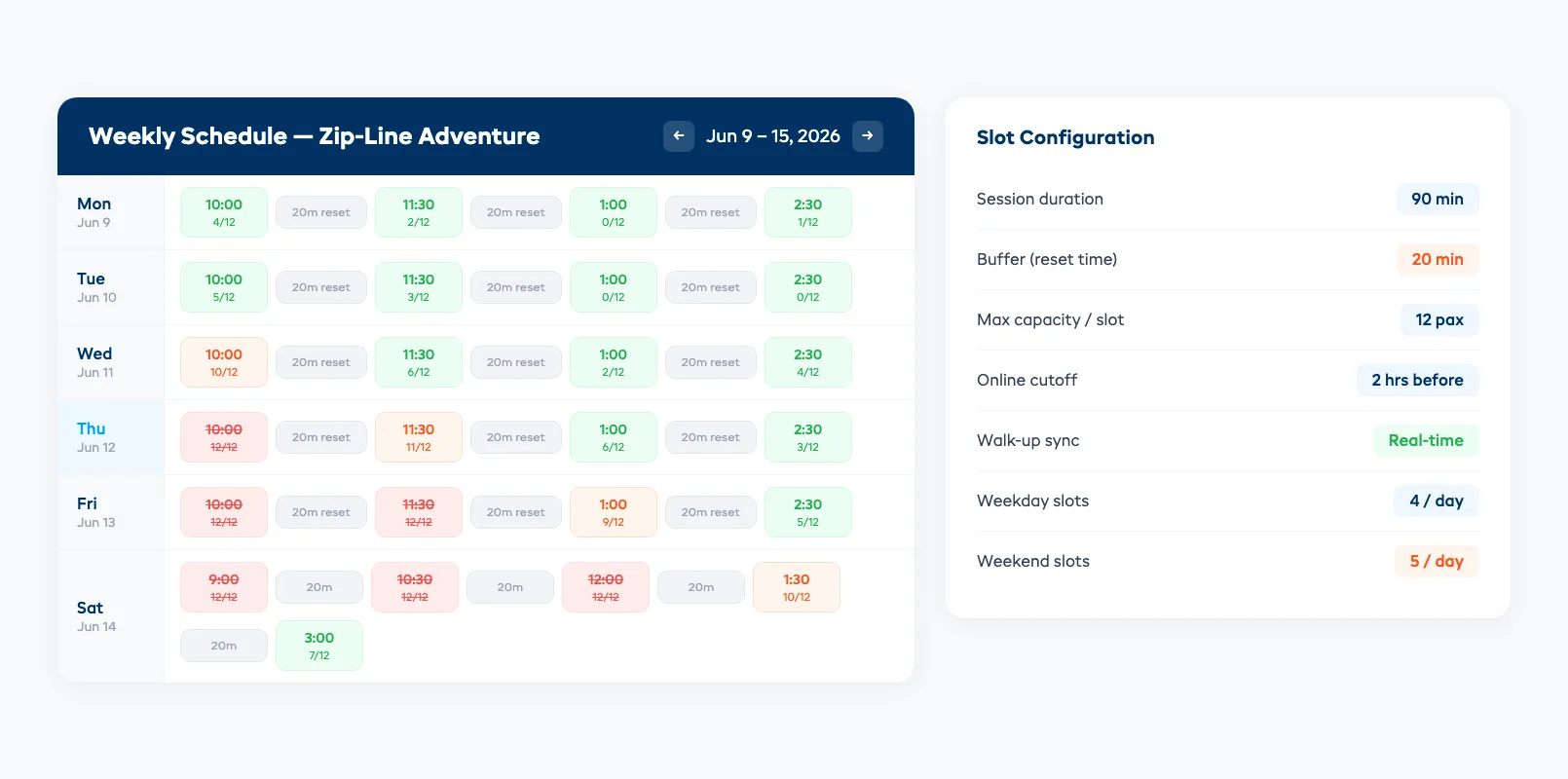
Real-time availability sync. When a walk-up customer books at the counter, the online widget should update within seconds. If your website still shows 4 spots but you just sold 3 in person, you'll oversell, and overselling activities with hard capacity limits means turning people away at the door.
Group Bookings and Party Size Handling
Activities attract groups: birthday parties, corporate teams, school excursions. Your software needs to handle them without breaking your slot capacity logic.
Minimum and maximum group sizes. A corporate team-building session requires at least 8 participants and caps at 24. Your booking form should enforce both limits and show pricing that adjusts by headcount.
Private bookings. A family of 4 wants to book an entire 12-person rafting slot privately. The system should block the remaining 8 spots from public sale and apply your private-booking rate, usually 1.5–2x the per-person price times the minimum group size.
Mixed bookings. Your 2pm slot has 12 spots. A group of 6 books. The remaining 6 should still be available for individual bookings. Some platforms treat any group booking as a full buyout. That's lost revenue.
Dynamic Pricing for Peak Hours and Seasons
Activity operators live and die by peak hours. Your 10am Saturday slot sells out three weeks in advance. Your 2pm Tuesday slot runs at 40% capacity. Static pricing leaves money on the table.
Time-of-day pricing. Charge $59 for the sunset session, $45 for the midday slot. Customers expect this. It's the same model as movie matinees and happy hours.
Day-of-week pricing. Weekends and holidays command a premium. Your software should let you set per-day price multipliers without creating separate products for "Saturday Zip-Line" and "Tuesday Zip-Line."
Seasonal pricing. Summer rates, shoulder-season discounts, winter minimums. Set date ranges with automatic price switches. Manual price changes at the start of each season are a recipe for stale pricing and lost revenue.
Early-bird and last-minute pricing. Offer 10% off for bookings made 14+ days in advance. Or drop prices 20% for same-day bookings on underperforming slots. Automated rules beat manual discounting every time.
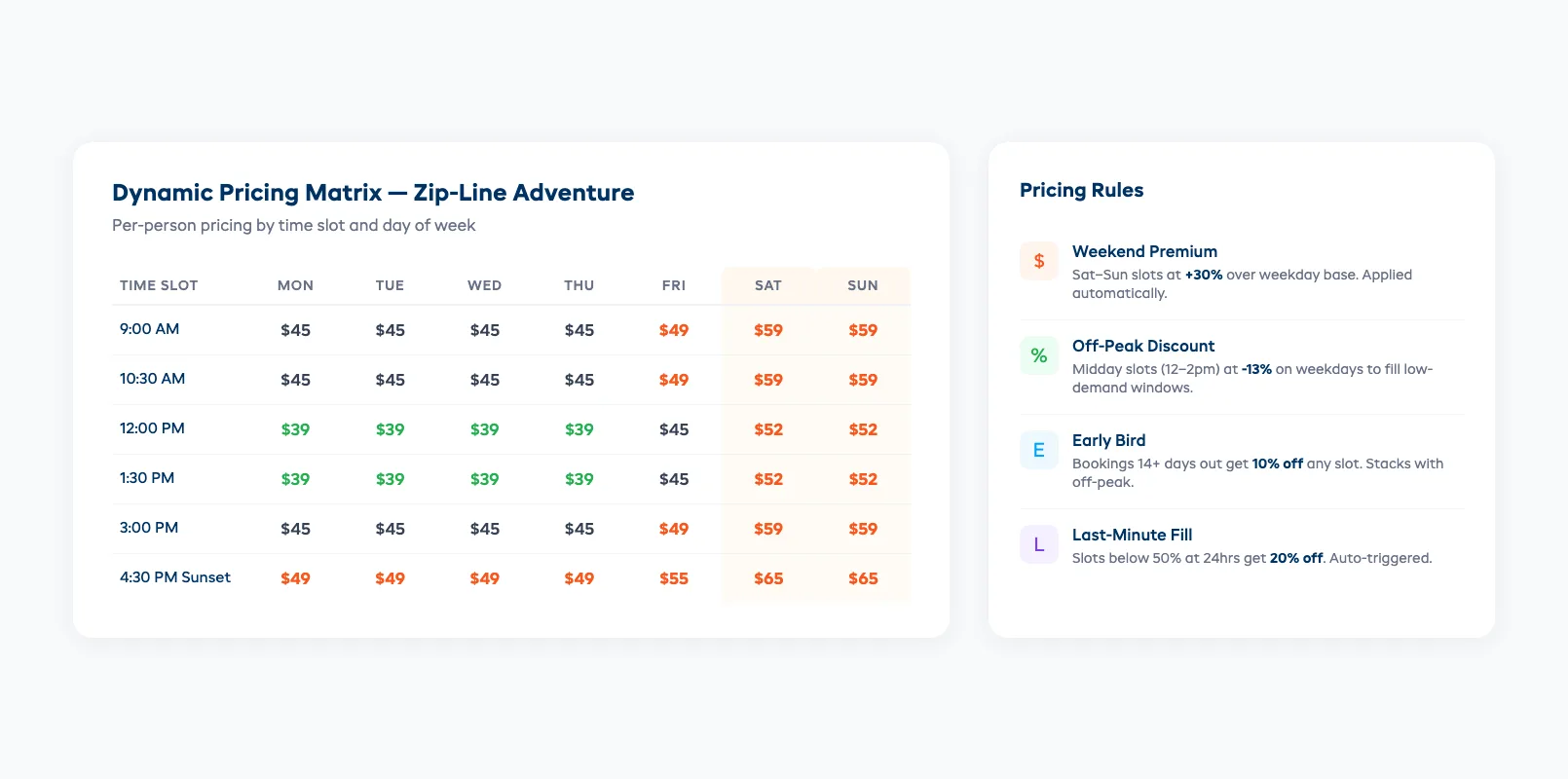
The goal isn't complicated. Match your pricing to demand so you fill more slots without discounting the ones that sell themselves. If you're evaluating whether to use one platform for everything, our breakdown of All-in-One Tour Operator Software covers the trade-offs.
What to Look For
When evaluating activity booking software, run every platform through these five checks:
1. Can it model your actual schedule? Build your real weekly schedule during the free trial. If you can't create 8 daily slots with different capacities, buffer times, and cutoff windows in under 30 minutes, the platform isn't built for activities.
2. Does walk-up booking work? Have someone book online while you simultaneously book a walk-up on the POS or admin panel. Does availability update in real time? If there's a lag of more than 10 seconds, you'll oversell during busy periods.
3. How does it handle groups? Book a group of 8 into a 12-person slot. Then try booking 5 more individuals. The system should accept 4 and reject the fifth. If it lets all 5 through, the capacity logic is broken.
4. Can you set different prices by time, day, and season? If the answer involves creating duplicate products for each price tier, walk away. You'll spend more time managing pricing than running your business.
5. What does the customer see? The booking widget should show available time slots, remaining capacity (or just "Available" / "Almost Full" / "Sold Out"), per-person pricing, and group options, all without requiring the customer to call you.
For a side-by-side look at platforms that handle both tours and activities, see our Best Software for Tour Operators comparison, or weigh up the Peek Pro alternatives if that platform is on your shortlist.
EquipDash handles all five out of the box: time-slot scheduling, real-time capacity sync, group bookings with mixed pricing, and dynamic pricing rules. If you want to see how it works for your specific operation, start a free trial.
FAQ
How is activity booking software different from a generic scheduling tool?
Generic scheduling tools (Calendly, Acuity) are built for one-on-one appointments. They don't support per-slot capacity limits, group bookings, walk-up POS integration, or dynamic pricing by time of day. Activity booking software models capacity, not just availability.
Can I use tour operator software for activities instead?
You can, but you'll fight the platform constantly. Tour software models departures and guides, not repeating time slots with capacity limits. If your activity runs 6–10 sessions per day with 15-minute turnovers, a tour platform will feel clunky and may not prevent overselling — the FareHarbor alternatives are worth a look if a tour-first tool is fighting your slot-based schedule.
What's a reasonable budget for activity booking software?
Expect $29–$99 per month depending on booking volume and features. Avoid platforms that charge per-booking commissions, at 200+ bookings per month, those fees add up faster than a flat subscription.
How do I handle walk-up customers alongside online bookings?
Use a platform with a POS or admin panel that syncs availability in real time. When a staff member books a walk-up, the online widget should reflect the reduced capacity within seconds. This prevents double-selling slots.
Should I show exact remaining spots or just availability status?
Showing "3 spots left" creates urgency and drives conversions. But some operators prefer "Available" / "Almost Full" / "Sold Out" to avoid customers gaming low-capacity slots. Test both and check your conversion rates after 30 days.
Can activity booking software handle both fixed-time and flexible bookings?
Yes. Most platforms support fixed time slots (escape rooms, guided tours) and flexible windows (kayak rentals where customers choose start time within a range). Look for a platform that supports both without requiring separate product types.
in one place