How Experience Pricing Works
Experience pricing in EquipDash is flexible enough to handle a variety of business models. Whether you charge per person, per group, or adjust prices by season, EquipDash has you covered.
The Two Pricing Decisions
When you create or edit an experience, you make two pricing decisions:
- When does the pricing apply? — Year-round or seasonal.
- How do you charge? — Per participant or per group.
These two choices combine into four possible pricing configurations.
Applies: Year Round vs Seasonal
Year Round
One set of prices applies all year long. This is the simplest option and works well if your pricing does not change with the seasons.
Seasonal
Different prices apply during different seasons. For example, you might charge more during summer and less during the off-season. This requires seasons to be configured in your account. See Seasonal Pricing for details.
Pricing Structure: By Participant vs By Group
By Participant
Each person booking the experience pays an individual price. You can set different prices for different types of participants using rate categories — for example, Adult, Child, Senior, or any custom category you define.
This is the most common pricing model for tours and activities. See Rate Categories for more on setting these up.
Example:
- Adult: $65 per person
- Child (5-12): $40 per person
- Under 5: Free
By Group
A single flat price covers the whole group, regardless of how many people attend (up to a maximum number of participants that you define).
This works well for private tours or activities where you charge a fixed rate for the experience itself.
Example:
- $250 per group (up to 8 people)
Optional: add a per-participant charge on top
Group pricing can also charge per person on top of the base price — think "$500 for the boat, plus $40 a head." Set the optional + Per participant amount next to the group price. Leave it blank to keep pure group pricing.
When it's set, the booking screen asks a single "How many participants?" question — the customer enters the headcount when they book, and the price works out automatically:
Example:
- $500 per group (up to 6 people) + $40 per participant
- A group of 4 pays $500 + 4 x $40 = $660
The headcount the customer enters also flows through to your session manifests, so you always know how many people are actually coming.
Optional: include the first few participants
Sometimes the base price already covers a person or two — the driver, the guide, the host — and you only want to charge for the extra passengers. Set First N included next to the per-participant amount.
When it's set, the per-participant charge skips that many people (per group):
Example:
- $500 per group + $40 per participant, first 1 included (the driver)
- A group of 4 pays $500 + (4 − 1) x $40 = $620
Leave it blank (or 0) to charge every participant.
Optional: booking minimums, discounts and a groups-per-slot limit
Group pricing can also carry booking rules — a minimum number of groups (with a fee for smaller bookings, or a straight no), an automatic discount once someone books several groups, and a cap on how many groups one time slot can take. See Group Booking Rules.
The Four Pricing Configurations
| Configuration | When to Use | Example |
|---|---|---|
| Year Round + By Participant | Simple per-person pricing all year | Guided hike: $50/adult, $30/child |
| Year Round + By Group | Fixed group rate all year | Private boat tour: $300/group |
| Seasonal + By Participant | Per-person pricing that varies by season | Summer kayak tour: $70/adult; Winter: $50/adult |
| Seasonal + By Group | Group rate that varies by season | Summer private tour: $350/group; Off-peak: $250/group |
How Pricing Appears to Customers
In the booking widget, customers see the prices relevant to their booking:
- For per-participant pricing, they select how many people of each rate category are attending. The total is calculated automatically.
- For per-group pricing, they see the flat group rate and the maximum number of participants allowed. If you added a per-participant charge, they also pick how many people are coming and the per-head amount is added on top.
- For seasonal pricing, the system automatically applies the correct rate based on the date of the session they are booking.
Setting Up Pricing
Pricing is configured in two places — pick whichever fits your workflow:
Inline on the Pricing Tab (recommended for quick price tweaks)
Open the experience detail page and click the Pricing tab. You'll see a side-by-side editor:
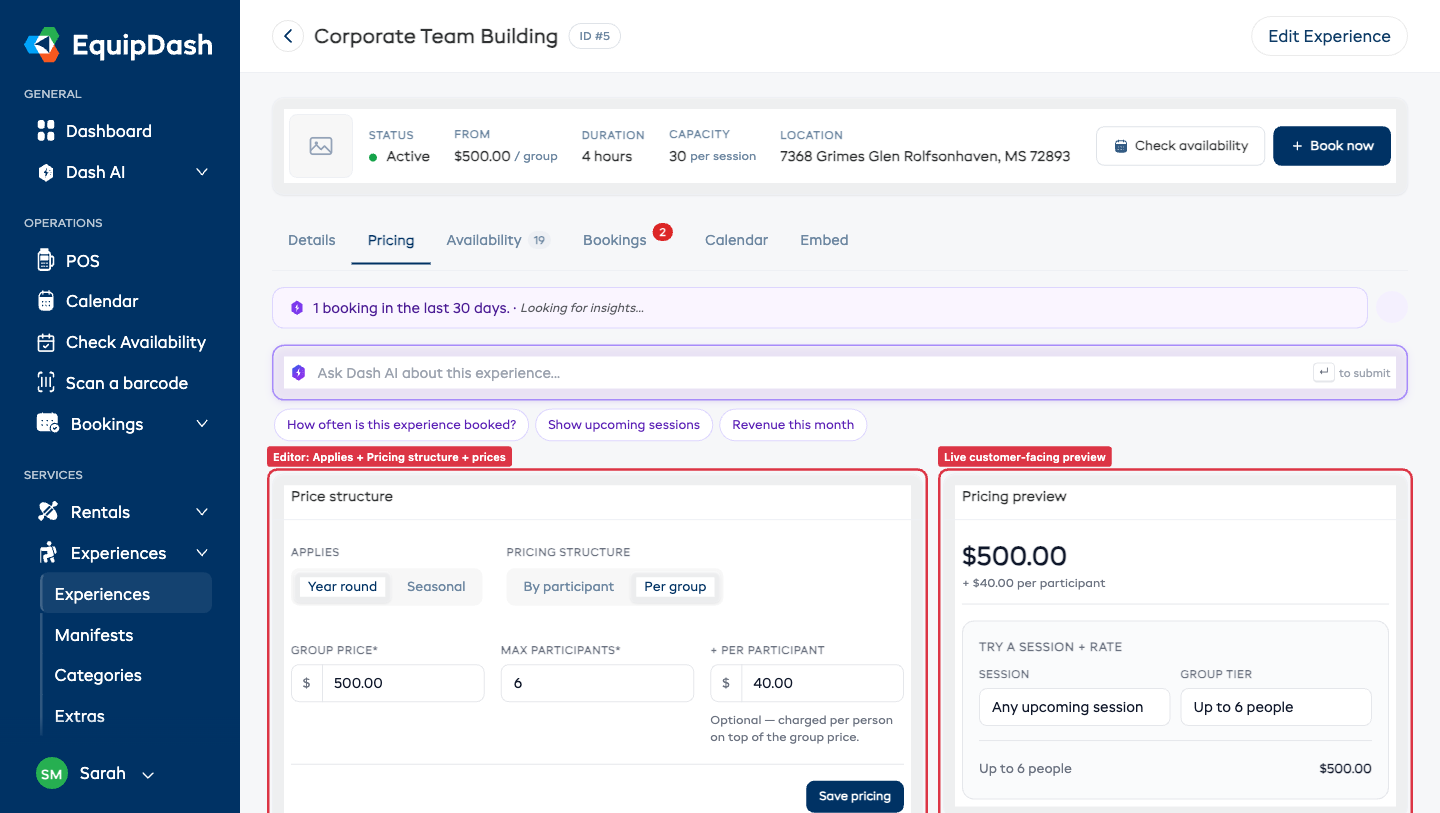
- Left card — Editor. Pick Year round or Seasonal under Applies, then Per participant or Per group under Pricing structure. The right rate-category checkboxes / season checkboxes appear automatically and the price input grid fills in.
- Right card — Preview. As you type, the customer-facing preview re-renders so you can see exactly what guests will see in the widget. Use the session + rate-type selectors to spot-check different combinations.
- Click Save Pricing at the bottom of the editor card. A small green confirmation pill appears on save.
The Pricing tab uses an isolated form — typing in the inline editor never touches what's loaded in the slide-out wizard, and vice versa. Each save replaces the existing pricing rows for the experience to keep the data clean (no row-level merging or accumulation).
From the Slide-Out Wizard (Step 2)
When you create a new experience or open the Edit Experience wizard from the detail page header, Step 2 is the same pricing editor wrapped in the wizard chrome — handy when you want to walk through every step end-to-end. Saving from Step 2 commits pricing along with the rest of the experience.
For per-participant pricing, you will need to select which rate categories to use. If you have not set up rate categories yet, see Rate Categories.
Changing Pricing Later
You can change the pricing structure of an existing experience at any time by either route above. However, be aware that:
- Switching between By Participant and By Group will reset your existing prices. You will need to re-enter them.
- Switching between Year Round and Seasonal will also reset prices.
- Existing bookings are not affected by pricing changes — they keep the price that was calculated at the time of booking.