Multi-Day Experiences
Some tours run over more than one day — a 3-day trek, a weekend kayak expedition, a multi-day cycling tour. EquipDash lets you sell these as one trip, one booking, with a start date and an end date, and everything understands the full span.
Turn it on
A multi-day experience is set up once, on the experience itself:
- Go to Experiences and create or edit the experience.
- Turn on Runs over multiple days.
- Save.
That's the only setting. (When it's on, the fixed "duration" field disappears — each departure defines its own length by its start and end date instead.)
Use this for any tour where guests are with you across more than one calendar day. For a tour that takes a few hours and finishes the same day, leave it off.
Add a multi-day departure
When you add a departure to a multi-day experience, you set when it starts and when it ends:
- Open the experience and go to the Availability tab.
- Click + Add session.
- Fill in:
- Start date and Start time — when the trip begins (e.g. Monday, 9:00 AM).
- End date and End time — when it finishes (e.g. Wednesday, 5:00 PM).
- Capacity — the number of spots for the whole trip.
- Guide(s) — who's leading it.
- Click Save.
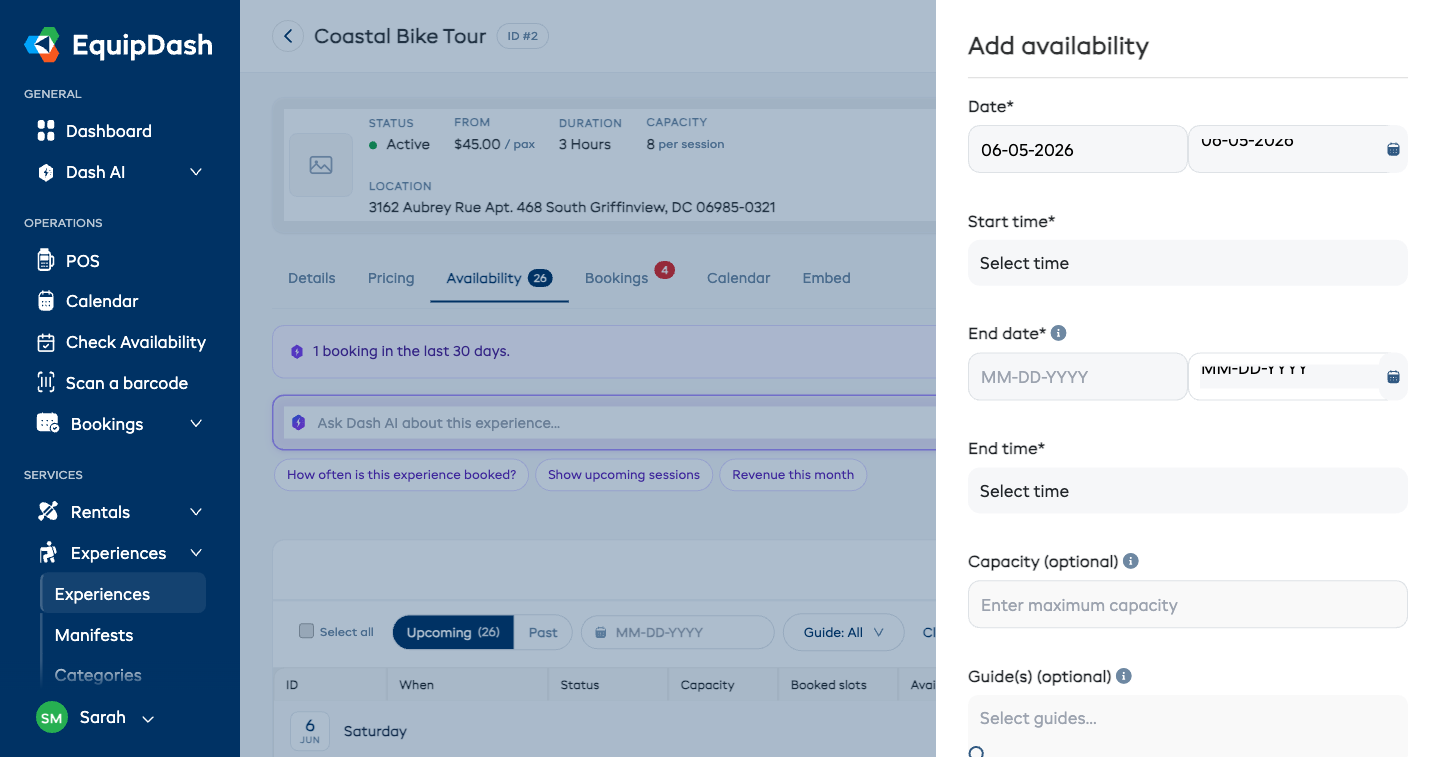
The end must be after the start. The whole span is sold as one trip — one price, one set of spots, one guide team.
What happens everywhere else
Once a multi-day departure is set up, EquipDash handles it correctly across the app:
- Calendar — the trip shows on every day it covers, each marked with the day number (e.g. Day 2/3), so you can see at a glance that your team and gear are committed for the whole window.
- Booking page — customers see the trip on its start day only (they can't accidentally book just the middle day), and the details read "3 days · Mon 9:00 AM – Wed 5:00 PM."
- Guides — a guide assigned to the trip is shown as unavailable for any other departure that overlaps those days, so you can't double-book them. (As always, this is a heads-up — you stay in control.)
- Manifest — the manifest shows the full date range, not just the start.
- Reminders — the pre-trip reminder goes out once before the trip starts, not every night of the trip.
What it doesn't do
To keep multi-day trips simple, a few things are deliberately left out — a multi-day trip is treated as one whole:
- No separate check-in for each day (check guests in once).
- No swapping guides part-way through.
- No different capacity or price per day.
- No room/accommodation management.
If you ever need one of these, get in touch — it would be a separate feature.