Automated Guest Communication for Tour Operators: Pre-Trip to Post-Review
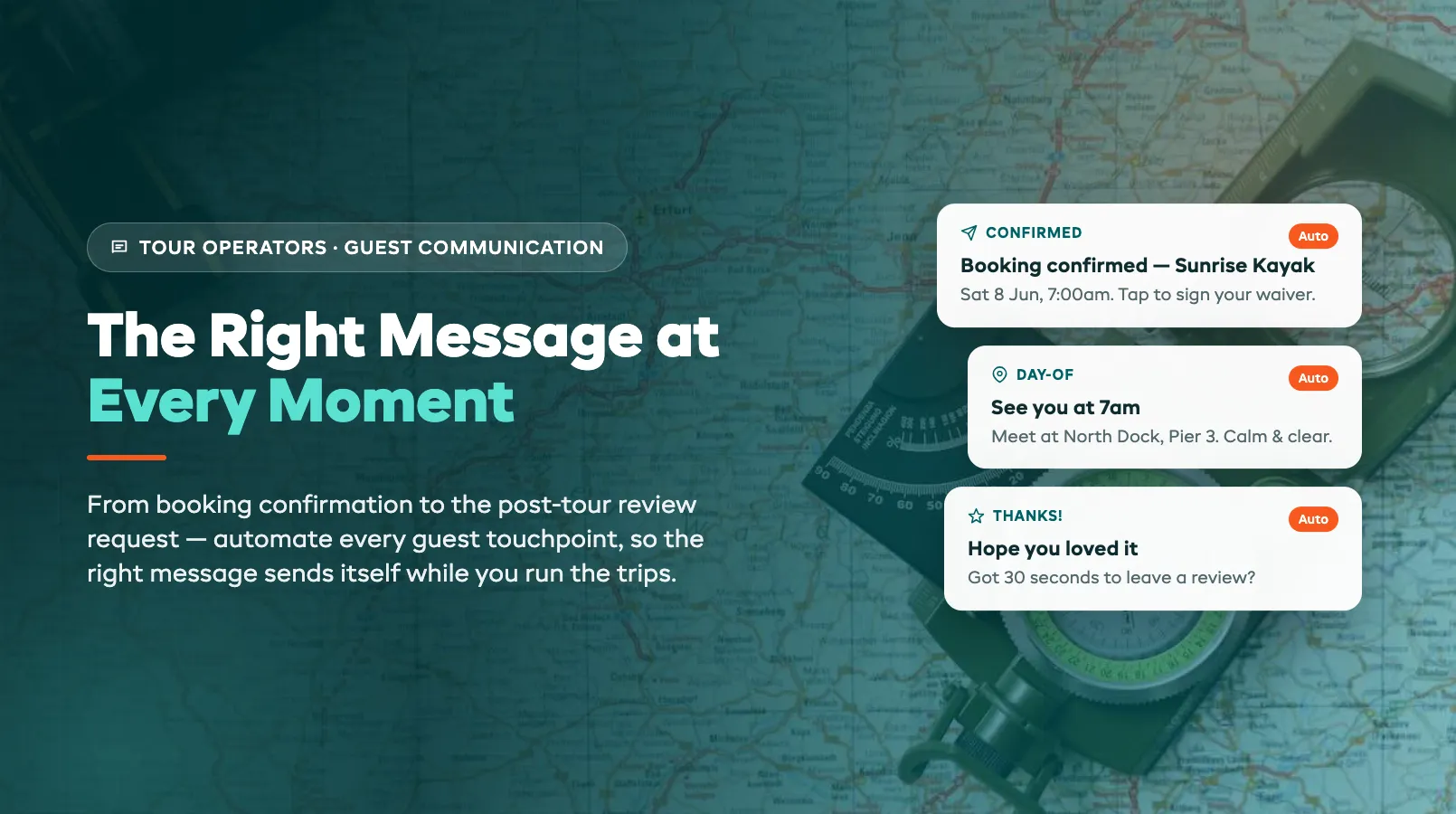
Most tour operators talk to guests in two bursts. There's a confirmation email when someone books, and then nothing, until the guest turns up at the wrong meeting point, or doesn't turn up at all because they forgot the trip was today. In between sits a stretch of silence that costs you no-shows, frantic phone calls, missed waivers, and reviews that never get written.
The fix isn't to spend your evenings typing emails. It's to set up the messages once and let them send themselves. Automated guest communication means every guest gets the right information at the right moment (booking confirmation, waiver reminder, meeting-point details, a weather heads-up, and a review request after the trip) without you lifting a finger on the day. This guide walks the full timeline and shows where automation earns its keep. For the bigger picture of how these tools reshape operations, start with our AI for tour operators guide.
The Guest Communication Timeline
Every booking follows the same arc, and each stage has a job. Map it once and you can see exactly where messages should fire. The booking confirmation locks in the sale and sets expectations. The pre-trip sequence gets waivers signed and questions answered before they clog your phone. The day-of message puts the guest at the right place at the right time. And the post-tour follow-up turns a happy customer into a review and, often, a repeat booking.
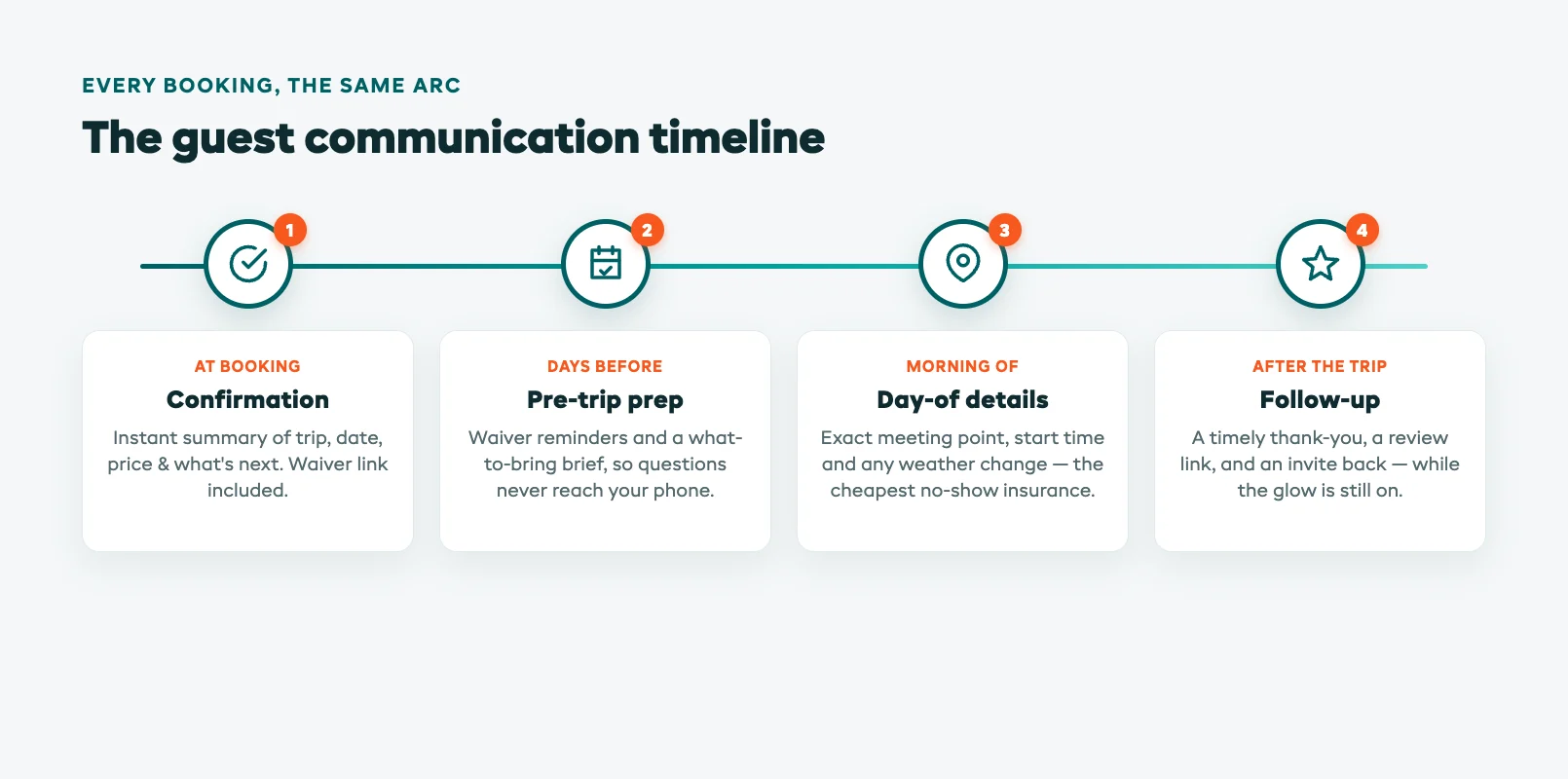
The point of mapping the timeline is that you stop thinking about messages one at a time. Instead of reacting ("oh, I should email everyone about tomorrow's weather") you build a sequence that runs on its own for every guest, every trip. Set the triggers (X days before, day-of at 7am, two hours after the trip ends) and the system handles the rest. You only step in when something is genuinely out of the ordinary.
Booking Confirmation Best Practices
The confirmation is the most-read message you'll ever send, so make it work hard. The moment someone books, they want reassurance that it went through and a clear summary of what they just bought: the trip, the date and time, the price, and what happens next. A confirmation that arrives instantly and reads cleanly sets the tone for the whole experience. One that's slow, vague, or missing the meeting details plants doubt before the guest has even packed.
Get the essentials in and skip the clutter. A strong confirmation states the trip name, date, start time, duration, total paid, and a one-line "what to do next", usually sign the waiver and watch for a reminder closer to the day. Add a clear cancellation policy so there's no argument later, and a direct way to reach you. If you run a booking confirmation process the same way every time, automation just makes it instant and consistent across every channel.
This is also the moment to start the waiver. Embedding a waiver link in the confirmation, while the guest is engaged and the booking is fresh, gets far more signatures than chasing people the night before. The earlier the ask, the smaller the day-of scramble.
Pre-Trip Preparation Emails
The days between booking and trip are where good operators separate themselves. A short pre-trip sequence (one message a few days out, another the night before) answers the questions guests always ask and heads off the problems that turn into no-shows. What should I wear? Where do I park? Can my kid come? Answer it before they ask and your phone stays quiet.
The single highest-value pre-trip message is the waiver reminder. Unsigned waivers are the classic day-of bottleneck: guests standing around filling out forms while the trip start slips later and later. An automated chaser that nudges only the people who haven't signed yet, and stops the moment they do, clears that backlog without you tracking a spreadsheet. A waiver chaser agent handles exactly this, sending polite reminders on a schedule until the form is done.
Use the pre-trip window to prep guests properly, too. A simple customer briefing checklist turned into an email (what to bring, what to wear, how fit you need to be, where to meet) means guests arrive ready instead of arriving with questions. Well-briefed guests are easier to run, safer, and happier, and happy guests write the reviews you want.
Day-Of Meeting Point and Weather Updates
The morning of the trip is when a single message prevents the most chaos. A day-of reminder with the exact meeting point (a pin, not just an address) the start time, and a "reply if you're running late" line dramatically cuts no-shows and lost guests. People are busy and forgetful; a timely nudge that lands a few hours before start is the cheapest no-show insurance you can buy.
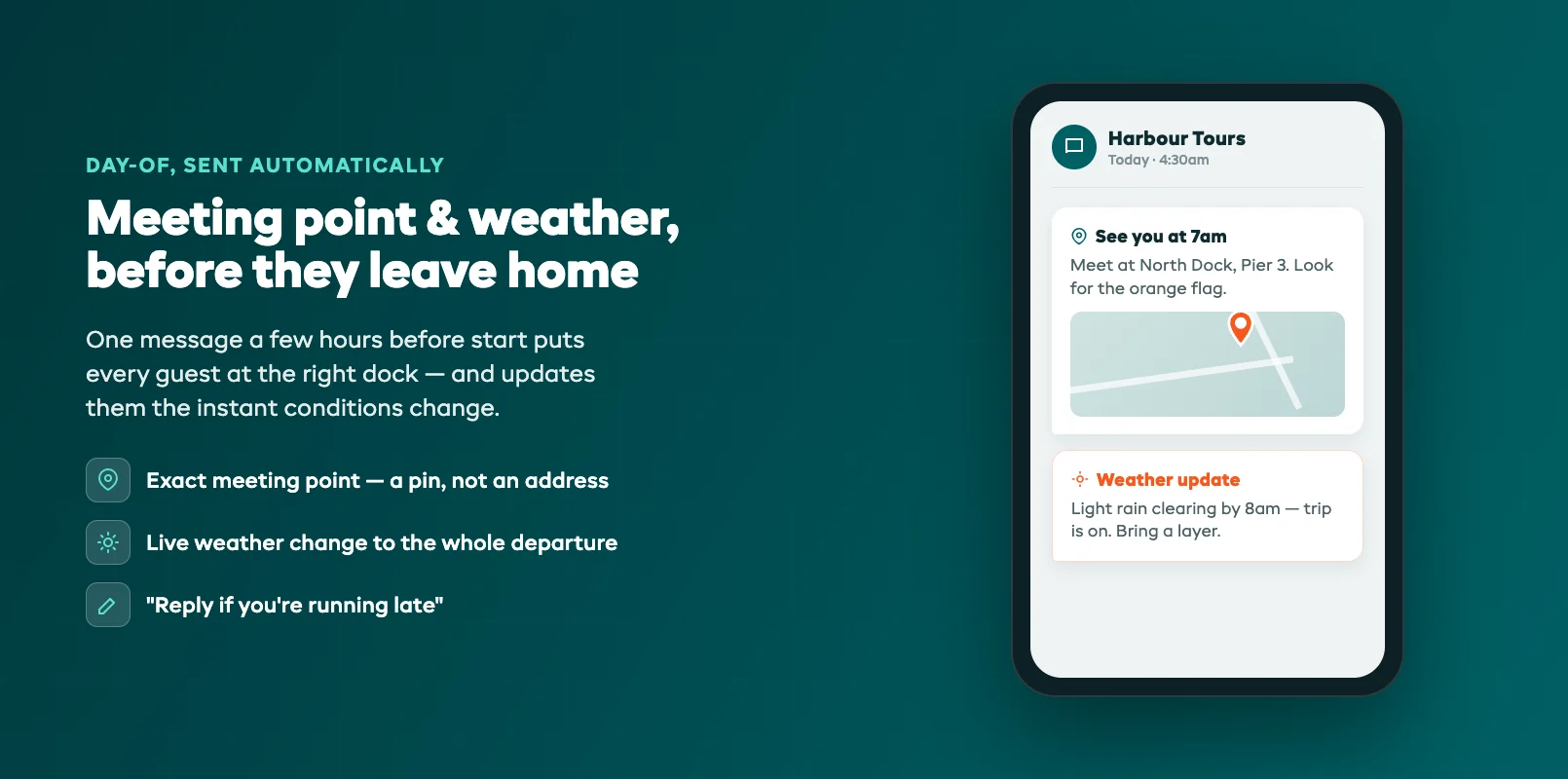
Weather is the other day-of variable, and it's where automation really pulls its weight. When conditions force a change, you need to reach every booked guest fast and clearly: a delay, a venue switch, or a cancellation with the rebooking options spelled out. Doing that by hand, guest by guest, during the exact window you're busiest is how messages get missed. An automated weather alert pushes one clear update to everyone on the affected departure in seconds. If you want guests to be able to ask follow-up questions instantly, pairing this with an AI chatbot means "is it still on?" gets answered without ringing your phone off the hook.
Post-Tour Follow-Up and Review Requests
The trip's over, the guest is buzzing, and most operators say nothing. That's the single biggest missed opportunity in the whole timeline. The hours right after a great experience are when a guest is most willing to leave a glowing review, and most receptive to booking their next trip or recommending you to a friend. Let that window close and you've left your best marketing on the table.
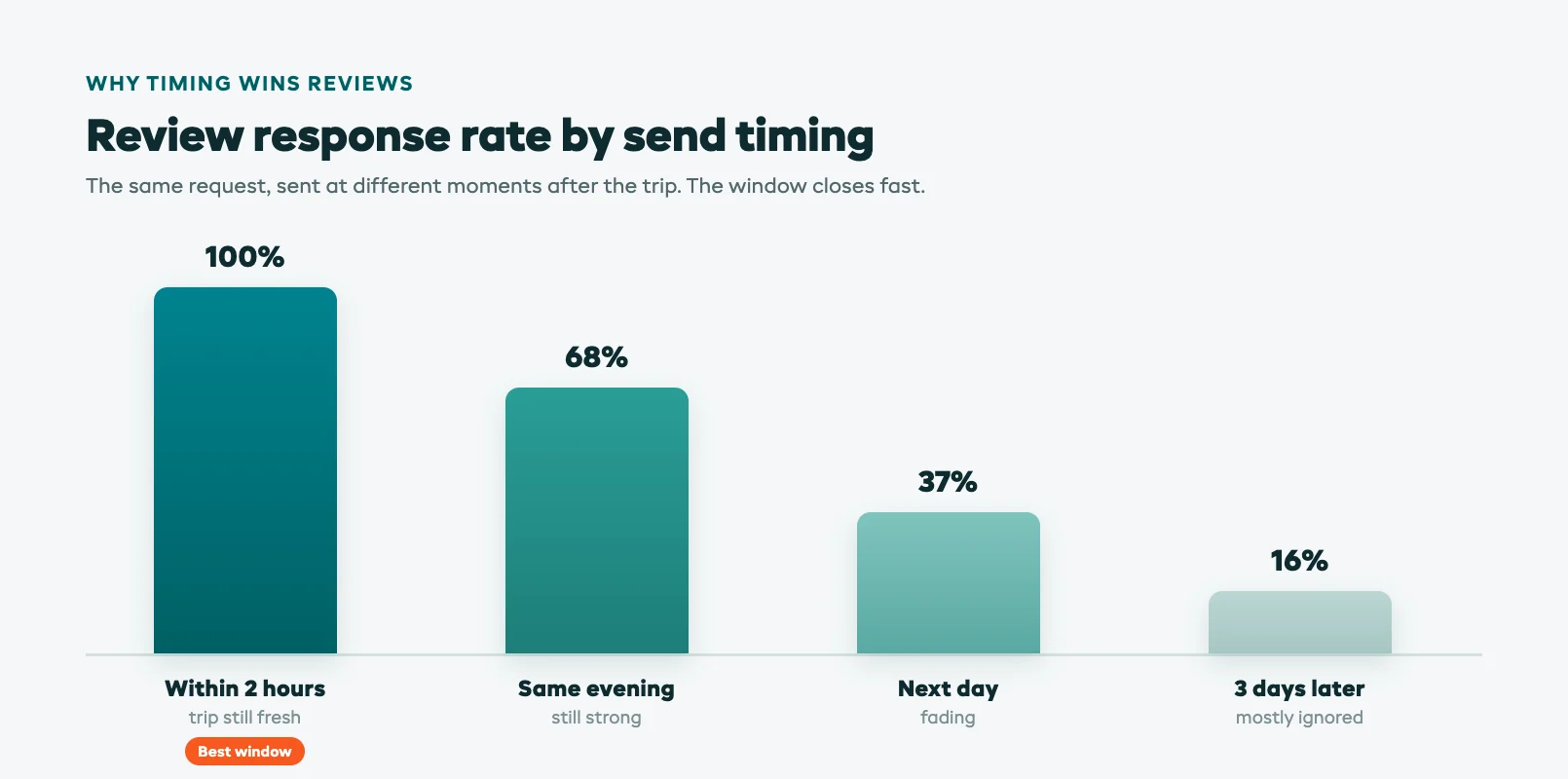
A simple automated follow-up captures it. A thank-you that lands an hour or two after the trip, with a direct link to your preferred review platform, gets far more reviews than a request that shows up three days later when the glow has faded. Timing and ease are everything: one tap to the review page, no hunting. A post-tour review request agent sends that message automatically and can even route unhappy guests to a private reply first, so problems reach you instead of your public reviews.
Don't stop at reviews. The same follow-up is the natural place to invite a repeat booking: a discount on their next trip, a heads-up about a different experience they'd enjoy, or a referral nudge. Guests who just had a good time are your warmest audience, and a single well-timed message turns one trip into the start of a relationship.
Personalization at Scale
The catch with all this is that generic blasts feel like spam, and guests tune them out. The trick is making automated messages feel personal: the guest's name, their specific trip, the actual meeting point for their departure, the right weather for their date. Done well, an automated message reads like you wrote it for them, because every detail is theirs. Done badly, it reads like a mailshot and gets ignored.
This is where pulling messages straight from your booking data matters. When the system already knows who booked what, when, and with whom, it can tailor every message without you writing variants by hand. Smarter tools take that a step further: adjusting tone, timing, and even which message to send based on the guest and the trip, so a first-timer gets more hand-holding than a returning regular. It's the same principle behind AI booking optimization: use the data you already have to make each touchpoint smarter.
Personalization at scale is what separates communication that builds loyalty from communication that annoys. The operators who get it right send fewer, better messages: each one relevant, timely, and clearly meant for that guest. If you want to see how the wider toolkit fits together, our guides on AI demand forecasting and dynamic pricing for tours cover the operational side, and the tour operator glossary explains the terms. You can also see how it all connects on the tours platform overview.
Start small. Pick the one gap that's costing you most (no-shows, missing waivers, or thin reviews) automate that single message first, and add the next one once it's running. Within a season you'll have a full timeline that talks to every guest, every trip, while you focus on running the tours.
FAQ
What guest messages should a tour operator automate first?
Start with the message that's costing you the most. For most operators that's either the day-of meeting-point reminder (cuts no-shows) or the waiver reminder (clears the day-of bottleneck). Automate that single message, confirm it's working, then add the booking confirmation, pre-trip prep, and post-tour review request one at a time until the whole timeline runs on its own.
Will automated messages feel impersonal to guests?
Only if you write them that way. A message that pulls in the guest's name, their specific trip, the real meeting point, and the weather for their date reads like you sent it personally, because every detail is theirs. The problem is generic blasts that ignore who the guest is. Pulling content straight from your booking data is what keeps automated messages feeling personal at scale.
When is the best time to send a review request?
An hour or two after the trip ends, while the experience is still fresh. That's when guests are most willing to leave a glowing review and most likely to click straight through. A request that arrives three days later, after the glow has faded, gets a fraction of the responses. Make it one tap to your review page and you'll see the difference.
How does automation help with bad weather?
When conditions force a delay, venue change, or cancellation, you need to reach every booked guest on that departure fast and clearly. Doing it by hand during your busiest window is how messages get missed. An automated weather alert pushes one consistent update, including rebooking options, to everyone affected in seconds, so no guest shows up to a trip that isn't running.
Do I need separate tools for email and text?
Not if your booking system handles both. The advantage of running guest communication from the same platform that holds your bookings is that every message, email or text, already knows the trip, the guest, and the timing. Stitching together separate tools means re-entering data and risking mismatched information. One system that sends across channels keeps everything consistent and saves you the admin.
Can automated communication reduce no-shows?
Yes, and it's one of the clearest wins. No-shows usually come from guests forgetting or losing the meeting details, not from changing their minds. A day-of reminder with the exact meeting point, start time, and a "reply if you're running late" line gives them everything they need at the moment it matters. Operators who add that single message typically see a noticeable drop in no-shows.
How does this connect to the rest of an AI tour stack?
Guest communication is one piece of a wider toolkit. It pairs naturally with a chatbot that fields guest questions, demand forecasting that tells you how busy a departure will be, and dynamic pricing that sets the rate. The common thread is using the booking data you already have to make each touchpoint smarter. Our AI for tour operators guide maps how the pieces fit together.
in one place