Equipment Sign-Out Sheet Template (Free Download)
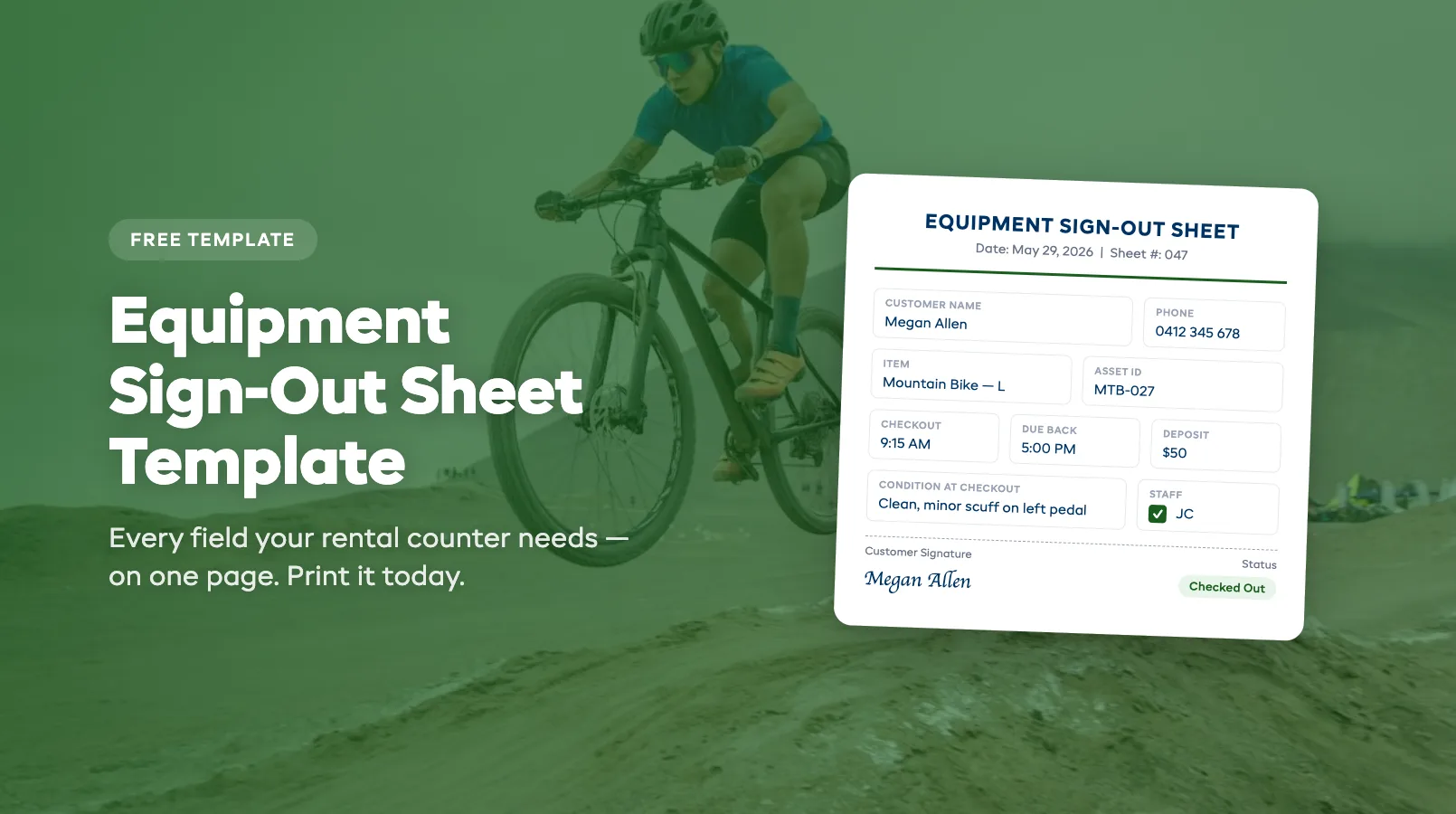
You've got 40 pieces of gear, three staff members, and a clipboard that's been through two seasons of coffee rings. Somewhere on page three, a customer's phone number is illegible and a return date might say the 5th, or the 9th. Nobody's sure.
Equipment sign-out sheets are the simplest form of inventory control. They work until they don't. This guide gives you a template you can print today, explains what every field is for, and helps you decide when paper has run its course.
For the full picture of managing your rental fleet, see the complete guide to rental inventory management.
What to Include on Your Sign-Out Sheet
A sign-out sheet is only useful if it captures the right information. Miss a field and you're left guessing when gear doesn't come back or comes back damaged. Include too many fields and your staff skips half of them during a Saturday rush.
Here's what belongs on every equipment sign-out sheet:
Customer information:
- Full name
- Phone number (mobile preferred. You need to reach them)
- Email address
- ID type and number (driver's license or passport)
Equipment details:
- Item name or description (e.g., "Mountain Bike — Large")
- Asset ID, serial number, or tag number
- Condition at checkout (clean, minor wear, specific damage notes)
Rental terms:
- Date and time of checkout
- Expected return date and time
- Rental rate and deposit collected
- Late fee policy reference
Signatures:
- Customer signature acknowledging condition and terms
- Staff initials confirming the checkout
Return fields (filled on check-in):
- Actual return date and time
- Condition at return
- Damage notes (if any)
- Staff initials on return inspection
That's 15-17 fields. It sounds like a lot, but on a well-designed form it fits on one page and takes under two minutes to fill out. The fields you skip are the ones that cost you money later: a missing phone number when gear is overdue, or no condition notes when a customer disputes a damage charge.
For a deeper look at the full checkout workflow, including waivers and pre-staging, see our guide to equipment check-in and check-out systems.
Free Template Download
We've built a printable equipment sign-out sheet template that includes every field listed above, formatted for A4 or Letter paper. Each page holds 5 rental entries with clear column headers.
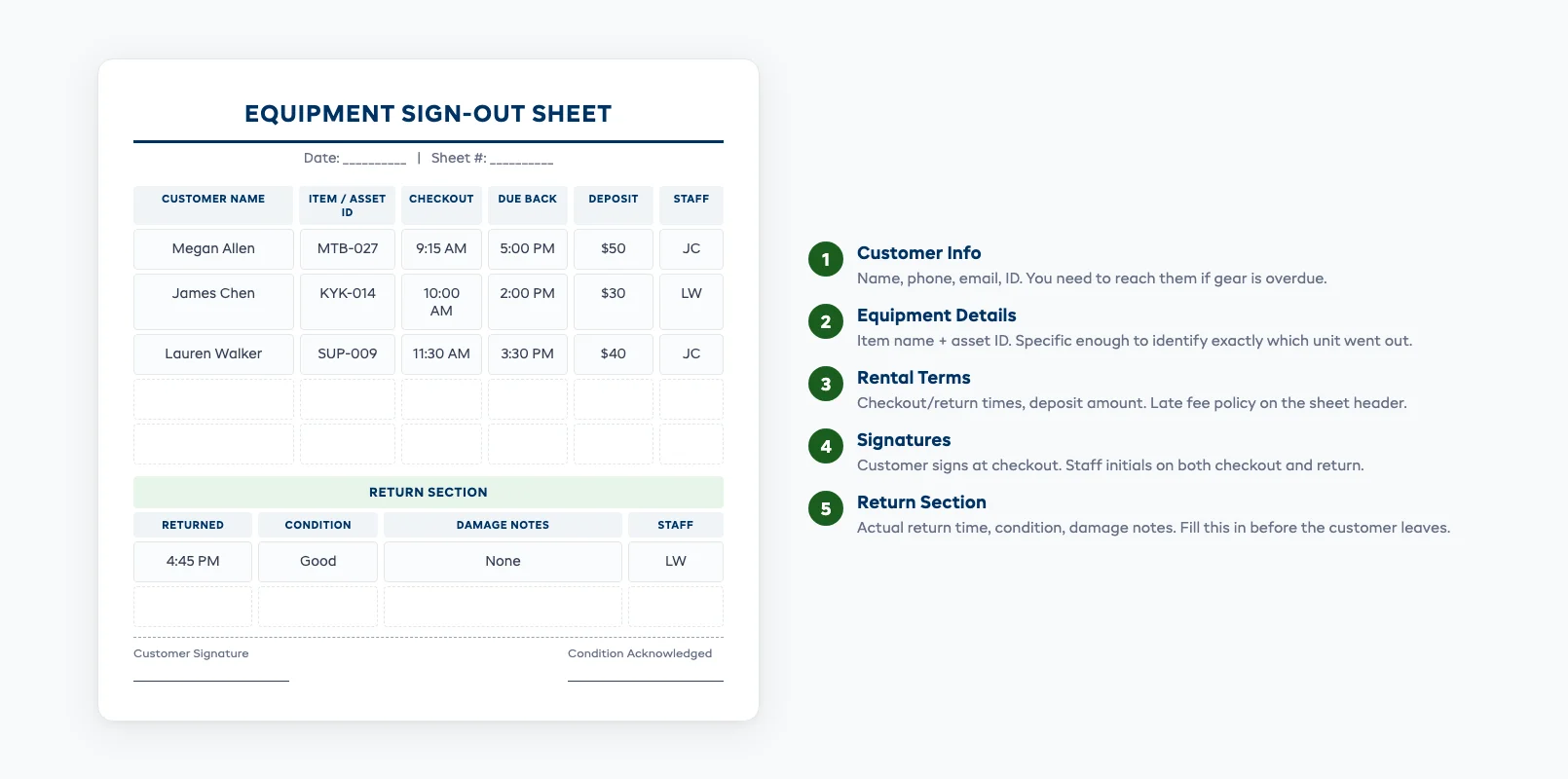
How to use it:
- Print a stack and keep it on a clipboard at your counter
- Fill in the top section (customer info + equipment details) at checkout
- Have the customer sign before they leave with the gear
- Complete the bottom section (return fields) when gear comes back
- File completed sheets by date. You'll need them for damage disputes and inventory audits
Tips for making paper sheets work better:
- Print on card stock or laminate a header sheet so columns stay readable
- Use one sheet per day rather than one sheet per customer. It gives you a snapshot of everything that's out
- Keep a separate "overdue" folder for any rentals past their return date
- Number your sheets sequentially so you know if one goes missing
This template gets you through the first phase. When you're ready to track equipment more systematically, our step-by-step guide on how to track rental equipment covers tagging, barcodes, and digital workflows.
Paper vs Digital Sign-Out Sheets
Paper sign-out sheets have one big advantage: zero setup cost. Print the template, hand your staff a pen, and you're running. No training, no software subscription, no Wi-Fi required.
But paper has a ceiling, and most rental shops hit it faster than they expect:
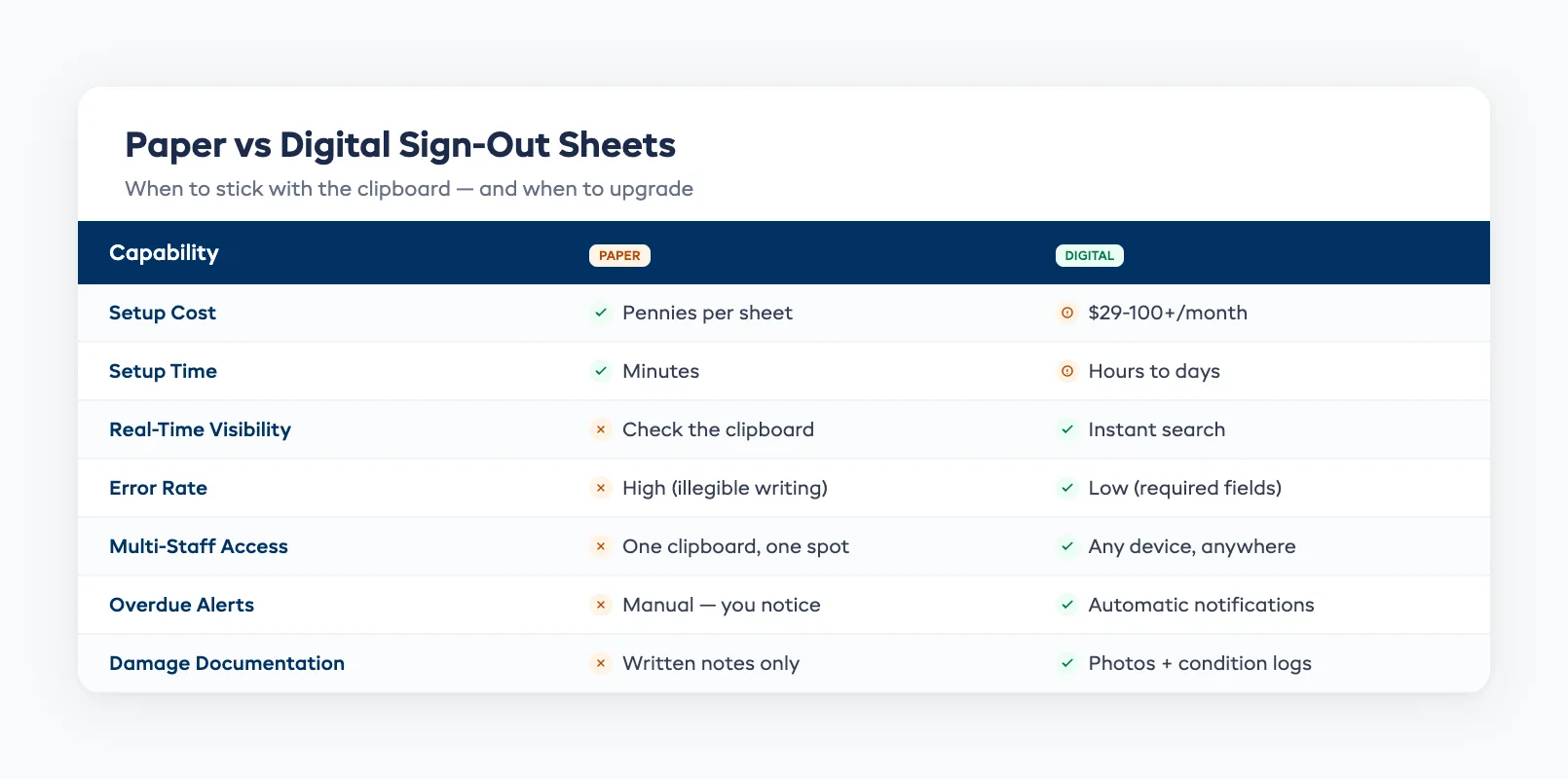
| Feature | Paper | Digital |
|---|---|---|
| Cost | Pennies per sheet | $29-100+/month for software |
| Setup time | Minutes | Hours to days |
| Real-time visibility | None — you check the clipboard | Instant: search by item, customer, or date |
| Error rate | High (illegible writing, missed fields) | Low (required fields, dropdowns, auto-fill) |
| Damage documentation | Written notes only | Photos linked to each rental |
| Multi-staff access | One clipboard, one location | Any device, any location |
| Overdue alerts | Manual — you notice when you notice | Automatic notifications |
| Reporting | Count the pages | One-click utilization reports |
For a single-location shop doing under 10 rentals a day with one or two staff, paper works. It's not elegant, but it captures what you need. For a deeper comparison of spreadsheets versus purpose-built software, see Rental Inventory: Spreadsheet vs Software.
The problems start when any of these happen:
- You hire a third employee and need to share information across shifts
- Walk-in volume exceeds 15 rentals per day and the clipboard backs up the counter
- You add online bookings and need to reconcile digital reservations with paper checkouts — a common cause of double bookings
- A customer disputes damage and you can't find the sign-out sheet from three weeks ago
When It's Time to Go Digital
The transition from paper to digital doesn't need to happen overnight. Most shops that switch successfully do it in stages:
Stage 1: Keep paper for walk-ins, add digital for online bookings. If you're already taking online reservations, those bookings live in your booking system. Don't re-enter them on a paper sheet. Use the paper only for walk-ins and phone bookings that aren't in the system yet.
Stage 2: Move check-out to a tablet at the counter. Replace the clipboard with a tablet running your rental software. Staff search the booking, confirm the items, capture a condition photo, and collect a digital signature. The paper sheet becomes the backup, not the primary record.
Stage 3: Retire the clipboard. Once your team is comfortable with the digital workflow and you've confirmed the system handles walk-ins smoothly, the paper goes away. Keep a small stack behind the counter for power outages or Wi-Fi failures, but it shouldn't be the daily tool.
The shops that struggle with this transition are the ones that try to flip everything in one day. Your long-time staff member who's been using clipboards for 12 years needs a week of overlap, not a mandate.
The real payoff shows up in time saved. A rental shop doing 20 checkouts per day spends roughly 40 minutes on paper sign-out sheets. A digital system cuts that to 15 minutes, and gives you searchable records, automatic overdue alerts, and condition photos that protect you in damage disputes. Over a season, that's 100+ hours back. Digital tracking also unlocks utilization reporting (knowing which gear earns its keep and which sits on the rack) plus automated maintenance scheduling based on rental counts instead of guesswork. For the full picture of managing your fleet beyond the checkout counter, see our rental fleet management guide.
FAQ
What fields should an equipment sign-out sheet include?
At minimum: customer name, phone number, item description with asset ID, condition at checkout, rental dates, deposit amount, and customer signature. Return fields should capture actual return date, condition at return, and staff initials. See the full field list in the "What to Include" section above.
Can I just use a notebook instead of a formal sign-out sheet?
You can, but you'll regret it. Notebooks lack structure: staff write different information in different orders, skip fields, and there's no dedicated return section. A printed template with columns forces consistency and takes the same amount of time to fill out.
How many rentals per day before paper sign-out sheets stop working?
Most shops hit the limit around 10-15 rentals per day. Below that, one person can manage the clipboard. Above that, you need real-time visibility into what's out, what's overdue, and what's available, and paper can't give you that without constant manual checking.
Is a spreadsheet a good middle ground between paper and software?
Spreadsheets solve the legibility and search problems but create new ones: version conflicts when two people edit at once, no mobile access at the counter, and no automatic alerts. They're a reasonable step between paper and purpose-built software, but most shops outgrow them within a season.
How do I handle damage disputes with paper sign-out sheets?
Your best defense is the condition field. At checkout, note any existing wear or damage. At return, note the current state. If there's new damage, document it while the customer is still present and get their acknowledgment. Without condition notes on both ends, you have no evidence, and the customer wins the dispute.
What's the biggest mistake shops make with equipment sign-out sheets?
Not filling in the return section. Staff get busy, the customer drops off the gear, and nobody logs the return. Now you don't know if the item is available, what condition it's in, or when it actually came back. Make return logging non-negotiable, even if it's just date, condition, and initials.
Do I need a separate sign-out sheet for each equipment type?
Not usually. A universal template works for most rental shops. The item description and asset ID fields handle the differentiation. The exception is high-value items (boats, motorised equipment) where you might want additional fields for fuel level, engine hours, or safety equipment checks.
in one place