Rental Inventory: Spreadsheets vs Software — When to Make the Switch

Spreadsheets work. For a while. If you're running a small rental shop, chances are you started tracking inventory in Google Sheets or Excel — and it got the job done. No monthly fees, no learning curve, total control.
But at some point, spreadsheets stop being helpful and start being risky. The question is knowing exactly when that point hits, and what you actually gain (and lose) by switching to rental inventory management software.
This is an honest comparison. We'll tell you where spreadsheets still make sense, where they break down, and how to migrate without losing your data or your sanity.
When Spreadsheets Work Fine
Let's be straight: spreadsheets are a legitimate tool for small rental operations. If any of these describe you, your spreadsheet is probably fine:
- You have fewer than 20 items and rent them out a few times per week. The volume is low enough that manual updates won't cause errors.
- You're the only person updating inventory. One person, one spreadsheet, no conflicts. The moment a second person enters the picture, version control becomes a problem.
- You don't take online bookings. If every rental starts with a face-to-face conversation, you can update the sheet in real time as it happens.
- Your gear doesn't need maintenance tracking. If you're renting simple items that don't require regular servicing, you don't need automated maintenance alerts.
Spreadsheets shine in these scenarios because they're free, flexible, and familiar. There's no shame in using them — some successful shops run on spreadsheets for years. If you're even earlier in the journey and still using paper, grab our equipment sign-out sheet template to capture the right fields at checkout. If you're in this camp and want to know which features matter most at small scale, our equipment rental software for small business guide covers exactly what's worth paying for.
The trouble starts when your operation outgrows what a flat file can handle.
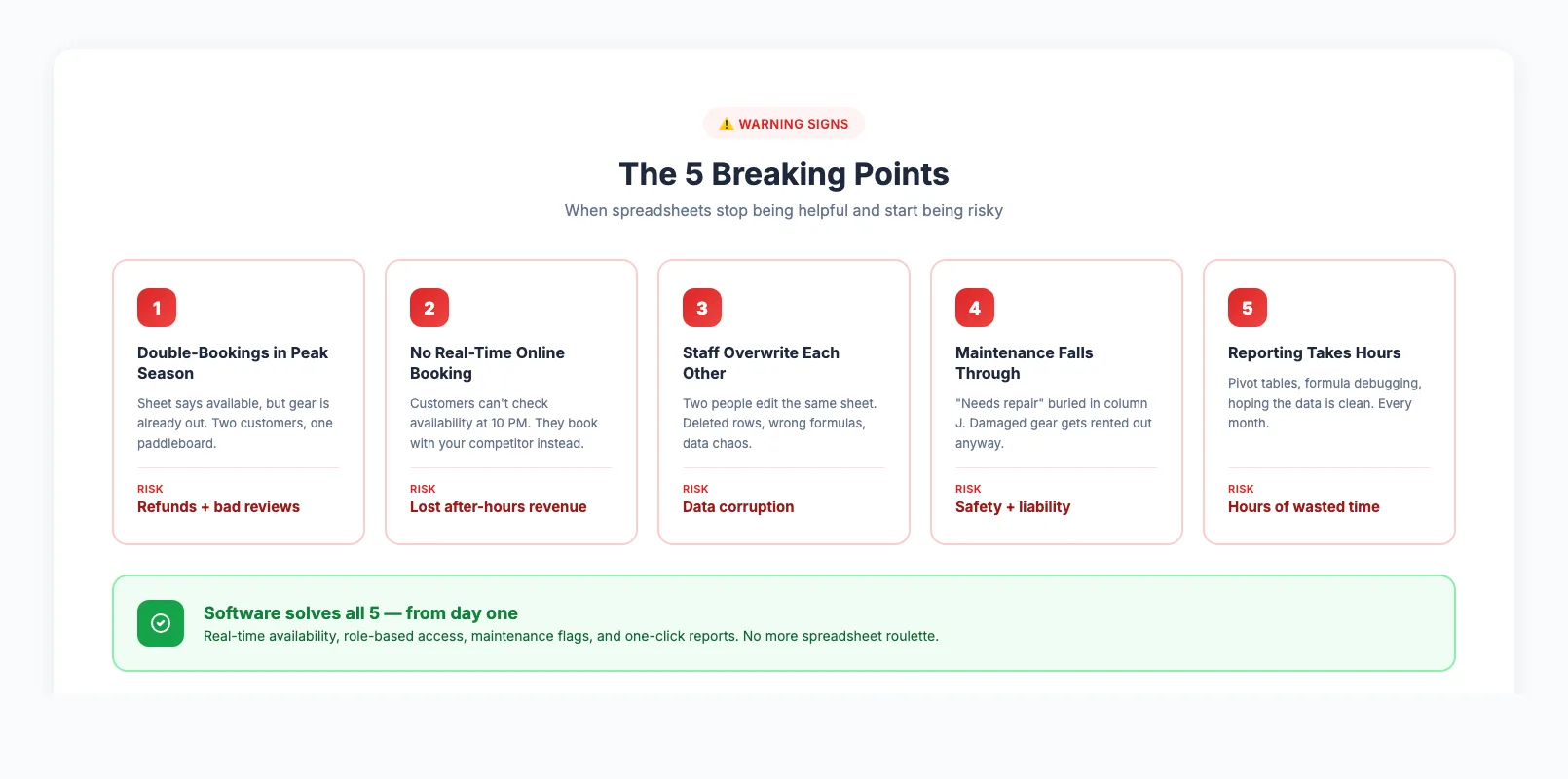
The 5 Breaking Points (Signs You've Outgrown Spreadsheets)
These aren't hypothetical problems. They're the exact situations where spreadsheet-based rental shops lose money, lose customers, or both.
1. Double-Bookings During Peak Season
Your spreadsheet says the stand-up paddleboard is available Saturday. But someone rented it Friday afternoon and the sheet wasn't updated. Now two customers show up for the same board.
With 30 items and 15 bookings per day in peak season, this becomes a daily risk — not a one-off mistake. Dedicated equipment rental software updates availability the instant a booking is confirmed, across every channel. For a complete breakdown of why this happens and how to fix it, see our guide on how to prevent double bookings.
2. You Can't Offer Real-Time Online Booking
Customers expect to check availability and book instantly at 10 PM on a Tuesday. A spreadsheet can't power a live booking widget on your website. You're stuck with "call to check availability" or a contact form — and losing the booking to a competitor who lets them reserve in two clicks.
An online booking system connected to your inventory eliminates this gap entirely. See our guide on what to look for in equipment rental booking software for a full breakdown of the features that matter most.
3. Staff Members Overwrite Each Other's Changes
The moment two people edit the same spreadsheet, you get conflicts. Google Sheets handles simultaneous editing better than Excel, but neither prevents someone from accidentally deleting a row, changing a formula, or entering data in the wrong column.
In rental software, every action is tracked, role-based, and reversible. Your front desk can check items out while your manager reviews returns — without stepping on each other's work.
4. Maintenance and Condition Tracking Falls Through the Cracks
That bike with the wobbly front wheel? It's in your spreadsheet under "Notes: needs repair." But nobody filters by that column before renting it out. In peak season, skipping maintenance checks means renting damaged gear to customers — creating safety risks and warranty issues.
Software flags items that need attention before they can be rented. You see it on the dashboard, not buried in column J.
5. Reporting Takes Hours Instead of Seconds
Which items have the highest utilization rate? What's your revenue per asset? How does this July compare to last July? With a spreadsheet, answering these questions means building pivot tables, writing formulas, and hoping the data is clean. These are exactly the fleet management metrics that drive replacement and sizing decisions.
With software, these are one-click reports. If you're looking to automate your rental business, real-time reporting is one of the first wins.
What You Gain by Switching to Software
Switching from spreadsheets to rental software isn't just about avoiding problems. It's about unlocking capabilities your spreadsheet can't provide:
Real-time availability across all channels. Your website, in-store counter, and any marketplace listings all pull from the same inventory. No sync delays, no conflicting information. Cloud-based equipment rental software makes this possible from any device — shop counter, phone, or laptop at home.
Automated confirmations and reminders. When a customer books, they get instant confirmation. The day before their rental, they get a reminder. No manual emails, no forgetting.
Check-in/check-out in seconds. Scan a barcode or tap a screen. The system records who has what, when it's due back, and updates availability instantly. This is exactly the kind of built-in inventory tracking that spreadsheets can't replicate. For a hands-on walkthrough of setting up QR codes, barcodes, and check-in workflows, see our guide on how to track rental equipment. If you want to design the full counter workflow — from customer arrival to gear return — our equipment check-in/check-out system guide covers it step by step.
Customer records that build themselves. Every booking creates a customer profile. Next time they visit, you see their rental history, waiver status, and preferences — without flipping through tabs in a spreadsheet.
Maintenance scheduling that actually works. Set service intervals. Get alerts when items hit their threshold. Block damaged gear from being rented until it's cleared. For the full breakdown of time-based vs usage-based triggers, see our guide to equipment maintenance tracking.
For a full comparison of what different platforms offer, see our equipment rental software comparison.
What You Lose (Honest Trade-Offs)
We'd be lying if we said there were no downsides. Here's what you give up:
Cost. Spreadsheets are free. Rental software typically costs $23–$119 per month, plus potential platform fees. For a very small operation with low booking volume, the monthly cost might not make sense yet.
Total flexibility. In a spreadsheet, you can add a column for anything. Software has a defined structure. Most platforms cover the standard fields well, but if you track something niche (like "customer shoe size" or "preferred paddle length"), you may need custom fields — which not all platforms offer on basic plans.
The learning curve. Your team knows spreadsheets. New software requires training, even if it's simple. Expect 1–2 weeks before everyone is comfortable and 30 days before the new system feels faster than the old one.
Migration effort. Exporting your spreadsheet data and importing it into a new system takes time. Simple inventories (item name, category, quantity) migrate in an hour. Complex setups with pricing rules, seasonal rates, and customer histories take longer.
The honest answer: if you process more than 50 bookings per month or have more than 30 items, the gains outweigh the costs. Below that threshold, a spreadsheet might still be your best tool.
How to Migrate Without Losing Data
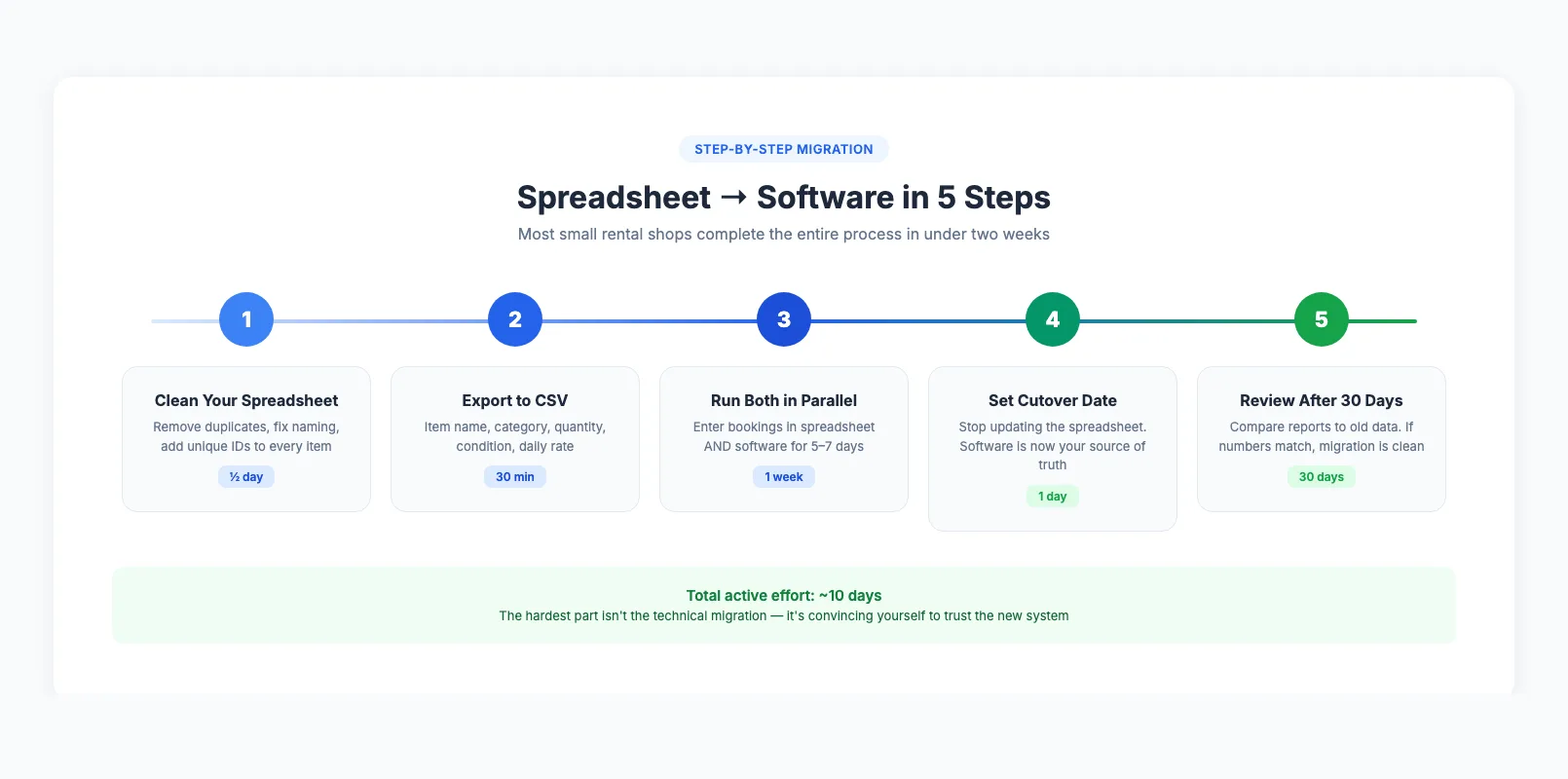
The migration fear is real but usually overblown. Here's a practical, step-by-step approach:
Step 1: Clean your spreadsheet first. Remove duplicate entries, fix inconsistent naming (is it "Mountain Bike (Blue)" or "Blue MTB"?), and make sure every item has a unique identifier. This takes an afternoon but saves hours during import.
Step 2: Export to CSV. Most rental software accepts CSV imports. Export your spreadsheet with columns for item name, category, quantity, condition, and daily/hourly rate.
Step 3: Run both systems in parallel for one week. Don't go cold turkey. Enter new bookings in both the spreadsheet and the software for 5–7 days. This catches any import errors and lets your team build confidence.
Step 4: Set a cutover date and commit. After the parallel period, stop updating the spreadsheet. Archive it as a backup, but make the software your single source of truth.
Step 5: Review after 30 days. Check utilization reports against your old spreadsheet data. If the numbers match, your migration is clean. If something's off, you still have the original spreadsheet to reference.
Most small rental shops complete this entire process in under two weeks. The hardest part isn't the technical migration — it's convincing yourself to trust the new system. After 30 days, the question isn't "should I go back to spreadsheets?" — it's "why didn't I switch sooner?"
If you're starting fresh and haven't settled on a platform yet, our guide on how to start an equipment rental business covers the technology decision in detail.
FAQ
At what point do spreadsheets stop working for tracking rental gear?
The tipping point is typically 30+ items with regular bookings, or 2+ staff members managing inventory. Below that, spreadsheets work fine. Above it, the risk of double-bookings, data entry errors, and missed maintenance becomes a daily problem rather than a rare one.
What are the real risks of sticking with spreadsheets during peak season?
Double-bookings (refunds + bad reviews), renting out damaged gear (liability issues), lost revenue from no online booking capability, and staff overwhelm from manual processes. During a busy July, one double-booking per week across a 50-item fleet can cost you $500–$1,000 in refunds and lost bookings per month.
How painful is the actual migration from spreadsheets to software?
Less painful than most people expect. For a typical small shop (50–100 items), the full migration takes 1–2 weeks including a parallel-run period. The CSV import itself takes under an hour. The real time investment is cleaning your spreadsheet data before import and training your team on the new system.
How much does rental inventory software cost compared to free spreadsheets?
Dedicated rental software ranges from $23–$119/month depending on the plan. At the entry level, you're spending roughly $276/year. The comparison isn't really "free vs paid" — it's "free tool that costs you bookings and staff time" vs "paid tool that captures more revenue and saves hours per week." Most shops recoup the cost within the first month through reduced errors and online bookings.
Can I use rental software and still keep my spreadsheet as backup?
Absolutely — and we recommend it during the transition. Export reports from your new software monthly and save them alongside your archived spreadsheet. After 2–3 months, most operators stop checking the spreadsheet entirely because the software's reporting is more accurate and more useful.
Will I lose my historical data when I switch?
No. Your spreadsheet stays intact forever. Import what you need into the new system (item inventory, customer lists, pricing) and keep the spreadsheet archived. Most software can't import full booking history, but your go-forward data starts building immediately. For tour operators with seasonal patterns, having even 3 months of software data is enough to start seeing useful trends.
in one place