Cloud-Based Equipment Rental Software: Why It Matters

If you still run your rental shop from a desktop application installed on one computer behind the counter, every sick day, power outage, or second location becomes a crisis. Cloud-based equipment rental software fixes that by moving your entire operation online — accessible from any device, anywhere, at any time.
This isn't a minor upgrade. It's the difference between a business that depends on a single machine and a full rental management system that runs whether you're at the counter, at home, or on the slopes checking tomorrow's bookings from your phone. For a broader look at what modern platforms offer, see our complete guide to equipment rental software.
What "Cloud-Based" Actually Means for Rental Shops
Cloud-based software runs on remote servers managed by the vendor — not on a hard drive at your shop. You access it through a web browser or mobile app. Your data syncs in real time across every device and location.
For rental operators, this means:
- No installation or local servers. Open a browser, log in, and start working. No IT staff required. If you're starting a new rental business, you can be operational in hours, not weeks.
- Automatic updates. New features and security patches roll out without downtime or manual installs. You always run the latest version.
- Device flexibility. Check bookings on your laptop at home, process a walk-in on a tablet at the counter using your rental POS, or review inventory on your phone between deliveries.
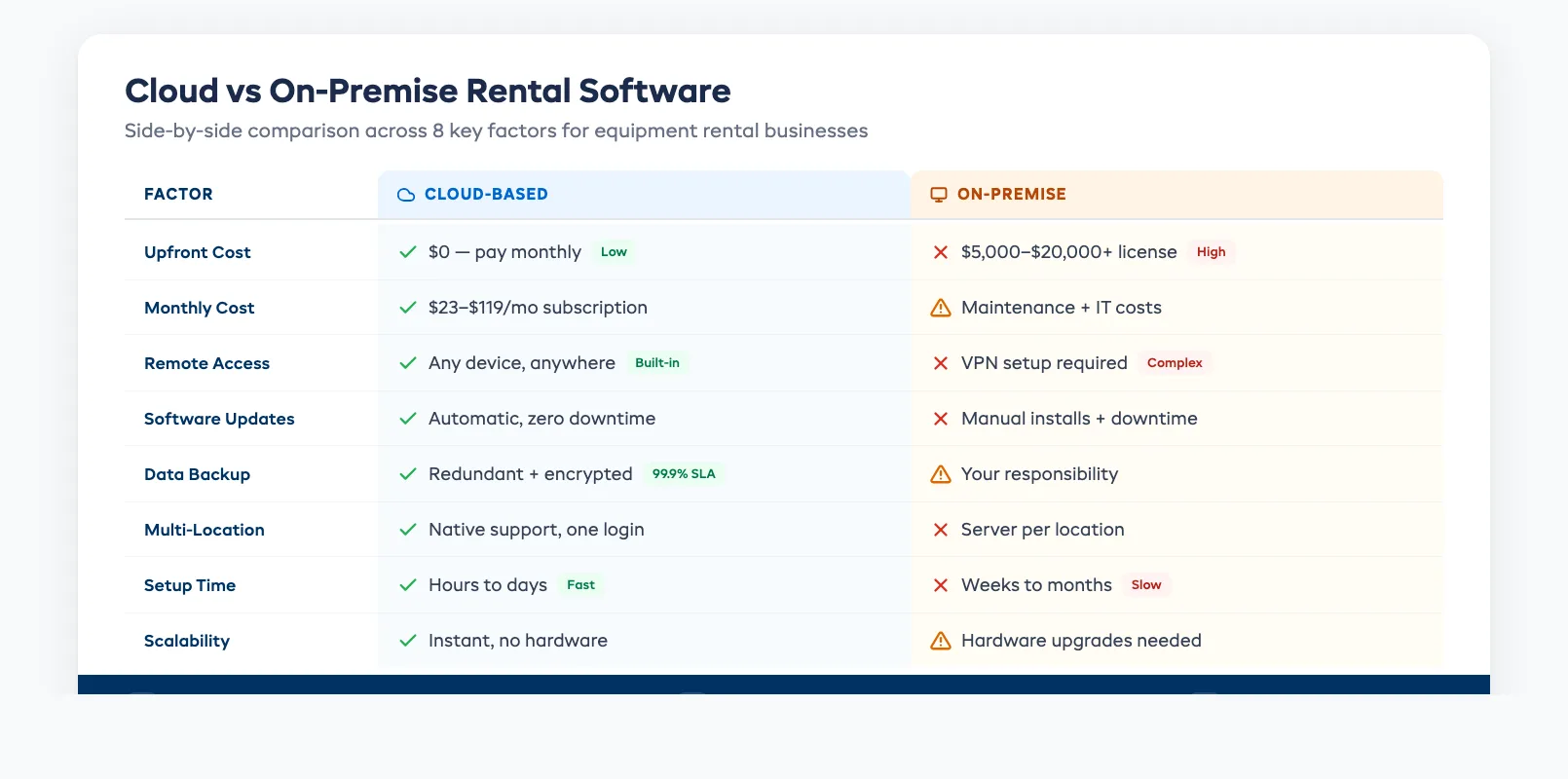
Compare this to on-premise software, where updates require scheduled downtime, data lives on one machine, and accessing the system from a second location means VPN headaches or expensive server setups.
Five Reasons Cloud Wins for Equipment Rental
1. Access Your Business From Anywhere
A cloud-based online booking system for rentals lets you manage reservations from any location. Heading to a trade show? Check tomorrow's schedule from the hotel. Running two shops? See both dashboards from one login.
This matters most during peak season, when quick decisions — reassigning gear, confirming a last-minute booking, approving a refund — can't wait until you're physically at the counter.
2. Multi-Location Support Without Extra Infrastructure
On-premise systems typically require a separate server at each location, with complex syncing between them. Cloud platforms handle multi-location natively. Your rental inventory stays unified across every shop, and built-in inventory tracking ensures customers see real-time availability regardless of which location holds the gear.
If you run both equipment rentals and guided experiences, an all-in-one cloud platform like EquipDash manages tour operations and rental operations from the same dashboard — no separate systems for each business line.
3. Lower Upfront Costs
On-premise software often requires a large upfront license fee ($5,000–$20,000), plus hardware, IT support, and annual maintenance contracts. Cloud-based rental software uses a subscription model — typically $23–$119 per month — with no hardware to buy.
For a small rental business, the difference is immediate: you pay as you go instead of making a five-figure bet before you've processed a single booking. To see how different platforms compare on pricing, check our equipment rental software comparison.
4. Automatic Backups and Data Security
When your data lives on a single desktop, one hard-drive failure or theft can wipe out years of customer records, booking history, and financial data. Cloud platforms store data across redundant servers with automatic backups, encryption, and 99.9%+ uptime guarantees.
This is especially important if you're still tracking inventory in spreadsheets. A local spreadsheet has no backup, no audit trail, and no access controls. Moving to cloud-based software solves all three problems at once.
5. Built-In Automation That Scales
Cloud platforms can automate repetitive tasks — sending booking confirmations, collecting digital waivers, triggering payment reminders, and flagging overdue returns. These automations run on the vendor's servers 24/7, not on your shop's desktop that shuts down at closing time.
As your business grows, cloud automation scales with you. Add more inventory, more staff, more locations — without upgrading hardware or worrying about system capacity.
"But What If My Internet Goes Down?"
This is the most common concern — and a fair one. Here's the reality:
Modern cloud platforms include offline fallback modes for essential tasks. You can still process walk-ins and check today's schedule even when connectivity drops. Once the connection restores, everything syncs automatically.
More importantly, internet outages at a fixed location are rare and usually brief. The risk of a 10-minute internet blip is far smaller than the risk of a hard-drive crash destroying your only copy of the booking database. And with mobile hotspots as backup, you're covered for all but the most extreme scenarios.
The reliability concern made sense in 2010. In 2026, cloud infrastructure is more reliable than the average shop's local hardware.
What to Look for in a Cloud-Based Rental Platform
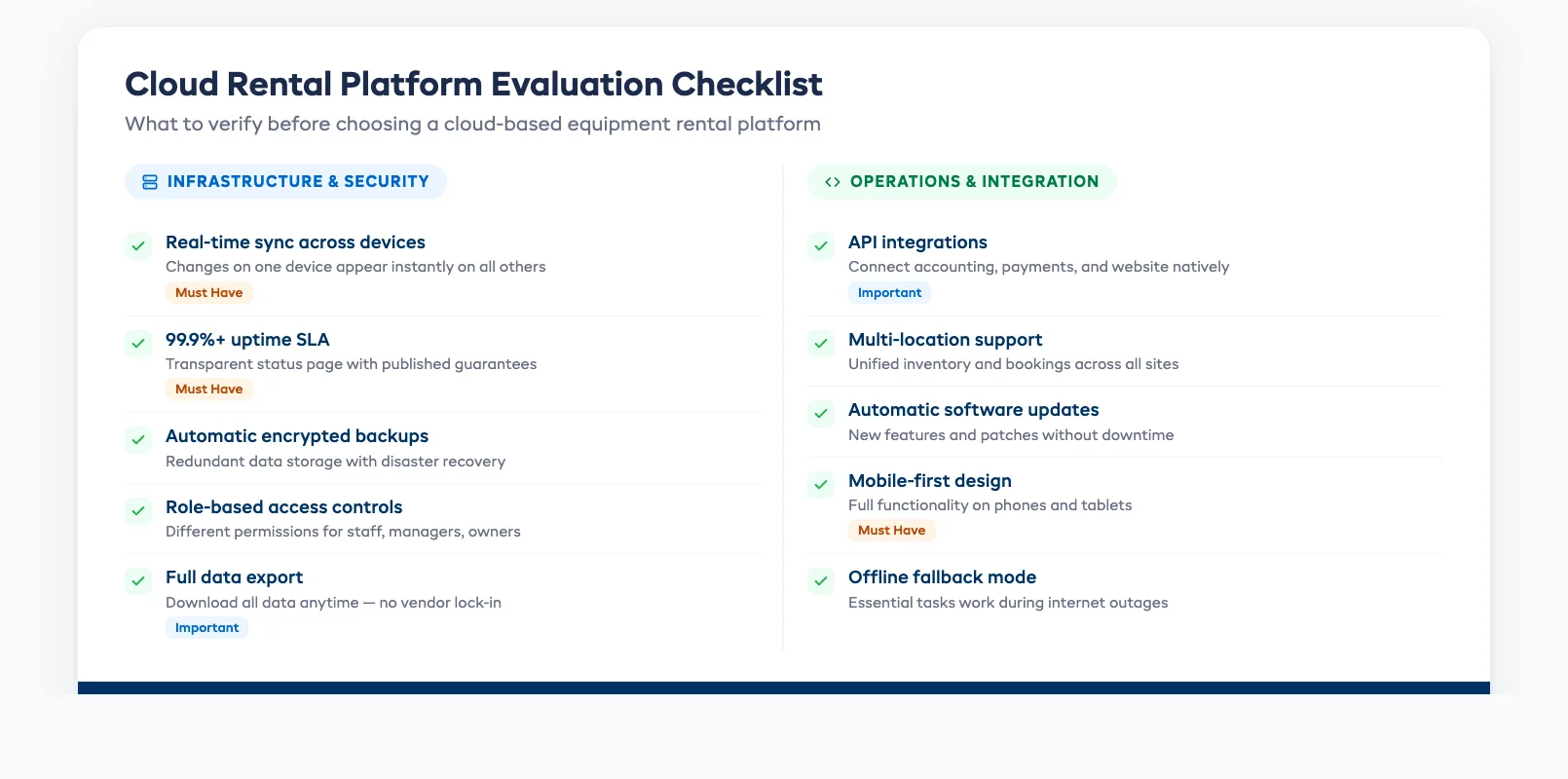
Not all cloud platforms are equal. When evaluating your options for equipment rental booking software, check for these cloud-specific features:
- Real-time sync across devices and locations — changes made on one device appear instantly on all others, which is critical to prevent double bookings when staff work from multiple stations
- Role-based access controls — give counter staff, managers, and owners different permission levels
- API integrations — connect with your accounting software, payment processor, and website without custom development
- Data export — you should always be able to download your full data set, so you're never locked in
- Uptime SLA — look for 99.9% or better, with transparent status pages
Make the Switch Before Peak Season
If you're planning to move off a desktop system, do it during your quiet season. Import your inventory, train your staff, and run both systems in parallel for a week. By the time bookings ramp up, your team will be comfortable — and you'll wonder why you didn't switch sooner.
Start your free 21-day trial of EquipDash and see how cloud-based rental management works in practice. No credit card required.
in one place