Equipment Rental Booking Software: What to Look For

Equipment rental booking software is the single feature that determines whether customers book with you or your competitor down the road. Yet most rental shop owners settle for generic scheduling tools that weren't built for gear, time-slots, or seasonal pricing.
The right booking system does more than accept reservations. It's one component of a broader rental management system — but it's the component that directly drives revenue. It shows real-time availability, handles multi-day rentals, collects deposits, and works flawlessly on a phone screen. The wrong one creates double-bookings, confuses customers, and sends them straight to the phone — or worse, to another shop.
This guide breaks down exactly what separates purpose-built rental booking system software from generic alternatives, so you can pick the tool that actually grows your revenue. If you're evaluating platforms more broadly, start with our complete guide to equipment rental software.
What Makes Rental Booking Software Different From Generic Booking Tools
Generic booking tools — the kind built for salons, fitness classes, or meeting rooms — handle one-size-fits-all time-slots. Rental businesses don't work that way.
When a customer rents a kayak for three days, your booking software needs to block that specific kayak across all three days, update availability in real time, and release it automatically on the return date. A generic calendar tool can't do that.
Here's what rental-specific booking software handles that generic tools miss:
- Asset-level availability. Track individual items (not just time-slots) so you never double-book the same piece of gear. This ties directly into rental inventory management — your booking system and inventory system should be the same platform. Look for equipment rental software with inventory tracking built in. For a full walkthrough of how asset-level tracking helps eliminate double bookings, see our dedicated guide.
- Flexible duration. Support hourly, half-day, full-day, multi-day, and weekly bookings — all from the same interface.
- Automatic turnaround time. Build in buffer periods between bookings for cleaning, inspection, or transport.
- Deposit and damage waiver collection. Collect partial payments and waiver signatures at the point of booking, not at pickup. For walk-in transactions, a rental-specific POS system handles this at the counter.
- Seasonal availability rules. Open and close specific inventory based on the season without manual updates each time.
If your current tool forces workarounds for any of these, you're using the wrong software. For a side-by-side look at how platforms handle these features, see our equipment rental software comparison.
Must-Have Booking Features for Rental Shops
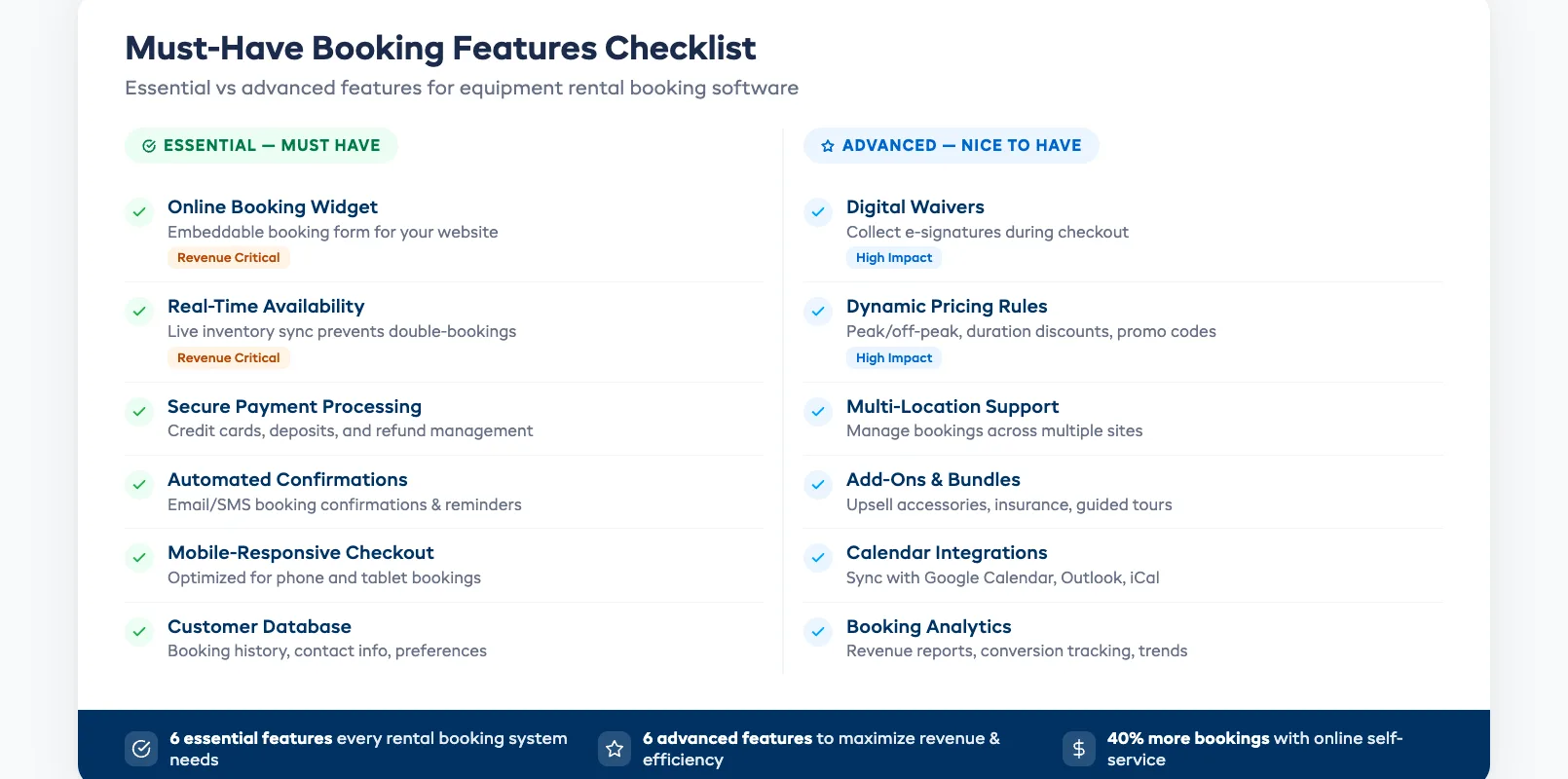
Not every feature on a vendor's checklist matters equally. These are the ones that directly affect whether a customer completes a booking — and whether you keep your sanity during peak season.
Real-time availability display. Customers should see exactly what's available for their dates before they hit "Book." If they have to submit a request and wait for confirmation, you'll lose them. According to Forrester Research, 53% of online shoppers abandon a purchase if they can't get an immediate answer.
Multi-item bookings. A family renting four bikes, two helmets, and a trailer needs to do it in one transaction — not four separate bookings. Your booking software for rental companies should handle bundled orders natively.
Automated confirmations and reminders. Every booking should trigger an instant confirmation email, followed by a reminder 24–48 hours before pickup. This cuts no-shows and eliminates manual follow-up. For a full breakdown of what else you can automate, see our guide on how to automate your rental business.
Built-in waiver collection. Digital waivers signed during the booking flow save 5–10 minutes per customer at the counter. That adds up to hours during a busy Saturday morning.
Calendar sync and staff visibility. Your team should see the day's bookings at a glance — what's going out, what's coming back, and what needs prep. If you're starting a new rental business, these features should be non-negotiable from day one.
Handling Complex Rental Pricing Online
Equipment rental pricing is rarely simple. You charge differently for a half-day versus a full week. Weekends cost more than weekdays. Peak season rates kick in on specific dates. And loyal customers expect a discount.
Good equipment rental booking software handles all of this without manual price overrides. Look for these pricing capabilities:
- Time-based rate tiers. Set different prices for hourly, daily, and weekly rentals — the system calculates the best rate automatically.
- Seasonal pricing rules. Define peak, shoulder, and off-season rates once. Prices adjust on the calendar without manual changes.
- Automatic quantity discounts. Offer "rent 3, get 10% off" without requiring coupon codes or staff intervention.
- Deposit and balance-due logic. Collect a 25% deposit at booking and charge the remainder at pickup — automatically.
- Promo code support. Run targeted promotions for slow periods without rebuilding your entire pricing structure.
The test is simple: can a customer see the correct total for their exact rental dates and quantities before checkout? If they have to call to ask "how much will this cost," your pricing setup isn't working.
Mobile Booking: Why It's Non-Negotiable
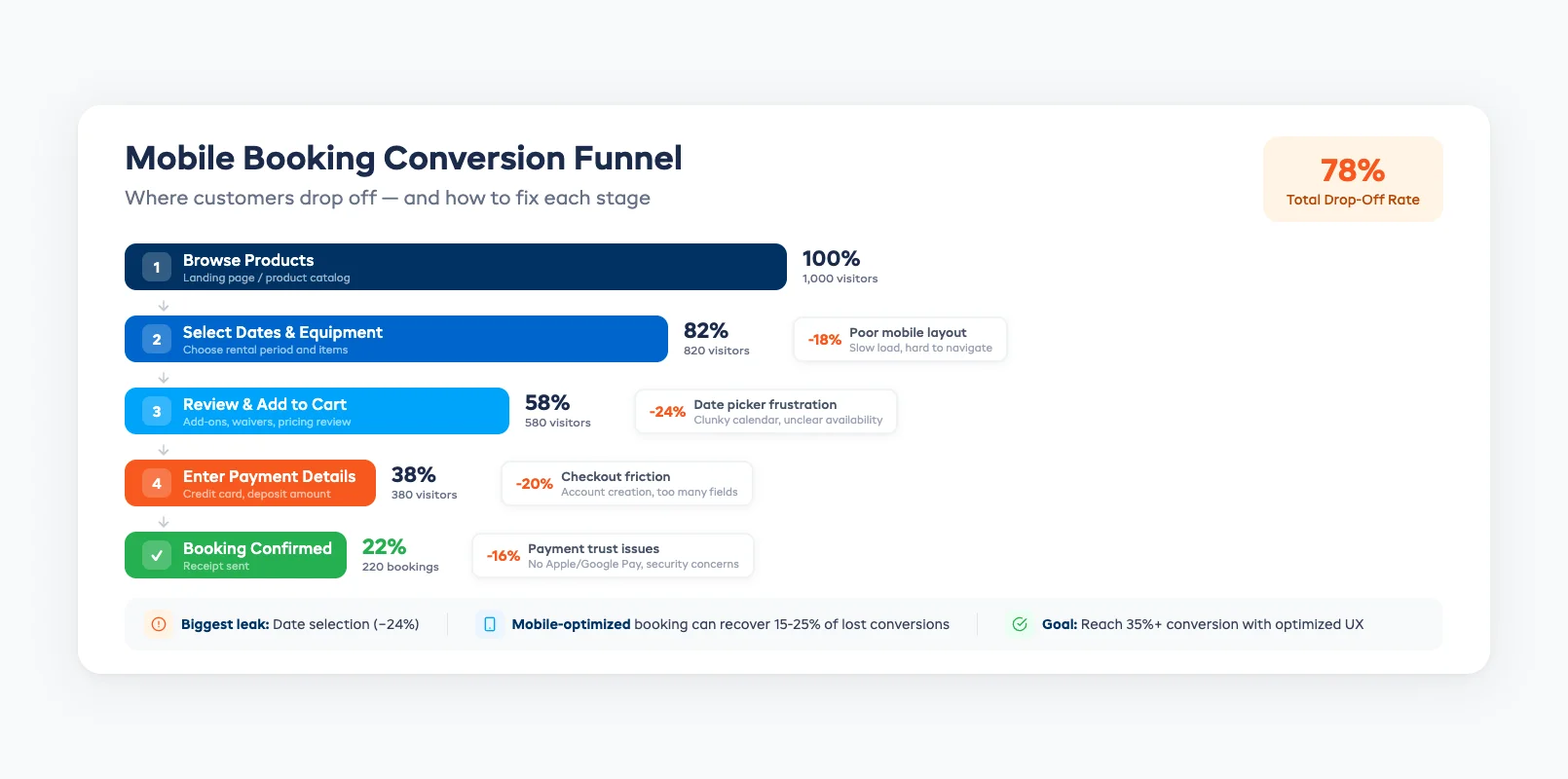
More than 60% of online bookings in the travel and leisure sector now happen on mobile devices, according to Statista's 2025 travel report. For rental shops near beaches, ski resorts, or trailheads, that number is even higher. Customers search "bike rental near me" on their phone and expect to book within two minutes.
Your rental booking system software must deliver a mobile experience that's fast, clear, and frustration-free. For a deeper dive into what makes a great online booking system for rentals, see our complete guide. Here's what matters most on mobile:
- Responsive design that actually works. Not a shrunk-down desktop page — a mobile-first layout with large tap targets and minimal scrolling.
- Fast load times. If your booking page takes more than 3 seconds to load on a mobile connection, roughly half your visitors leave.
- Simplified checkout. Auto-fill support, Apple Pay or Google Pay, and as few form fields as possible. Every extra field costs you conversions.
- Click-to-call fallback. Some customers will still want to call. Make the phone number tappable and visible on every page.
If you can't complete a booking on your own phone in under 90 seconds, your customers can't either.
How to Reduce Abandoned Bookings
Abandoned bookings are the silent revenue killer for rental businesses. A customer picks their dates, selects their gear, gets to checkout — and leaves. Industry data shows online booking abandonment rates hover around 70% across travel and leisure.
You can't eliminate abandonment entirely, but the right booking software for rental companies can cut it significantly. Here's how:
Show the total cost early. Hidden fees revealed at checkout are the number-one reason people abandon. Display the full price — including deposits, taxes, and add-ons — before the final step.
Reduce form fields. Ask only for what you need to confirm the booking: name, email, phone, payment. Collect everything else (waiver, ID, preferences) after the booking is secured.
Add trust signals. Display security badges, your cancellation policy, and a phone number on the checkout page. Customers handing over payment details need reassurance.
Enable cart recovery. If a customer abandons mid-booking, an automated email sent within an hour can recover 10–15% of lost bookings. Most rental-specific platforms include this — generic tools usually don't.
Offer guest checkout. Forcing account creation before booking adds friction. Let customers book first, then invite them to create an account in the confirmation email.
If you're running a small rental business, even basic cart recovery can make a measurable difference in monthly revenue.
Ready to Upgrade Your Booking Experience?
The difference between a good season and a great one often comes down to how easy it is for customers to give you their money. The right equipment rental booking software removes every obstacle between "I want to rent this" and "Booking confirmed."
Look for a cloud-based equipment rental software platform built specifically for rental operations — one that handles real-time availability, flexible pricing, mobile-first checkout, and automated follow-ups out of the box. If you also run tours or guided experiences, choose a system that handles both from a single dashboard. And if you're still tracking inventory in spreadsheets, upgrading your booking system is the perfect time to make the switch.
Start your free 21-day trial of EquipDash and see how a purpose-built rental booking system fills more slots with less effort. No credit card required.
in one place