Equipment Rental Software for Small Business: What You Actually Need

You run a small rental shop. Maybe 20 kayaks, 30 bikes, or a mix of ski gear that fits in a single storage room. You've been handling bookings by phone, tracking inventory on a whiteboard, and it's worked fine — until now.
The question isn't whether equipment rental software exists for shops your size. It's whether you actually need it, and which features matter when you're running lean with a small team.
This guide cuts through the enterprise-grade noise and focuses on what small rental shops (1–10 employees, under 100 items) actually need from software — and what you can safely ignore.
When Does a Small Rental Shop Need Software?
Not every small shop needs software on day one. If you're renting out five surfboards to walk-ins only, a notebook might genuinely work.
But there are clear signals that you've outgrown manual systems:
- You've double-booked gear more than once. A customer showed up and their kayak was already out. That costs you a refund, a bad review, and the rental fee. If this keeps happening, our guide on how to prevent double bookings walks through the root causes and fixes.
- You're losing after-hours bookings. People search for "bike rental near me" at 9 PM. If they can't book online, they book with whoever lets them. That's revenue walking to your competitor every night.
- Tracking gear takes longer than renting it. When your morning starts with "wait, where's the blue tandem?" instead of serving customers, spreadsheets have hit their limit. Our spreadsheets vs software guide covers the exact tipping points and how to migrate without losing data.
- You're hiring your first employee. The moment someone else needs to know what's booked, what's available, and what's due back — you need a shared system, not your memory.
If two or more of those sound familiar, software will pay for itself within the first month. A rental inventory management system eliminates the guesswork entirely. If you're still unclear on what these platforms actually do, our guide on what a rental management system is covers the fundamentals.
The 4 Features That Matter Most at Small Scale
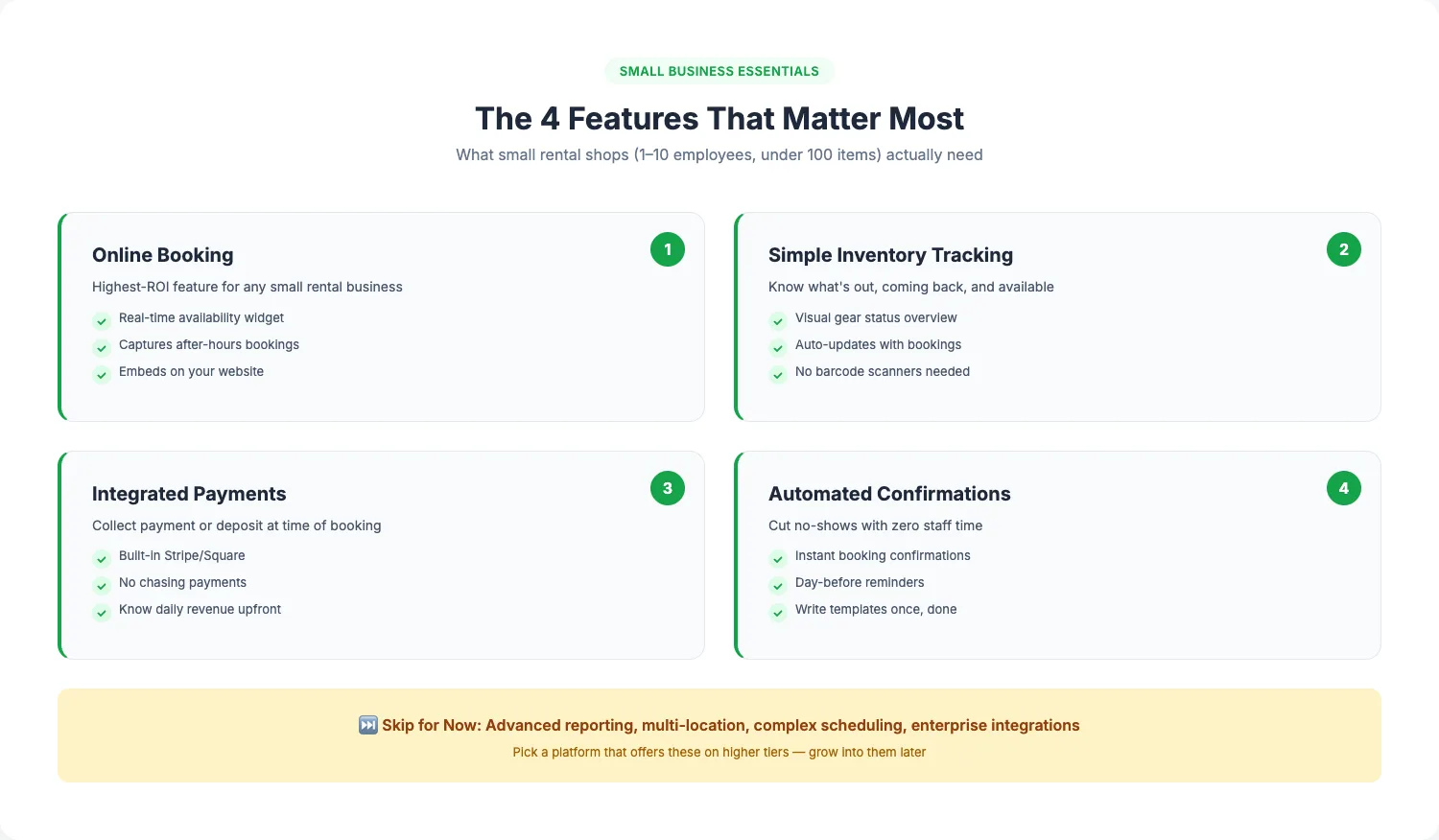
Enterprise platforms love listing 200 features. Most of them solve problems you don't have yet. Here's what actually moves the needle for a small shop:
1. Online Booking With Real-Time Availability
This is the single highest-ROI feature for any small rental business. When customers can see what's available and book instantly — at midnight, during your lunch break, while you're out on a delivery — you capture revenue you'd otherwise miss completely.
Look for a cloud-based equipment rental software system that embeds a booking widget on your website and updates availability the second a reservation is made. For a deeper look at which booking features matter most, see our guide on what to look for in rental booking software. If you're also running tours or guided experiences, make sure the same system handles both.
2. Simple Inventory Tracking
You don't need barcode scanners, depreciation tracking, or fleet management dashboards (yet). You need to know:
- What's currently out
- What's coming back today
- What's available for tomorrow
That's it. A clear, visual overview of your gear status that updates automatically when bookings are made or items are checked in. For a closer look at how tracking works in practice, see our guide to equipment rental software with inventory tracking. If you want to understand the full spectrum, our rental inventory management guide covers everything from spreadsheets to full platforms.
3. Integrated Payments
Chasing payments wastes time and creates awkward conversations. Software that collects payment (or at least a deposit) at the time of booking means you start each day knowing exactly what revenue is coming in.
Look for built-in payment processing — not a separate tool you need to configure. Stripe or Square integration is standard. Avoid platforms that charge high commission rates on top of payment processing fees. If walk-in transactions are a big part of your day, a dedicated equipment rental POS system handles deposits, waivers, and time-based pricing right at the counter.
4. Automated Confirmations and Reminders
Every no-show costs you the rental fee plus the opportunity cost of that slot. Automated confirmation emails and day-before reminders cut no-shows dramatically. You write the templates once, and the system sends them for every booking — no staff time required.
This is the gateway to automating your rental business more broadly. Start here and expand later.
What You Can Skip (For Now)
Small shops waste money on features they'll never use. Here's what to ignore until you actually need it:
- Advanced reporting and analytics. You don't need AI demand forecasting with 30 items. You know your busy days. Wait until you're tracking patterns across hundreds of bookings.
- Multi-location management. You have one shop. Don't pay for features built for chains.
- Complex staff scheduling. If it's you and one employee, a shared calendar is fine.
- Enterprise integrations. QuickBooks sync, channel management, and API access matter when you're processing thousands of bookings. Not dozens.
- Custom waiver workflows. A simple digital waiver is useful. A multi-step approval chain with conditional logic is overkill.
The key: pick a platform that offers these features on higher tiers, so you can grow into them. Don't pay for them now, but don't paint yourself into a corner by choosing a tool that can't scale.
Getting Your Team On Board
"My team isn't tech-savvy" is the most common objection small shop owners raise — and it's usually unfounded.
Here's what actually works:
Start with the booking page, not the dashboard. Your staff doesn't need to learn the whole system on day one. Show them where to see today's bookings and how to check items in and out. That's enough for week one.
Let customers do the data entry. When customers book online, they fill in their own details, select their gear, sign waivers, and pay. Your team's job becomes "hand over the kayak" — not data entry.
Pick software with a clean, simple interface. If the dashboard looks like a spaceship cockpit, your team will avoid it. The best small-business software feels like using a phone app, not learning a new language. If you're comparing platforms, weight ease-of-use heavily.
Give it two weeks. Most resistance fades after the first few days of not having to answer "is the red mountain bike available Saturday?" by phone. Once your team sees the time savings firsthand, they'll wonder how they managed without it.
Budget-Friendly Options for Small Shops
Small rental shop software doesn't need to break the bank. Here's how to think about cost:
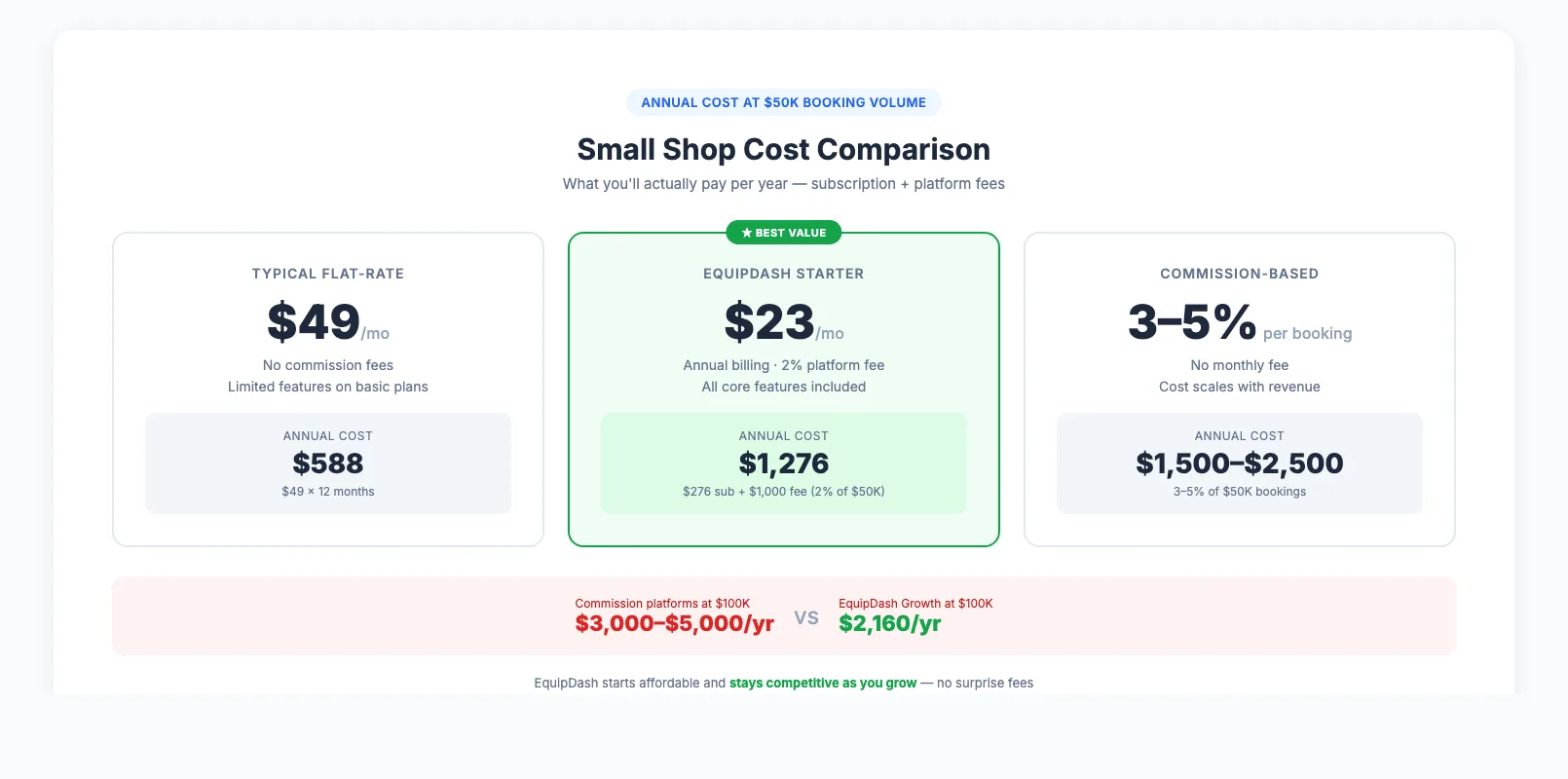
What you'll spend: Most platforms designed for small businesses start at $20–$30 per month. At that price point, capturing just one or two extra after-hours bookings per month pays for the software entirely.
Watch for hidden costs. Some platforms charge low monthly fees but take 3–5% of every booking as a commission. On $5,000 in monthly bookings, that's $150–$250 per month on top of your subscription. Always calculate the total annual cost, not just the sticker price.
EquipDash starts at $23/month (annual billing) with a 2% platform fee. For a small shop processing $50,000 in bookings annually, that's $276 subscription + $1,000 platform fee = $1,276 per year. No hidden fees, no surprise charges.
For a deeper dive on how different pricing models compare, see our complete software comparison.
Free trials matter. Never commit to annual billing before testing. A 14–21 day trial gives you enough time to import your inventory, test the booking flow, and see whether your team actually uses it. If you're still in the planning phase, our guide on how to start an equipment rental business covers everything from initial investment to your first bookings.
The bottom line: if you're managing more than 20 items and taking any bookings at all, the right software will save you more time and capture more revenue than it costs. Start simple, start small, and grow into the features as your business grows.
FAQ
Do I really need rental software if I only have 20–50 items?
Yes — if you're taking bookings. The number of items matters less than how often they're booked. A 30-kayak shop renting daily during summer has hundreds of transactions per month. That's where double-bookings, missed payments, and lost gear become real problems. Software isn't about inventory size — it's about booking volume and the cost of mistakes.
What's the minimum viable software setup for a small rental shop?
Online booking with real-time availability, basic inventory tracking (what's out, what's available), integrated payments, and automated confirmation emails. These four features handle 90% of a small shop's needs and cost $20–$30 per month. Everything else is nice-to-have.
How do I get my non-tech-savvy staff to actually use new software?
Start small — show them the daily booking view and the check-in/check-out flow. That's it for week one. Let the online booking system handle customer data entry. Within two weeks, most staff members are comfortable. The key is choosing software with a clean, simple interface rather than trying to train people on a complex system.
How much does equipment rental software cost for a small business?
Most small-business plans range from $20–$55 per month. Some platforms also charge a percentage of each booking (1–5%). Calculate the total annual cost: subscription fees plus any transaction fees at your expected booking volume. For an online booking system that covers everything a small shop needs, expect to spend $500–$1,500 per year total.
Can I start with free tools and upgrade later?
You can start with a Google Sheet for inventory and a free booking form, but you'll hit limits fast. Free tools don't sync with each other — you'll spend more time on data entry than you save. A better approach: use a free trial of proper rental software and only pay once you've confirmed it works for your shop.
in one place