Online Booking Systems for Rentals: The Complete Guide

Your rental shop closes at 6pm. Your competitors' booking pages don't. Every night, customers search for bike rentals, kayak tours, or ski gear — and the shops that let them book online get the reservation. The ones that say "call us during business hours" get skipped.
An online booking system for rentals isn't a nice-to-have anymore. It's the difference between capturing revenue around the clock and losing it to operators who already made the switch. Whether you rent equipment, run tours, or do both, the right booking system turns your website into a 24/7 sales channel — no extra staff required.
This guide covers everything rental and tour operators need to know about online booking systems: how they work, what features matter most, how to handle complex pricing, and what to expect when you set one up. No jargon, no fluff — just practical answers from operators who've been there. If you're specifically weighing whether to keep phone bookings alongside online, check our online booking vs phone reservations comparison.
Why Online Booking Is No Longer Optional for Rental Shops
The shift to online booking isn't coming — it already happened. According to Phocuswright, over 65% of activity and rental bookings now start with an online search. And research from Salesforce shows that 60%+ of consumers prefer self-service booking over calling a business. If your rental shop doesn't offer online booking, you're invisible to most of your potential customers.
Here's what that means in real numbers. A rental shop processing 20 bookings per day with an average order value of $85 is generating roughly $620,000 per year. Industry data suggests that shops without 24/7 online booking miss 15–25% of potential reservations — bookings that happen after hours, on mobile devices, or from travelers who won't wait for a callback. That's $93,000 to $155,000 in revenue walking out the door every year.
The math isn't theoretical. Rental operators who add online booking consistently report a 20–30% increase in bookings within the first 90 days. Most of the growth comes from three places:
- After-hours bookings — Customers browsing at 10pm on a Tuesday, planning their weekend. They book immediately when they can, or they move on.
- Mobile bookings — Over 70% of rental searches happen on phones. If your booking process requires a phone call, you've already lost the mobile customer.
- Reduced no-shows — Online booking systems collect deposits and send automated confirmations and reminders. Shops using them report 30–50% fewer no-shows compared to phone-only bookings.
Beyond revenue, online booking frees up your team. Every phone booking takes 4–8 minutes of staff time. At 20 bookings per day, that's over two hours of payroll spent answering phones instead of helping the customers standing in front of you. A booking system handles those conversations automatically. For the full list of tasks you can automate beyond booking, see our guide on how to automate your rental business.
For a closer look at why the after-hours window matters so much, read our breakdown of 24/7 online booking for rental shops.
The bottom line: online booking isn't an upgrade. It's table stakes. The question isn't whether you need it — it's which type of system fits your operation.
How Online Booking Systems Work (The Basics)
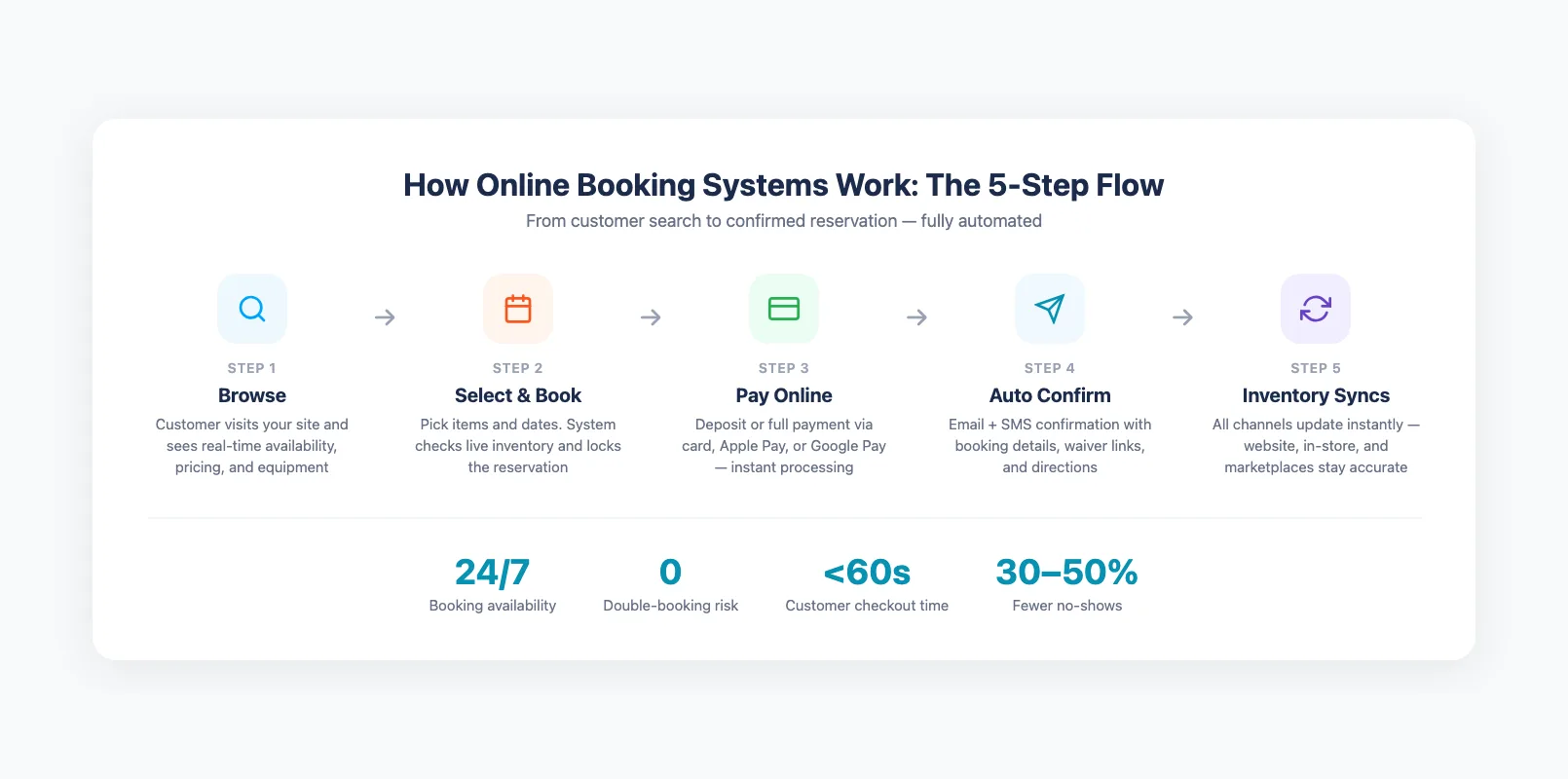
An online booking system connects your website to your real-time inventory. When a customer visits your site, they see what's actually available — right now, for the dates they want. They pick their items, choose their times, and pay a deposit or full amount. Your inventory updates automatically so the next customer sees accurate availability.
Here's the typical flow:
Step 1: Customer browses your website. They land on your rental page and see available equipment, tours, or experiences with dates, times, and pricing displayed in real time.
Step 2: Customer selects items and dates. The system checks live inventory and confirms the item is available for those specific dates. No double-booking risk because the system locks the item the moment a reservation starts.
Step 3: Customer pays online. Deposit or full payment via credit card, Apple Pay, or Google Pay. Payment is processed through an integrated gateway — no separate terminal or manual reconciliation needed.
Step 4: Confirmation goes out automatically. The customer gets an email (and optionally SMS) with booking details, waiver links, directions, and any prep instructions. Your staff sees the booking on their dashboard or calendar instantly.
Step 5: Inventory updates across all channels. Whether you take bookings through your website, in-store, or via a third-party marketplace, the system keeps one source of truth. Available stock is always accurate.
The key difference between a good online booking system and a basic calendar tool is the inventory connection. Calendar tools show time slots. Booking systems understand your stock — they know you have 15 mountain bikes, that 8 are rented this Saturday, and that serial number MB-042 is in for a brake repair. That's the difference between "maybe available" and "confirmed available." For a closer look at how equipment rental software with inventory tracking powers this connection, see our dedicated guide.
For equipment rental software in general, the booking engine is just one piece of a larger system that includes inventory tracking, payments, waivers, and reporting. But booking is where the revenue starts — so it's where most operators begin.
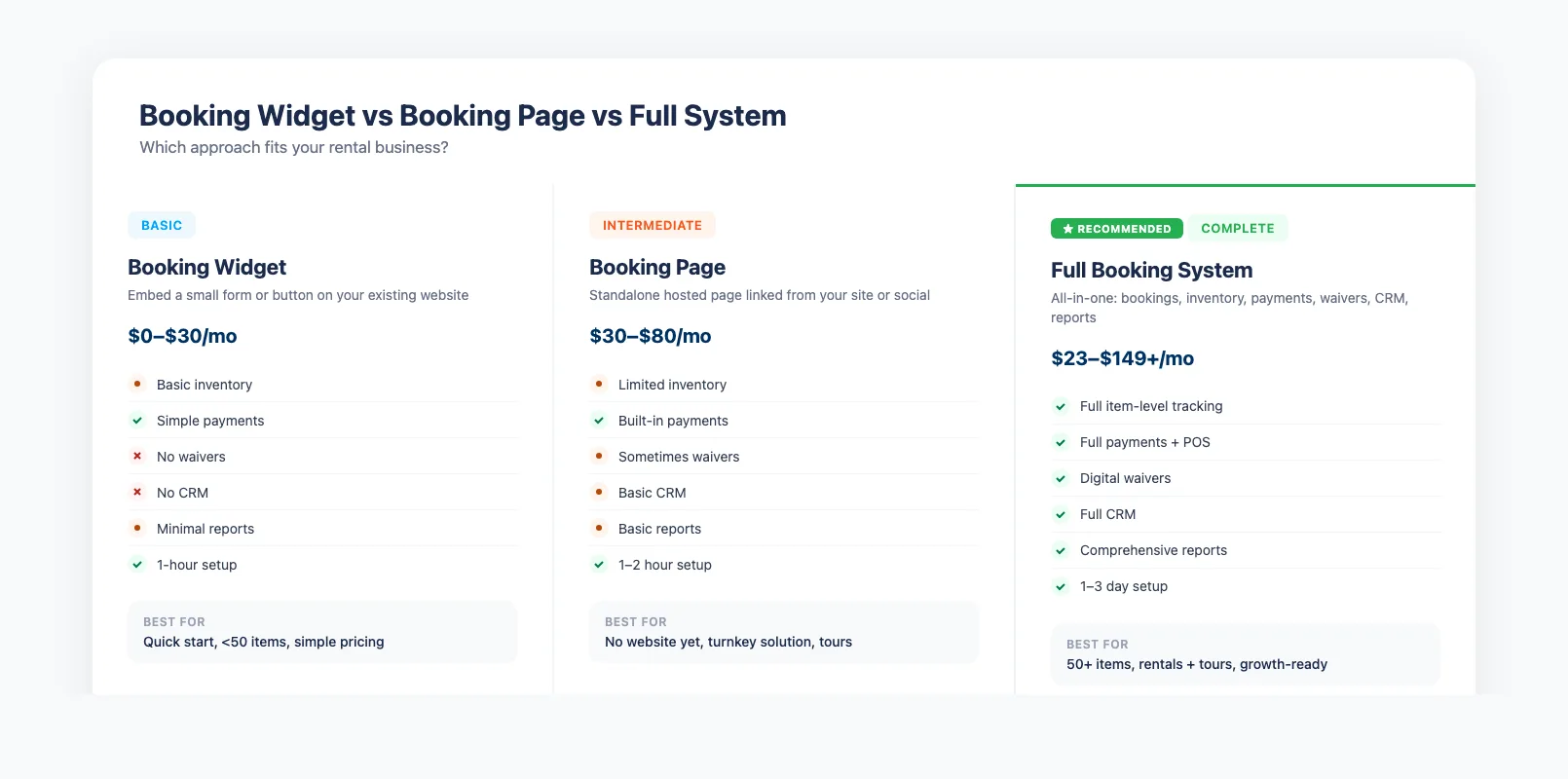
Booking Widget vs Booking Page vs Full System
Not all online booking solutions are the same. Before you evaluate platforms, you need to understand the three main approaches — because each one fits a different stage of business growth.
Booking Widget
A booking widget is a small form or button you embed on your existing website. Customers click "Book Now," a pop-up or inline form appears, and they complete the reservation without leaving your site.
Best for: Operators who already have a website they like and just want to add booking capability. Simple rental setups with fewer than 50 items.
Limitations: Widgets typically offer limited customization, basic inventory awareness, and minimal reporting. They're a quick win but often outgrown within 12–18 months. For a step-by-step walkthrough of adding a widget to WordPress, Squarespace, or a custom site, see our guide on how to add online booking to your rental website.
Booking Page
A booking page is a standalone page (usually hosted by the booking provider) where customers complete their reservation. You link to it from your website, social media, or Google Business listing.
Best for: Operators who don't have a website yet or want a turnkey solution with no development work. Tour operators with a simple product lineup.
Limitations: Customers leave your website to complete the booking, which can reduce trust and conversion rates. You have limited control over the look and feel.
Full Booking System
A full booking system is an all-in-one platform that handles bookings, inventory, payments, waivers, customer management, and reporting. It integrates with your website (or provides one) and serves as the operating backbone of your business.
Best for: Operators with 50+ rental items, multiple product types (rentals + tours), or multi-location businesses. Anyone who's outgrown spreadsheets and needs a single source of truth.
Trade-off: More setup time upfront. But once running, it eliminates the need for 4–6 separate tools and pays for itself through operational efficiency.
| Feature | Widget | Booking Page | Full System |
|---|---|---|---|
| Real-time inventory | Basic | Limited | Full item-level tracking |
| Payment processing | Simple | Built-in | Full (deposits, refunds, POS) |
| Digital waivers | No | Sometimes | Yes |
| Customer management | No | Basic | Full CRM |
| Reporting & analytics | Minimal | Basic | Comprehensive |
| Setup time | 1 hour | 1–2 hours | 1–3 days |
| Monthly cost | $0–30 | $30–80 | $23–149+ |
For most rental shops processing 10+ bookings per day, a full system pays for itself within the first month. You can learn more in our equipment rental software comparison to see how the top platforms compare.
Must-Have Features for Rental and Tour Booking
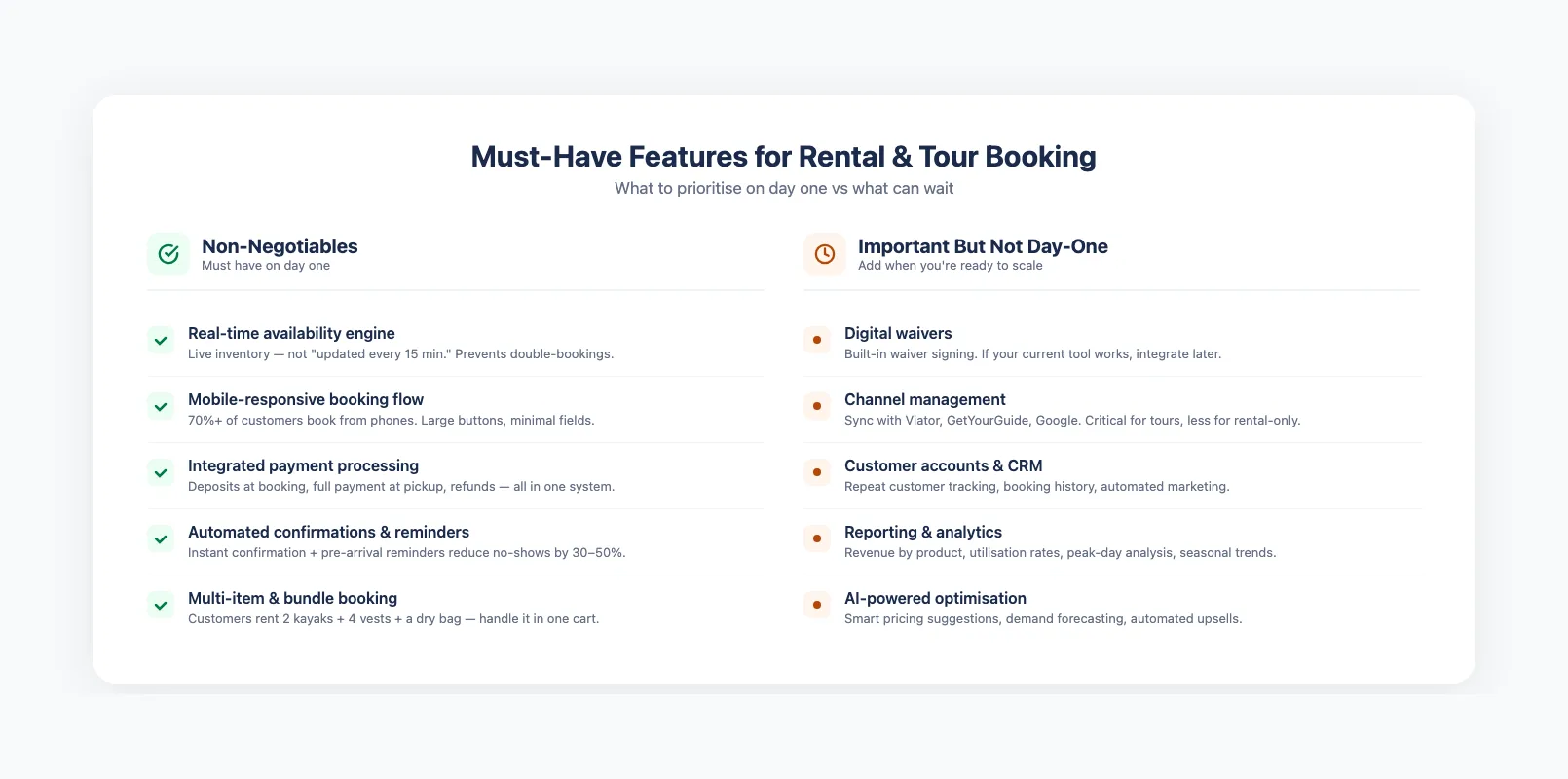
Not every feature on a booking platform's marketing page matters for your daily operation. Here are the ones that actually earn their keep — and the ones you can skip until later.
The Non-Negotiables
Real-time availability engine. This is the single most important feature. Your booking system must show live, accurate inventory. Not "updated every 15 minutes" — real-time. Every minute of delay is a double-booking risk. The system should also block out items that are reserved, in maintenance, or in transit. For a deeper look at how real-time availability booking actually works across multiple channels, see our dedicated guide.
Mobile-responsive booking flow. Over 70% of your customers are booking from their phones. If the booking process isn't designed for mobile screens — large buttons, minimal form fields, fast load times — you're losing conversions at the checkout step.
Integrated payment processing. Collect deposits at booking, full payment at pickup, and handle refunds or damage charges inside the same system. Separate payment tools mean manual reconciliation, slower checkouts, and higher error rates.
Automated confirmations and reminders. Every booking should trigger an instant confirmation email. Pre-arrival reminders (24 hours before, morning-of) reduce no-shows by 30–50% and give customers waiver links and directions without your team lifting a finger.
Multi-item and bundle booking. Your customers don't just rent one kayak. They rent two kayaks, four paddles, four life vests, and a dry bag. The system should handle multi-item carts, bundles, and add-ons in a single transaction.
Important but Not Day-One
Digital waivers. Built-in waiver signing saves time and keeps everything in one system. But if your current waiver tool works, you can integrate later.
Channel management. If you list on Viator, GetYourGuide, or Google Things To Do, you need a system that syncs availability across channels to prevent overbooking. Critical for tour operators, less urgent for rental-only shops.
Customer accounts and CRM. Repeat customer tracking, booking history, and automated marketing help grow lifetime value. But they're a phase-two priority for most shops getting started with online booking.
Reporting and analytics. Revenue by product, utilization rates, peak-day analysis, and seasonal trends. Essential for scaling, but your first win is getting bookings online — optimization comes after.
For a detailed breakdown of how different platforms handle these features, see our equipment rental software comparison where we score 10 platforms across 6 criteria. If you're focused specifically on the booking experience, our guide on what to look for in equipment rental booking software covers must-have features, pricing tools, and mobile optimization. Tour operators have additional needs — group sizing, guide scheduling, and waiver collection — which we cover in our checklist of online booking features every tour operator needs.
How to Handle Complex Pricing and Availability
This is where most basic booking tools fall short — and where many rental operators get stuck. Rental pricing isn't simple. You're not selling a fixed product at a fixed price. You're selling time-based access to physical inventory that has maintenance schedules, damage risk, and seasonal demand swings.
A good online booking system should handle these pricing scenarios without workarounds:
Time-Based Pricing
- Hourly, half-day, full-day, multi-day rates — with automatic price breaks for longer durations
- Minimum rental periods — e.g., 2-hour minimum on weekends
- Late return fees — calculated automatically based on your policy
Seasonal and Dynamic Pricing
- Peak season surcharges — higher rates during summer, holidays, or school breaks
- Shoulder season discounts — lower rates to fill slow periods
- Day-of-week pricing — weekend vs. weekday rates for the same item
- Early bird discounts — lower prices for bookings made 7+ days in advance
Availability Rules
- Buffer time between rentals — 30 minutes between kayak returns and next checkout for cleaning and safety checks
- Prep and return windows — time blocked before and after each rental for equipment inspection
- Maintenance blackouts — automatically block items due for service
- Capacity limits — maximum group sizes for guided tours, maximum simultaneous equipment checkouts for safety
Group and Bundle Pricing
- Group discounts — 10% off for parties of 6+
- Package deals — bike + helmet + lock at a bundled rate lower than individual prices
- Add-on pricing — optional extras (GoPro mount, child seat, premium paddles) offered during checkout
The difference between a basic booking widget and a full rental inventory management system becomes clear here. Widgets handle simple "pick a date, pay a price" flows. Full systems understand that your pricing model has layers — and they calculate the right total without you building spreadsheet formulas.
Platforms like EquipDash handle all of these scenarios from a single pricing engine, with the AI assistant helping you identify pricing optimization opportunities based on your booking patterns.
Implementation: What to Expect
Setting up an online booking system is faster than most operators expect. The typical timeline for a rental shop with 50–200 items looks like this:
Week 1: Account Setup and Configuration
- Create your account and configure business details (hours, locations, policies)
- Set up your product catalog — add rental items with descriptions, photos, and pricing
- Configure pricing rules (time-based rates, seasonal adjustments, add-ons)
- Connect your payment processor (Stripe, Square, or the platform's built-in gateway)
Week 2: Inventory and Availability
- Import your inventory (most platforms support CSV upload or manual entry)
- Assign serial numbers, barcodes, or QR codes to individual items
- Set availability rules (buffer times, maintenance windows, capacity limits)
- Configure automated emails (booking confirmations, reminders, follow-ups)
Week 3: Testing and Launch
- Test the complete booking flow from customer perspective
- Process test transactions to verify payment handling
- Train your staff on the dashboard and in-store workflows
- Embed the booking widget or connect your booking page to your website
- Go live — start accepting online bookings
Common Pitfalls to Avoid
Don't try to migrate everything at once. Start with your top 20 rental items and your most popular tour. Get comfortable with the system, then add the rest. If you're still in the planning phase, our guide on how to start an equipment rental business covers the full checklist from day one.
Don't skip staff training. The biggest reason booking systems fail isn't the technology — it's frontline staff who revert to the old way because they weren't trained. Spend an hour walking your team through the daily workflow.
Don't forget mobile testing. Book something from your phone before going live. If it takes more than 3 taps to complete a booking, your conversion rate will suffer.
Don't overcomplicate pricing on day one. Start with simple pricing and add seasonal rules once you have 30 days of booking data to work with.
For operators comparing platforms, our equipment rental software comparison breaks down the real costs and features — so you know what you're signing up for.
Measuring ROI on Your Booking System
An online booking system is an investment. Here's how to measure whether it's paying off — and when to expect a return.
Key Metrics to Track
Online booking rate. What percentage of your total bookings come through the online system vs. walk-ins and phone calls? Most shops see this climb from 0% to 40–60% within 90 days of launching online booking.
After-hours bookings. How many bookings come in outside your operating hours? This is pure revenue you weren't capturing before. Track it monthly — it's your strongest ROI signal.
Average order value. Online booking systems with add-ons and bundles typically increase average order value by 10–20%. Customers add extras during checkout that they wouldn't ask about in person.
No-show rate. Compare your no-show rate before and after implementing automated reminders and deposit collection. A drop from 15% to 5% on 20 daily bookings at $85 average is worth $62,000 per year.
Staff time saved. Track how many hours per week your team spends on phone bookings and manual scheduling. If you're saving 10 hours per week at $18/hour, that's $9,360 per year in payroll redeployed to customer service.
When to Expect ROI
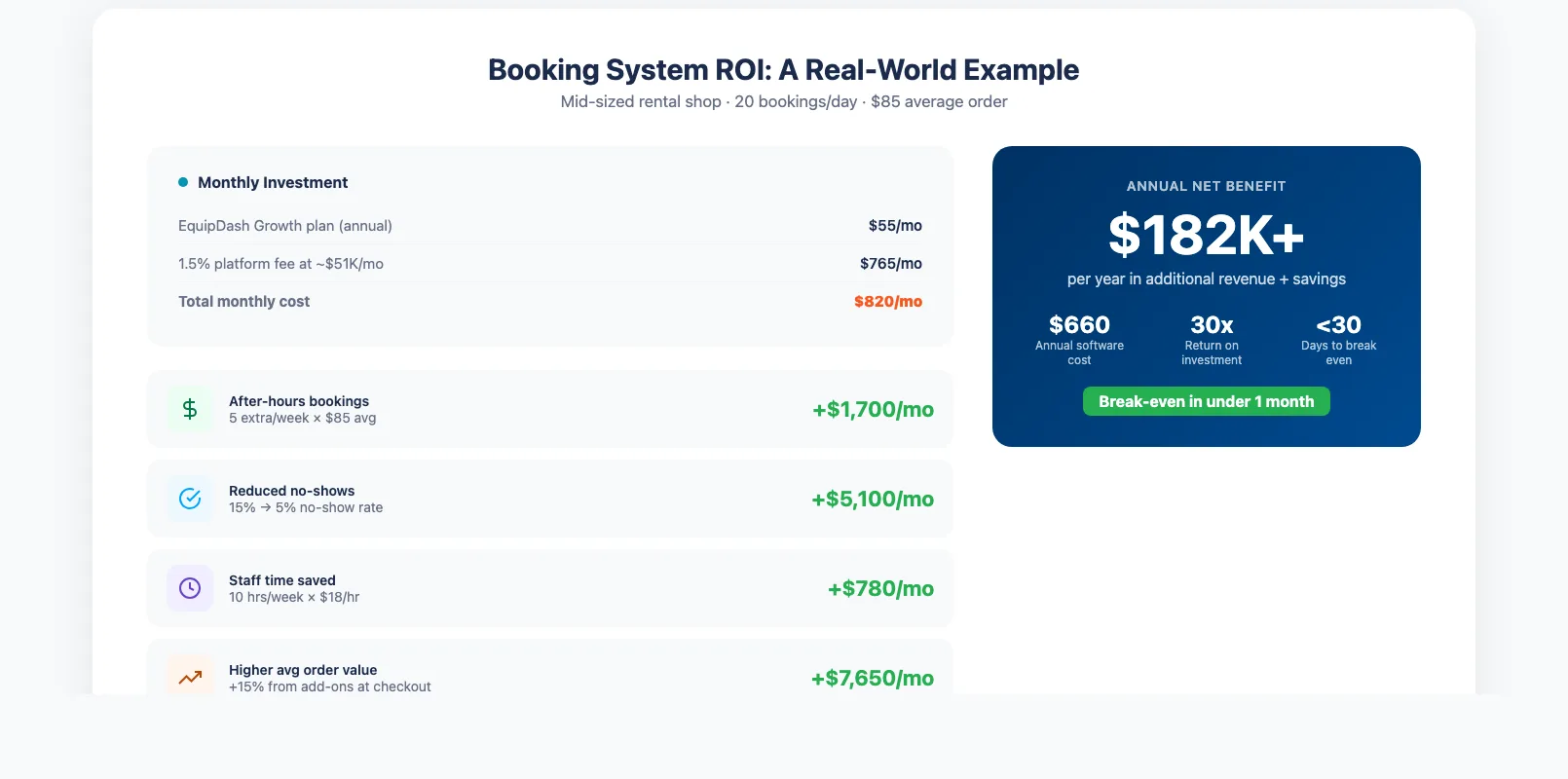
Most rental shops break even on their booking system within 30–60 days. Here's a realistic example:
A rental shop paying $55/month for a booking system (like EquipDash's Growth plan on annual billing) captures 5 additional after-hours bookings per week at $85 average. That's $1,700/month in new revenue against a $55/month cost — a 30x return.
Add reduced no-shows, higher average order values from add-ons, and staff time savings, and the total ROI is typically $15,000–$30,000 per year for a mid-sized rental operation. For a detailed comparison of EquipDash vs other platforms, see our equipment rental software comparison.
The operators who see the biggest returns are the ones who've been running on phone bookings and spreadsheets the longest. If that's you, the switch isn't just worth it — it's overdue. For a step-by-step walkthrough of the transition, see our spreadsheets vs software migration guide. And if you're a small shop looking for the essentials, you can skip the enterprise features and focus on what actually matters. Prefer a system you can access from anywhere without installing anything? Our guide to cloud-based equipment rental software explains why most operators are choosing SaaS over on-premise.
If you run tours alongside your rental operation, make sure your booking system handles both from a single dashboard. Managing two separate systems defeats the purpose.
FAQ
How much does an online booking system for rentals cost?
Most booking platforms charge $23–$149 per month depending on your plan tier, plus a platform fee of 1–3% per transaction. Some charge commission-based pricing with no monthly fee but take 3–6% of every booking. For a rental shop doing $100,000 in annual bookings, expect total costs of $2,160–$4,000 per year with a subscription-based model, or $3,000–$6,000 with commission-based pricing. EquipDash's Growth plan, for example, costs $55/month (annual billing) plus a 1.5% platform fee — totaling $2,160 per year at $100K in bookings.
Can an online booking system handle my complex pricing and availability rules?
Yes — but not all systems handle complexity equally well. Look for platforms that support hourly/daily/multi-day rates, seasonal pricing, group discounts, buffer times between rentals, and add-on products. Basic widgets typically can't handle these scenarios. A full booking system built for rental businesses should handle all of them out of the box. EquipDash's AI assistant can even recommend pricing adjustments based on your booking patterns and seasonal trends.
How long does it take to set up an online booking system?
Most operators are live within 1–3 weeks. Week one is account setup and product catalog entry. Week two is inventory import and availability configuration. Week three is testing, staff training, and launch. Shops with fewer than 50 items can often go live in under a week. The most important thing is not to rush — take time to test the full booking flow from a customer's perspective before going live.
Will customers trust booking online instead of calling?
Yes. Research consistently shows that 60%+ of consumers prefer self-service booking over phone calls. Younger customers (under 40) overwhelmingly prefer online booking. The key is offering a clean, mobile-friendly booking experience with secure payment processing and instant confirmation. Displaying reviews, trust badges, and a clear cancellation policy on your booking page builds confidence.
What if I already have a website? Do I need to replace it?
No. Most booking systems offer an embeddable widget or booking page that integrates with your existing website. You don't need to rebuild your site. You add a "Book Now" button or embed the booking calendar on your rental pages. The system handles everything from there — availability, payment, confirmation — while your website stays the same.
How do I prevent double bookings when I take reservations online and in-store?
A real-time booking system syncs inventory across all channels instantly. When a customer books online, that item is immediately unavailable for in-store booking (and vice versa). The system maintains one source of truth. This is why real-time inventory tracking is so critical — any delay between channels creates a double-booking window. For more on managing your rental stock effectively, see our guide to rental inventory management.
What's the difference between a booking system and a reservation system?
Functionally, they're the same thing in the rental industry. "Booking system" and "reservation system" are used interchangeably. Some platforms use "reservation" for calendar-based scheduling and "booking" for transaction-based reservations that include payment. For rental operators, the distinction doesn't matter — you need a system that handles both scheduling and payment in one flow.
in one place