Load-Outs That Don't Come Back Short
The van comes back from Saturday's gala, the cases go on the shelf, and on Wednesday a tech opens the PA kit for the next job and finds two XLRs, a DI box and the HDMI adapter missing. Nobody knows which job kept them, and it's too late to ask. A load-out checklist that runs both ways, out and back, catches the gap while the client still has the room.
Most AV rental companies count the big items without thinking about it. Nobody loses a subwoofer. The losses come from the small things that make the big things work: the 3 m XLR, the USB-C to HDMI adapter, the IEC lead, the clamp, the spare antenna. They're cheap one at a time, but a show doesn't run without them, and a kit that goes out short makes your next client's tech look bad. This guide covers how to build kit lists at the level that matters, pack and scan out, check returns the same day, charge for shortages fairly and write damage notes that stand up. If you're still choosing systems for event work, start with our event rental software guide.
Where short returns actually start
A short return is rarely theft. It's usually one of four gaps, and each one has its own fix.
The kit list lives in someone's head. Your senior tech knows the PA package needs 16 XLRs, four speaker leads and a spare DI. The weekend casual doesn't, so the case goes out with whatever was in it last time.
Nobody counts what went out. If the out count was never written down, you can't prove anything is missing when the case comes back. "I think there were 16" doesn't hold up with a client.
Swaps happen on site. The client wanted a second wireless handheld, so the tech grabbed one from another kit. That change never reached the paperwork, and now two kits are wrong.
Returns get checked days later. The strike finishes at midnight, the cases get stacked by the door, and the check-in happens when someone needs the gear again. By then the venue has cleared the room and the client's event manager has moved on.
Build kit lists down to the last adapter
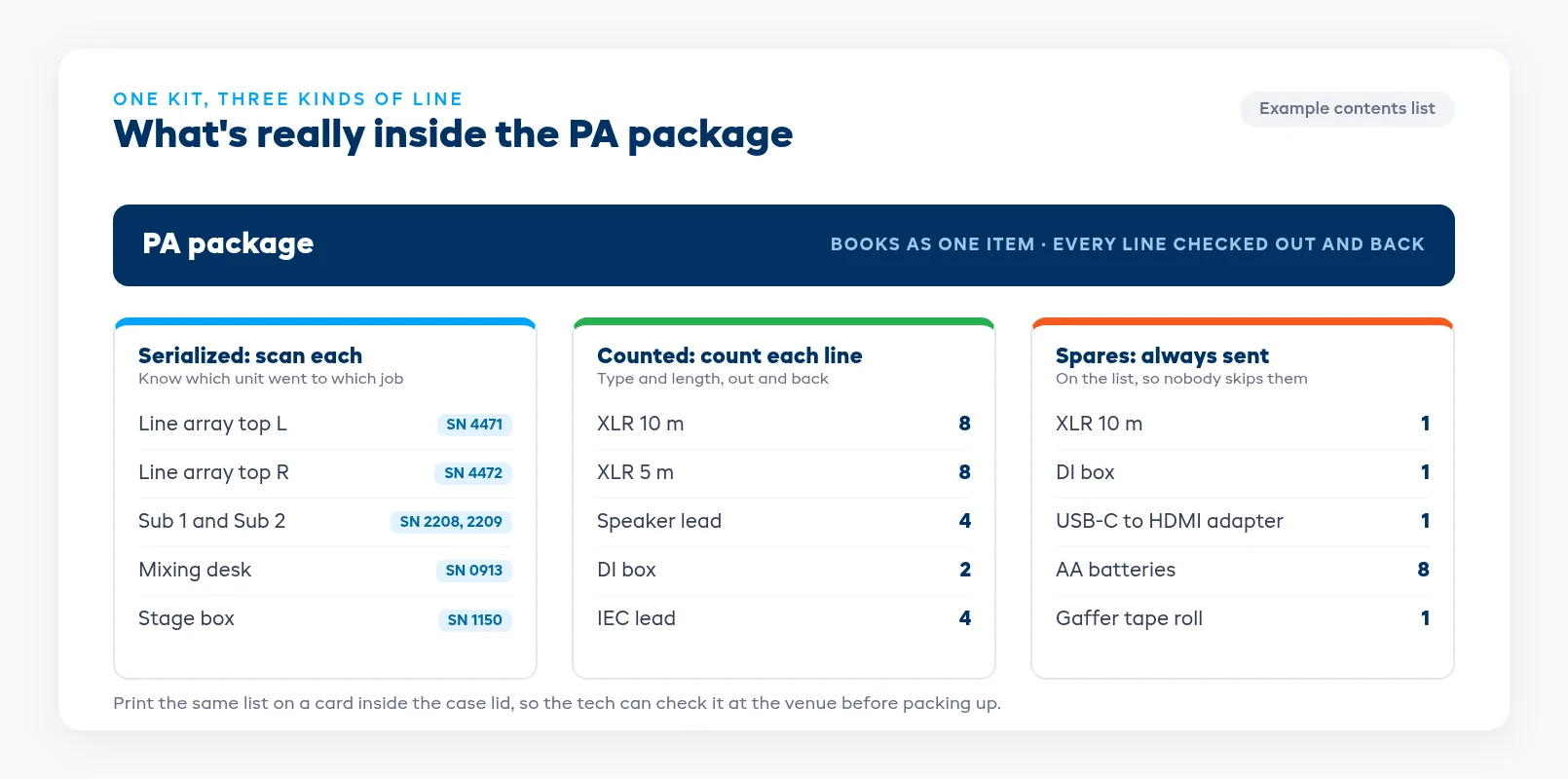
A kit is only as good as its contents list. Instead of "PA package," write "2 tops, 2 subs, 1 desk, 1 stage box, 16 XLR 10 m, 4 speaker leads, 2 DI boxes, 4 IEC leads, 1 power distro," so anyone in the warehouse can pack it.
Split every kit into two kinds of item:
- Serialized items. Desks, speakers, amps, wireless receivers and packs, projectors, LED processors. Each one has its own serial or asset tag, so you know which unit went to which job and which one came back faulty.
- Counted items. Cables by type and length, adapters, clamps, gaffer tape, batteries. You don't need to know which XLR went where, only how many went out and how many came back.
Write cables by length as well as type. "XLR x16" hides the fact that the job needed eight 10 m runs and the case came back with eight 5 m ones. Label cable ends with length bands or colored tape so the count at the dock takes seconds.
Put a printed contents card inside each case lid. It gives the tech something to check against at the venue, before anything gets packed into the wrong case at 1 AM. Include the spares you always send (an extra XLR, a spare DI, a second set of batteries for wireless packs) so nobody treats them as optional.
Pack and scan out against the pull sheet
The warehouse should pack from a pull sheet generated from the job, not from memory or last week's notes. The sheet lists every kit, every serialized item and every counted line, with a tick column for each.
Scan each serialized item as it goes into the case, and count the bulk items against the sheet. A second person checking the big jobs before the van leaves catches most mistakes. Have the person who packed it sign the sheet, so there's a name on the out count.
Before the doors close:
- Every line on the pull sheet is ticked or marked short. A known short going out is fine if it's written down and the client has been told. An unknown one is the problem.
- Swaps are on the sheet. If a different desk or a spare mic pack went instead of the planned one, change the job so it matches what's actually in the van.
- Sub-rented gear is marked. Anything you brought in from another company needs to be on the same sheet, with its owner noted, so it comes back to you and then goes back to them.
- Condition is noted for anything already marked. A scuffed case or a cracked LED panel corner should be recorded before it leaves, so nobody blames the client for it later.
If you send crew with the gear, the tech running the show owns the kit on site. Our guide to AV rental software for crewed jobs covers putting crew and equipment on the same job.
Check returns in the same day
The return check is where most AV companies lose money, because it's the step that slides. Put it on the job schedule like the load-in, with a person and a time against it.
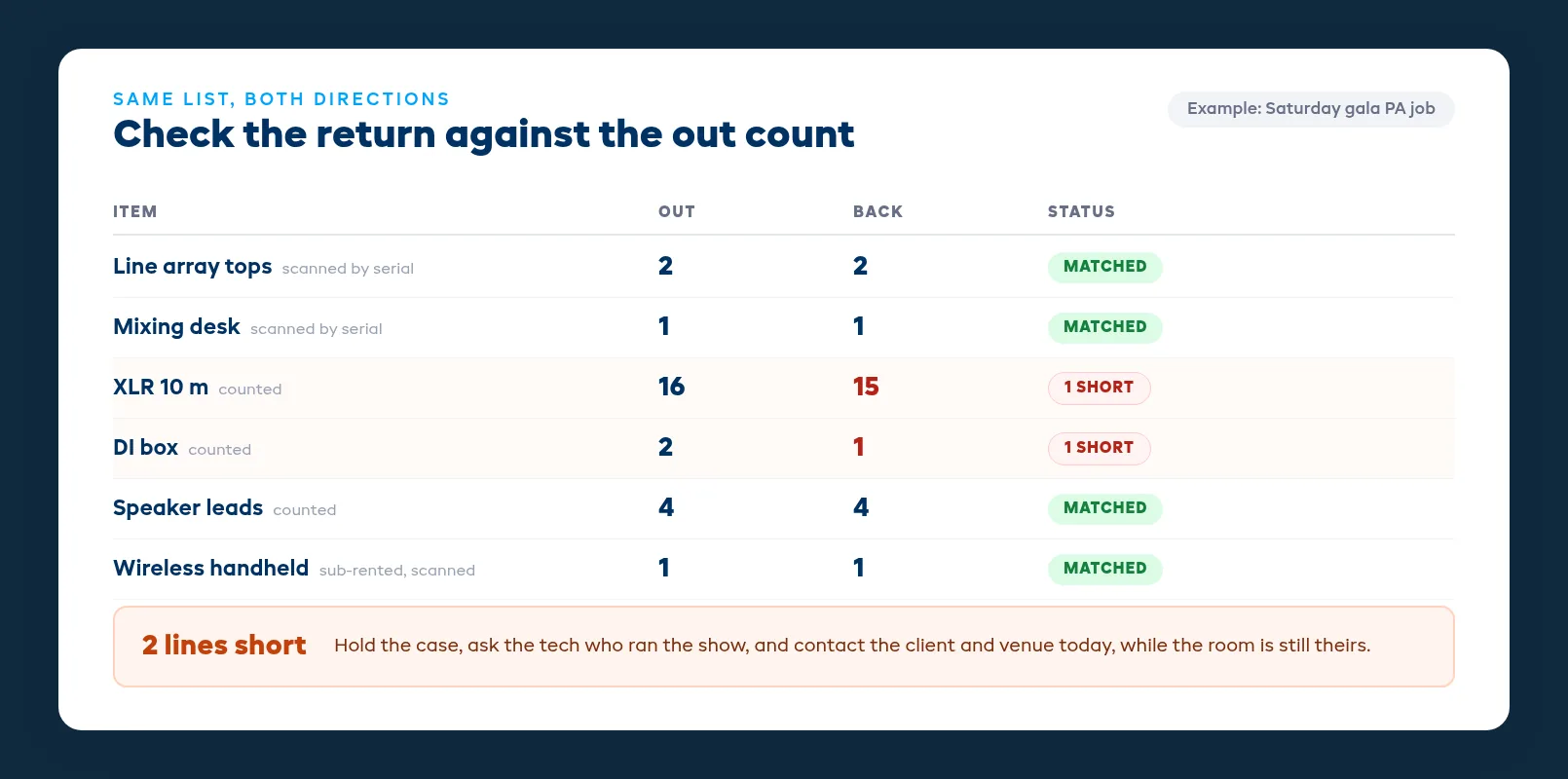
When the van comes back, run every case through the same list it went out on:
- Scan every serialized item back in. Anything that doesn't scan is missing, wherever the paperwork says it is.
- Count every bulk line. Compare the count to what went out, not to what the kit is supposed to hold, because the out count is what the client signed for.
- Keep returned gear in a holding area until it's checked. If unchecked cases go straight onto the shelf, the next job can pull a kit that's already short.
- Test what can be tested. Power up the desk, check the wireless packs pair, plug in a few cables at random. A faulty cable that goes back on the shelf becomes the next show's problem.
Check the same day if you can, and the next morning at the latest. A shortage you find within a day can usually be traced: the tech remembers where the DI box was plugged in, the venue still has its lost property, and the client still has the room key.
Handle shortages: chase first, then charge
When something is short, look for it before you bill for it. Most missing cables and adapters turn up in another case, the tech's van or the venue's lost property.
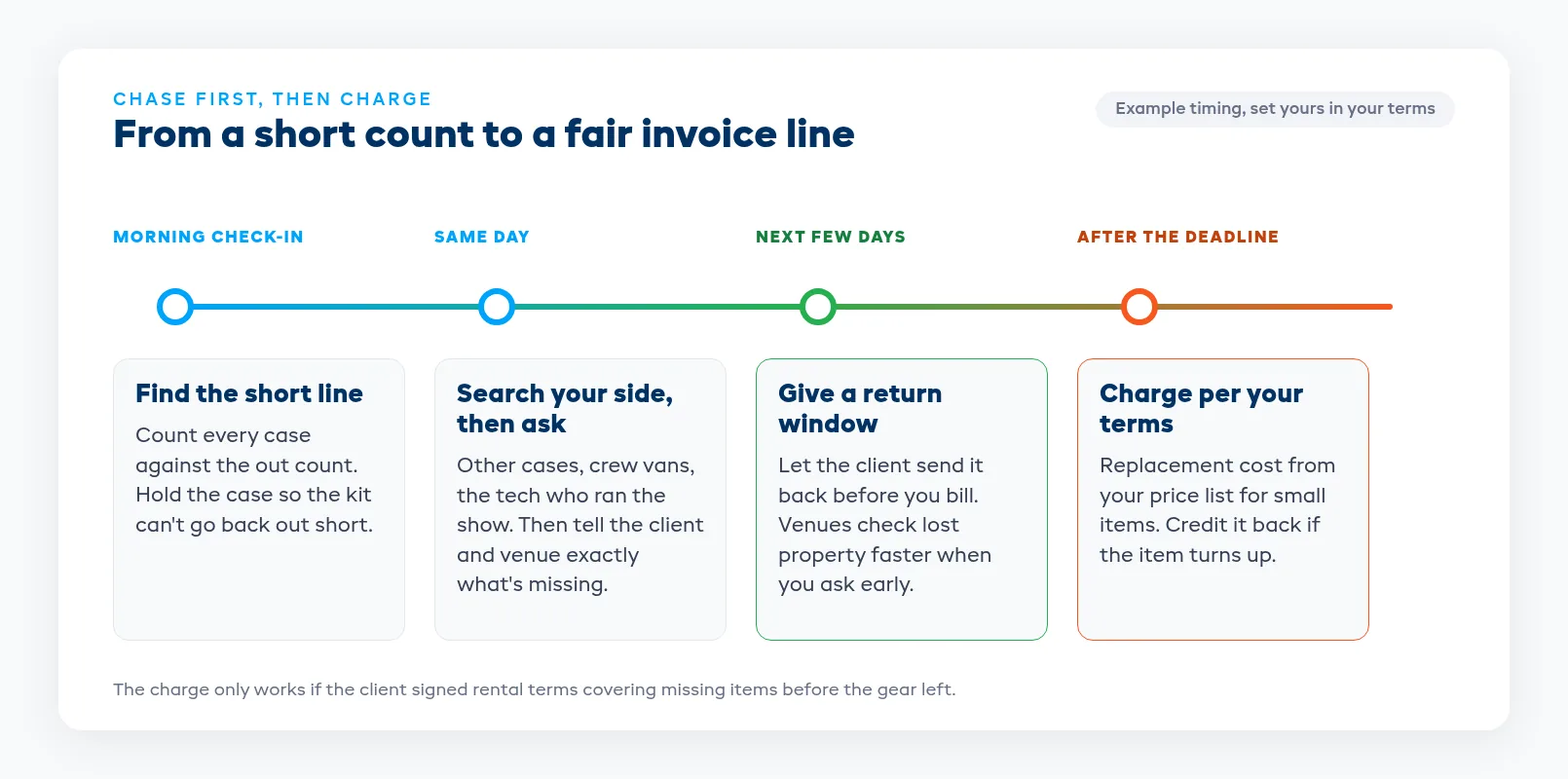
A process that keeps the client relationship intact:
- Check your own side first. Look through the other cases from that job, the crew's vehicles and any kit that went out on the same day. Ask the tech who ran the show.
- Contact the client and venue the same day. Tell them exactly what's missing, with the item, quantity and the case it should have been in. A venue will look in its lost property far more readily on Monday than three weeks later.
- Set a deadline for the item to come back. Give the client a reasonable window, such as a few days, to return it before you charge.
- Charge what your rental agreement says. Your terms should state that missing items are charged at replacement cost, and you should keep a price list for common small items so nobody makes up a number on the spot. If an item turns up after you've charged, credit it back.
The terms do most of the work here. If the client signed rental terms that cover missing and damaged items before the gear left, a shortage charge is a line on an invoice. If they didn't, it's an argument. A deposit taken at booking also gives you something to draw on for large jobs.
Damage notes that hold up
Damage is harder than shortage, because you have to show the item left in good condition. That means notes at both ends.
Record condition at check-out for anything high value. A photo of each LED panel face, the desk screen and the lenses on projectors takes a minute and settles most disputes before they start.
Write the return note at the dock, not later. Note what's damaged, how, and which job it came back from. "Cracked corner on LED panel 07, returned from the Saturday gala, photo attached" gives you something to send the client, where "panel broken" gives you nothing to point to.
Take the item out of stock straight away. A damaged item that goes back on the shelf gets sent out again. Tag it, set it aside and send it to the workshop so it can't be booked until it's fixed.
Separate wear from damage. Cables fray, gaffer residue builds up, and cases get scuffed. Normal wear is your cost. Damage from misuse, such as a speaker that was dropped or a cable that was cut, is what you charge for, and your terms should say which is which.
A load-out checklist you can print
Pin this on the warehouse wall and keep a copy in each van. It covers both ends of the job, because a load-out check without a return check only catches half the problem.
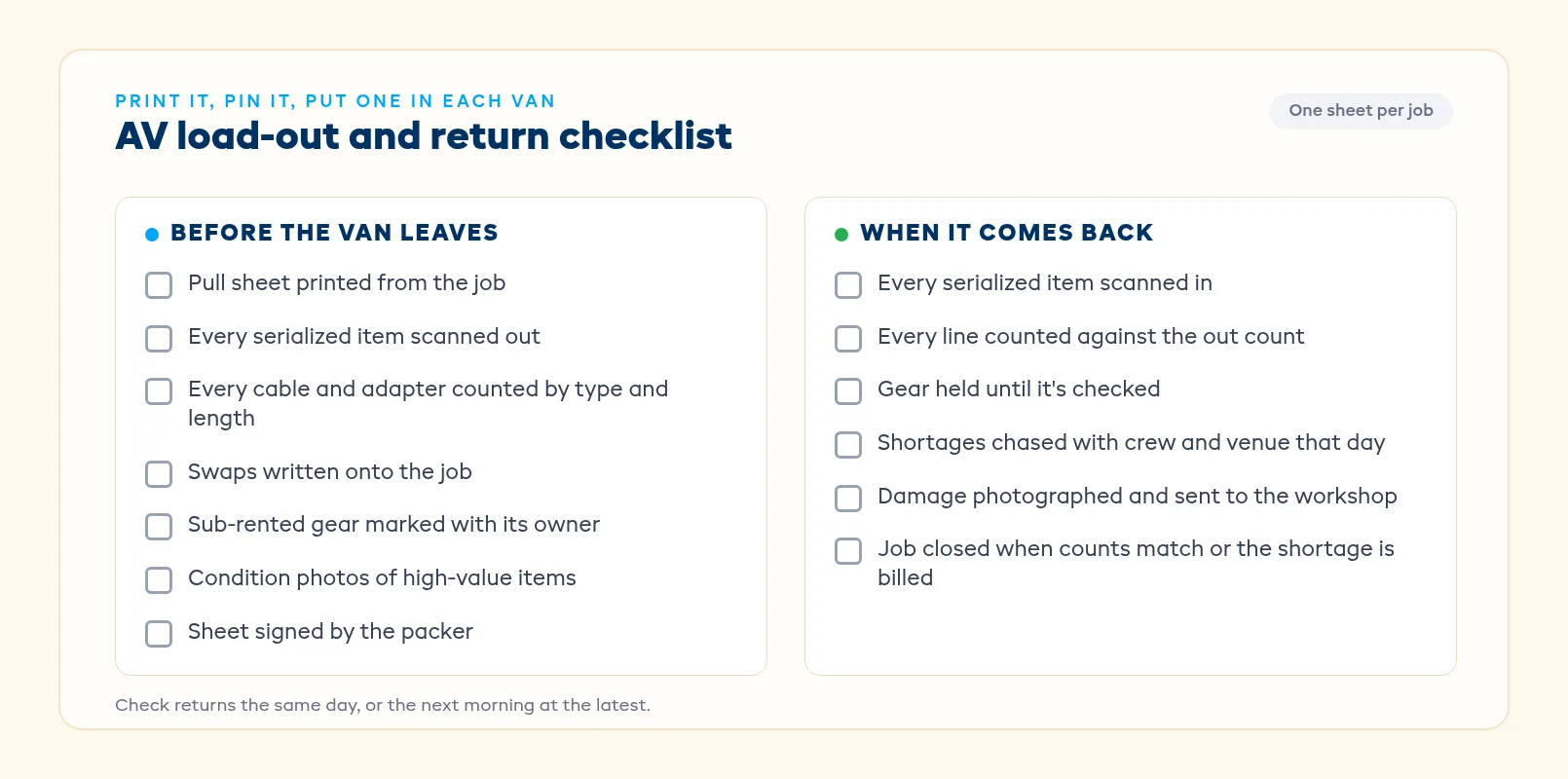
Before the van leaves: pull sheet printed from the job, every serialized item scanned out, every bulk line counted, swaps written onto the job, sub-rented gear marked with its owner, high-value condition photos taken, and the sheet signed by the packer.
When it comes back: every serialized item scanned in, every bulk line counted against the out count, gear held until it's checked, shortages chased with the crew and venue that day, damage photographed and sent to the workshop, and the job closed only when the counts match or the shortage is billed.
Where EquipDash fits
On EquipDash's AV rental software, you build a kit once and it books as a single item, while every component underneath stays tracked on its own. A component committed to one kit can't be promised inside another. The warehouse packs from a printed pull sheet, and you can swap items on the day. High-value items like desks and radios are tracked by serial number, and cables and consumables can be tracked as bulk stock.
You can scan an item's barcode at the counter to find it and its booking, then check it out or back in. Cases are scanned back in against the job, so a short return is caught the same day, and sub-rented items sit on the same pull sheet and return check as your own gear. The Short Return Alert bot tells you the same day when a job comes back missing items.
At return, you can log a condition report with photos. If something is damaged, send it to the workshop and it comes off sale until it's back in stock, with a record of who had it and how it came back (the workshop is on the Growth and Pro plans). Rental terms and liability are signed digitally before the van leaves, and deposits can be a fixed amount or a percentage of the rental value. Plans start from $23/mo billed annually, and you can compare them on the pricing page.
FAQ
What should an AV load-out checklist include?
It should include every kit on the job with its full contents, every serialized item scanned out, every cable and adapter counted by type and length, any swaps or sub-rented gear, condition notes for high-value items, and a signature from the person who packed it. The same list is then used to check the gear back in.
How do we stop cables and adapters going missing on AV rentals?
Count them out and count them back. List cables by type and length on the pull sheet, put a contents card in each case lid, and check returns against the out count on the same day. Most missing cables are found in another case, a crew vehicle or the venue's lost property if you look within a day.
Should we charge clients for missing cables?
Yes, if your rental agreement says so and you've looked for the item first. State in your terms that missing items are charged at replacement cost, keep a price list for common small items, give the client a few days to return the item, and credit the charge if it turns up later.
When should AV returns be checked in?
The same day if possible, and the next morning at the latest. The tech still remembers the show, the venue still has its lost property, and the client is still reachable. Keep returned gear in a holding area until it's checked so a short kit can't go straight back out.
Which AV items need serial number tracking?
Track anything expensive or individually faulty by serial: mixing desks, speakers, amps, wireless receivers and packs, projectors and LED processors. Cables, adapters, clamps and consumables can be tracked as counted stock, because you only need to know how many went out and came back.
How do we prove equipment damage was caused by the client?
Record condition before the gear leaves and again when it comes back. Photograph the faces of LED panels, desk screens and projector lenses at check-out, write a dated return note with a photo at the dock, and keep both on the job. Separate normal wear, which is your cost, from misuse, which your terms should allow you to charge for.
in one place